
How to Replace and Code the Battery in the Škoda Octavia III


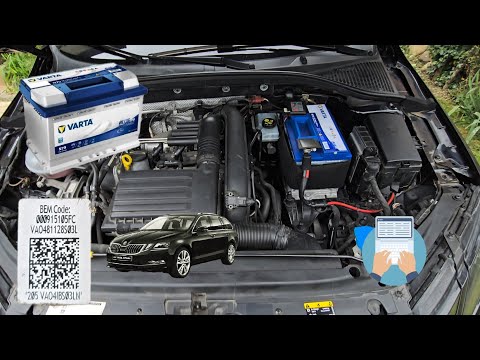
When it's time to replace the battery in your Škoda Octavia III (2013–2020), it's not just a matter of removing the old one and installing a new one. Vehicles in the VAG group (Škoda, Volkswagen, Seat, Audi) include a Battery Energy Management system (BEM) that requires you to register or code the new battery so the electrical system functions correctly.
In this guide, we explain how to replace the battery properly, what coding is for, and how to avoid common mistakes.
Content in this publication
Why Replace the Battery and When to Do It?
Signs Your Battery Is Failing
- The engine cranks slowly or requires multiple attempts to start
- The Stop-Start system stops working
- Warning messages appear on the dashboard immediately after disconnecting/reconnecting the battery
- Warning lights appear after installing a new battery, which usually means it has not been coded correctly
Requirements for the New Battery
Before purchasing a replacement, make sure:
You may be interested in reading Skoda Octavia Clutch Master Cylinder Replacement
- You use the same technology: if your car originally came with AGM or EFB, the replacement must match
- The new battery has equal or similar capacity (Ah) and dimensions
- You choose a high-quality battery — cheaper options often fail sooner in cars with battery management systems
Step-by-Step Physical Replacement
Required Tools & Preparation
- 10 mm wrench for terminals; ratchet and sockets for battery hold-down if needed
- Optional: memory saver tool to preserve electrical settings
- Vehicle should be parked on a flat surface, engine off, parking brake applied
Correct Disconnection & Installation Order
- Turn off Stop-Start system if active
- Disconnect the negative (-) terminal first
- Disconnect the positive (+) terminal and remove the battery clamp/holder
- Install the new battery: first connect positive (+), then negative (-)
- Ensure the battery is properly secured
Basic Checks After Installation
- Confirm the battery is firmly held in place
- Check terminals for corrosion and tightness
- Start the vehicle and verify proper operation of systems such as air-conditioning, Stop-Start, and lights
- If warning symbols appear, coding is likely required
Coding / Registering the New Battery
Why Coding Is Necessary
On the Octavia III, the car’s control unit must recognize a new battery to adjust charging strategies properly. Without coding, you may see faults and the battery’s lifespan may be reduced.
Typical Coding Procedure (Example: VCDS Software)
- Access Module 19 – CAN Gateway
- Enter Adaptation menu
- Update the following fields:
- Rated battery capacity
- Battery technology
- Battery manufacturer
- Battery serial number
- Save changes and clear any fault codes
What If You Don’t Code It?
- If the new battery has the same type and capacity, the system might eventually adapt automatically
- This can take days of driving, during which Stop-Start or comfort systems may not work properly
- Coding is strongly recommended to avoid issues and ensure proper battery life
Common Mistakes & How to Avoid Them
Installing the Wrong Battery
Using a standard battery when the vehicle requires AGM or EFB may cause malfunctions and a shorter lifespan
Forgetting to Code the Battery
Results in dashboard errors, Stop-Start malfunction, and erratic charging behavior
You may be interested in readingSkoda Octavia Clutch Master Cylinder ReplacementYou may be interested in reading
 Skoda Octavia Oil Service Reset — Complete DIY Guide
Disconnecting Without a Memory Saver
Not critical, but may reset window controls, radio presets, and other settings
Not Securing the Battery Properly
Loose batteries can vibrate, causing electrical faults and reducing lifespan
Tips to Maximize Battery Life
- Drive regularly — repeated short trips prevent full charging
- Avoid leaving the car unused for long periods; use a trickle charger if parked for weeks
- Check terminals occasionally to avoid corrosion
- If installing a larger capacity or different type battery, ensure coding reflects those changes
Conclusion
Replacing the battery in a Škoda Octavia III is not just a mechanical task — it involves electronic management and proper coding. By choosing the correct battery, installing it correctly, and registering it in the system, you will ensure reliable operation and avoid electrical issues.
You may be interested in readingSkoda Octavia Clutch Master Cylinder ReplacementYou may be interested in reading
Skoda Octavia Oil Service Reset — Complete DIY GuideYou may be interested in reading
 Skoda Octavia Glow Plug Replacement Cost in the UK — Full Guide & Cost Breakdown
If in doubt or if warning lights persist, it’s worth visiting a professional with the proper diagnostic tools.
If you want to know other articles similar to How to Replace and Code the Battery in the Škoda Octavia III you can visit the category Service and Parts.
Vauxhall Meriva Engine Management Light: Causes, Checks, and Fixes
Vauxhall Meriva Key Fob Replacement: Complete Guide
Vauxhall Meriva Tyre Size: Complete Fitment Guide
Vauxhall Meriva Engine Light: Causes, Diagnosis, and Fixes
Vauxhall Meriva Engine Oil: Complete Selection and Maintenance Guide
Vauxhall Meriva Code 82 Reset: Meaning, Steps, and Fixes
Leave a Reply
More content of your interest