

Honda Civic Check System Warning: The Complete Guide to What It Means & How to Fix It

Content in this publication
- Understanding the Honda Civic Check System Warning
- What the Check System Warning Actually Means
- Common Triggers Behind the Check System Warning
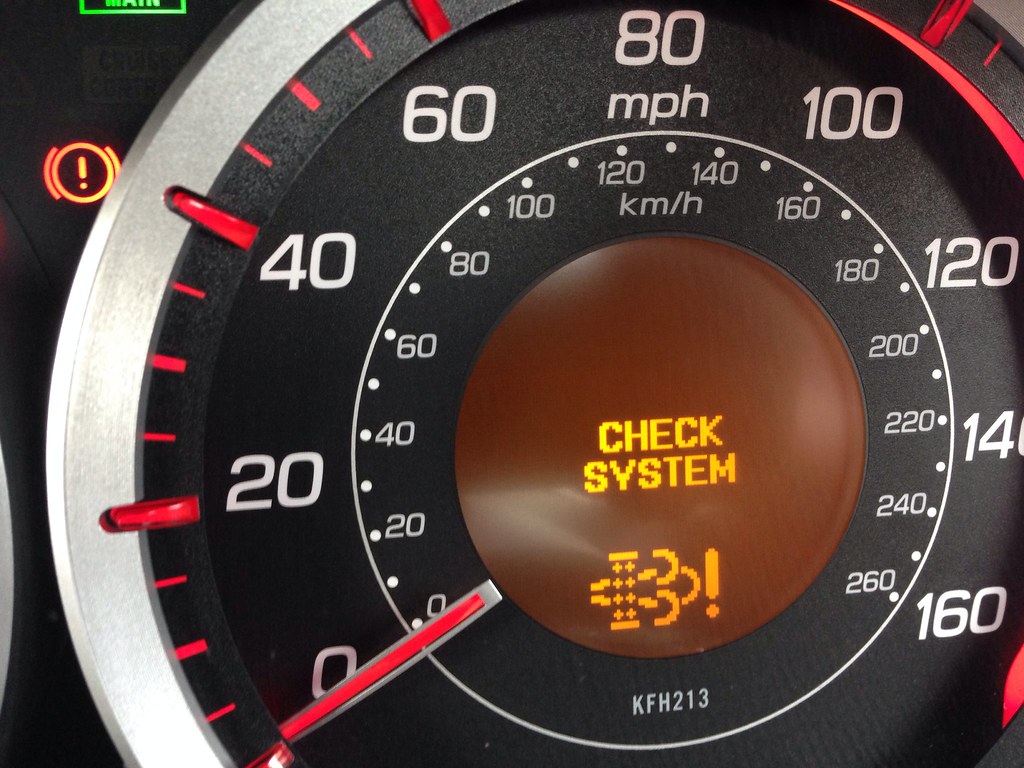
- How the Check System Warning Appears on the Dashboard
- Honda Civic Systems Most Likely to Fail
- Step-by-Step Guide to Diagnosing the Check System Warning at Home
- Resetting the Check System Warning
- When the Check System Warning Is Serious
- Cost of Fixing Check System Warning Issues
- Preventing the Check System Warning
- Why the Check System Warning Is More Common in Modern Civics
- Conclusion
- FAQs
Understanding the Honda Civic Check System Warning
The moment the Check System warning lights up on the Honda Civic’s dashboard, our minds naturally jump to conclusions. Is it dangerous? Is it urgent? Can we keep driving? We’ve all been there—staring at a glowing message that feels like a cryptic riddle designed to spike our stress levels. Thankfully, the Check System warning is far less mysterious when broken down with clarity and a bit of real-world context.
In this comprehensive guide, we walk through every reason the warning appears, how to diagnose it at home, when to call a mechanic, and how to prevent it in the future. Think of this as the handbook we all wish Honda had written in a more human tone.
What the Check System Warning Actually Means
The Check System message is an umbrella alert. It’s Honda’s way of saying:
“Hey, something important isn’t working the way it should—check it.”
It does not point to one specific fault. Instead, it prompts us to review a subsystem such as:
- Tyre Pressure Monitoring System (TPMS)
- Collision Mitigation Braking System (CMBS)
- Road Departure Mitigation
- Adaptive Cruise Control
- Brake Hold System
- Electric parking brake
- Low battery voltage
- Sensor obstructions
- General electronic stability issues
The warning acts like a digital nudge, urging us to look deeper rather than panic.
Common Triggers Behind the Check System Warning
We’ve seen this alert triggered by everything from harmless dirt on a bumper sensor to deep electrical faults. Let’s unpack the biggest culprits.
Low Tyre Pressure
One of the most common reasons for the warning.
Symptoms:
- Vibrations at high speed
- Sluggish steering response
- TPMS light flashing or steady
Driving Assist Systems Disabled
If any ADAS component goes offline, the Check System message appears.
Typical causes:
- Dirty front radar
- Fog or heavy rain
- Camera obstruction near rear-view mirror
- Sensor overheating in hot climates
Weak 12V Battery
Honda Civics, especially 2016–2022 models, are sensitive to battery voltage drops.
Signs include:
- Slow engine cranking
- Multiple dashboard warnings
- Random system resets
ABS, VSA, or Traction Control Faults
A single sensor issue often cascades into multiple system alerts.
Loose Fuel Cap
Surprisingly common—fuel vapour system fluctuations can trigger system warnings.
Electrical Connector Corrosion
Moisture in wheel-speed sensors or engine bay harnesses can generate ghost codes.
You may be interested in reading Honda Civic VSA Warning Light: The Complete Driver’s Guide
Software Glitches
Modern Civics heavily rely on software updates to fix stability bugs.
How the Check System Warning Appears on the Dashboard
The message varies slightly by Civic generation.
8th Gen (2006–2011)
- Appears alongside VSA or TPMS warnings
- Less automation, more mechanical alerts
9th Gen (2012–2015)
- Braking and steering assist systems become tied to the warning
- TPMS transitions to indirect systems in some countries
10th Gen (2016–2021)
- Most sensitive to ADAS and battery-related faults
- Check System often linked to collision avoidance
11th Gen (2022–present)
- Camera-heavy diagnostics
- Software-driven network of connected sensors
Honda Civic Systems Most Likely to Fail
Let’s break down the top Honda systems known for triggering false positives and genuine warnings.
Lane Keeping Assist System (LKAS)
When dirty or obstructed, LKAS commonly disables itself.
Adaptive Cruise Control (ACC)
Rain, snow, or insects blocking the sensor can shut it down instantly.
Collision Mitigation Braking System (CMBS)
A radar fault here often triggers the Check System message.
Brake Hold System
If the electric parking brake malfunctions, both systems alert at once.
Step-by-Step Guide to Diagnosing the Check System Warning at Home
Before rushing to a dealer, we can perform basic checks that resolve the issue in many cases.
1. Check Tyre Pressure
Use a gauge and inflate to door-jam specifications:
- Typically 32–36 PSI (depending on model)
2. Inspect Radar & Camera Sensors
Wipe with a microfiber towel:
- Front grille radar
- Windshield camera
- Rear corner sensors
3. Restart the Civic
A soft reboot resets many systems:
- Turn off engine
- Exit and lock the vehicle
- Wait 2–3 minutes
- Restart
4. Check Battery Voltage
Healthy range:
- Engine off: 12.4–12.7V
- Engine running: 13.7–14.7V
5. Look for Loose Connectors
Especially:
- ABS wheel sensors
- Under-hood fuse box
- Negative battery ground
6. Use an OBD2 Scanner
Tools like FIXD or BlueDriver can provide:
- Error codes
- Pending sensor failures
- Live voltage data
7. Test Driving Assist Features
Try enabling:
You may be interested in readingHonda Civic VSA Warning Light: The Complete Driver’s GuideYou may be interested in reading
 Honda Civic Wet Belt Replacement: The Complete Owner’s Guide
- LKAS
- ACC
- Road Departure Mitigation
If unavailable, the issue likely lies in ADAS.
Resetting the Check System Warning
A reset is not a fix, but it can clear the message once the underlying issue is resolved.
How to Reset via Infotainment (10th–11th Gen)
- Press Home
- Go to Settings
- Select Vehicle
- Tap All Settings
- Choose Driver Assist System Setup
- Reset ADAS Sensors or TPMS
How to Reset by Disconnecting Battery
- Turn off ignition
- Disconnect negative terminal
- Wait 10 minutes
- Reconnect terminal
- Restart vehicle
This resets ECU voltage memory but not deep faults.
When the Check System Warning Is Serious
Sometimes the alert should not be ignored.
Stop Driving Immediately If:
- Brake system warnings accompany it
- Engine temperature spikes
- Steering feels heavy or unresponsive
- Metal grinding or knocking is heard
Seek Immediate Service When:
- Multiple system warnings stack
- Car enters limp mode
- Fuel consumption rises suddenly
- Dash lights flicker irregularly
Cost of Fixing Check System Warning Issues
Prices vary depending on the root cause.
| Issue | Typical Cost (UK/US) |
|---|---|
| New battery | £90–£160 / $110–$180 |
| Wheel speed sensor | £120–£250 / $130–$280 |
| TPMS reset | Free–£40 / $0–$50 |
| Radar sensor cleaning | Free |
| Radar replacement | £800–£1,400 / $900–$1,600 |
| Camera recalibration | £180–£350 / $200–$400 |
Preventing the Check System Warning
Good habits reduce 80% of triggering events.
We Recommend:
- Washing the Civic every 1–2 weeks
- Avoid pressure washing radar sensors
- Checking tyre pressure monthly
- Replacing the 12V battery every 3–4 years
- Updating the infotainment system software
- Keeping windshield area clean
- Avoiding aftermarket LED lights that disturb sensors
Why the Check System Warning Is More Common in Modern Civics
Today’s Honda Civic models rely on a network of layered sensors. More technology means more opportunities for things to glitch, misread, or fail.
We aren’t driving simple machines anymore—we’re driving rolling computers. And like any computer, the Civic can experience bugs, voltage dips, and sensor confusion. The Check System warning is simply the car’s safety net.
Conclusion
The Honda Civic Check System warning isn’t meant to scare us—it’s meant to protect us. Whether caused by a simple low-pressure tyre or a complex ADAS system malfunction, the alert signals that something needs attention. By understanding the root causes, performing basic checks, and knowing when to seek assistance, we maintain both safety and peace of mind.
The Civic is one of the world’s most reliable cars, and with a little know-how, the Check System message becomes just another friendly reminder rather than a source of stress.
FAQs
1. Can I drive with the Check System warning on?
Yes, but only briefly—unless paired with braking or steering alerts.
2. Does a weak battery trigger the Check System warning?
Absolutely. Battery voltage is one of the leading causes.
3. Do I need a dealer to clear the warning?
Not always. Many issues can be resolved and reset at home.
4. Will a software update fix the problem?
In some cases, yes—especially for ACC, LKAS, or CMBS.
5. Why does the warning appear randomly?
Sudden voltage drops, temperature swings, or dirty sensors often cause intermittent alerts.
You may be interested in readingHonda Civic VSA Warning Light: The Complete Driver’s GuideYou may be interested in reading
Honda Civic Wet Belt Replacement: The Complete Owner’s GuideYou may be interested in reading
 Skoda Kamiq Boot Size: The Complete Practical Guide for Real-World Space, Everyday Usability & Hidden Storage Potential
If you want to know other articles similar to Honda Civic Check System Warning: The Complete Guide to What It Means & How to Fix It you can visit the category Service and Parts.
Jaguar F-Pace Wading Depth: How Deep Water Can This Luxury SUV Handle?

Jaguar F-Pace Tyre Pressure Reset: Complete Guide for Drivers

Jaguar F-Pace Engine Options: A Complete Guide to Performance, Power, and Practicality

Jaguar F-Pace Low Battery Warning: Causes, Fixes, and What Drivers Should Know

Jaguar F-Pace Alternator Replacement: Cost, Symptoms, and Complete Guide

Jaguar F-Pace Coolant Level Low: Causes, Fixes, and Prevention Guide
Leave a Reply
More content of your interest