
How to Start Volvo XC60 With Key: The Complete Owner’s Guide

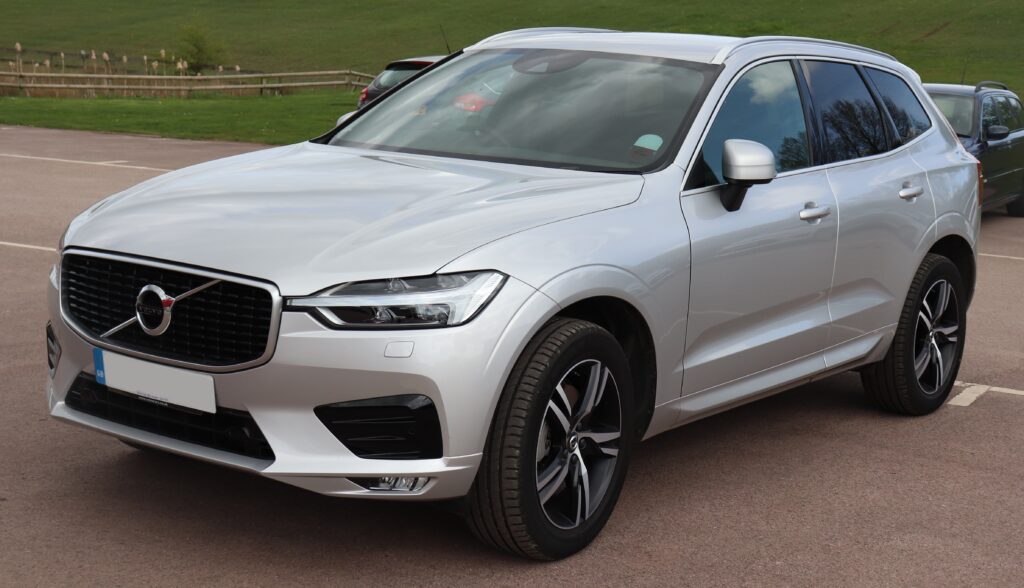
Starting your Volvo XC60 might seem like second nature—until it isn’t. Maybe you’ve just bought one, borrowed one, or you’re staring at the dashboard wondering why nothing happens when you press the button. We’ve all been there.
So let’s break it down together—clearly, casually, and without the fluff. By the end of this guide, you’ll not only know how to start your Volvo XC60 with a key, but also understand why it works the way it does.
Content in this publication
- Understanding the Volvo XC60 Key System
- Why Volvo Uses a Push-Start System
- Step-by-Step: How to Start Volvo XC60 With Key
- Why Pressing the Brake Is Essential
- What Happens When You Press Start?
- Keyless Start vs Traditional Key Ignition
- Starting the XC60 With a Dead Key Fob Battery
- Where Is the Backup Key Reader Located?
- Common Mistakes When Starting the XC60
- What If the Car Doesn’t Detect the Key?
- Starting the XC60 in Cold Weather
- Remote Start: Does the XC60 Support It?
- Starting Without Pressing the Brake (Accessory Mode)
- Understanding the START/STOP Button Behavior
- How to Turn Off the Engine Properly
- What If the Engine Cranks but Won’t Start?
- How the XC60 Protects You While Starting
- Tips for First-Time XC60 Owners
- Is It Possible to Start Without the Key?
- How Long Does the Key Battery Last?
- Quick Checklist: Starting Volvo XC60 Correctly
- Closing Thoughts: Starting Made Simple
- FAQs
Understanding the Volvo XC60 Key System
Before we jump into steps, we need to understand what we’re dealing with.
What Kind of Key Does the XC60 Use?
The Volvo XC60 doesn’t rely on a traditional “turn-and-go” key. Instead, it uses:
- Key fob (remote key)
- Keyless entry system
- Start/Stop button
It’s less like turning a lock and more like granting permission to the car to wake up.
Why Volvo Uses a Push-Start System
Volvo prioritizes safety and convenience. The push-start system allows:
- Faster ignition
- Anti-theft protection
- Seamless driving experience
Think of it as your car recognizing you before letting you take control.
Step-by-Step: How to Start Volvo XC60 With Key
Let’s get practical.
Basic Starting Procedure
- Enter the vehicle with the key fob
- Sit in the driver’s seat
- Press the brake pedal firmly
- Press the START/STOP button
- Engine starts instantly
That’s it. Simple, right?
But here’s the catch: every step matters.
Why Pressing the Brake Is Essential
Safety First, Always
The car won’t start unless:
- Brake pedal is pressed
- Gear is in Park (P)
This prevents accidental movement—especially useful if you’ve got kids, pets, or distractions.
What Happens When You Press Start?
When you hit that button:
- The car checks for the key fob
- Systems power up
- Engine ignition sequence begins
It’s like flipping multiple switches at once—silent, but powerful.
Keyless Start vs Traditional Key Ignition
Key Differences
| Feature | Traditional Key | Volvo XC60 Key |
|---|---|---|
| Insert key | Yes | No |
| Turn ignition | Yes | No |
| Push button | No | Yes |
| Smart detection | No | Yes |
The XC60 is built for modern driving—no twisting required.
Starting the XC60 With a Dead Key Fob Battery
Here’s where things get interesting.
Emergency Start Method
If your key fob battery dies:
You may be interested in reading Regular Maintenance Tips to Prevent Fiat 500 Engine Overheating
- Place the key fob in the backup reader (usually in the center console or cup holder)
- Press the brake pedal
- Press START/STOP button
The car uses a passive chip inside the key—no battery needed.
Where Is the Backup Key Reader Located?
Depending on the model year:
- Inside the center console
- Near the cup holders
- Sometimes in the armrest compartment
Check your manual—but it’s always somewhere accessible.
Common Mistakes When Starting the XC60
Let’s be honest—most “it won’t start” problems are user errors.
Top Mistakes
- Not pressing the brake
- Key fob not inside the car
- Weak key battery
- Gear not in Park
- Pressing button too quickly
We’ve all rushed it at least once.
What If the Car Doesn’t Detect the Key?
Possible Causes
- Key battery is dead
- Interference from other electronics
- Key is outside detection range
Quick Fixes
- Move the key closer to the steering wheel
- Replace the battery
- Use the backup reader
Starting the XC60 in Cold Weather
Cold mornings can be tricky.
Tips for Smooth Start
- Ensure battery is strong
- Let electronics initialize before driving
- Avoid repeated start attempts
Think of your engine like waking up—it needs a moment.
Remote Start: Does the XC60 Support It?
Yes, many models do.
How It Works
Using the Volvo app:
- Open app
- Select your vehicle
- Tap “Start”
The engine starts remotely—perfect for cold mornings.
Starting Without Pressing the Brake (Accessory Mode)
Want to turn on electronics without starting the engine?
Accessory Mode Steps
- Press START/STOP without pressing brake
This activates:
- Infotainment system
- Dashboard
- Climate controls
Different Press Actions
- Press once (no brake) → Accessory mode
- Press with brake → Start engine
- Press while running → Turn off engine
Simple—but easy to mix up at first.
How to Turn Off the Engine Properly
- Stop the vehicle completely
- Shift to Park (P)
- Press START/STOP button
The engine shuts down smoothly.
What If the Engine Cranks but Won’t Start?
Now we’re talking troubleshooting.
Possible Reasons
- Fuel issues
- Battery problems
- Starter motor fault
What You Can Do
- Check dashboard warnings
- Try again after a few seconds
- Seek professional help if persistent
How the XC60 Protects You While Starting
Volvo is obsessed with safety—and it shows.
Built-in Protections
- Immobilizer system
- Brake interlock
- Key authentication
It’s like having a digital bouncer guarding your car.
You may be interested in readingRegular Maintenance Tips to Prevent Fiat 500 Engine OverheatingYou may be interested in reading
 How to Check and Maintain Fluid Levels in Your Fiat 500
Tips for First-Time XC60 Owners
If you’re new, here’s what we recommend:
- Always carry a spare key
- Learn the backup start method
- Replace key battery regularly
- Don’t rush the start process
Mastering these basics saves headaches later.
Is It Possible to Start Without the Key?
Short answer: No.
Long answer: The car requires:
- A valid key fob
- Recognized signal
Without it, the system stays locked down.
How Long Does the Key Battery Last?
Typically:
- 1–2 years
Signs It’s Dying
- Reduced range
- “Key not detected” message
- Intermittent unlocking
Replace it before it fails completely.
Quick Checklist: Starting Volvo XC60 Correctly
Let’s summarize in one glance:
- Key inside car ✔️
- Brake pressed ✔️
- Gear in Park ✔️
- Press START/STOP ✔️
Miss one—and the car won’t cooperate.
Closing Thoughts: Starting Made Simple
At first glance, starting a Volvo XC60 might feel like learning a new language. No key turning, no engine roar on command—just a button and a bit of trust.
But once you get it, it becomes second nature. Smooth. Effortless. Almost invisible.
And that’s the beauty of modern engineering—it fades into the background so you can focus on the drive.
FAQs
1. Can I start my Volvo XC60 without pressing the brake?
No. Pressing the brake is required to start the engine. Without it, you’ll only enter accessory mode.
2. What happens if my key fob battery dies?
You can still start the car by placing the key in the backup reader area.
3. Why does my XC60 say “key not detected”?
Usually due to a weak battery, interference, or the key being outside the car.
4. Can I start the XC60 remotely?
Yes, if your model supports it via the Volvo mobile app.
5. Is it safe to leave the key inside the car?
Not recommended. It increases theft risk and may confuse the key detection system.
You may be interested in readingRegular Maintenance Tips to Prevent Fiat 500 Engine OverheatingYou may be interested in reading
How to Check and Maintain Fluid Levels in Your Fiat 500You may be interested in reading
 Preventing Electrical Issues in Your Fiat 500: What to Look For
If you want to know other articles similar to How to Start Volvo XC60 With Key: The Complete Owner’s Guide you can visit the category Tips.
How to Start Jaguar F-PACE With Key: Complete Step-by-Step Guide
How to Start Land Rover Discovery Sport With Manual Key
How to Check Nissan Leaf Battery Health: The Complete Owner’s Guide
How to Start a Nissan Juke with a Manual Key: A Complete Step-by-Step Guide
How to Turn Off the Speed Warning on a Nissan Juke: The Complete Guide

How to Turn Off the VDC Light on a Nissan Xterra: Complete Expert Guide
Leave a Reply
More content of your interest