

Kia Niro Change KM to Miles: A Simple Guide for Every Driver

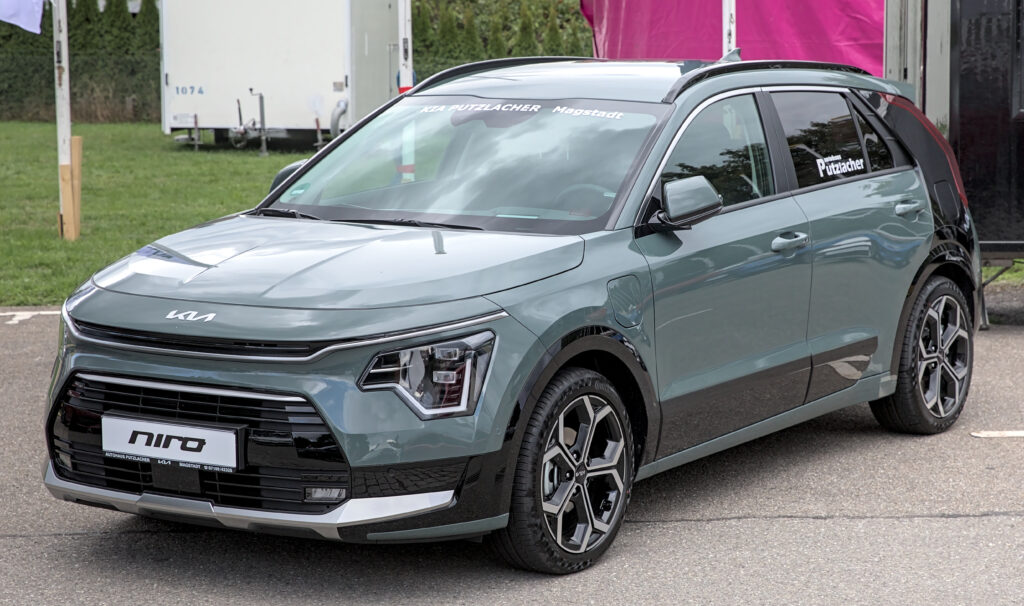
Switching your Kia Niro from kilometers to miles sounds like a tiny tweak—but it can feel like unlocking a secret door in your dashboard. Whether you’ve imported your Niro, moved countries, or simply prefer miles over kilometers, knowing how to change the display matters more than you’d think. Speed awareness, fuel economy, service intervals, even resale value—everything becomes clearer when your car speaks your language.
We’re going to walk through every method, every generation, and every dashboard style Kia has used in the Niro lineup. No jargon. No fluff. Just clean, confident steps you can follow in under a minute.
Content in this publication
- Why Drivers Want to Change KM to Miles
- Understanding the Kia Niro Instrument Cluster
- The Quick Method (Works on Most Models)
- Step-by-Step for First-Generation Kia Niro (2016–2021)
- Step-by-Step for Second-Generation Kia Niro (2022+)
- What Changes When You Switch Units?
- What If the Option Is Missing?
- Can You Change Only the Digital Screen?
- Common Mistakes Drivers Make
- Hybrid vs EV: Any Differences?
- Why This Matters More Than You Think
- Troubleshooting Checklist
- The Human Side of a Digital Change
- Closing Thoughts
- FAQs
Why Drivers Want to Change KM to Miles
Some reasons are practical. Others are personal. All are valid.
- You imported your Kia Niro from Europe or Asia
- You moved to the UK, US, or another miles-based country
- You share the car with someone who thinks in miles
- You prefer MPG instead of L/100km
- You want your speed limits to make instant sense
Think of it like switching your phone from Celsius to Fahrenheit—it’s not about the numbers, it’s about comfort.
Understanding the Kia Niro Instrument Cluster
Before we press any buttons, it helps to know what we’re working with.
The Kia Niro has evolved through:
- First Generation (2016–2021)
- Second Generation (2022–present)
Each generation may use:
- Analog gauges with a digital center screen
- Fully digital instrument clusters
- Hybrid, Plug-in Hybrid, or Electric layouts
Despite the variety, Kia kept one thing consistent: the units setting lives in the Settings menu.
The Quick Method (Works on Most Models)
For most Kia Niro models, the process looks like this:
- Turn the ignition on (engine on or accessory mode)
- Use the steering wheel buttons to open the menu
- Navigate to Settings or User Settings
- Find Units or Distance/Speed Units
- Select Miles (MPH) instead of Kilometers (KM/H)
- Confirm and exit
That’s it. The speedometer, trip meter, and fuel economy will all update instantly.
Step-by-Step for First-Generation Kia Niro (2016–2021)
Using the Steering Wheel Controls
- Press the Menu button on the steering wheel
- Scroll to User Settings
- Select Other Features or Units
- Choose Distance/Speed Unit
- Switch from km/h to mph
Your dashboard will refresh like a digital chameleon—same car, new language.
Step-by-Step for Second-Generation Kia Niro (2022+)
The newer Niro feels more like a smartphone on wheels.
You may be interested in reading Volkswagen ID.3 Boot Space: Real-World Practicality in an Electric Age
- Tap Settings on the infotainment screen
- Go to Vehicle Settings
- Open Cluster or General
- Tap Units
- Select Miles / MPG
You’ll see:
- Speed → MPH
- Distance → Miles
- Efficiency → MPG
It’s a full conversion, not just a cosmetic change.
What Changes When You Switch Units?
This isn’t only about speed. The Kia Niro updates multiple systems at once:
| Feature | Before (KM) | After (Miles) |
|---|---|---|
| Speedometer | km/h | mph |
| Odometer | kilometers | miles |
| Trip Meter | km | miles |
| Fuel Economy | L/100km or km/L | MPG |
| Navigation Distance | km | miles |
| EV Range (Electric Niro) | km | miles |
It’s like changing the measuring tape your car uses.
What If the Option Is Missing?
Sometimes the menu doesn’t show “Miles.” Common reasons:
- Region-locked software
- Imported vehicle firmware
- Older cluster firmware
What You Can Do
- Update the infotainment system at a Kia dealer
- Ask for a region reflash
- Use an OBD coding tool (advanced users only)
In rare cases, analog clusters may remain in km/h physically—but the digital display can still switch.
Can You Change Only the Digital Screen?
Yes. Many Niro models keep the analog dial in km/h while the center screen shows mph. This is common in imported vehicles.
It’s still legal in many regions as long as mph is visible.
Common Mistakes Drivers Make
- Changing language instead of units
- Adjusting navigation units only
- Confusing trip reset with unit settings
- Looking in the infotainment menu instead of the cluster menu
The units setting almost always lives with the instrument cluster, not the radio.
Hybrid vs EV: Any Differences?
The steps are nearly identical, but what changes is what else updates.
Hybrid & Plug-in Hybrid
- MPG replaces km/L
- EV range switches to miles
- Trip efficiency recalculates
Electric Niro
- Range becomes miles
- Consumption may show mi/kWh
- Charging estimates adapt
Your car recalculates everything instantly—no restart needed.
Why This Matters More Than You Think
Driving is about instinct. When your dashboard speaks in a unit you grew up with, reaction time improves.
You may be interested in readingVolkswagen ID.3 Boot Space: Real-World Practicality in an Electric AgeYou may be interested in reading
 Volkswagen ID.3 Battery Size: Everything You Need to Know
- Speed limits become intuitive
- Range anxiety drops
- Navigation feels natural
- Maintenance intervals make sense
It’s the difference between translating in your head and just knowing.
Troubleshooting Checklist
If the change didn’t work:
- Restart the vehicle
- Re-enter the settings menu
- Confirm the selection saved
- Check both cluster and infotainment menus
- Update system software
In 99% of cases, it’s a simple menu oversight.
The Human Side of a Digital Change
We often treat cars like machines, but they’re companions. When your Kia Niro finally speaks in miles, it feels like it’s meeting you halfway—like switching a friend’s language so conversations flow easier.
Small change. Big comfort.
Closing Thoughts
Changing your Kia Niro from kilometers to miles is one of those tiny tweaks that quietly transforms your daily drive. It removes mental math, sharpens awareness, and makes every mile feel familiar. Whether you’re cruising city streets or stretching out on the highway, your dashboard should feel like home.
And now—it does.
FAQs
1. Will changing to miles affect my actual odometer history?
No. It only changes how values are displayed. Your car’s internal records remain accurate.
2. Can I switch back to kilometers anytime?
Absolutely. Just repeat the steps and select km.
3. Does this affect resale value?
Not negatively. In many regions, it actually improves clarity for buyers.
4. Will navigation automatically update to miles?
Yes, in most models it syncs with the unit setting.
5. Do I need a dealer to make this change?
In nearly all cases, no. It’s a user-level setting.
Volkswagen ID.3 Boot Space: Real-World Practicality in an Electric AgeYou may be interested in reading
Volkswagen ID.3 Battery Size: Everything You Need to KnowYou may be interested in reading
 Volkswagen ID.3 Charger Type: Everything We Need to Know Before Plugging In
If you want to know other articles similar to Kia Niro Change KM to Miles: A Simple Guide for Every Driver you can visit the category Service and Parts.
How to Reset Volvo XC60 Infotainment System: The Complete Practical Guide
Volvo XC60 Gearbox Oil Change: The Complete Expert Guide
Volvo XC60 Engine Management Light: Causes, Fixes, and What It Really Means
Skoda Kamiq Size Comparison: Dimensions, Space & Real-World Practicality
Volvo XC60 Headlight Adjustment for Europe: The Complete Practical Guide
Volvo XC60 City Safety Service Required: What It Means, Causes, and Fixes
Leave a Reply
More content of your interest