

Land Rover Discovery Sport Service Reset: Complete Step-by-Step Guide


When the service indicator pops up on the dashboard of the Land Rover Discovery Sport, it’s essentially the vehicle’s way of tapping us on the shoulder and saying, “Hey, it’s time for some attention.” After completing routine maintenance—oil changes, inspections, or scheduled servicing—the final step is often resetting the service light.
But here’s the twist: many drivers don’t realize that resetting the service indicator isn’t just about clearing a message. It’s about recalibrating the vehicle’s maintenance tracking system so it can accurately monitor the next service interval.
In this guide, we’ll walk through everything you need to know about performing a Land Rover Discovery Sport service reset—from understanding how the system works to step-by-step procedures for different model years.
Content in this publication
- Understanding the Service Reminder System
- When You Should Perform a Service Reset
- Service Reset Compatibility by Model Year
- Checklist Before Resetting
- Step-by-Step Reset Procedure
- Steps for Infotainment Reset
- Popular Diagnostic Tools
- Common Causes
- Factors That Affect Service Intervals
- Typical Oil Service Procedure
- Service Reminder
- Warning Lights
- Maintenance Tips
- Watch for These Signs
- Mistakes to Avoid
- Dealer Reset
- DIY Reset
- 1. How do I reset the service light on a Land Rover Discovery Sport?
- 2. Can I reset the service indicator without changing the oil?
- 3. Why won’t my service light reset?
- 4. Do newer Discovery Sport models require a different reset method?
- 5. Does resetting the service light fix warning lights?
Understanding the Service Reminder System
Modern vehicles, including the Discovery Sport, use an intelligent service interval monitoring system.
Instead of relying solely on mileage, the system evaluates:
- Driving style
- Engine load
- Time since last service
- Mileage accumulation
When the algorithm determines that maintenance is due, the “Service Required” message appears on the dashboard.
Why Resetting the Service Indicator Matters
Resetting the indicator ensures:
- Accurate maintenance tracking
- Proper service interval calculations
- Avoidance of unnecessary warning lights
- Clean dashboard notifications
Think of it like resetting a kitchen timer after baking a cake—without resetting it, the timer keeps ringing even though the job is already done.
Land Rover Discovery Sport Service Reset Basics
Before diving into the reset process, it helps to know a few basics about the Discovery Sport’s electronics.
When You Should Perform a Service Reset
You should reset the service indicator only after completing maintenance, such as:
- Engine oil change
- Oil filter replacement
- Scheduled annual service
- Major service intervals
Resetting the indicator without servicing the vehicle can cause missed maintenance, which may shorten engine life.
Service Reset Compatibility by Model Year
The reset procedure varies slightly depending on the model year.
First Generation (2015–2019)
These models use a manual pedal reset procedure.
Facelift and Newer Models (2020–Present)
Later models rely more on menu-based resets through the infotainment or instrument cluster.
Preparation Before Resetting the Service Light
Before attempting a reset, it’s wise to check a few things.
Checklist Before Resetting
Make sure the following conditions are met:
- Engine is turned OFF
- Ignition is set to ON position
- Vehicle battery is healthy
- Driver door is closed
- Seatbelt is not engaged
Small details like these can make the difference between a reset working instantly or failing repeatedly.
Method 1: Land Rover Discovery Sport Service Reset Using Pedals
This is the most common method, especially for earlier models.
Step-by-Step Reset Procedure
Follow these steps carefully:
- Turn the ignition ON without starting the engine.
- Press and hold both:
- Brake pedal
- Accelerator pedal
- Continue holding both pedals for approximately 30 seconds.
- Watch the instrument cluster for a reset confirmation message.
- Release the pedals once the message appears.
What You Should See
The dashboard may display:
- “Service Resetting”
- “Service Interval Reset”
- Or the service message disappears entirely.
If done correctly, the reset should complete automatically.
Method 2: Reset Through the Vehicle Menu
Newer Discovery Sport models include a more intuitive digital interface.
You may be interested in reading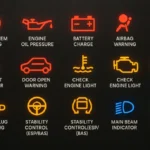 Land Rover Discovery Sport Engine Warning Light UK: Causes, Meaning, and What To Do
Steps for Infotainment Reset
- Turn ignition ON.
- Navigate to Vehicle Settings.
- Select Service Menu.
- Choose Reset Service Indicator.
- Confirm the reset.
This process takes less than a minute and is often easier than the pedal method.
Using Diagnostic Tools for Service Reset
Professional technicians often use OBD diagnostic tools to reset service reminders.
Popular Diagnostic Tools
Examples include:
- Autel diagnostic scanners
- Launch X431 scanners
- Land Rover-specific diagnostic systems
- OBD2 professional reset tools
These tools can reset multiple systems simultaneously, including:
- Oil service reminders
- Brake service notifications
- Transmission service indicators
Why the Service Reset Sometimes Fails
Occasionally, the reset procedure doesn’t work the first time.
Several factors can interfere.
Common Causes
- Ignition not in the correct position
- Pedals not held long enough
- Door open during procedure
- Weak vehicle battery
- Software glitches
Simple Fixes
If the reset fails:
- Turn ignition off and retry
- Ensure both pedals are fully pressed
- Wait a full 30 seconds
- Repeat the process
Sometimes it simply takes two or three attempts.
Service Interval Settings Explained
The Discovery Sport typically follows a 12-month or 16,000 km / 10,000 mile service schedule.
However, this can vary based on driving conditions.
Factors That Affect Service Intervals
The system monitors:
- Short trips
- Cold starts
- Aggressive acceleration
- Heavy towing
- Stop-and-go traffic
When the system detects demanding driving patterns, it may shorten the service interval.
Oil Change and Service Reset Relationship
An oil change is the most common reason drivers perform a reset.
Typical Oil Service Procedure
During routine service we usually:
- Drain old engine oil
- Replace oil filter
- Install new oil
- Inspect engine components
- Reset service indicator
Skipping the reset means the vehicle still believes the old oil is in the engine.
How Long Does a Service Reset Take?
Surprisingly little time.
Most resets take less than one minute.
Estimated Time
| Reset Method | Time Required |
|---|---|
| Pedal reset | 30–60 seconds |
| Menu reset | 30 seconds |
| Diagnostic tool | 10–20 seconds |
The real time investment is usually reading the instructions correctly.
Service Reset vs Warning Lights
Many drivers confuse service reminders with warning lights.
They are not the same.
Service Reminder
- Maintenance reminder
- Non-critical
- Can be reset after servicing
Warning Lights
- Indicate mechanical issues
- Should never be reset without diagnosis
- May require repairs
Think of service reminders as a calendar notification, while warning lights are more like emergency alerts.
Maintaining Your Discovery Sport After Reset
Resetting the service indicator is just one part of proper vehicle care.
You may be interested in readingLand Rover Discovery Sport Engine Warning Light UK: Causes, Meaning, and What To DoYou may be interested in reading
 Land Rover Discovery Sport Windscreen Replacement Cost: What Owners Should Expect
Maintenance Tips
We recommend:
- Checking oil every 1,000 miles
- Monitoring tire pressure
- Inspecting brake pads regularly
- Keeping software updates current
- Following manufacturer service intervals
A Discovery Sport that receives proper care can easily deliver many years of reliable performance.
Signs Your Vehicle Still Needs Service
Even if the service light has been reset, physical symptoms can signal underlying issues.
Watch for These Signs
- Engine knocking sounds
- Reduced fuel efficiency
- Rough idling
- Excessive exhaust smoke
- Slow acceleration
If any of these appear, it’s wise to inspect the vehicle immediately.
Common Mistakes Drivers Make During Reset
Let’s be honest—most of us rush through instructions the first time.
Here are a few common errors.
Mistakes to Avoid
- Starting the engine during reset
- Releasing pedals too early
- Ignoring dashboard messages
- Resetting without performing maintenance
Patience is the secret ingredient here.
Dealer Reset vs DIY Reset
You have two options when dealing with service reminders.
Dealer Reset
Pros:
- Guaranteed accuracy
- Professional diagnostics
- Software updates included
Cons:
- Higher cost
- Requires appointment
DIY Reset
Pros:
- Free
- Fast
- Convenient
Cons:
- Easy to perform incorrectly
- Limited diagnostic ability
For many drivers, the DIY method works perfectly after routine maintenance.
Final Thoughts
Resetting the Land Rover Discovery Sport service light might seem like a minor task, but it plays an important role in maintaining accurate service records and ensuring the vehicle continues to operate efficiently.
Once you understand the reset procedures—whether using pedals, menu navigation, or diagnostic tools—the process becomes surprisingly simple.
In many ways, performing a service reset is like turning the page in a maintenance journal. The vehicle has completed one chapter of its care routine and is ready to begin the next.
Stay consistent with maintenance, reset the service reminder properly, and your Discovery Sport will reward you with smooth performance mile after mile.
Frequently Asked Questions
1. How do I reset the service light on a Land Rover Discovery Sport?
Turn the ignition on without starting the engine, press and hold the brake and accelerator pedals simultaneously for about 30 seconds, and wait for the reset confirmation.
2. Can I reset the service indicator without changing the oil?
Technically yes, but it is not recommended because the system will incorrectly track the next service interval.
3. Why won’t my service light reset?
Common reasons include incorrect ignition position, pedals released too early, open doors, or a weak battery.
4. Do newer Discovery Sport models require a different reset method?
Yes. Some newer models allow service reset through the infotainment system or instrument cluster menus.
5. Does resetting the service light fix warning lights?
No. Warning lights indicate potential mechanical problems and require proper diagnosis rather than a simple reset.
You may be interested in readingLand Rover Discovery Sport Engine Warning Light UK: Causes, Meaning, and What To DoYou may be interested in reading
Land Rover Discovery Sport Windscreen Replacement Cost: What Owners Should ExpectYou may be interested in reading
Land Rover Discovery Sport Glow Plug Replacement: Complete Guide for Diesel OwnersIf you want to know other articles similar to Land Rover Discovery Sport Service Reset: Complete Step-by-Step Guide you can visit the category Service and Parts.
How to Reset Volvo XC60 Infotainment System: The Complete Practical Guide
Volvo XC60 Gearbox Oil Change: The Complete Expert Guide
Volvo XC60 Engine Management Light: Causes, Fixes, and What It Really Means

Skoda Kamiq Size Comparison: Dimensions, Space & Real-World Practicality
Volvo XC60 Headlight Adjustment for Europe: The Complete Practical Guide
Volvo XC60 City Safety Service Required: What It Means, Causes, and Fixes
Leave a Reply
More content of your interest