

Vauxhall Corsa Radio Not Working? Ultimate Fix Guide

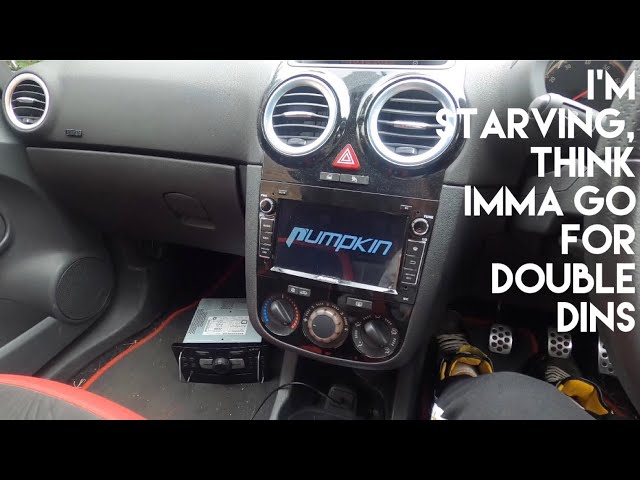
A silent Vauxhall Corsa radio can turn an enjoyable drive into a dull journey. When your infotainment system refuses to cooperate — no power, no sound, or no signal — the silence feels louder than ever. Below, we deliver the most comprehensive troubleshooting guide to bring your Vauxhall Corsa radio back to life with confidence and precision.
Content in this publication
- Common Causes of Vauxhall Corsa Radio Failure
- Power Supply & Fuse Failure
- Inspect Wiring & Ground Connections
- Antenna Problems & Signal Loss
- Volume, Mute & Audio Output
- Security Code Lockout
- Software Reset / Factory Reset
- Amplifier & Speaker Failure
- Head Unit Failure
- When Professional Help Is Needed
- Preventing Future Radio Problems
- Frequently Asked Questions
- Final Thoughts
Common Causes of Vauxhall Corsa Radio Failure
- Blown fuse
- Loose or damaged wiring
- Antenna failure
- Security code lockout
- Software glitches
- Faulty amplifier or speakers
- Internal radio head-unit failure
Power Supply & Fuse Failure
Check the Radio Fuse
A blown radio fuse is the most frequent reason for a dead radio.
Steps
- Locate the fuse box (dashboard panel or engine bay).
- Refer to fuse label: Audio / Radio / Infotainment.
- Remove the radio fuse with a puller.
- Inspect the fuse filament — if broken, replace with same-amp rating.
Important: Never install a higher-amp fuse. This risks severe electrical damage.
Inspect Wiring & Ground Connections
Loose power feeds or poor grounding can silence the radio completely.
Key Checks
- Wiring harness behind the head unit
- Ground cable integrity (typically black)
- Connector seating into radio module
If the dashboard removal intimidates you, consult a professional — incorrect handling can damage trim clips or wiring.
Antenna Problems & Signal Loss
Without a functional antenna, radio reception collapses.
Checklist
- Verify roof antenna is tight and undamaged.
- Inspect base seal for corrosion.
- Check antenna cable connection at rear of radio.
- For glass-integrated antennas, inspect rear-window connectors.
A broken or corroded antenna mast/base often causes intermittent static or total signal loss.
You may be interested in reading Vauxhall Corsa Code 24: The Ultimate Guide to Diagnosing & Fixing This Speed Sensor Fault
Volume, Mute & Audio Output
Before diving deeper:
- Ensure mute is OFF.
- Increase volume (especially after Bluetooth calls).
- Switch audio source (FM, DAB, AUX, USB).
- Test multiple stations to rule out broadcast issues.
Security Code Lockout
If “CODE” or similar appears on the screen, the radio is locked due to:
- Battery disconnect/replacement
- Radio removal or reset
How to Retrieve Code
- Owner’s handbook radio card
- Sticker inside the glovebox
- Previous maintenance paperwork
- Vauxhall dealership (requires proof of ownership)
Software Reset / Factory Reset
Glitches may freeze the radio or block sound output.
Common Reset Methods
- Hold Power for 10–15 seconds
- Press and hold Power + Home
- Use hidden reset pinhole button
Always check your Corsa model-year instructions, as reset buttons vary.
Amplifier & Speaker Failure
Some trims include an external amplifier. Failure symptoms:
- Radio powers on but no sound
- Intermittent cut-outs
- Sound only from certain speakers
Speaker Diagnosis
- Balance/fader test in menu
- Try different audio sources
- Listen for crackling — hints at failing speakers
Head Unit Failure
A faulty central unit may show signs such as:
- Black screen but power to system
- Frozen display
- Buttons not responding
- Random reboots
If internal electronics burn out, replacement or repair is required.
You may be interested in readingVauxhall Corsa Code 24: The Ultimate Guide to Diagnosing & Fixing This Speed Sensor FaultYou may be interested in reading
 Vauxhall Corsa 1.4 EcoFlex Problems: The Ultimate Owner’s Guide
When Professional Help Is Needed
Seek expert assistance if:
- Fuse repeatedly blows
- Wiring appears burnt or corroded
- Security code recovery fails
- Display powers on but no audio output persists
- You plan to install aftermarket head unit upgrades
Qualified car-audio specialists have diagnostic equipment for fast fault detection.
Preventing Future Radio Problems
- Avoid jump-starting without surge protection
- Keep battery terminals clean & secure
- Do not spray water aggressively near roof antenna base
- Always store radio security code safely
Frequently Asked Questions
Why does my Corsa radio power on but no sound plays?
Likely amplifier, speaker, or internal audio processor fault. Also check mute, fader, and balance settings.
Where do I find the radio code?
Inside the owner’s manual, glovebox sticker, radio card, or from Vauxhall with proof of ownership.
Can a weak battery stop the radio working?
Yes — low voltage can trigger software lock, corruption, or code prompt.
How do I reset the Corsa radio?
Most models: hold Power for ~10 seconds. Some require a paper-clip reset button.
Can I install an aftermarket radio?
Yes — you may need:
You may be interested in readingVauxhall Corsa Code 24: The Ultimate Guide to Diagnosing & Fixing This Speed Sensor FaultYou may be interested in reading
Vauxhall Corsa 1.4 EcoFlex Problems: The Ultimate Owner’s GuideYou may be interested in reading
 Vauxhall Corsa Inlet Manifold Problems: The Full Expert Guide
- Fascia trim
- Wiring harness adapter
- Steering control adapter (if equipped)
Final Thoughts
A silent radio doesn’t have to derail your drive. By working through fuse checks, wiring inspection, antenna evaluation, and software resets, most Vauxhall Corsa radio failures can be cured at home. For deeper amplifier or head-unit faults, professional diagnosis ensures a swift return to road-trip harmony.
Ready to bring the rhythm back to your Corsa? Follow the steps above — and enjoy the music again.
If you want to know other articles similar to Vauxhall Corsa Radio Not Working? Ultimate Fix Guide you can visit the category Common Problems.
Jaguar F-Pace Engine Problems: Common Issues, Causes, and Fixes

Jaguar F-Pace Problems: Reliability Issues, Common Faults, and What Owners Should Know

Land Rover Discovery Sport Not Starting: Causes, Fixes, and Real-World Troubleshooting Guide

Land Rover Discovery Sport Heater Not Working: Causes, Fixes, and Troubleshooting Guide

Land Rover Discovery Sport No Sound: Causes, Fixes, and Complete Troubleshooting Guide

Land Rover Discovery Sport Coolant Level Low: Causes, Fixes, and Prevention Guide
Leave a Reply
More content of your interest