

Leapmotor C10 Not Charging: Causes, Fixes and Troubleshooting Guide

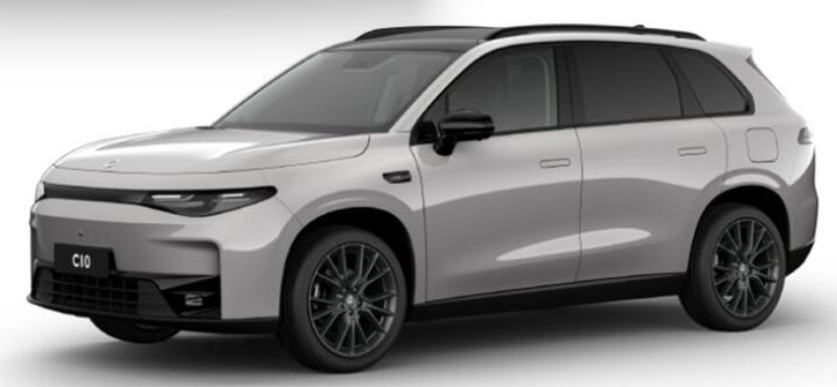
Few things are more frustrating than plugging an electric car into a charger, walking away, and returning later to discover that the battery percentage has barely moved—or hasn't moved at all. If your Leapmotor C10 is not charging, however, don't immediately assume the battery or onboard charger has failed.
EV charging is basically a conversation between several pieces of equipment. The charging station says, "I'm ready." The vehicle replies, "I recognize you." Safety checks take place, charging limits are negotiated, and only then does electricity begin flowing.
When one part of that electronic handshake gets confused, charging may never start.
The good news? Many Leapmotor C10 charging problems are surprisingly simple to diagnose. A charging schedule might be active. The plug may not have fully locked. A wallbox could be waiting for authorization. A public charger may have failed its handshake. Or the C10 might simply need the charging session to be restarted.
In this guide, we'll walk through the most likely explanations, starting with the easy fixes before moving toward problems that deserve professional attention.
Content in this publication
- Why Is My Leapmotor C10 Not Charging?
- Start With These Quick Checks
- Check Whether the Charging Plug Is Fully Inserted
- Make Sure Scheduled Charging Isn't Preventing the C10 From Charging
- Check Your Charging Limit
- Leapmotor C10 Not Charging at Home
- Leapmotor C10 Stops Charging and Won't Restart
- Leapmotor C10 Not Charging From a Household Socket
- Leapmotor C10 Not Charging at a Public Charger
- Leapmotor C10 AC Charging Works but DC Fast Charging Doesn't
- Leapmotor C10 DC Charging Works but AC Charging Doesn't
- Inspect the Leapmotor C10 Charging Port
- Could Temperature Stop the C10 From Charging?
- Why the Leapmotor C10 May Charge Slowly Instead of Not Charging
- Check for Software and App Problems
- Charging Cable Problems
- Could the 12-Volt Battery Affect Charging?
- What About the High-Voltage Battery?
- When Should You Contact a Leapmotor Dealer?
- How to Diagnose a Leapmotor C10 Charging Problem Efficiently
- Can You Keep Driving If Your Leapmotor C10 Won't Charge?
- How to Reduce Future Charging Problems
- Is the Leapmotor C10 Known for Charging Problems?
- Leapmotor C10 Not Charging: The Bottom Line
- Frequently Asked Questions About Leapmotor C10 Charging Problems
Why Is My Leapmotor C10 Not Charging?
When a Leapmotor C10 won't charge, we can usually divide the possible causes into four broad areas: the electricity supply, the EV charger, the cable or connector, and the vehicle itself.
Think of charging as water traveling through a hose. The battery may be perfectly healthy, but if the tap is closed, the hose is disconnected, or a valve refuses to open, nothing reaches the destination.
Current Leapmotor C10 specifications confirm support for scheduled charging through the Leapmotor app, while market specifications can vary between BEV and range-extended C10 versions.
That means the first troubleshooting rule is simple: don't replace anything until we know which part of the charging chain has stopped working.
Start With These Quick Checks
Before experimenting with settings or calling roadside assistance, run through the basics.
- Disconnect the charging plug and firmly reconnect it.
- Confirm that the charger itself has power.
- Check whether the wallbox or public charger reports an error.
- Make sure scheduled charging is disabled temporarily.
- Confirm that the battery hasn't already reached the configured charge target.
- Examine the charging plug and vehicle socket for dirt, moisture, bent contacts, corrosion, or obvious damage.
- Try another charging station if one is available.
- If possible, try another compatible charging cable.
- Stop the current charging session completely before starting a fresh one.
- Check the Leapmotor app and vehicle display for charging warnings or fault messages.
These quick checks can isolate an enormous number of faults without tools.
Leapmotor's charging instructions also recommend inspecting the cable and connection equipment before charging and checking the charge port for contamination, moisture, rust, or damaged terminals.
Check Whether the Charging Plug Is Fully Inserted
A Loose Connection Can Stop Charging Completely
It sounds almost too simple, but an incompletely inserted connector remains one of the first things worth checking.
The vehicle and charger need to detect that the connector has been correctly installed before current is allowed to flow. Push the charging connector fully into the C10 until it is securely seated.
Leapmotor's charging guidance says that with compatible AC charging equipment, the charging connector should be fully inserted and correctly connected before charging begins.
If you plugged the car in quickly and walked away, disconnect it and try again.
Listen and Look for Confirmation
Once connected, check the instrument display and charging information in the vehicle or app.
If the car shows no recognition of the cable whatsoever, our investigation moves toward the cable, charger, socket, locking mechanism, electrical supply, or communication system.
If the car recognizes the charger but says charging is delayed or scheduled, the hardware may be perfectly fine.
Make Sure Scheduled Charging Isn't Preventing the C10 From Charging
This is an especially important possibility because the Leapmotor C10 supports scheduled charging through the Leapmotor app. Official specifications list schedule charging among the vehicle's connected-app features.
Imagine plugging in at 6:00 p.m. while the car has been instructed to start at midnight. Everything appears ready, but zero energy flows.
That's not necessarily a failure.
Temporarily Disable Charging Schedules
If your Leapmotor C10 is plugged in but not charging, temporarily remove or disable any charging schedule in the Leapmotor app and test immediate charging.
Also check the charger itself.
Many smart wallboxes have their own timetable. If you've programmed one schedule in the car and another in the wallbox, the two systems can essentially spend the evening waiting for each other.
For troubleshooting, simplify the setup:
Car scheduling off + wallbox scheduling off + immediate charging enabled.
Once normal charging works, reintroduce the schedules one at a time.
Avoid Competing Smart-Charging Rules
This matters particularly with tariff-based charging, solar surplus charging, dynamic electricity pricing, and home-energy-management systems.
The smarter our charging setup becomes, the more opportunities there are for one system to tell another to wait.
Check Your Charging Limit
Another easily overlooked explanation is the configured battery charging target.
If a charge limit is set and the battery has already reached that level, the vehicle may correctly refuse additional charging.
For example, if the target were configured at 80% and the battery were sitting around that threshold, connecting the car would not necessarily produce the charging behavior you'd expect from an almost-empty EV.
Before diagnosing a hardware fault, inspect the charging settings and temporarily raise the target if appropriate.
Leapmotor C10 Not Charging at Home
Home charging gives us an advantage: we control most of the equipment.
If the C10 charges normally at a public station but refuses to charge at home, that's an important diagnostic clue. The battery and much of the vehicle charging system are probably capable of accepting energy.
We should then investigate the home supply, cable, wallbox, smart controls, and AC charging communication.
Check the Wallbox Status
Look at the wallbox lights or app.
Is it showing ready, connected, charging, paused, scheduled, unauthorized, unavailable, or faulted?
Those words matter.
"Connected" doesn't necessarily mean electricity is flowing. It may simply mean the charger can detect the vehicle.
Likewise, a smart charger may require RFID authorization, app approval, tariff activation, or another condition before it supplies power.
Restart the Wallbox
A power cycle can clear temporary communication glitches.
Stop charging properly, disconnect the vehicle if instructed by your charging-equipment manufacturer, and restart the charger according to its documentation.
Once it returns to its normal ready state, reconnect the C10 and initiate a completely new session.
Leapmotor C10 Stops Charging and Won't Restart
Here's where the issue becomes more interesting.
Recent C10 owners have reported situations involving solar-surplus wallboxes in which charging successfully begins but doesn't automatically restart after the wallbox interrupts the session. Some users specifically describe problems after dynamic switching or a charging pause, requiring them to manually restart charging or disconnect and reconnect the vehicle. These reports are anecdotal rather than an official diagnosis from Leapmotor, but they are useful when troubleshooting similar behavior.
Why Solar Charging Can Complicate Things
Solar-surplus charging isn't like traditional overnight EV charging.
Clouds pass overhead. Solar production falls. The wallbox reduces current. Production rises again. The charger asks the car to resume.
That cycle may occur many times.
Some intelligent charging systems also change between single-phase and three-phase operation depending on available solar generation.
That's a demanding communication environment compared with plugging into a charger that provides steady power for six hours.
Try Starting a Fresh Charging Session
If charging stopped after an interruption and doesn't resume, stop the charging session completely rather than endlessly waiting for automatic recovery.
Then restart charging through the appropriate app or charger, or unplug and reconnect the cable once the charging equipment indicates that doing so is safe.
Some C10 owners have reported that initiating a new charging session restores operation after an interrupted solar-charging session.
Test Without Solar-Surplus Automation
For diagnosis, temporarily place the wallbox in a straightforward fixed charging mode.
If the C10 charges continuously under fixed conditions but struggles only when solar automation repeatedly pauses, resumes, or changes phases, you've discovered something extremely valuable.
The problem is probably related to the interaction between the vehicle and smart-charging strategy rather than an EV battery that simply cannot charge.
Leapmotor C10 Not Charging From a Household Socket
Where supported by the vehicle, local regulations, and supplied equipment, some C10 configurations can use Mode 2 AC charging equipment from an appropriate household electrical supply.
Leapmotor documentation instructs owners to inspect the Mode 2 charging equipment before use and ensure that the charging cable, plugs, and associated components are undamaged.
If household charging fails, verify that the outlet actually has electricity by using an appropriate safe test method. Check whether a circuit breaker or residual-current device has tripped and examine the portable charging unit for error lights.
Never repeatedly reset a breaker that continues tripping.
That's not the electrical system being stubborn. It's the electrical system telling us something is wrong.
Household EV charging places a substantial continuous load on a circuit, so questionable sockets, extension cords, adapters, overheated connections, or inadequate wiring should never be treated casually.
Leapmotor C10 Not Charging at a Public Charger
If your C10 refuses a public charger, avoid drawing conclusions from one failed attempt.
Public charging stations occasionally malfunction. Connectors become damaged. Payment terminals lose communications. Apps fail. Individual charging stalls may be offline even while neighboring units function perfectly.
Try Another Charging Stall
If stall number four fails, try number five.
Better still, test a charger operated by another network.
If the C10 successfully charges elsewhere, the original charging point becomes our primary suspect.
Some chargers won't begin until account authentication, RFID authorization, contactless payment, or app activation has completed.
The vehicle might be physically connected while the charger is still waiting for permission.
Public-charger displays usually provide useful clues. Messages such as "authorizing," "vehicle connected," "communication error," or "charging unavailable" point us toward different parts of the process.
Leapmotor C10 AC Charging Works but DC Fast Charging Doesn't
This is one of the most valuable troubleshooting distinctions we can make.
AC and DC charging don't use exactly the same charging path.
During AC charging, the vehicle's onboard charging hardware converts incoming alternating current into energy suitable for the high-voltage battery. With DC fast charging, conversion largely occurs in the charging station and high-voltage DC energy is delivered to the vehicle under tightly controlled communication and battery-management conditions.
Therefore, a car can potentially have trouble with one charging method while the other continues working.
Test More Than One DC Charger
One unsuccessful DC session doesn't prove the C10 is defective.
Try another known-working fast charger.
If DC charging repeatedly fails across several operators while AC charging works reliably, document the behavior and arrange diagnosis through an authorized service facility.
Useful details include the battery percentage, outside temperature, charger operator, charger power rating, vehicle warning message, software version, and approximate time of each attempt.
That information can turn "my car won't charge" into a reproducible technical problem.
Leapmotor C10 DC Charging Works but AC Charging Doesn't
Now reverse the logic.
If several DC stations charge the vehicle normally but multiple AC chargers fail, an AC-specific issue becomes more plausible.
Possible areas include the Type 2 cable, AC charging equipment, onboard charger, charge-port contacts, control-pilot communication, vehicle settings, or software.
Again, test methodically.
A different AC cable and a different AC charging station provide far more useful information than reconnecting the same charger twenty times.
Inspect the Leapmotor C10 Charging Port
Look for Dirt, Water, or Foreign Material
Charging ports live outside, so they see rain, dust, road grime, pollen, moisture, freezing temperatures, and everything else the weather can throw at a car.
Leapmotor specifically instructs users to make sure there are no water stains or foreign objects in the charging port and to inspect terminals for rust or corrosion.
Do not insert tools, metal objects, cleaning sprays, or improvised equipment into the port.
If contamination or damage is significant, let a qualified technician handle it.
Inspect the Connector Too
The vehicle isn't the only half of the connection.
Examine the charging plug for cracking, contamination, unusual discoloration, deformation, or heat damage.
A connector that has become abnormally hot is not something we should "try one more time."
Stop using it and have the charging equipment inspected.
Could Temperature Stop the C10 From Charging?
Extreme temperature can affect EV charging behavior because lithium-ion batteries operate best within a suitable thermal window.
Cold conditions can reduce charging speed while the battery-management system protects the cells. Very high temperatures can also cause power reductions as the vehicle or charging equipment manages heat.
Current Leapmotor C10 materials describe a battery pre-heating feature designed to improve charging efficiency in cold climates.
So a reduced charging rate isn't automatically a fault.
However, "charging slowly" and "not charging at all" aren't the same problem.
If the charging system reports a temperature-related warning, follow the vehicle's instructions and avoid attempting to override protective measures.
Why the Leapmotor C10 May Charge Slowly Instead of Not Charging
Sometimes owners interpret low power as charging failure.
If your charger normally delivers several kilowatts but you're seeing a much smaller figure, the session is still technically active.
Charging power can vary because of supply limitations, wallbox settings, household load balancing, thermal protection, battery temperature, battery state of charge, smart charging, charger restrictions, or communication between the vehicle and charging equipment.
The key question becomes:
Is the power genuinely zero, or merely lower than expected?
Check the displayed charging rate and estimated completion time before assuming charging has completely stopped.
Check for Software and App Problems
The C10 is heavily software-driven. Current model specifications include over-the-air upgrade functionality along with connected charging controls through the Leapmotor app.
That means we shouldn't ignore software when troubleshooting.
If charging problems began immediately after a software update, record the installed version and describe the timing to the dealer. Likewise, if the vehicle charges correctly but the mobile app displays stale information, the app may be the problem rather than the charging system.
Don't Trust One Screen Alone
Cross-check the information.
Look at the car's instrument display, central screen, Leapmotor app, wallbox app, and charger display where available.
If the wallbox reports several kilowatts being delivered while the Leapmotor app hasn't refreshed, that's very different from every device reporting zero power.
Charging Cable Problems
Type 2 cables look wonderfully simple from the outside, but they're responsible for both electrical connection and communication.
A damaged conductor or signal connection can prevent a session from beginning even when the cable looks reasonably normal externally.
If you use a detachable Type 2 cable at home, trying another known-compatible cable is one of the cleanest diagnostic tests available.
When Cable A repeatedly fails but Cable B works at the same charger with the same vehicle, we've learned something useful.
Could the 12-Volt Battery Affect Charging?
Like other modern EVs, the Leapmotor C10 relies on a low-voltage electrical system to wake control modules, operate computers, manage contactors, and coordinate vehicle functions.
So high-voltage battery capacity isn't the only electrical condition that matters.
A severely discharged or defective low-voltage battery can create strange symptoms in electric vehicles.
That said, this isn't an invitation to disconnect batteries, reset modules, or experiment with electrical systems without proper guidance. If the vehicle exhibits broader electrical symptoms—screens failing to wake, locking issues, repeated warnings, or numerous unrelated faults—have the low-voltage system professionally checked.
What About the High-Voltage Battery?
The expensive possibility naturally sits in the back of every owner's mind:
"What if the main battery has failed?"
It's possible for high-voltage battery systems to develop faults, but jumping to that conclusion from one failed charging session is like replacing your laptop because the café Wi-Fi stopped working.
We want evidence.
A genuine battery or high-voltage system fault is more concerning when the charging problem appears across multiple known-good AC and DC chargers, especially when accompanied by battery warnings, reduced-power messages, inability to enter drive mode, abnormal state-of-charge behavior, or persistent diagnostic alerts.
That's the point where repeated home experimentation should stop.
When Should You Contact a Leapmotor Dealer?
Professional diagnosis makes sense when the C10 repeatedly refuses several known-working chargers, when AC or DC charging consistently fails across different locations, when the charge-port locking system malfunctions, when warning messages remain after restarting the session, or when the cable or charging port shows physical or heat damage.
The same applies when the vehicle reports a high-voltage, battery, charging-system, insulation, electrical, or thermal fault.
Take screenshots before warnings disappear.
Record exactly what happened.
Dealership technicians can do far more with:
"DC charging failed on three separate 150 kW chargers at 36%, 42%, and 38% state of charge with the same vehicle warning"
than with:
"It sometimes doesn't charge."
How to Diagnose a Leapmotor C10 Charging Problem Efficiently
The smartest approach is elimination.
Start with the exact setup that failed.
Then change only one variable at a time.
Try another cable. Then another charger. Disable schedules. Try immediate charging. Compare AC against DC. Check whether the issue appears only after charging interruptions. Check whether it happens only at home.
This is how we turn a mysterious EV problem into a pattern.
Suppose the results look like this:
Home smart wallbox with solar mode: fails after interruption.
Same wallbox in normal charging mode: works.
Public AC charger: works.
Public DC charger: works.
We've narrowed the fault tremendously. The vehicle obviously can charge. Our attention should shift toward the interaction between solar-charging logic, wallbox controls, and the car.
Now imagine the opposite:
Three AC chargers: fail.
Three DC chargers: fail.
Different cables: fail.
No schedule active.
Persistent vehicle charging warning: present.
That pattern deserves professional diagnosis quickly.
Can You Keep Driving If Your Leapmotor C10 Won't Charge?
Technically, the vehicle may still drive normally if enough battery energy remains and no serious warning prohibits operation.
Practically, however, a car that cannot accept charge has a shrinking operating window.
If the battery is already low, don't turn troubleshooting into a range gamble.
Driving around town searching for charger number seven while the remaining range falls isn't a sensible diagnostic strategy.
If repeated charging attempts fail and usable range is becoming limited, contact roadside assistance or an authorized Leapmotor service provider.
How to Reduce Future Charging Problems
Charging becomes easier when the setup stays simple and predictable.
Keep connectors clean and dry, inspect cables periodically, use properly installed charging equipment, avoid damaged sockets or adapters, and keep vehicle software current where updates are officially available.
If you use advanced solar integration, dynamic tariffs, phase switching, or automated load management, understand which device controls the charging schedule.
Ideally, one system should be the conductor and everything else should play along.
Two different apps both trying to control charging can resemble two people grabbing the steering wheel at the same time.
Is the Leapmotor C10 Known for Charging Problems?
We should be careful here.
Individual owner reports exist describing particular C10 charging behaviors, including difficulty restarting after certain interrupted solar-wallbox sessions. That doesn't justify declaring that all Leapmotor C10s have a general charging defect.
Different markets also receive different C10 versions, software releases, battery configurations, onboard charging capabilities, and charging equipment.
The useful approach is to treat owner reports as diagnostic clues rather than proof of a universal fault.
If your symptom closely matches a reported pattern, test the suggested scenario. If it doesn't, continue troubleshooting based on what your own vehicle is actually doing.
Leapmotor C10 Not Charging: The Bottom Line
When a Leapmotor C10 is not charging, the worst thing we can do is immediately assume the traction battery has failed.
Start simple.
Check the connection. Inspect the charging port. Remove scheduled charging temporarily. Confirm that the wallbox actually supplies power. Restart the charging session. Test another cable and another charger. Compare AC and DC charging.
If the C10 stops charging after a smart wallbox interrupts the session, manually beginning a fresh charging session is particularly worth testing because some owners have reported restart difficulties in that scenario.
Most importantly, look for patterns.
One failed public charger tells us almost nothing. Five different chargers producing exactly the same failure tell us a great deal.
And when repeated testing points toward the vehicle—or when electrical damage, overheating, high-voltage warnings, or persistent faults appear—stop troubleshooting and let an authorized technician take over.
Charging problems can feel like a brick wall. Usually, though, they're more like a maze: once we work through the possibilities in the right order, the exit becomes much easier to find.
Frequently Asked Questions About Leapmotor C10 Charging Problems
Why is my Leapmotor C10 plugged in but not charging?
The most common possibilities include scheduled charging, a configured charge target, an incompletely connected cable, a wallbox waiting for authorization, charger failure, smart-charging settings, or a communication problem between the C10 and charging equipment. Disable schedules temporarily and test another charger before assuming the vehicle has a hardware fault.
Why does my Leapmotor C10 stop charging and not restart?
Some C10 owners using solar-surplus and dynamically controlled wallboxes have reported that charging may not automatically resume after certain charging interruptions. Starting a completely new session, or disconnecting and reconnecting where safe, may restore charging. Because these are owner reports rather than a universal Leapmotor diagnosis, persistent problems should still be reported to the dealer.
Why won't my Leapmotor C10 charge at home but works at public chargers?
If public charging works reliably, investigate the home wallbox, electrical supply, cable, authorization settings, charging schedules, load balancing, solar controls, and smart-charging configuration. Temporarily disabling automation and testing immediate fixed-power charging can help isolate the cause.
Why does my Leapmotor C10 charge on AC but not DC fast chargers?
Repeated DC-only failure can point toward a DC charging communication, connector, software, battery-management, or high-voltage system issue, although an individual public charger may simply be faulty. Try several known-working DC chargers before contacting Leapmotor with the results.
Should I call Leapmotor if my C10 won't charge?
Yes, if it refuses multiple known-working chargers, repeatedly displays charging or high-voltage warnings, shows physical charging-port damage, overheats at the connector, or consistently fails on either AC or DC charging. Record error messages, charger details, battery percentage, vehicle software version, and the circumstances of each failure to make diagnosis easier.
If you want to know other articles similar to Leapmotor C10 Not Charging: Causes, Fixes and Troubleshooting Guide you can visit the category Common Problems.
Volvo S90 Common Problems: Reliability & Repair Guide
Volvo S90 No Sound: Causes, Fixes and Solutions

Nissan Rogue Smells Like Gas: Causes and Fixes
Vauxhall Agila Problems: Common Faults & Fixes

Kia Sorento Jerking When Accelerating: Causes & Fixes

Jaguar F-Pace Low Battery: Causes, Warning Signs, and How to Fix It
Leave a Reply
More content of your interest