

Volvo S90 No Sound: Causes, Fixes and Solutions

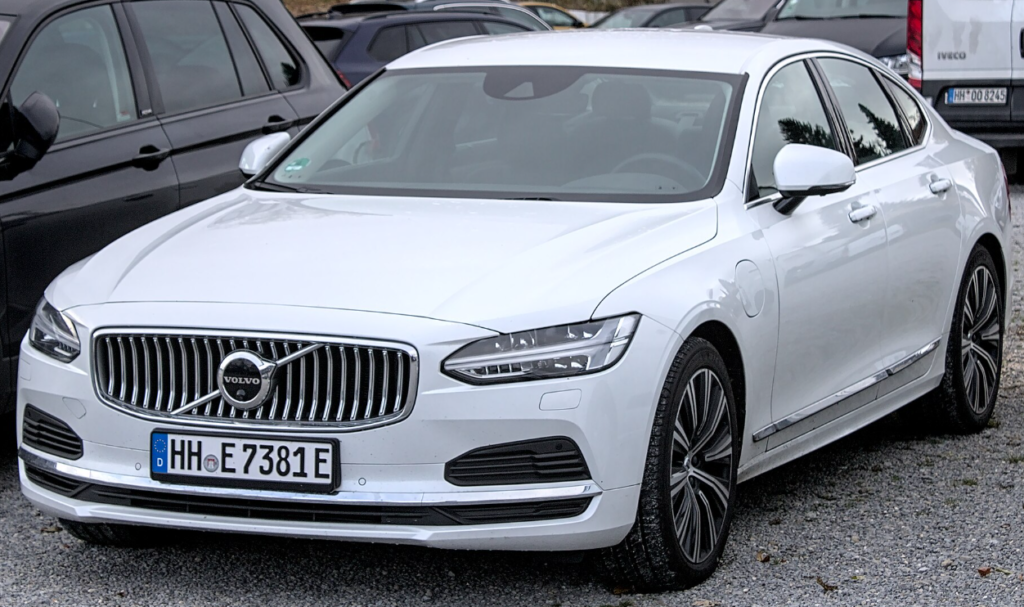
The Volvo S90 is a premium luxury sedan known for its elegant Scandinavian design, advanced technology, and high-quality sound systems. However, some owners experience a frustrating problem: the Volvo S90 has no sound, even when the infotainment display appears to be working normally.
You might start your vehicle, select your favorite radio station, and discover that absolutely nothing comes through the speakers. In other situations, Bluetooth music stops playing, navigation instructions become silent, or the entire sound system suddenly stops working.
Fortunately, a Volvo S90 audio problem does not always indicate expensive hardware damage. Many sound issues are associated with infotainment software glitches, incorrect audio settings, Bluetooth connectivity problems, or temporary electronic malfunctions.
In this comprehensive guide, we will explain why your Volvo S90 may have no sound, how to identify the cause, and which troubleshooting steps can help restore audio functionality.
We will also cover differences between older Volvo S90 models equipped with Sensus infotainment and newer versions using Google built-in technology.
Content in this publication
- Why Does My Volvo S90 Have No Sound?
- Volvo S90 No Sound: Common Problems and Solutions
- How to Fix Volvo S90 No Sound
- Volvo S90 Radio Has No Sound
- Volvo S90 No Sound From Speakers
- Volvo S90 No Sound From Turn Signals
- Volvo S90 Navigation Voice Not Working
- Volvo S90 Apple CarPlay No Sound
- Volvo S90 No Sound After Software Update
- Volvo S90 Audio Fuse Problems
- Can a Weak Battery Cause Volvo S90 Sound Problems?
- Volvo S90 Sound Stops Working Randomly
- Volvo S90 Sound Problems by Model Year
- How Much Does It Cost to Fix Volvo S90 Audio Problems?
- When Should You Visit a Volvo Service Center?
- How to Prevent Volvo S90 Audio Problems
- Volvo S90 No Sound Troubleshooting Checklist
- Frequently Asked Questions About Volvo S90 No Sound
- Conclusion: How to Fix Volvo S90 No Sound
Why Does My Volvo S90 Have No Sound?
Several electronic components work together to deliver sound through the Volvo S90 audio system. These include the infotainment computer, audio amplifier, speakers, wiring, multimedia applications, and Bluetooth connectivity modules.
When one of these components stops working correctly, the vehicle may experience partial or complete audio loss.
The most common possible causes include:
- Temporary infotainment software glitches.
- Muted or incorrectly adjusted volume settings.
- Bluetooth connection errors.
- Incorrect audio source selection.
- Audio amplifier malfunctions.
- Blown infotainment-related fuses.
- Software problems after an update.
- Low-voltage electrical issues.
- Damaged speakers or loose connections.
- Incorrect sound balance or speaker focus settings.
The most important troubleshooting step is determining whether the problem affects every audio function or only one particular source.
For example, if Bluetooth music produces no sound but the radio works normally, the problem is probably associated with the smartphone connection or audio routing.
However, if the radio, Bluetooth, navigation instructions, and other sounds disappear simultaneously, the problem may involve a central infotainment or audio component.
Volvo S90 No Sound: Common Problems and Solutions
Before attempting repairs, we recommend comparing your symptoms with the following troubleshooting table.
| Problem | Possible cause | Recommended solution |
|---|---|---|
| No sound from any speaker | Infotainment or amplifier issue | Restart the infotainment system |
| Radio works but is silent | Software or volume settings | Check volume and switch sources |
| Bluetooth connects without sound | Audio routing problem | Reconnect your smartphone |
| Navigation has no voice | Guidance volume muted | Adjust navigation volume |
| Only some speakers work | Balance setting or hardware fault | Inspect audio settings |
| Sound disappears randomly | Software or electrical problem | Restart and check software |
| No sound after an update | Software compatibility issue | Restart and verify update status |
| No indicator clicking sounds | Wider infotainment malfunction | Use the correct reset procedure |
Most owners should begin with basic audio checks before investigating the amplifier, wiring, or fuses.
How to Fix Volvo S90 No Sound
There are several troubleshooting methods we can try before visiting a Volvo service center.
1. Check the Volume and Mute Settings
Although this may seem obvious, incorrect volume settings are among the easiest issues to overlook.
The Volvo S90 can control different audio functions independently, including music, phone calls, navigation instructions, and notifications.
A muted audio source may create the impression that the entire sound system has failed.
Follow these steps:
- Start your Volvo S90 while safely parked.
- Open the radio or another audio source.
- Increase the volume using the available controls.
- Check whether the selected source is muted.
- Try the steering wheel volume buttons.
- Switch to another radio station or media source.
If the radio begins playing normally, the issue may have been caused by the volume settings.
However, if every audio function remains silent, continue with the next troubleshooting method.
2. Restart the Volvo S90 Infotainment System
One of the most useful ways to troubleshoot a Volvo S90 with no sound is restarting its infotainment system.
Modern vehicle infotainment platforms operate similarly to computers. Temporary software glitches can interrupt audio processing, Bluetooth connections, and application functionality.
The correct restart procedure depends on your Volvo S90 model year and infotainment platform.
Volvo S90 2022 and Newer: Google Built-In
Many Volvo S90 models from approximately 2022 onward use Google built-in infotainment, although equipment varies by market.
For compatible models, the center display can be restarted using the Home button.
Follow these instructions:
- Park the vehicle safely.
- Locate the Home button beneath the center touchscreen.
- Press and hold the button for approximately 20 seconds.
- Continue holding when the screen enters cleaning mode.
- Wait until the screen turns off and the Volvo logo appears.
- Release the button.
- Allow the infotainment system to restart.
- Test the audio system again.
This procedure restarts the infotainment interface without intentionally deleting personal settings.
If your Volvo S90 was experiencing a temporary software problem, audio functionality may return after the restart.
Volvo S90 2017–2021: Sensus Infotainment
Older Volvo S90 models generally use the Sensus infotainment system.
These vehicles do not use the same center-display restart procedure as Google built-in models.
For a temporary Sensus malfunction, try allowing the vehicle to complete its normal sleep cycle.
- Park your Volvo S90 safely.
- Switch off the vehicle.
- Exit the car.
- Close all doors and lock the vehicle.
- Leave it undisturbed for approximately 30 minutes.
- Unlock the vehicle and start it again.
- Check whether the audio has returned.
This procedure allows the electronic systems to enter their normal sleep state before restarting.
If the audio problem persists, further troubleshooting may be required.
3. Switch Between Different Audio Sources
If restarting the infotainment system does not restore sound, we recommend testing several audio sources.
Depending on the model year and equipment, the Volvo S90 may support:
- FM radio.
- Bluetooth audio streaming.
- Apple CarPlay.
- Android Auto on compatible configurations.
- Integrated music applications.
- Navigation voice instructions.
- Hands-free telephone calls.
Begin by selecting a radio station with a strong signal.
If the radio is silent, connect your smartphone and attempt to play music.
Then test another available audio function, such as navigation guidance.
If one source works while another does not, the problem is likely limited to a particular application, connection, or audio setting.
If every source remains silent, the problem may involve the infotainment system, amplifier, or another shared electronic component.
4. Fix Volvo S90 Bluetooth No Sound
Bluetooth connectivity problems can prevent music from playing even when the smartphone appears connected to the vehicle.
In some situations, the phone connects successfully for calls but fails to route music through the car speakers.
To troubleshoot Bluetooth audio:
- Open Bluetooth settings on your smartphone.
- Confirm that your Volvo S90 is connected.
- Verify that the vehicle is selected as the audio output.
- Increase the smartphone media volume.
- Start playing music.
- Select Bluetooth media on the infotainment display.
- Disconnect and reconnect the phone if necessary.
If the problem continues, remove the existing Bluetooth pairing.
How to Reconnect Bluetooth
A fresh connection can sometimes resolve compatibility and audio-routing problems.
Follow these steps:
- Remove the Volvo S90 from the smartphone's saved Bluetooth devices.
- Delete the smartphone from the vehicle's paired-device list.
- Restart your smartphone.
- Enable Bluetooth again.
- Begin the pairing process from the vehicle.
- Confirm the matching connection code.
- Accept the required permissions.
- Test music playback.
We also recommend connecting another smartphone.
If the second phone works normally, the issue may be associated with the original device's settings or software rather than the Volvo audio system.
5. Check the Volvo S90 Sound Settings
Incorrect speaker settings can sometimes make parts of the sound system appear defective.
Depending on the audio package, Volvo S90 models offer adjustments such as:
- Sound balance.
- Speaker focus.
- Equalizer settings.
- Surround sound.
- Navigation volume.
- Media volume.
- Phone call volume.
Some configurations allow audio to be focused toward particular seating positions.
For example, choosing a rear-focused setting may reduce or disable sound from certain front speakers.
If only some speakers appear silent, review these adjustments before assuming that the speakers require replacement.
Where available, restore the audio settings to their default configuration and test the system again.
Volvo S90 Radio Has No Sound
A particularly confusing problem occurs when the radio display operates normally but no sound comes through the speakers.
The screen may show the radio station, frequency, and other information while remaining completely silent.
Possible explanations include a muted radio source, temporary software malfunction, audio output problem, or amplifier-related fault.
How to Fix Volvo S90 Radio No Sound
First, change the radio station and increase the volume gradually.
Next, switch to another audio source, such as Bluetooth music.
If Bluetooth works correctly but the radio remains silent, the issue may involve the radio software or source settings.
However, if both radio and Bluetooth are silent, the problem may affect the wider audio system.
Restarting the infotainment platform is an appropriate next step.
If the problem remains unresolved, consider having the vehicle professionally diagnosed.
Volvo S90 No Sound From Speakers
When no sound comes from any of the speakers, it is important to determine whether the issue is software-related or caused by a physical component.
Depending on the equipment package, the Volvo S90 can feature premium sound systems, including Harman Kardon and Bowers & Wilkins audio configurations.
These systems use electronic components to process and reproduce sound.
A malfunction affecting an amplifier, power supply, audio signal, or communication network can potentially interrupt playback.
Could the Volvo S90 Amplifier Be Faulty?
Yes. A defective amplifier is one possible explanation for complete audio loss.
The audio amplifier is responsible for powering speakers using the processed audio signal.
Potential symptoms of amplifier-related problems include:
- No sound from several audio sources.
- Audio stopping unexpectedly.
- Intermittent speaker output.
- Distorted sound before complete failure.
- Persistent audio loss despite infotainment restarts.
However, these symptoms do not confirm that the amplifier itself is defective.
Software malfunctions, wiring problems, power interruptions, and electronic communication errors can cause similar behavior.
Replacing the amplifier without a proper diagnosis could result in unnecessary expenses.
What If Only One Speaker Stops Working?
When most speakers work normally but one remains silent, a localized problem becomes more likely.
Possible causes include:
- A damaged speaker.
- Loose electrical connections.
- Damaged speaker wiring.
- Incorrect balance settings.
- An amplifier channel problem.
We recommend checking the speaker focus and balance settings first.
If possible, play music while testing individual speaker positions.
If one speaker consistently fails while the others operate normally, a technician may need to inspect the speaker and its associated wiring.
Volvo S90 No Sound From Turn Signals
Some Volvo S90 owners may experience missing indicator clicking sounds alongside radio or infotainment audio problems.
This is particularly important because it suggests that more than one sound-generating function may be affected.
If the radio, parking assistance sounds, and turn signal clicks disappear simultaneously, the issue may involve the broader infotainment or electronic audio system.
How to Troubleshoot Missing Indicator Sounds
Begin by checking whether the visual turn signal indicators are functioning correctly.
Next, test the radio and another audio source.
If several audio functions are missing, use the correct infotainment restart procedure for your model.
For older Sensus vehicles, a complete sleep cycle may help resolve temporary infotainment issues.
For compatible Google built-in models, restart the center display using the Home button.
If the problem persists, arrange a professional inspection.
Important: If the vehicle's actual turn signal indicators, safety warnings, or other essential systems are malfunctioning, do not assume the issue is limited to sound. Have the vehicle inspected before driving.
Another problem occurs when music works normally but navigation instructions cannot be heard.
This is often caused by navigation audio settings rather than a complete sound-system failure.
Many navigation applications provide independent settings for spoken directions.
Try the following steps:
- Start a navigation route while safely parked.
- Open the navigation sound settings.
- Verify that spoken guidance is enabled.
- Increase the navigation volume.
- Check whether the guidance is muted.
- Test another navigation instruction.
If using smartphone navigation, make sure the app is sending audio through the intended output.
In some cases, navigation instructions may play through the phone rather than the vehicle's speakers.
If music and radio function normally, the problem is less likely to involve all speakers or the main amplifier.
Volvo S90 Apple CarPlay No Sound
Apple CarPlay provides access to compatible iPhone applications through the Volvo infotainment system.
However, connection errors and audio-routing problems can occasionally interrupt playback.
Common symptoms include:
- Apple CarPlay connects but music does not play.
- Navigation instructions are silent.
- Phone calls work but music does not.
- Audio disappears when switching between applications.
How to Fix CarPlay Audio
First, disconnect the iPhone and check whether the vehicle's built-in radio works.
If the radio plays normally, the problem may involve the CarPlay connection.
Reconnect the iPhone and verify that the correct audio application is selected.
For vehicles using wired CarPlay, inspect the USB cable and confirm that the phone is connected to the appropriate data-capable port.
We also recommend restarting the iPhone and checking for available operating system updates.
If necessary, remove the Volvo from the iPhone's CarPlay settings and set up the connection again.
Remember that CarPlay availability and supported connection methods depend on the model year and market.
Volvo S90 No Sound After Software Update
Software updates are designed to improve functionality, performance, and system stability.
Nevertheless, audio problems can sometimes appear around the same time as an update.
Possible symptoms include:
- Music applications displaying normally without sound.
- Bluetooth audio no longer working.
- Navigation voice instructions disappearing.
- The infotainment system behaving unexpectedly.
The timing may suggest a software-related issue, although it does not prove the update itself caused the fault.
What Should We Do After an Update?
Begin by restarting the infotainment system using the appropriate method.
Next, check whether the update installation completed successfully.
Reconnect your smartphone if necessary and test multiple audio sources.
On compatible Google built-in models, software information can be accessed through the infotainment settings.
Menu names can vary by software version, but available update information is generally found under the system settings.
If the problem began immediately after an update and remains unresolved, contact a Volvo service center.
Explain when the problem appeared and provide the installed software version if possible.
Avoid installing unofficial vehicle software or attempting unsupported firmware modifications.
Volvo S90 Audio Fuse Problems
A blown electrical fuse can potentially interrupt power to infotainment or audio-related components.
However, not every sound problem is caused by a fuse.
The Volvo S90 uses multiple fuse panels, and their locations and assignments can vary by model year and equipment.
How to Check the Audio Fuse
If you suspect a fuse problem:
- Switch off the vehicle safely.
- Consult the owner's manual for your exact model year.
- Locate the appropriate fuse diagram.
- Identify the fuse associated with the relevant equipment.
- Follow the manufacturer's inspection instructions.
- Replace a fuse only when permitted, using the specified type and rating.
Never replace a fuse with one rated for higher amperage.
Doing so can create electrical hazards and potentially damage wiring or electronic modules.
If a replacement fuse blows again, the underlying electrical problem should be professionally diagnosed.
Can a Weak Battery Cause Volvo S90 Sound Problems?
A weak 12-volt electrical supply can contribute to unusual behavior in electronically complex vehicles.
The Volvo S90 relies on stable electrical power to operate numerous control modules, displays, and communication systems.
If the electrical supply becomes unstable, different electronic functions may behave unexpectedly.
Possible accompanying symptoms include:
- Multiple electronic warning messages.
- Inconsistent infotainment startup.
- Unexpected system restarts.
- Intermittent electronic malfunctions.
- Problems affecting several systems simultaneously.
However, a silent audio system alone does not establish that the battery is defective.
If the vehicle experiences several electrical symptoms, we recommend having its battery and charging systems tested.
Electrified Volvo S90 versions may have additional battery systems and specialized electrical components.
Owners should avoid disconnecting batteries or handling hybrid electrical equipment without following the appropriate manufacturer procedures.
Volvo S90 Sound Stops Working Randomly
Intermittent audio failure can be especially frustrating because the problem may disappear before a technician examines the vehicle.
Your Volvo S90 may play music normally in the morning but remain silent during the next journey.
Possible causes include temporary infotainment software errors, electrical communication problems, power supply issues, or intermittent hardware faults.
Why Does the Sound Return After Restarting?
If audio returns after restarting the infotainment system or allowing the vehicle to sleep, the electronic system may have recovered from a temporary malfunction.
However, this does not necessarily mean the underlying problem has been permanently repaired.
If sound failures occur repeatedly, we recommend keeping a record of the symptoms.
Useful information includes:
- When the problem occurs.
- Which audio sources stop working.
- Whether turn signal or navigation sounds are also affected.
- Whether restarting restores audio.
- Any warning messages.
- Whether the problem occurs after a software update.
Providing this information can help a technician identify an intermittent malfunction.
Volvo S90 Sound Problems by Model Year
The Volvo S90 has used different infotainment platforms throughout its production history.
Understanding which system is installed in your vehicle is essential because troubleshooting procedures are not always interchangeable.
| Model years | Typical infotainment system | Recommended first approach |
|---|---|---|
| 2017–2019 | Sensus | Check settings and complete a sleep cycle |
| 2020–2021 | Sensus in most markets | Test audio sources and Bluetooth |
| 2022–2023 | Google built-in in applicable markets | Restart the center display |
| 2024–2025 | Google built-in in applicable markets | Restart and verify software |
| 2026 and newer | Market-dependent newer systems | Follow model-specific instructions |
Infotainment equipment and transition dates can vary between countries.
Volvo S90 2017–2021 Audio Problems
Older Volvo S90 models generally use the Sensus platform.
Common troubleshooting steps include checking sound settings, testing the available audio sources, reconnecting smartphones, and allowing the vehicle to complete its sleep cycle.
If the problem persists across every source, professional diagnostics may be necessary.
Volvo S90 2022–2026 Audio Problems
Many newer Volvo S90 vehicles use Google built-in infotainment.
These models support a different center-display restart procedure and, in compatible configurations, software updates delivered over the air.
If the audio suddenly disappears, restarting the center display may help resolve a temporary issue.
However, persistent silence should not automatically be treated as a software problem.
Amplifiers, wiring, speakers, and electrical components can also require inspection.
How Much Does It Cost to Fix Volvo S90 Audio Problems?
The cost of repairing a Volvo S90 sound system depends on the exact cause.
Some problems require only basic troubleshooting, while others involve expensive electronic components.
| Repair or solution | General cost level |
|---|---|
| Adjust volume settings | Free |
| Restart infotainment | Free |
| Reconnect Bluetooth | Free |
| Install an available OTA update | Usually no separate installation charge |
| Electrical diagnosis | Low to moderate |
| Replace an authorized fuse | Low |
| Repair damaged speaker wiring | Variable |
| Replace a speaker | Moderate to high |
| Replace an amplifier | Potentially high |
| Replace an infotainment module | Potentially very high |
These categories are general indications rather than fixed repair prices.
The final cost depends on the vehicle's equipment, local labor rates, replacement parts, and warranty status.
We recommend obtaining a confirmed diagnosis before authorizing expensive audio-system repairs.
When Should You Visit a Volvo Service Center?
Not every audio malfunction requires professional assistance.
However, certain symptoms indicate that a more detailed inspection would be appropriate.
Consider visiting a qualified Volvo technician when:
- No sound returns after the correct infotainment restart.
- Every available audio source remains silent.
- Audio failures occur frequently.
- Electrical warning messages appear.
- A fuse repeatedly blows.
- Speakers produce continuous distortion.
- Sound problems began after water intrusion.
- Safety-related sounds or indicators malfunction.
- Audio hardware is suspected to be defective.
A technician can inspect electronic modules, diagnostic trouble codes, electrical connections, and sound-system components.
This is particularly important when the fault is intermittent or affects several vehicle systems.
How to Prevent Volvo S90 Audio Problems
Although not every electronic malfunction can be prevented, some maintenance habits may reduce avoidable issues.
Keep Your Software Updated
Install compatible official infotainment updates when available.
These may improve system stability, application compatibility, and overall performance.
Maintain Reliable Smartphone Connections
Keep your phone's operating system updated.
If you frequently experience connectivity issues, remove outdated Bluetooth pairings and reconnect devices when necessary.
Use Suitable USB Cables
For wired smartphone integration, use reliable cables compatible with your device and vehicle.
Damaged cables can interrupt communication.
Avoid Unapproved Electrical Modifications
Poorly installed aftermarket electronics can create electrical and audio problems.
If upgrading the sound system, choose a specialist familiar with the Volvo S90's electrical architecture.
Address Electrical Problems Promptly
If the vehicle begins showing several electronic malfunctions simultaneously, arrange an inspection instead of assuming they are unrelated.
Follow Model-Specific Restart Instructions
Always identify whether your Volvo uses Sensus or Google built-in infotainment before attempting a restart.
Avoid unnecessary factory resets, battery disconnections, or unsupported software procedures.
Volvo S90 No Sound Troubleshooting Checklist
Before paying for a repair, complete the following checks:
- Check the audio volume and mute settings.
- Test at least two different radio stations.
- Try Bluetooth or another media source.
- Check navigation and phone call audio.
- Review sound balance and speaker focus.
- Restart the infotainment system using the correct procedure.
- Reconnect the smartphone.
- Check for available official software updates.
- Inspect relevant fuses according to the owner's manual.
- Arrange professional diagnosis if the problem remains unresolved.
Following this sequence can help narrow down the possible causes and avoid replacing expensive components unnecessarily.
Frequently Asked Questions About Volvo S90 No Sound
1. Why Is My Volvo S90 Radio Working but There Is No Sound?
If the radio display operates normally but the speakers remain silent, possible causes include incorrect volume settings, infotainment software problems, audio routing errors, or an amplifier-related fault.
We recommend increasing the volume, changing the radio station, and testing another media source.
If every audio function is silent, restart the infotainment system using the procedure appropriate for your Volvo S90.
2. How Do I Reset My Volvo S90 Sound System?
For compatible Volvo S90 models equipped with Google built-in, press and hold the Home button beneath the center touchscreen for approximately 20 seconds until the display restarts and the Volvo logo appears.
For older Sensus models, switch off the vehicle, lock it, and leave it undisturbed for approximately 30 minutes before restarting.
These procedures are intended to refresh the infotainment system, not perform a complete factory reset.
3. Why Does My Volvo S90 Bluetooth Connect but Have No Sound?
The smartphone may be connected without routing media audio correctly.
Verify that the vehicle is selected as the audio output, Bluetooth media is active, and music playback is not paused or muted.
If the problem persists, remove the pairing from both devices and reconnect them.
Testing another smartphone can help identify whether the issue is caused by the phone or the vehicle.
4. Can a Blown Fuse Cause No Sound in a Volvo S90?
Yes. A blown fuse affecting an infotainment or audio-related component may interrupt sound-system operation.
However, fuse assignments differ depending on the model year and equipment.
Consult the correct owner's manual before inspecting or replacing any fuse.
If a fuse repeatedly fails, professional electrical diagnosis is recommended.
5. Why Does My Volvo S90 Sound System Stop Working Randomly?
Intermittent audio loss may result from software instability, electrical communication errors, power supply problems, or hardware faults.
If audio returns after restarting the vehicle's infotainment system, a temporary electronic malfunction is possible.
However, repeated failures should be investigated, particularly if radio, Bluetooth, navigation instructions, and indicator sounds disappear simultaneously.
Conclusion: How to Fix Volvo S90 No Sound
Experiencing a Volvo S90 no sound problem can be frustrating, especially when the infotainment screen appears normal and the speakers remain completely silent.
Fortunately, many audio problems can be investigated without immediately replacing expensive components.
We recommend starting with the simplest solutions: check the volume, verify the audio settings, test different sources, and reconnect your smartphone.
If these steps do not work, restart the infotainment system using the correct procedure for your vehicle.
For compatible newer Volvo S90 models with Google built-in, the Home button can be used to restart the center display. Older Sensus vehicles may benefit from completing a normal sleep cycle.
If the sound system continues malfunctioning, further inspection of the amplifier, fuses, wiring, software, and electrical system may be necessary.
The key is to determine whether the problem affects one audio source or the entire sound system.
By following a systematic troubleshooting approach, we can identify likely causes, reduce unnecessary repair expenses, and restore the comfortable driving experience expected from the Volvo S90.
If you want to know other articles similar to Volvo S90 No Sound: Causes, Fixes and Solutions you can visit the category Common Problems.
Volvo S90 Common Problems: Reliability & Repair Guide

Nissan Rogue Smells Like Gas: Causes and Fixes
Vauxhall Agila Problems: Common Faults & Fixes

Kia Sorento Jerking When Accelerating: Causes & Fixes

Jaguar F-Pace Low Battery: Causes, Warning Signs, and How to Fix It
Haval Jolion Problems: Common Issues, Reliability and What Owners Should Know
Leave a Reply
More content of your interest