

What Honda Civic Do I Have? The Complete Guide to Identifying Your Honda Civic Model

Content in this publication
- Understanding Why Identifying Your Honda Civic Matters
- How Honda Structures the Civic Lineup
- Start With the Most Reliable Clue: Your VIN Number
- Check the Registration and Insurance Documents
- Look for Trim Badges on the Car Exterior
- Use Interior Features to Identify Your Honda Civic
- Identify Your Honda Civic Generation (One of the Most Important Steps)
- Honda Civic Generations and Their Visual Signatures
- Match Your Civic by Body Style
- Check Under the Bonnet: Engine Identification
- Compare Your Features to Trim Levels
- Identify Your Civic Using the Infotainment System
- Check Your Wheel Design
- Use the Vehicle Logbook or Owner’s Manual
- Search Free VIN Decoder Websites
- Ask a Honda Dealer
- Common Scenarios and Solutions
- Quick Step-by-Step Guide to Identify Your Honda Civic
- Final Thoughts: Knowing Your Civic Empowers You
- FAQs
Understanding Why Identifying Your Honda Civic Matters
We’ve all been there — standing in front of our Honda Civic, scratching our heads, wondering, “What exact version do I own?” It sounds simple, but identifying your Civic can feel a bit like trying to remember someone’s name right after they’ve said it. Annoying, slightly embarrassing, and unexpectedly complicated.
Yet, knowing your Civic’s model, trim, engine, and generation is vital. It shapes how we maintain it, order parts for it, insure it, and even how we talk about it. Whether you’re buying, selling, fixing, or simply curious, this guide will help you pinpoint exactly what Honda Civic you have — without the guesswork, confusion, or internet rabbit holes.
How Honda Structures the Civic Lineup
Before diving into the detective work, let’s break down how Honda organizes the Civic family. Civics are grouped in:
- Generations (e.g., 8th gen, 10th gen)
- Body styles (hatchback, sedan, coupe — depending on market/year)
- Trims (LX, EX, Sport, EX-L, Touring, Type R, etc.)
- Engine options (1.4 i-DSI, 1.5 VTEC Turbo, 2.0 i-VTEC, etc.)
Understanding these categories sets the foundation for identifying which one lives in your driveway.
Start With the Most Reliable Clue: Your VIN Number
The Vehicle Identification Number (VIN) is like your Civic’s DNA code. It is unique, precise, and tells you nearly everything about the car.
Where to Find Your VIN
Look in these spots:
- At the base of the windshield on the driver’s side
- On the driver-side door jamb
- On your insurance card
- On your registration document
- In the engine bay on stamped metal plates
How to Decode Your VIN
The VIN is a 17-character code. Here’s what matters most:
The 10th character: Model Year
Examples:
- A = 2010
- F = 2015
- M = 2021
The 4th–8th characters: Model, trim, engine
Honda encodes the body type (sedan/hatchback/coupe), engine displacement, and drivetrain inside these characters.
When we combine these, we get a very accurate picture of your exact Civic.
Check the Registration and Insurance Documents
If decoding the VIN feels like cracking the Da Vinci code, paperwork simplifies things.
Your registration usually includes:
- Year of the vehicle
- Body type
- Engine displacement
- Series/model (e.g., “Civic EX,” “Civic Sport,” “Civic 2.0 i-VTEC”)
Insurance documents often list the engine and trim more clearly than government registration.
Look for Trim Badges on the Car Exterior
Most Honda Civics proudly wear a badge on the rear:
- “LX”
- “EX”
- “Sport”
- “Touring”
- “RS”
- “Type R”
If yours is debadged, damaged, or someone removed it intentionally, don’t worry — we can still identify it by the interior and features.
Use Interior Features to Identify Your Honda Civic
Your cabin is one of the easiest places to detect what Civic you have.
Common Clues
- Push-button start → Higher trims
- Digital display size → Trim-specific
- Seat materials → Cloth (LX) / leather (EX-L)
- Sunroof → EX and above
- Dual-zone climate control → Touring or high trims
- Paddle shifters → Sport trims
This method is surprisingly accurate since Honda assigns features consistently across trims.
Identify Your Honda Civic Generation (One of the Most Important Steps)
One of the simplest ways to determine your Civic is by identifying its generation, because trims and engines vary depending on the generation.
You may be interested in reading Which Honda Civic Comes With Leather Seats? The Definitive Guide to Every Trim, Every Year, and Every Interior Option
Below is a breakdown so you can match your Civic visually and functionally.
Honda Civic Generations and Their Visual Signatures
10th Generation (2016–2021)
- Wide, aggressive front end
- C-shaped taillights
- Fastback roofline
- 1.0 and 1.5 VTEC Turbo engines common
- Digital instrument cluster
11th Generation (2022–Present)
- Cleaner, more mature styling
- Straight LED taillights
- Horizontal dashboard vents
- Larger touchscreen
- Less aggressive than the 10th gen, more refined
9th Generation (2012–2015)
- Softer design
- Split-level dashboard
- Broad taillights
- Not as sharp as the 8th or 10th
8th Generation (2006–2011) — The Iconic “UFO” (UK/Europe Hatch)
- Futuristic dashboard
- Split windscreen
- Triangular tailpipes (Type S/Type R)
- Unique “spaceship” vibe
7th Generation (2001–2005)
- Boxy shape
- Tall roofline
- Flat dashboard
- More upright stance
Match Your Civic by Body Style
Sedan
- Four doors
- Longer body
- Smooth roofline
Hatchback
- Shorter rear
- More vertical tailgate
- Popular in UK/EU markets
Coupe (mainly North America)
- Two doors
- Sportier silhouette
Body style alone narrows the search dramatically since some trims were sedan-only or hatch-only.
Check Under the Bonnet: Engine Identification
The engine code tells another large part of the story.
Common Engine Codes (Examples)
- R18A → 1.8 i-VTEC (8th/9th gen)
- L15B → 1.5 VTEC Turbo (10th/11th gen)
- K20Z4 → Type R (FN2)
- K20C1 → Type R (FK2/FK8)
You can usually find the engine code:
- Printed on a sticker
- Stamped on the engine block
- Listed in the owner’s manual
Compare Your Features to Trim Levels
Once you know the body style, engine, and generation, matching your trim becomes easier.
Common Trim-Level Characteristics
| Trim | Key Features |
|---|---|
| LX | Entry level, cloth seats, basic audio |
| EX | Sunroof, alloy wheels, upgraded screen |
| Sport | Sporty wheels, stiffer suspension, body kit |
| EX-L | Leather seats, premium interior |
| Touring | Full LED lights, largest screen, all tech |
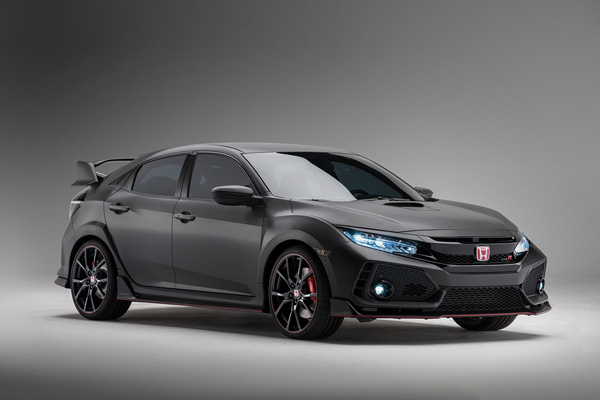
| Type R | Performance-focused, most aggressive styling |
Identify Your Civic Using the Infotainment System
Honda updates its screens, buttons, layouts, and menus with each generation.
Clues from the infotainment system
- 7” touchscreen with Android Auto → Mainly 10th gen
- All-digital driver display → 11th gen
- Red-themed graphics → Type R
- Split digital/analog dash → 8th/9th gen
Check Your Wheel Design
Honda’s wheel designs are surprisingly useful for identification.
Examples
- Black 18-inch alloys → Sport trims
- Silver 16-inch wheels → LX
- Two-tone machined alloys → EX-L or Touring
- Red accents → Type R
Match your wheels against online model-year brochures for near-perfect accuracy.
Use the Vehicle Logbook or Owner’s Manual
These documents usually contain:
- Trim level
- Engine size
- Fuel type
- Body variant
If the original owner didn’t lose them, you’re golden.
Search Free VIN Decoder Websites
Many sites reveal:
- Trim
- Engine
- Manufacturing plant
- Market (EU/UK/US)
They’re not always perfect but great for confirmation.
Ask a Honda Dealer
If everything fails, a Honda service department can tell you your exact:
- Model
- Trim
- Engine
- Build specification
- Market configuration
They decode the VIN using Honda’s internal database.
Common Scenarios and Solutions
“My Civic Doesn’t Have Exterior Badges”
Check:
- Infotainment system
- Seat material
- Dashboard layout
“I Bought It Used With No Paperwork”
Use:
- VIN
- Body style
- Generation design cues
- Interior features
“I Think My Civic Has Been Modified”
Compare:
You may be interested in readingWhich Honda Civic Comes With Leather Seats? The Definitive Guide to Every Trim, Every Year, and Every Interior OptionYou may be interested in reading
 What Honda Civic Comes With a Turbo? The Complete Guide to Every Turbocharged Civic Model
- Wheels
- Seats
- Spoilers
- Exhaust tips
Aftermarket parts can disguise the original trim.
Quick Step-by-Step Guide to Identify Your Honda Civic
Here’s the simplest method to figure it out quickly:
Step 1 — Find the VIN
Look at the windshield or door jamb.
Step 2 — Determine the Model Year
Decode the 10th VIN character.
Step 3 — Identify the Generation
Match your model visually to the gen list above.
Step 4 — Check the Body Style
Sedan, hatchback, or coupe.
Step 5 — Check Interior and Exterior Features
Match features to trims.
Step 6 — Confirm With Engine Code
Look at the engine bay or manual.
Step 7 — Cross-Check With Documentation
Registration, insurance, manuals.
Once you follow these steps, you’ll know precisely which Honda Civic you have.
Final Thoughts: Knowing Your Civic Empowers You
At the end of the day, identifying your Honda Civic isn’t just about satisfying curiosity — it’s about giving yourself practical control. From buying parts without headaches, to understanding the car’s capabilities, to appreciating its place in Honda’s legacy, knowing your Civic makes you a smarter, more confident owner.
It’s like finally putting a name to a familiar face — suddenly everything makes sense.
FAQs
1. How do I quickly identify my Honda Civic model?
Use your VIN — it reveals the year, body type, engine, and trim.
2. What generation is my Honda Civic?
Match your car visually to the generation breakdown in this guide.
3. Can the registration tell me my Civic trim?
Sometimes — it often lists engine and body type, but not always the trim.
4. How do I know if I have a Type R?
Look for large spoiler, red interior accents, and a K-series turbo engine.
5. What if my Civic has been modified?
Check the VIN and interior features — modifications rarely alter the underlying trim identity.
You may be interested in readingWhich Honda Civic Comes With Leather Seats? The Definitive Guide to Every Trim, Every Year, and Every Interior OptionYou may be interested in reading
What Honda Civic Comes With a Turbo? The Complete Guide to Every Turbocharged Civic ModelYou may be interested in reading
 Which Honda Civic Models Have VTEC? The Complete, Definitive Guide
If you want to know other articles similar to What Honda Civic Do I Have? The Complete Guide to Identifying Your Honda Civic Model you can visit the category Blog.
Volvo S90 Reliability: Problems, Costs & Best Years
Is Haval Jolion a Good Car? Honest Review, Reliability, Pros and Cons
How to Start Haval Jolion With Spare Key: Complete Guide
How to Calculate Per Diem on an Auto Loan

How to Calculate the Residual Value of a Car
Is the Honda Passport Selling Well? Sales Numbers Tell the Story
Leave a Reply
More content of your interest