

How to Open a Mazda Key Fob and Replace the Battery (Step-By-Step Expert Guide)

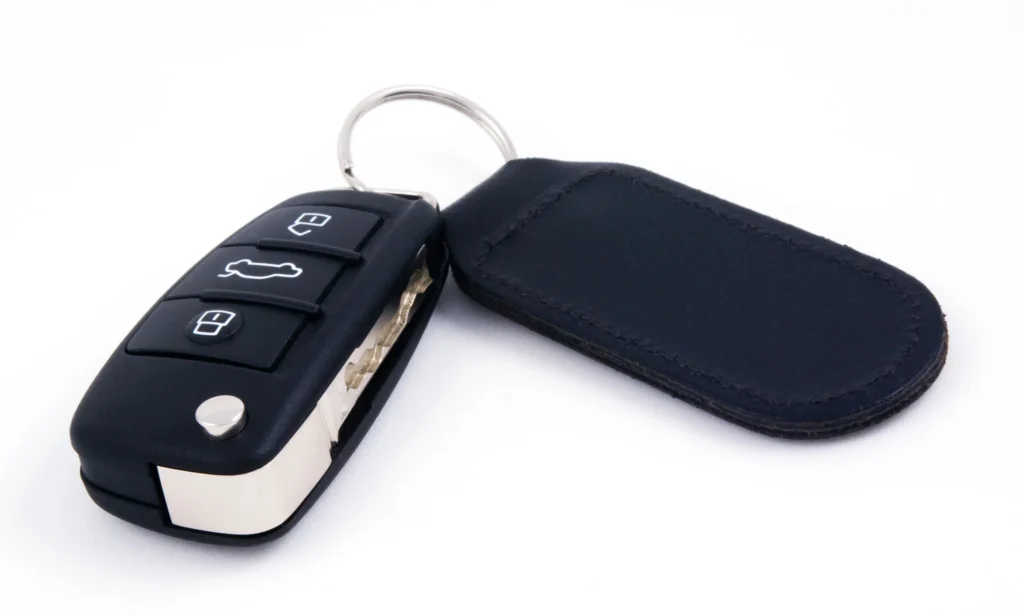
Opening a Mazda key fob and replacing its battery should never feel like a mystery. We’ve created the ultimate, highly detailed guide to help you confidently access, open, and service your Mazda key fob—whether you drive a Mazda 3, Mazda CX-5, Mazda CX-30, Mazda 6, Mazda CX-9, or any other modern Mazda model. We walk you through every stage with clarity, precision, and expert-level detail so you can restore full keyless entry functionality in minutes.
Content in this publication
- Understanding Mazda Key Fob Construction
- Mazda Key Fob Battery Types (CR2025 vs CR2032)
- Tools Required for Opening a Mazda Key Fob
- Identifying Your Mazda Key Fob Model
- Step-By-Step Guide: How to Open Mazda Key Fob
- Replacing the Mazda Key Fob Battery
- 8. Test the Key Fob
- Mazda Key Fob Troubleshooting Guide
- When a Mazda Key Fob Won’t Open or Is Stuck
- Mazda Push-Button Start Not Working After Battery Replacement
- How Long Mazda Key Fob Batteries Last
- Why Proper Mazda Key Fob Maintenance Matters
- Signs Your Mazda Key Fob Battery Is Dying
- How to Store a Mazda Key Fob Correctly
- Professional Mazda Key Fob Battery Replacement
- Conclusion
- FAQs
Understanding Mazda Key Fob Construction
Mazda key fobs are built with compact housings, precise seams, and internal circuitry that depend on correct handling. Before opening the fob, we ensure we understand its basic architecture:
- A removable auxiliary (emergency) key
- A tightly sealed outer plastic shell
- A lithium coin-cell battery compartment
- A stabilised circuit board with antenna and contact pads
- Shock-resistant internal supports
Because Mazda uses similar engineering across most models, the replacement steps remain consistent, even when fob designs vary slightly by generation.
Mazda Key Fob Battery Types (CR2025 vs CR2032)
Most Mazda key fobs use:
- CR2025
- CR2032
Both are 3-volt lithium coin-cell batteries, but the CR2032 is slightly thicker and has a higher capacity. Mazda selects the appropriate type depending on the fob’s internal clearance and circuitry.
To prevent issues such as failed lock/unlock signals or intermittent push-button start behaviour, we always match the exact battery that was originally installed.
Tools Required for Opening a Mazda Key Fob
To ensure a damage-free process, we gather:
- Flathead screwdriver (small or precision size)
- Protective tape (optional) to shield the casing from marks
- CR2025 or CR2032 battery, depending on your specific Mazda model
- Clean cloth to protect internal components from dust or fingerprints
Identifying Your Mazda Key Fob Model
Mazda uses several fob styles:
- Smart Key (newer models) – slim, rectangular, push-button start compatible
- Flip-style key fob (older models) – mechanical flip-out key with internal battery
- Basic fob (entry-level models) – simpler design, often using CR2025
To ensure correct replacement steps, confirming your fob type is essential. Model-year variations also influence how the case opens.
Step-By-Step Guide: How to Open Mazda Key Fob
Below is the full procedure, designed to prevent damage and ensure proper reassembly.
1. Remove the Auxiliary Key
Every modern Mazda key fob includes a built-in mechanical key.
Process:
- Turn the fob over.
- Locate the small release button on the back.
- Press firmly and slide out the metal auxiliary key.
Removing this component exposes the internal release area and prevents accidental obstruction during disassembly.
2. Locate the Seam and Opening Slot
Mazda fob casings contain an engineered separation line along the edges where two halves meet. A small indentation—typically near the auxiliary key channel—provides a leverage point.
We carefully inspect this seam to identify the best insertion area for the tool.
3. Insert a Flathead Screwdriver
If protecting the casing:
- Wrap the screwdriver tip with electrical tape.
Then:
- Insert the tip into the small notch.
- Hold the fob securely with your other hand.
- Apply gentle twisting pressure.
The goal is to create an initial gap without forcing or bending the plastic.
4. Pry the Key Fob Open
Once the first section lifts, we gradually work around the perimeter:
You may be interested in reading Mazda 3 Dashboard Warning Lights Guide (2001–2024): Complete Meanings, Causes & Fixes
- Move slowly along the seam
- Avoid applying excessive force
- Keep pressure even to prevent cracking the casing
The case separates into two clean halves, revealing the circuit board and battery.
Replacing the Mazda Key Fob Battery
With the shell open, the battery compartment becomes visible. We replace the battery with a steady hand and precise alignment.
5. Remove the Old Battery
We carefully:
- Lift the old CR2025 or CR2032 battery using a fingertip or non-metallic tool
- Avoid touching the circuit board
- Avoid bending or distorting contact tabs
Noting the original orientation is crucial—Mazda fobs require the positive (+) side facing up.
6. Install the New Battery
We align the new battery:
- Slide it gently under the retaining tabs
- Ensure the battery sits flush
- Confirm firm contact with both terminals
A poorly seated battery can lead to weak signal output or non-responsive push-button start.
7. Reassemble the Key Fob
We align the two casing halves precisely, then press firmly until every edge snaps together evenly.
A proper seal:
- Prevents moisture infiltration
- Protects circuitry from dust
- Ensures the structural integrity of the fob
We also reinsert the auxiliary key to restore the fob's full functionality.
8. Test the Key Fob
Before concluding the process, we verify:
- Lock/unlock response time
- Boot/trunk release function
- Push-button start detection
- Smart proximity sensing (if your Mazda supports it)
If the fob does not respond, the following should be checked:
- Battery polarity
- Contact alignment
- Case closure
- Internal component seating
Mazda Key Fob Troubleshooting Guide
If issues occur after installing a new battery, we examine the following:
Dirty or obstructed contacts
Dust or oxidation can block electrical flow.
Dislodged internal components
An incorrectly aligned circuit board can interrupt signal output.
Damaged battery tabs
Bent connectors can prevent voltage transmission.
Incorrect battery type
CR2025 vs CR2032 mismatches can cause fitment or performance problems.
Signal interference
Nearby electronics may affect wireless communication.
Correcting these issues typically restores full functionality.
When a Mazda Key Fob Won’t Open or Is Stuck
Occasionally, a stubborn seam or worn latch may resist opening.
You may be interested in readingMazda 3 Dashboard Warning Lights Guide (2001–2024): Complete Meanings, Causes & FixesYou may be interested in reading
 Mazda 3 Battery Replacement: The Complete Expert Guide for Smooth, Reliable Starts
We ensure:
- We apply only controlled leverage
- We avoid prying near the circuit board
- We work around the perimeter instead of one fixed point
This prevents structural cracks or broken clips.
If the car does not detect the key:
- Hold the fob directly against the push-button start
- Press the brake/clutch and attempt ignition
- If successful, the battery or internal antenna may not be seated properly
Mazda includes an emergency proximity coil, allowing the car to detect a low-power fob.
How Long Mazda Key Fob Batteries Last
Typical lifespan:
- 1–3 years depending on use
- Shorter if the fob is stored near electronics such as phones or wireless routers
- Faster drain in cold climates
Replacing the battery early prevents lockout situations or failed start attempts.
Why Proper Mazda Key Fob Maintenance Matters
Neglecting a low battery can lead to:
- Lock/unlock delays
- Complete fob failure
- Immobiliser activation
- Inability to start the engine
- Loss of proximity features
A quick, preventative battery replacement ensures consistent reliability.
Signs Your Mazda Key Fob Battery Is Dying
We watch for:
- Reduced range
- Requiring multiple button presses
- Intermittent unlock commands
- Dashboard warnings such as “Key Battery Low”
- Slow response from push-button start
Early recognition prevents emergency lockout scenarios.
How to Store a Mazda Key Fob Correctly
Best practices:
- Keep away from moisture
- Avoid extreme heat or cold
- Store away from magnets or electronics
- Do not submerge or drop
- Use protective cases to minimise impact damage
Proper storage dramatically increases both battery and fob lifespan.
Professional Mazda Key Fob Battery Replacement
Even though this process is straightforward, some owners prefer dealership service for:
- Guaranteed Mazda-approved parts
- Diagnostic checks
- Firmware updates
- Keyless entry calibration
A professional inspection ensures optimal performance.
Conclusion
Maintaining and replacing your Mazda key fob battery ensures flawless keyless entry, reliable communication with your vehicle, and consistent push-button start operation. By following this detailed guide—covering opening the fob, replacing the CR2025 or CR2032 battery, reassembling the case, and testing the functions—you can keep your Mazda performing at its best with minimal downtime.
FAQs
1. What battery does a Mazda key fob use?
Most Mazda key fobs use either a CR2025 or CR2032 lithium coin battery, depending on model and year.
2. Can I open a Mazda key fob without damaging it?
Yes. By using a small flathead screwdriver and working slowly along the seam, the casing opens cleanly without damage.
3. Why won’t my Mazda key fob work after replacing the battery?
Likely issues include incorrect battery orientation, loose internal components, or improper case closure.
4. How often should I change my Mazda key fob battery?
Typically every 1–3 years, depending on use patterns and environmental conditions.
You may be interested in readingMazda 3 Dashboard Warning Lights Guide (2001–2024): Complete Meanings, Causes & FixesYou may be interested in reading
Mazda 3 Battery Replacement: The Complete Expert Guide for Smooth, Reliable StartsYou may be interested in reading
 Mazda 3 Service Reset: The Complete Step-By-Step Guide You Can Actually Trust
5. Does a Mazda need reprogramming after a battery change?
No. Replacing the battery does not erase programming or require re-synchronisation.
If you want to know other articles similar to How to Open a Mazda Key Fob and Replace the Battery (Step-By-Step Expert Guide) you can visit the category Service and Parts.
How to Reset Volvo XC60 Infotainment System: The Complete Practical Guide
Volvo XC60 Gearbox Oil Change: The Complete Expert Guide
Volvo XC60 Engine Management Light: Causes, Fixes, and What It Really Means

Skoda Kamiq Size Comparison: Dimensions, Space & Real-World Practicality
Volvo XC60 Headlight Adjustment for Europe: The Complete Practical Guide
Volvo XC60 City Safety Service Required: What It Means, Causes, and Fixes
Leave a Reply
More content of your interest