
How to Open a Mazda Key Fob: Step-by-Step Guide

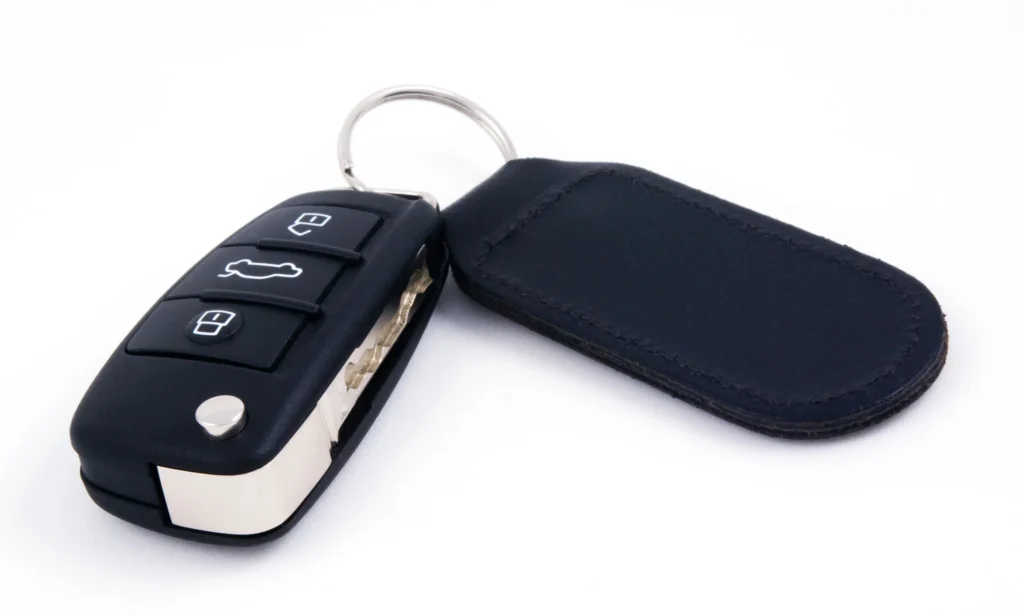
Wondering how to open a Mazda key fob without breaking the plastic case? We can usually access the battery compartment with a small flathead screwdriver wrapped in tape, a soft cloth, and a little patience. The important part is identifying which Mazda key design we have: older smart keys and newer transmitters open differently.
In this guide, we'll walk through the most common methods, show where the release mechanism is usually located, explain how to change the battery, and troubleshoot a fob that refuses to open or work afterward. We'll also cover the differences between CR2025 and CR2032 batteries so we don't accidentally buy the wrong replacement.
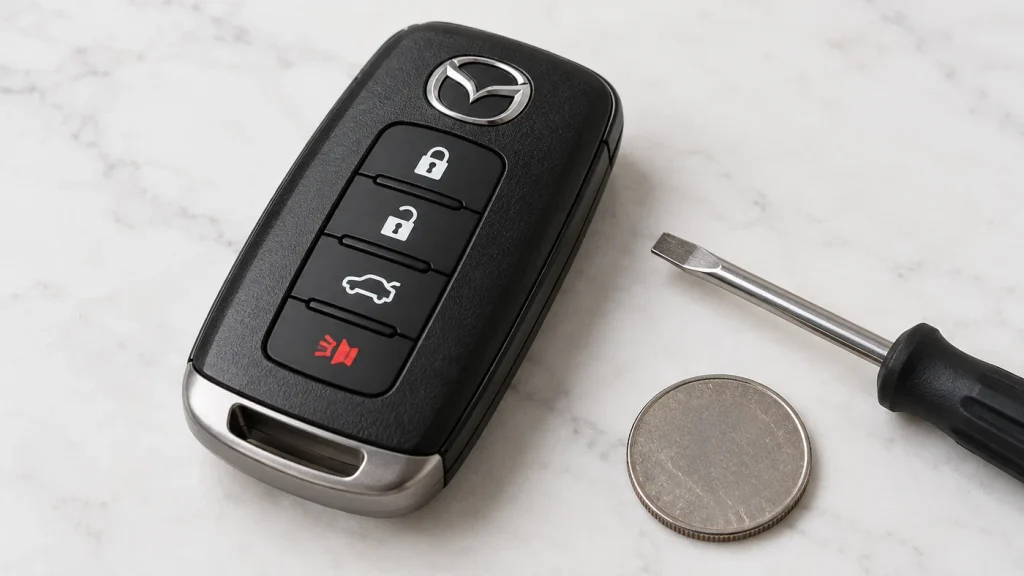
Illustrative image: the appearance and opening points of an actual Mazda remote vary by model and year.
Content in this publication
- Quick Answer: How Do You Open a Mazda Key Fob?
- Before You Start: Identify Your Mazda Key Type
- What Tools Do We Need?
- How to Open a Newer Mazda Key Fob (Step by Step)
- How to Open an Older Mazda Key Fob
- Mazda Key Fob Battery: CR2025 vs CR2032
- Can We Open a Mazda Key Fob Without a Screwdriver?
- Where Is the Hidden Key in a Mazda Key Fob?
- How to Open a Mazda Key Fob by Model
- How Long Does Opening and Replacing a Mazda Key Fob Battery Take?
- Why Won't My Mazda Key Fob Open?
- Why Is My Mazda Key Fob Not Working After Opening It?
- Can We Start a Mazda With a Dead Key Fob Battery?
- Common Mistakes to Avoid When Opening a Mazda Key
- When Should We Replace the Whole Mazda Key Fob?
- Frequently Asked Questions
- Final Thoughts
Quick Answer: How Do You Open a Mazda Key Fob?
To open a Mazda key fob, locate the release button or sliding latch for the auxiliary (emergency) key. On many newer designs, we first remove a lower cover and the auxiliary key, release a tab that holds the upper cover, then use a tape-wrapped flathead screwdriver at the designated gap to lift the upper cover. On many older designs, we pull out the emergency key and carefully separate the battery cover at its intended notch.
Never pry into a random seam or force the halves apart. The precise release points differ. If the casing on our key doesn't match the descriptions below, the key battery replacement section in the owner's manual is the safest reference.
Before You Start: Identify Your Mazda Key Type
Newer Mazda Smart Key
Many recent Mazda keys use a rectangular transmitter with a removable lower cover and a separate upper cover. In some versions, the buttons are positioned along the side of the case rather than on the face. A sliding or press-in knob releases the lower cover; an internal tab then releases the upper cover. These details matter because pulling against a locked clip can break it.
Older Mazda Smart Key
Earlier smart keys, including the design described in the 2018 Mazda CX-5 owner's manual, typically have an auxiliary key that we withdraw by pressing a release knob. The next step is to open the case slightly at a specific groove before working a protected screwdriver along the edge and removing the cover. Some models also have a separate battery cap and a sealing ring.
Flip-Key and Replacement Aftermarket Remotes
A traditional flip-key remote with a folding blade may have a small notch, a screw, or a separate battery compartment. Aftermarket shells can differ from factory Mazda keys even when they look similar. If the key has screws, remove them first rather than forcing the case apart. The steps in this article primarily concern factory-style smart-key transmitters.
What Tools Do We Need?
We don't need a workshop to open most Mazda key fobs. Prepare a clear table and gather these simple items:
- A small flathead screwdriver, preferably with electrical tape wrapped around its metal tip.
- A plastic trim tool or nonmetal pry pick, if the case provides room for one.
- A soft microfiber cloth to protect the housing and prevent small parts from disappearing.
- A replacement coin-cell battery, but only after verifying the size specified for the exact key.
- A small tray for the emergency key, battery cap, and other removable parts.
Avoid sharp knives, oversized screwdrivers, and excessive force. We also recommend keeping keys and loose coin batteries away from children. Swallowed coin batteries can cause life-threatening internal injuries and require immediate emergency medical attention.
How to Open a Newer Mazda Key Fob (Step by Step)
The following sequence follows the general arrangement documented for newer Mazda transmitters, such as a 2024 CX-5. Not every Mazda has this particular latch and cover layout, so compare the shape of the actual remote with the owner’s manual before using a tool.
Step 1: Release the Lower Cover and Remove the Emergency Key
Hold the fob securely with the buttons facing away from your palm. Find the small sliding knob or release on the lower portion of the transmitter. While moving that knob in its release direction, take off the lower cover and pull out the metal auxiliary key. Place the key and cover in the tray so they won't be lost.
We shouldn't yank on the key blade if nothing moves. Confirm that the latch is fully released and the lower cover is out of the way. Some older remotes allow the metal key to slide out directly, without first removing a lower cover.
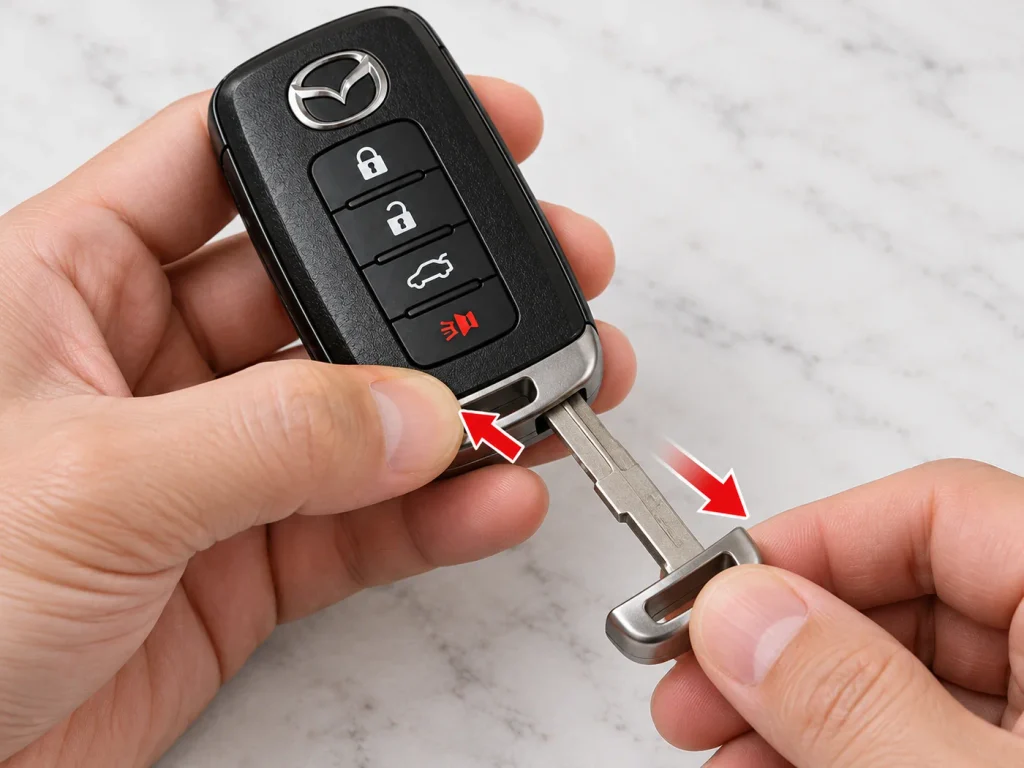
Step 1 illustration: release the retaining mechanism and remove the emergency key. Latch locations differ by key design.
Step 2: Find and Release the Upper-Cover Tab
Once the lower cover is removed, inspect the exposed end of the remote. On the newer Mazda design, a small retaining tab secures the upper shell. Press the tab as described by the owner's manual to unlock that section. It should release without bending or cracking the plastic.
Don't assume the entire remote should split down the middle. Often we are removing a specific upper panel, not opening the electronics housing like a clamshell. That distinction helps preserve the molded retaining clips.
Step 3: Insert a Protected Flathead Screwdriver Into the Correct Gap
Wrap the tip of a small flathead screwdriver in a layer of tape. Locate the gap intended for opening the cover, not an arbitrary side seam. Insert the tip gently and slide it only in the direction indicated for your specific transmitter. The goal is to disengage the cover, not dig into the plastic.
If the screwdriver leaves deep marks or meets significant resistance, stop and check for a missed release tab. A plastic pry tool is a good alternative where the gap is large enough, although some tight notches require the narrower flathead specified by Mazda.
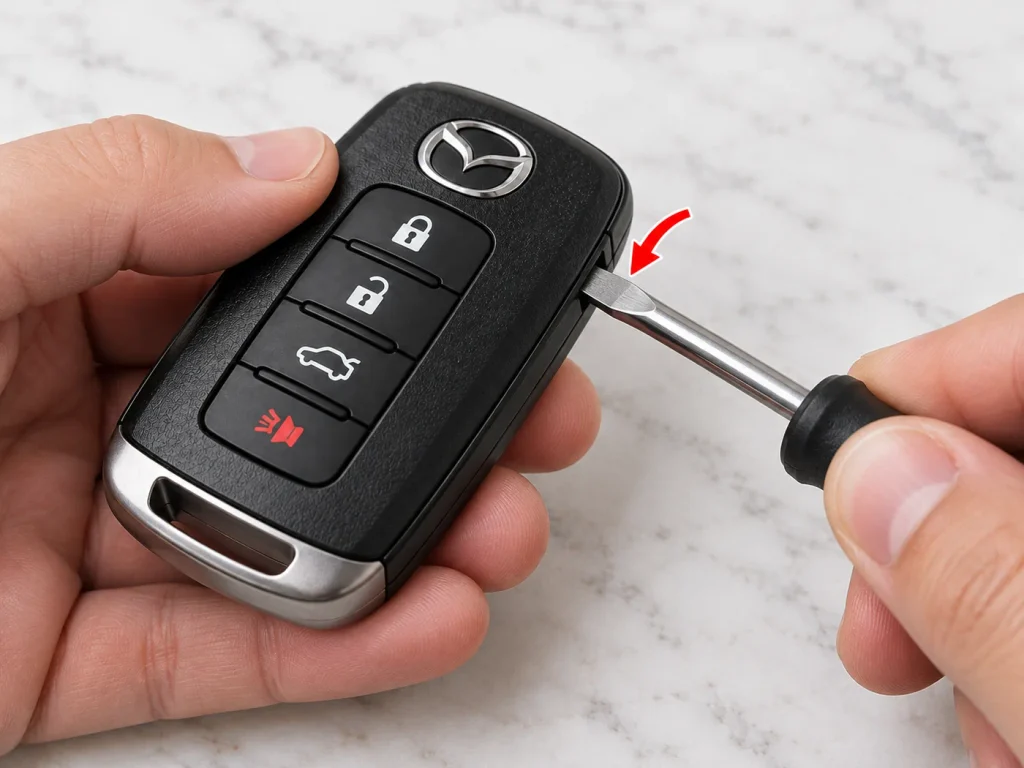
Step 3 illustration: use only the opening point specified for your key; the pictured seam is not a universal Mazda location.
Step 4: Gently Lift Off the Cover
With the correct tab released and the tool positioned in the designated gap, twist the screwdriver slightly to free the cover. We should feel the shell disengage rather than suddenly snap. Work slowly until the upper cover lifts away, and set it aside with its retaining clips facing upward so they cannot be crushed.
Never pry toward the circuit board or antenna. If one edge remains attached, inspect the clip before proceeding. Pulling on the cover while a clip is still engaged is one of the easiest ways to damage a working key.
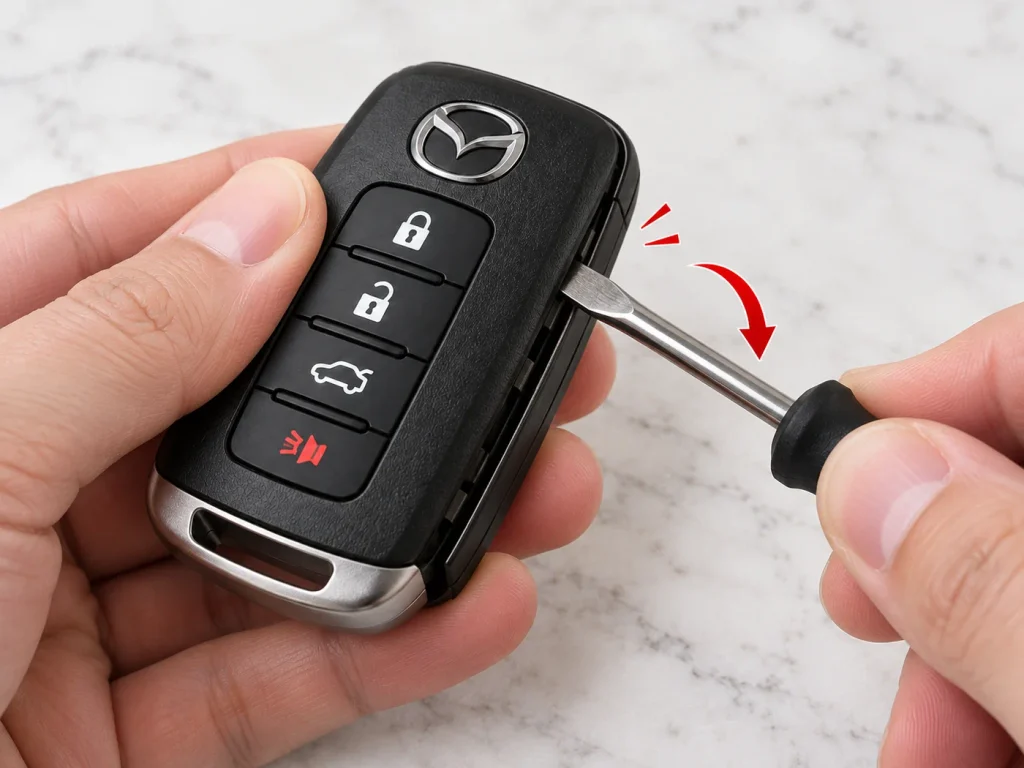
Step 4 illustration: a small controlled movement releases the cover. Avoid force and follow the real latch arrangement.
Step 5: Access the Battery Compartment
After the outer cover has been removed, many factory keys still have a round battery cap over the coin cell. Lift the cap carefully at its intended lip. Take note of the battery's orientation and avoid scratching contacts, bending metal terminals, or touching the circuit board unnecessarily.
If we're changing the battery, confirm the size printed on the old cell and compare it with the owner's manual. On the 2024 Mazda CX-5, the specified battery is CR2032, installed with the positive (+) face upward. Other remotes may require a different size, so we shouldn't treat CR2032 as universal.
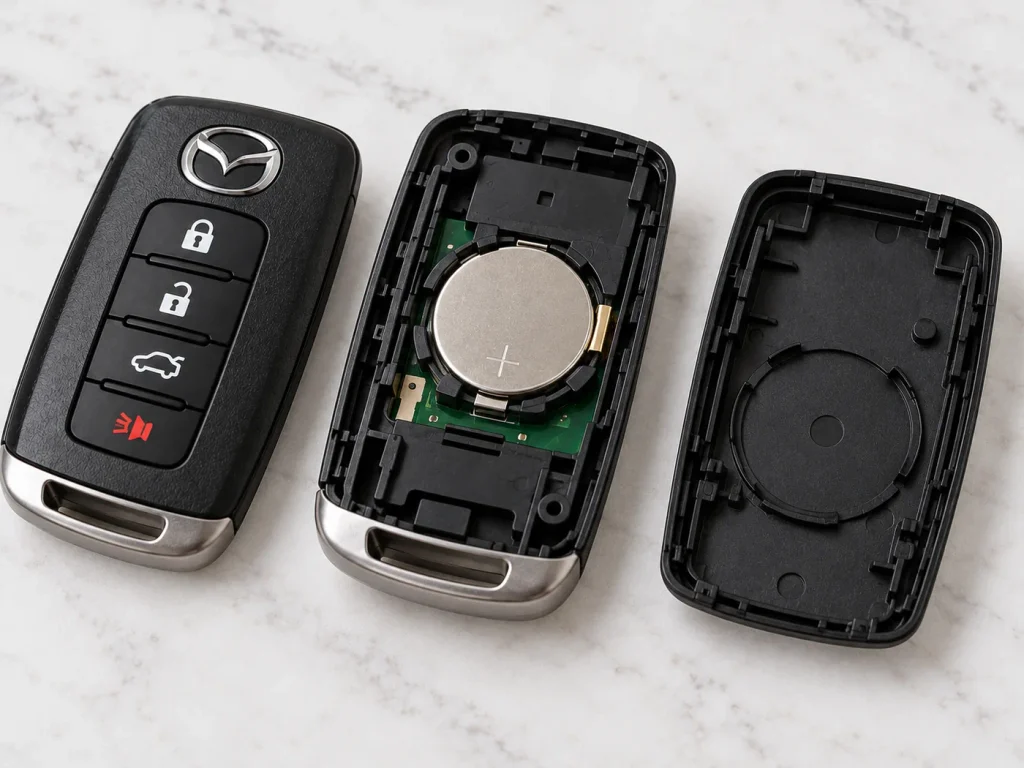
Step 5 illustration: a coin-cell battery inside a disassembled remote. Actual battery caps, seals, electronics, and case parts vary.
Step 6: Reassemble the Mazda Key Fob and Test It
Put the battery cap back in its original position, if one was fitted. Line up the upper-cover tabs and press the cover into place without twisting it. Reattach the lower cover by placing its tabs into the matching slots, then put the auxiliary key back into its compartment.
Finally, stand near the vehicle and try the lock and unlock buttons. Check that the case is flush around its perimeter, the buttons move normally, and the emergency key is secure. If the remote still doesn't work, work through the troubleshooting section below rather than immediately reopening it with force.
How to Open an Older Mazda Key Fob
Older Mazda keyless remotes can require a different approach. For example, the Mazda CX-5 owner's manual for 2018 describes removing the auxiliary key, starting the cover opening with a tape-wrapped flathead screwdriver, sliding the tool along a specified gap, and then lifting off the cover. We shouldn't copy the newer two-cover procedure onto that older unit.
Step 1: Remove the Auxiliary Key
Press the small release knob and pull out the metal emergency key. Look at the opening and the surrounding plastic for the notch or insertion point used to unlock the cover. If we can't identify it, refer to the diagram for our year and model before proceeding.
Step 2: Open the Cover at the Designed Groove
Use a tape-wrapped flathead screwdriver to twist very gently in the correct groove. This first motion creates a small gap. We can then insert the tool into that gap and move it along the edge in the prescribed direction to release the cover clips. Work in short, controlled movements rather than levering the case open all at once.
Step 3: Remove the Battery Cap and Preserve the Seal
Older designs may include a round cap and a rubber sealing ring. Keep both components clean and make sure the ring stays seated without stretching or tearing. If moisture protection is compromised, the remote may become more vulnerable to corrosion over time.
Step 4: Replace the Battery and Close the Case
For the 2018 Mazda CX-5 smart key, Mazda specifies a CR2025 coin cell, with the positive side facing up. Replace the cap, confirm that the sealing ring is properly positioned, close the cover, and reinsert the emergency key. For a different year or model, verify the specification first.
Mazda Key Fob Battery: CR2025 vs CR2032
One of the biggest sources of confusion is battery size. These two battery numbers look similar, and both indicate a 3-volt lithium coin cell, but they differ in thickness. That difference can affect the battery fit and electrical contact pressure inside the remote.
| Battery | Nominal diameter | Nominal thickness | Mazda example |
|---|---|---|---|
| CR2025 | 20 mm | 2.5 mm | 2018 CX-5 factory smart key |
| CR2032 | 20 mm | 3.2 mm | 2024 CX-5 factory smart key |
Do not substitute one for the other just because it fits loosely or appears close in size. Use the battery listed in the appropriate owner's manual and check any markings on the removed cell. The model name alone is not sufficient: Mazda changed transmitter designs across model years, markets, and equipment packages.
Can We Open a Mazda Key Fob Without a Screwdriver?
Sometimes, yes. Removing the auxiliary key usually takes no tools, and certain accessible cover clips may be released with a fingernail or a purpose-made plastic tool. However, the complete battery-cover procedure for many factory Mazda smart keys calls for a small flathead screwdriver. A coin is not always thin enough to engage the proper notch.
If we use a plastic pry tool, it must fit comfortably without forcing the groove wider. Avoid using the metal emergency key itself as a lever unless the owner's manual specifically instructs us to do so; bending the blade or damaging the case is an unnecessary risk.
Most Mazda smart-key transmitters include an auxiliary metal key for situations when the wireless remote cannot unlock the vehicle. We usually access it through a push button, sliding knob, or removable lower cover, depending on the key generation.
On a newer design, the lower panel may conceal the auxiliary key even though the remote appears completely sealed. On many older designs, pressing the release knob allows the key to pull directly from the housing. The hidden key operates the appropriate mechanical door lock; it isn't necessarily designed to open the plastic battery compartment.
How to Open a Mazda Key Fob by Model
Mazda CX-5
The CX-5 provides a useful example of why the model year matters. A 2018 factory key uses a different cover-opening sequence and a CR2025 battery, while the 2024 owner's manual describes a lower cover, an upper-cover tab, and a CR2032 battery. Before opening a CX-5 key, choose the instructions that match the exact year and physical transmitter.
Mazda3 and Mazda6
Mazda3 and Mazda6 transmitters have appeared in several shapes over the years, including conventional keyless remotes and later smart-key designs. We should identify whether the auxiliary key releases directly or a cover must come off first. If an aftermarket shell has replaced the original, we need to follow the shell manufacturer's design rather than relying on the vehicle name alone.
Mazda CX-30, CX-50, CX-70, and CX-90
Many recent Mazda crossovers use a newer-style smart key, but the button arrangements and trim pieces may still differ. The 2024 CX-50 owner's manual, for example, documents removal of the lower cover, release of the upper tab, and careful use of a protected flathead screwdriver. Check the exact owner's manual to avoid prying the wrong panel.
Mazda CX-9 and MX-5 Miata
The CX-9 and MX-5 have also used multiple transmitter generations. Some Mazda smart-key guides show separate outer covers and battery caps; others show a more direct shell opening. We can use the same careful approach—identify the latch, protect the tool, release the correct cover—but the precise order comes from the year-specific instructions.
How Long Does Opening and Replacing a Mazda Key Fob Battery Take?
For an uncomplicated battery change, we can usually finish in just a few minutes once we have identified the correct cover and purchased the correct cell. First-time owners may take longer, particularly when an internal latch is difficult to see.
It is better to spend an extra minute inspecting the transmitter than to replace a cracked case. If the battery is leaking, the contacts are corroded, or the plastic is already damaged, we should stop and arrange a professional inspection rather than treat it as an ordinary DIY battery change.
Why Won't My Mazda Key Fob Open?
The Release Tab Is Still Engaged
If the cover doesn't move, look for a sliding knob, recessed clip, or hidden catch. A latch can be surprisingly difficult to notice when the emergency key is still in place. Do not increase leverage until we've confirmed the correct release sequence.
The Tool Is in the Wrong Seam
The decorative join around the casing may resemble the actual opening gap. Using the wrong seam can crack the housing or damage the water-resistant seal. Compare the insertion point with the diagram in the owner's manual instead of assuming every visible line is a pry point.
The Plastic Is Damaged or Previously Glued
A used remote might have a snapped internal clip or a replacement shell secured with adhesive. If the cover is glued or warped, trying to force it may damage the electronics. A locksmith or Mazda service center can help us identify whether just the housing should be replaced.
Why Is My Mazda Key Fob Not Working After Opening It?
Opening the key isn't supposed to erase its pairing with the vehicle. If it stops working after a battery replacement, the most common checks are straightforward:
- Battery orientation: confirm that the positive (+) side faces the direction specified by the manual.
- Wrong battery: verify the exact type rather than assuming all Mazda keys use CR2032.
- Battery contacts: inspect for dirt, bent terminals, or a coin cell that isn't seated properly.
- Case alignment: make sure the covers aren't pressing a button continuously.
- Power-saving or temporary suspension setting: some Mazda keys have functions that can limit wireless operation; check the owner's manual.
- A different fault: the vehicle's electrical system, radio interference, or damage to the transmitter may also be responsible.
Test with a spare working key if available. If the spare works normally but the serviced key doesn't, the problem is probably local to that key. If neither works, troubleshooting only the new battery may send us in the wrong direction.
Can We Start a Mazda With a Dead Key Fob Battery?
On many push-button-start Mazdas, we can still start the engine using an emergency procedure even when the remote's coin battery has lost power. The details vary, but some owner's manuals instruct the driver to hold the Mazda emblem area of the transmitter against the START/STOP button while pressing the brake pedal and following the instrument-cluster prompts.
We should use the exact procedure shown for the vehicle, since the recognition position and sequence can differ. The emergency metal key can help unlock the appropriate door, but it isn't a universal replacement for the electronic immobilizer process.
Common Mistakes to Avoid When Opening a Mazda Key
Forcing the Housing Apart
A small screwdriver should release clips, not break them. Stop immediately if the plastic turns white, cracks, or bends significantly.
Touching the Circuit Board
Oil, moisture, and static electricity can interfere with delicate components. Handle the shell and battery edges rather than the exposed electronics.
Losing the Rubber Seal
A displaced gasket or damaged battery cap can weaken the remote's resistance to moisture. Keep seals clean and reinstall them precisely.
Buying the Battery Before Checking the Model Year
The CR2025 and CR2032 examples above prove why the owner's manual matters. A small thickness difference can lead to an unreliable connection or difficulty closing the case.
Leaving a Coin Cell Within Reach of Children
A loose lithium coin battery is a serious ingestion hazard. Never leave it on the table unattended, and dispose of the used battery according to local rules. If anyone may have swallowed a battery, seek emergency medical help immediately.
When Should We Replace the Whole Mazda Key Fob?
If the electronics and buttons work but the shell is cracked, a compatible replacement housing may be enough. We must ensure it matches the transmitter's exact shape and internal components, not just the Mazda model. Replacement of the entire transmitter may be necessary if the circuit board is damaged, severely corroded, or no longer communicates with the car.
Replacing the plastic shell isn't the same as programming a new remote. A complete new key may require cutting an auxiliary blade and professional pairing to the vehicle. Before spending money on a new key, rule out a dead or incorrectly installed coin battery.
Frequently Asked Questions
1. How do you open a Mazda key fob to change the battery?
Release the emergency key or removable lower cover, locate the specified upper-cover latch or opening notch, and use a tape-wrapped flathead screwdriver only at the designated gap. Lift the appropriate cover, remove any battery cap, and replace the cell with the exact type required for your key.
2. What screwdriver do I need to open a Mazda key fob?
A small flathead screwdriver with its tip wrapped in electrical tape is commonly recommended in Mazda owner’s manuals. A plastic pry tool may work where there is sufficient room. Avoid a sharp blade or an oversized screwdriver that can damage the cover.
3. Does every Mazda key fob use a CR2032 battery?
No. A 2024 Mazda CX-5 specifies CR2032, while a 2018 Mazda CX-5 specifies CR2025. Other Mazda transmitters may differ. Check the exact model-year manual and battery marking before buying a replacement.
4. Will opening my Mazda key fob erase its programming?
Simply opening the housing or replacing the coin-cell battery normally does not erase the key's existing pairing. If the remote fails afterward, check battery orientation, contact pressure, case assembly, and any key power-saving setting before assuming it needs programming.
5. What should I do if the Mazda key fob cover is stuck?
Stop applying pressure and inspect the latch and opening groove again. Use the diagram for the exact key instead of prying at random. If a clip is damaged, the cover is glued, or the shell is badly warped, consult a qualified automotive locksmith or Mazda service center.
Final Thoughts
Learning how to open a Mazda key fob is often simple once we identify the correct transmitter generation. The safest method is to remove the auxiliary key or lower cover, release the intended tab, and use a protected flathead screwdriver only where Mazda specifies. We can then access the battery compartment, install the correct cell, and close everything without damaging the clips or seals.
The main takeaway is that no single opening method or battery size applies to every Mazda. Match the procedure to our actual key, work gently, and check the vehicle's owner’s manual whenever the shell does not behave as expected.
If you want to know other articles similar to How to Open a Mazda Key Fob: Step-by-Step Guide you can visit the category Service and Parts.
Kia Picanto Dashboard Warning Lights & Symbols: Complete Guide

Hyundai i20 Dashboard Warning Lights Guide
Vauxhall Antara Dashboard Lights: Complete Warning Symbol Guide

Hyundai i10 Dashboard Warning Lights and Their Meanings: Complete Guide

Peugeot 308 Dashboard Symbols, Warning Lights & Fault Guide

Hyundai Kona Dashboard Warning Lights
Leave a Reply
More content of your interest