

BYD Seal Not Charging: Causes, Fixes, and Troubleshooting Guide

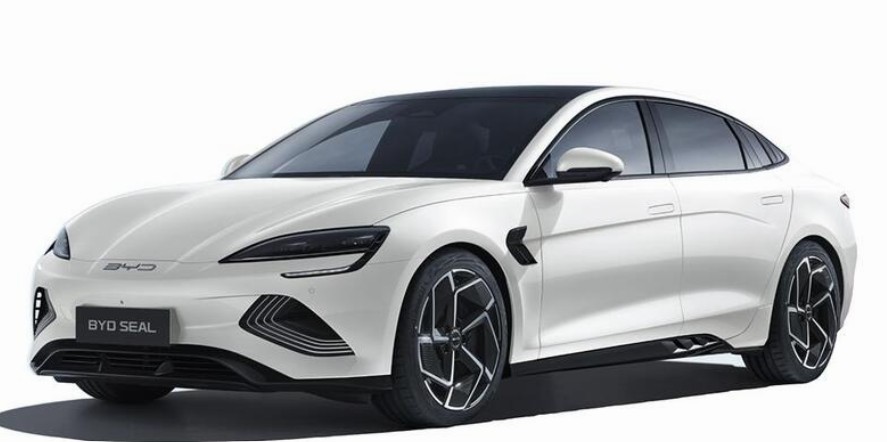
Few things are more frustrating than plugging in your electric vehicle and discovering that it simply refuses to charge. If you're dealing with a BYD Seal not charging, you're not alone. Whether the issue appears at home, at a public charging station, or after a software update, there are several possible reasons behind the problem.
The good news? Most charging issues can be diagnosed and resolved without immediately heading to a service center. In this comprehensive guide, we'll explore the most common causes, practical solutions, preventive maintenance tips, and expert recommendations to help get your BYD Seal charging properly again.
Content in this publication
- Understanding How the BYD Seal Charging System Works
- Common Signs Your BYD Seal Is Not Charging
- Battery Protection Features Can Delay Charging
- Check the Charging Cable First
- Examine the Charging Port
- Public Charger Compatibility Problems
- Home Charger Problems
- Software Glitches and Temporary Errors
- Charging Schedule Settings
- Battery State of Charge Issues
- Weather-Related Charging Problems
- Understanding Charging Error Messages
- How to Troubleshoot a BYD Seal That Won't Charge
- When the Battery Management System Stops Charging
- Charging Port Maintenance Tips
- Signs You Need Professional Service
- Can a Faulty Charger Damage a BYD Seal?
- How to Maximize Charging Reliability
- The Future of BYD Charging Technology
- Conclusion
- Frequently Asked Questions
Understanding How the BYD Seal Charging System Works
Before we jump into troubleshooting, it helps to understand the basics.
The BYD Seal uses an advanced battery management system (BMS) that constantly monitors:
- Battery temperature
- Battery state of charge
- Charger compatibility
- Charging speed
- Safety conditions
If the system detects a problem, charging may be delayed, reduced, or completely stopped.
Think of the BMS as the vehicle's security guard. If something doesn't look right, it won't allow energy to enter the battery.
Common Signs Your BYD Seal Is Not Charging
Charging problems can appear in several ways.
The Vehicle Refuses to Start Charging
You connect the charger and nothing happens.
Charging Starts Then Stops
The battery begins charging but stops after a few minutes.
Charging Error Messages Appear
Messages may indicate communication failures or charging faults.
Slow Charging Speeds
The vehicle charges much slower than expected.
Public Chargers Fail to Connect
Some owners report communication issues with certain public charging networks.
Battery Protection Features Can Delay Charging
One of the most misunderstood aspects of EV ownership is battery protection.
Cold Weather Charging Restrictions
If the battery temperature is too low, the BYD Seal may delay charging until the battery warms up.
High Temperature Protection
Extreme heat can also trigger charging limitations.
The vehicle prioritizes battery health over immediate charging speed.
Check the Charging Cable First
Sometimes the simplest explanation is the correct one.
Inspect for Visible Damage
Look for:
- Cracks
- Bent pins
- Frayed insulation
- Burn marks
Even minor damage can interrupt charging.
Try Another Cable
If possible, test a different charging cable to determine whether the original cable is faulty.
Examine the Charging Port
The charging port is exposed to weather, dust, and everyday wear.
Look for Debris
Check for:
- Dirt
- Leaves
- Moisture
- Foreign objects
Even small contaminants can affect the connection.
Inspect Connector Pins
Damaged or bent pins may prevent proper communication between the charger and vehicle.
Public Charger Compatibility Problems
Not all charging stations behave the same way.
Communication Errors
Some charging networks occasionally experience software communication issues with specific vehicles.
When this happens:
- Disconnect the charger
- Wait a few minutes
- Reconnect
- Try another charging station
Authentication Issues
Certain chargers require app activation or RFID cards before charging can begin.
Always verify that the charging session has started successfully.
Home Charger Problems
If your BYD Seal charges elsewhere but not at home, the issue may be with your charging equipment.
Circuit Breaker Trips
Check your electrical panel.
A tripped breaker can stop power delivery without obvious signs.
You may be interested in reading Hyundai Coupe Reliability: The Complete Guide to Long-Term Ownership
Wall Charger Faults
Modern chargers contain safety systems that may disable charging if faults are detected.
Look for warning lights or error indicators.
Power Supply Interruptions
Voltage fluctuations can interrupt charging sessions.
Software Glitches and Temporary Errors
Modern EVs are essentially computers on wheels.
Sometimes software becomes confused.
Restart the Vehicle
A simple reboot can resolve many temporary issues.
Steps:
- Turn off the vehicle completely.
- Lock the car.
- Wait several minutes.
- Restart and try charging again.
Check for Software Updates
Manufacturers regularly release updates that improve charging compatibility and system reliability.
Charging Schedule Settings
The issue might actually be a setting.
Delayed Charging Enabled
Many owners accidentally activate scheduled charging.
The vehicle then waits for a specific time before beginning.
Battery Protection Limits
Some settings restrict charging to certain percentages.
Review:
- Charging schedule
- Target battery percentage
- Smart charging options
Battery State of Charge Issues
Oddly enough, a very high battery level can sometimes create confusion.
Battery Already Near Full
If the battery is close to 100%, charging may not begin immediately.
Calibration Problems
Occasionally, battery readings may become inaccurate.
A few normal charge cycles can often restore proper calibration.
Electric vehicles are affected by environmental conditions.
Heavy Rain
Modern EVs are designed for wet conditions, but excessive moisture around connectors can occasionally interfere with charging.
Snow and Ice
Frozen charging ports may prevent secure connections.
Extreme Heat
The vehicle may reduce charging speed to protect battery health.
Understanding Charging Error Messages
Different messages indicate different problems.
Communication Failure
Typically points to:
- Charger incompatibility
- Faulty cable
- Software issues
Charging Interrupted
Often caused by:
- Power fluctuations
- Overheating
- Charger faults
May indicate:
- Hardware failure
- Battery system issue
- Charging port fault
How to Troubleshoot a BYD Seal That Won't Charge
Follow this step-by-step process.
Step 1: Inspect the Cable
Check for damage and try another cable if available.
Step 2: Check the Charging Port
Remove debris and verify pin condition.
Step 3: Restart the Vehicle
Power cycle the car completely.
Step 4: Try Another Charger
Test both AC and DC charging if possible.
Step 5: Review Charging Settings
Ensure no scheduling restrictions are active.
Step 6: Verify Power Supply
Inspect home charger status and electrical connections.
You may be interested in readingHyundai Coupe Reliability: The Complete Guide to Long-Term OwnershipYou may be interested in reading
Hyundai Coupe Insurance Group: Everything You Need to Know Before BuyingStep 7: Update Vehicle Software
Install available updates.
When the Battery Management System Stops Charging
The BMS is designed to prevent damage.
Safety Overrides
Charging may stop if the system detects:
- Excessive temperature
- Voltage abnormalities
- Communication faults
Battery Protection Is a Good Thing
Although frustrating, these protections help preserve long-term battery health.
Charging Port Maintenance Tips
Prevention is always easier than repair.
Keep the Port Clean
Regularly inspect and clean the charging port.
Avoid Excessive Moisture
Dry the connector before charging when necessary.
Use Quality Charging Equipment
Cheap accessories can create reliability problems.
Store Cables Properly
Prevent cable damage by avoiding sharp bends and heavy loads.
Signs You Need Professional Service
Some problems require expert diagnosis.
Repeated Charging Failures
If charging consistently fails despite troubleshooting, service may be necessary.
Burning Smells
Stop charging immediately and seek assistance.
Visible Damage
Cracked ports, melted connectors, or damaged cables require professional attention.
Persistent Error Messages
Repeated warnings often indicate deeper issues.
Can a Faulty Charger Damage a BYD Seal?
In most cases, no.
The vehicle contains multiple layers of protection.
However, poor-quality charging equipment can:
- Cause charging interruptions
- Reduce efficiency
- Trigger error messages
Using certified charging equipment is always recommended.
How to Maximize Charging Reliability
Let's focus on prevention.
Follow a Regular Inspection Routine
Monthly checks can catch problems early.
Keep Software Updated
Updates often improve charging performance.
Use Trusted Charging Networks
Reliable infrastructure reduces connection issues.
Protect Charging Equipment
Treat cables and connectors with care.
The Future of BYD Charging Technology
EV charging technology continues to improve.
Future updates may bring:
- Faster charging speeds
- Improved charger compatibility
- Better software diagnostics
- Enhanced battery protection systems
As charging networks expand and standards mature, many current issues will become increasingly rare.
Conclusion
Experiencing a BYD Seal not charging situation can feel alarming, especially if you're relying on the vehicle for daily transportation. Fortunately, most charging issues stem from relatively simple causes such as charging cable faults, charging port contamination, software glitches, scheduling settings, or charger compatibility problems.
By methodically checking the charging equipment, inspecting the port, reviewing vehicle settings, and testing alternative charging stations, we can often identify and resolve the issue without expensive repairs. Regular maintenance and software updates also play a major role in keeping the charging system reliable.
The BYD Seal is engineered with sophisticated safety systems designed to protect the battery. While these protections may occasionally interrupt charging, they ultimately help ensure long-term performance and battery longevity.
Frequently Asked Questions
1. Why is my BYD Seal plugged in but not charging?
The most common causes include charger faults, charging schedules, software glitches, communication errors, or charging port contamination.
2. Can cold weather stop a BYD Seal from charging?
Yes. Extremely low temperatures may delay charging until the battery reaches a safe operating temperature.
3. Why does charging start and then stop?
Possible reasons include overheating, charger communication problems, power supply interruptions, or battery protection systems.
You may be interested in readingHyundai Coupe Reliability: The Complete Guide to Long-Term OwnershipYou may be interested in reading
Hyundai Coupe Insurance Group: Everything You Need to Know Before BuyingYou may be interested in reading
Hyundai Coupe Engine Swap: The Ultimate Guide to Unlocking Performance4. How do I reset the charging system on a BYD Seal?
Turn the vehicle off completely, lock it, wait several minutes, and then restart before reconnecting the charger.
5. Should I contact a service center if charging keeps failing?
Yes. Persistent charging failures, repeated error messages, or visible charging port damage should be inspected by qualified technicians.
If you want to know other articles similar to BYD Seal Not Charging: Causes, Fixes, and Troubleshooting Guide you can visit the category Blog.
Honda Passport Life Expectancy: How Many Miles Can It Last?
Honda Passport Depreciation: How Well Does It Hold Its Value?

Nissan Rogue Reliability Rating: How Reliable Is the Rogue?
Nissan Rogue Life Expectancy: How Long Does It Last?
Vauxhall Agila Reliability: Common Problems, Best Engines and What to Check
Vauxhall Agila Insurance Group UK: Complete Guide to Insurance Costs
Leave a Reply
More content of your interest