
Dacia Duster Radio Not Working — Complete Troubleshooting Guide

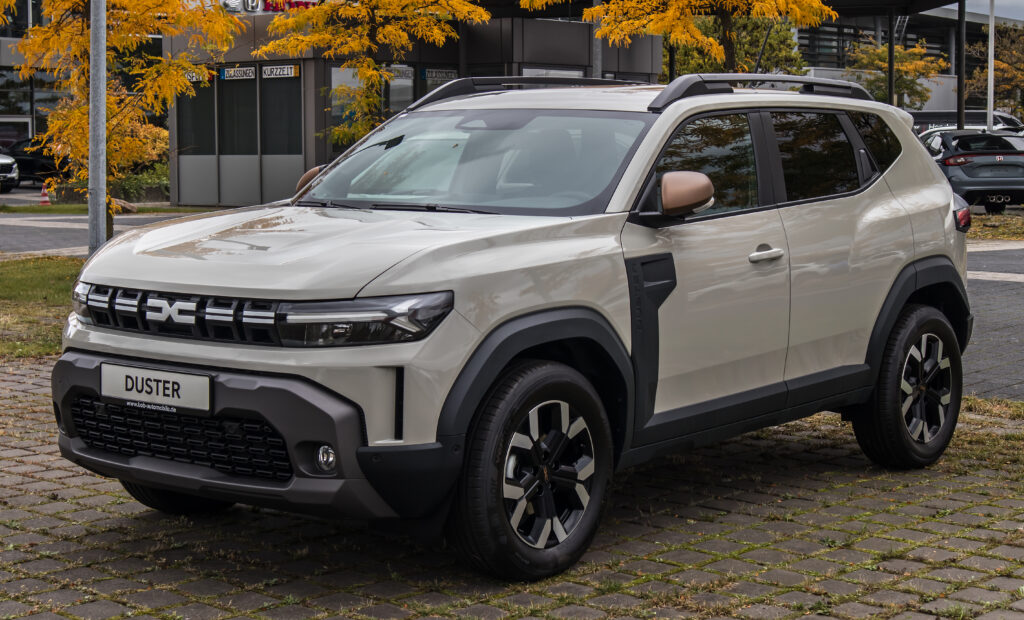
We’ve all had that moment: you start the engine, ready for a drive, and instead of music… silence. The cabin suddenly feels twice as quiet and somehow ten times more boring. If your Dacia Duster radio stopped working, you’re not alone — it’s one of the most searched issues among Duster owners.
The good news? In most cases, it’s not a catastrophic failure. It’s usually something small — a fuse, software glitch, or wiring hiccup — acting like a stubborn door that just needs the right key.
So today we’re rolling up our sleeves together. No jargon overload, no dealership panic. Just clear steps, real logic, and practical fixes.
Content in this publication
- Why the Dacia Duster Radio Stops Working
- First Quick Checks (Always Do These First)
- Blown Fuse — The #1 Cause
- Radio Asking for Code (Locked Stereo)
- Media Nav Screen Frozen or Unresponsive
- Battery Voltage Problems
- No Sound But Radio Is On
- Steering Wheel Controls Not Working
- Bluetooth Connected But No Audio
- USB and AUX Not Working
- Aftermarket Radio Problems
- Moisture Inside Dashboard
- Firmware Update Fix
- Wiring Harness Failure
- Amplifier Failure
- When the Radio Drains the Battery
- Step-By-Step Full Diagnostic Checklist
- When You Actually Need a New Radio
- Final Thoughts
- FAQs
Why the Dacia Duster Radio Stops Working
Modern radios aren’t just radios anymore — they’re infotainment computers. That means your issue could be electrical, digital, or even communication-related inside the car network.
Common root causes:
- Blown fuse
- Software freeze
- Battery voltage drop
- Faulty wiring harness
- Locked stereo (code required)
- Faulty speakers or amplifier
- Steering wheel control communication error
- Moisture or corrosion
- Media Nav firmware bug
Think of the radio like a smartphone bolted into your dashboard. If a phone freezes, we restart it — cars are surprisingly similar.
First Quick Checks (Always Do These First)
Before grabbing tools, let’s rule out the obvious. Many owners skip these and waste hours.
Basic Power Cycle
- Turn ignition OFF
- Open driver door
- Wait 5 minutes (this matters — modules go to sleep)
- Restart car
You’d be amazed how often the radio wakes up like nothing happened.
Check Volume and Mute Settings
It sounds silly — but software updates sometimes reset audio settings.
- Verify mute isn’t enabled
- Turn volume knob manually (don’t rely only on steering controls)
- Switch between FM / Bluetooth / USB
If Bluetooth works but FM doesn’t → tuner issue
If nothing works → power issue
Blown Fuse — The #1 Cause
If the screen is black or dead, we immediately suspect power supply.
Where the Radio Fuse Is Located
The Duster has two fuse areas:
- Cabin fuse box (dashboard side)
- Engine bay fuse box
The radio fuse is typically inside the cabin panel.
How to Check the Fuse
Tools Needed
- Fuse puller or tweezers
- Torch
- Spare 15A fuse
Steps
- Remove side dashboard cover
- Locate RADIO / MEDIA fuse
- Pull fuse out
- Inspect metal strip inside
Broken strip = blown fuse
Replace it and test.
If the Fuse Blows Again
Now we have a deeper electrical short:
Possible causes:
- Aftermarket charger
- Dashcam wiring
- USB socket damage
- Water ingress behind dash
Never keep replacing fuses — that’s like putting tape over a warning light.
Radio Asking for Code (Locked Stereo)
Sometimes the radio works… but won’t play.
Instead, it shows:
CODE, 0000, or ENTER PIN
This happens after:
- Battery replacement
- Flat battery
- Jump starting
The radio thinks it’s stolen and locks itself.
How to Enter the Dacia Radio Code
- Turn ignition ON
- Use preset buttons to input numbers
- Hold button 6 (or OK depending on model)
If correct → instant sound
If wrong too many times → temporary lockout
Where to Find the Code
- Owner’s manual card
- Dealership records
- Radio serial number label
If the screen is stuck like a paused movie, you’re dealing with software — not hardware.
Symptoms
- Touchscreen not reacting
- Radio playing but buttons dead
- Stuck on logo
- Bluetooth greyed out
Classic infotainment crash.
Hold the power button for 10–15 seconds
The system will reboot — just like rebooting a laptop.
This fixes about 70% of freezing issues.
Battery Voltage Problems
Cars hate low voltage more than they hate potholes.
If your battery dropped below 11.5V recently, modules start misbehaving.
Signs of Low Voltage Radio Failure
- Radio works only while driving
- Turns off randomly
- Resets clock every start
- Screen flickers
Solution
Charge or replace battery.
Modern radios need stable voltage — otherwise they crash repeatedly like an exhausted computer.
No Sound But Radio Is On
Now we’re entering the “ghost radio” zone — screen works, stations change… silence remains.
This usually means the amplifier or speakers aren’t receiving signal.
Check Balance and Fade Settings
Go into audio settings:
- Set balance to center
- Set fade to middle
Sometimes audio accidentally gets sent only to rear or right side.
Speaker Test Trick
Switch to phone call (hands-free):
If you hear caller → speakers OK
If silent → wiring or amplifier issue
Steering Wheel Controls Not Working
If volume buttons stop responding, it’s rarely the radio itself.
The steering wheel communicates through the CAN-Bus network — basically the car’s nervous system.
Common Causes
- Clock spring wear
- Connector loose behind airbag
- Steering column wiring fatigue
The radio works, but commands never reach it.
Bluetooth Connected But No Audio
This one drives owners crazy.
Music shows “playing” on phone… but silence in car.
Fix
Delete the car from phone AND phone from car.
Then reconnect fresh.
Bluetooth profiles get corrupted — think of it as two people speaking different dialects of the same language.
USB and AUX Not Working
If only USB fails:
Possible issues:
- Damaged socket
- Dirty contacts
- Unsupported file format
Try:
- FAT32 formatted USB
- Different cable
- Small flash drive (<32GB)
Duster radios can be picky — they prefer simple storage, not modern high-capacity drives.
Aftermarket Radio Problems
Installed a new stereo recently? That changes everything.
Typical Mistakes
- Missing CAN adapter
- No ignition live wire
- Wrong ISO harness
- Antenna amplifier not powered
The Duster doesn’t behave like old cars — its electronics expect communication.
Without a CAN interface, the radio may:
- Not turn off
- Drain battery
- Produce no sound
Moisture Inside Dashboard
Rain + parked uphill = water entering through pollen filter housing.
It slowly drips onto wiring connectors.
Signs
- Radio works only on sunny days
- Crackling sound
- Random resets after rain
Electrical contacts corrode — resistance rises — signal disappears.
Firmware Update Fix
Sometimes the problem isn’t physical — it’s buggy software.
Media Nav systems occasionally glitch after updates.
When To Update
- Navigation freezes
- Bluetooth unstable
- Radio restarts randomly
Updating firmware restores communication protocols inside the unit.
Wiring Harness Failure
Years of vibration slowly loosen connectors.
Think of the harness like headphone cables bending daily — eventually they break internally.
Common Location
Behind head unit connector block
Symptoms
- Sound returns when pressing dashboard
- Radio cuts over bumps
- Intermittent power
Classic loose connector behavior.
Amplifier Failure
Higher trims include a small internal amplifier module.
When it fails:
- Screen works perfectly
- No sound on any source
- Fuse intact
The radio brain works — the speaker muscles don’t.
When the Radio Drains the Battery
If your battery dies overnight after radio problems, the unit never sleeps.
Cause:
CAN communication stuck awake.
Fix:
Reset vehicle modules by disconnecting battery for 15 minutes.
Step-By-Step Full Diagnostic Checklist
Let’s combine everything into a logical order.
Stage 1 — Easy Checks
- Restart car
- Check mute/volume
- Try different source
Stage 2 — Electrical
- Inspect fuse
- Check battery voltage
- Battery reset
Stage 3 — Software
- Soft reset
- Delete Bluetooth devices
- Update firmware
Stage 4 — Hardware
- Inspect connectors
- Test speakers
- Check moisture
Stage 5 — Advanced
- CAN wiring
- Amplifier
- Replacement unit
Follow this order and you avoid unnecessary repairs.
When You Actually Need a New Radio
Replace the unit only if:
- No power + fuse OK + voltage OK
- Burn smell
- Internal short
- Water damage inside casing
Most radios get replaced prematurely — diagnosis saves money.
Final Thoughts
The silence of a broken radio feels bigger than it is. Once we understand that the Dacia Duster infotainment system is basically a small computer connected to a car network, the mystery disappears.
In reality, most failures come from:
- Power instability
- Software crashes
- Loose connections
Rarely from total failure.
So before booking a dealership visit, give these steps a try. You might fix it in your driveway — and the first song afterward will sound twice as good.
FAQs
1. Why does my Dacia Duster radio turn on but no sound comes out?
Usually amplifier failure, muted settings, or speaker wiring issue. The unit is working, but audio isn’t reaching speakers.
2. Why did my radio stop working after battery change?
The stereo locked itself and needs the security code entered.
3. Can low battery cause radio failure?
Yes. Low voltage causes infotainment systems to freeze or reboot repeatedly.
4. Why does Bluetooth connect but play no audio?
Corrupted pairing profile — delete both devices and reconnect.
5. Do I need a dealer to fix it?
Most cases are fuse, reset, or wiring related — DIY fixable.
If you want to know other articles similar to Dacia Duster Radio Not Working — Complete Troubleshooting Guide you can visit the category Common Problems.
Volvo XC40 Sound Not Working? Complete Troubleshooting Guide

Mazda Diesel Engine Problems: Common Faults and Fixes
Volkswagen Key Not Detected or No Key Error: Causes and Fixes
Volvo S90 Common Problems: Reliability & Repair Guide
Volvo S90 No Sound: Causes, Fixes and Solutions

Nissan Rogue Smells Like Gas: Causes and Fixes
Leave a Reply
More content of your interest