
Waze on Tesla Model 3: Everything We Need to Know Before Using It

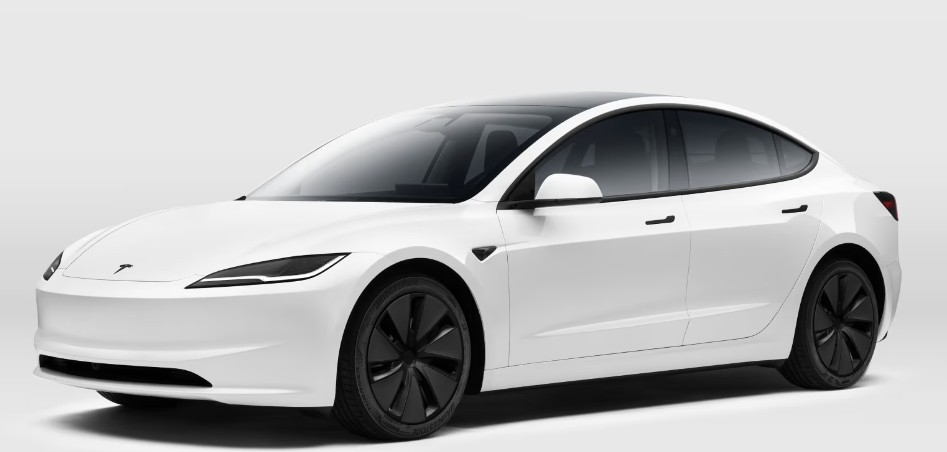
The Tesla Model 3 feels like driving tomorrow today. Minimalist interior, lightning-fast acceleration, silent cruising, and one giant touchscreen that controls nearly everything. Yet, for many drivers, there’s one lingering question floating around like a cloud over a sunny highway:
Can we use Waze on a Tesla Model 3?
At first glance, it feels strange that one of the world’s smartest cars doesn’t natively support one of the world’s most beloved navigation apps. Especially when Waze has built its reputation on real-time traffic alerts, police reports, accident warnings, and community-driven routing that often feels eerily accurate.
But Tesla does things differently. Always has.
So in this guide, we’ll dive deep into how Waze works with the Tesla Model 3, whether it’s officially supported, the best ways to use it, hidden tricks, limitations, workarounds, and whether Tesla’s own navigation system is enough to replace it altogether.
Buckle up. This road has a few interesting turns.
Content in this publication
- Why Drivers Want Waze on a Tesla Model 3
- Does Tesla Model 3 Support Waze Natively?
- Why Tesla Avoids Apple CarPlay and Android Auto
- Can We Still Use Waze in a Tesla Model 3?
- Using Waze on Your Phone While Driving
- Best Phone Mount Options for Tesla Model 3
- Can We Mirror Waze onto the Tesla Screen?
- Third-Party Apps That Bring Waze to Tesla
- Using Waze Through the Tesla Browser
- Tesla Android Project: The Big Game-Changer
- Is Tesla Navigation Better Than Waze?
- Can We Use Both Tesla Navigation and Waze Together?
- How Waze Affects Tesla Battery Usage
- Does Waze Drain Phone Battery Faster in a Tesla?
- Voice Commands with Waze in Tesla Model 3
- Can Tesla Add Native Waze Support in the Future?
- How Tesla Owners Feel About the Lack of Waze
- Best Alternatives to Waze for Tesla Drivers
- Tips for Using Waze Efficiently in a Tesla Model 3
- Is Waze Worth Using in a Tesla Model 3?
- The Future of Navigation Inside Tesla Vehicles
- Should We Rely Only on Tesla Navigation?
- Final Thoughts on Waze on Tesla Model 3
- FAQs
Why Drivers Want Waze on a Tesla Model 3
There’s a reason millions of drivers keep opening Waze even when their cars already have built-in navigation systems.
Waze feels alive.
Unlike traditional GPS systems that simply guide us from Point A to Point B, Waze behaves more like a digital co-pilot whispering updates into our ears every few seconds.
It warns us about:
- Traffic jams
- Speed cameras
- Police presence
- Construction zones
- Debris on the road
- Accidents
- Lane closures
- Hidden shortcuts
For commuters, it’s like having a friend ahead on the highway sending live updates.
Tesla’s navigation system is intelligent, but Waze has a personality. That community-powered ecosystem is what keeps people hooked.
And when we combine the futuristic appeal of the Tesla Model 3 with Waze’s crowd-sourced navigation magic, the idea sounds perfect in theory.
But reality is slightly more complicated.
Does Tesla Model 3 Support Waze Natively?
The short answer?
No.
The Tesla Model 3 does not officially support Waze as a native application inside the car’s infotainment system.
Unlike many vehicles from brands like Ford, Hyundai, or Toyota, Tesla vehicles do not include:
- Apple CarPlay
- Android Auto
- Native Waze integration
That means we cannot simply plug in our phone and open Waze on the Tesla screen the way we would in many other modern vehicles.
Tesla prefers to maintain a fully closed ecosystem. Think of it like the automotive version of a luxury tech fortress.
Elegant? Yes.
Flexible? Not always.
Why Tesla Avoids Apple CarPlay and Android Auto
This decision frustrates many new Tesla owners, but Tesla has its reasons.
Tesla wants complete control over:
- Software updates
- User experience
- Interface design
- Navigation systems
- Performance optimization
- Data collection
- Energy routing
If Apple CarPlay or Android Auto were introduced, Tesla would lose some of that control.
Instead, Tesla developed its own navigation system powered by Google Maps data combined with Tesla-specific route planning.
That includes:
- Supercharger routing
- Battery-aware navigation
- Energy consumption predictions
- Charging stop recommendations
- Traffic rerouting
Tesla’s system isn’t weak. In fact, it’s one of the smartest EV navigation systems on earth.
But it still lacks several beloved Waze features.
Can We Still Use Waze in a Tesla Model 3?
Absolutely.
We just need to get creative.
There are several methods Tesla owners use daily to run Waze alongside their driving experience.
Some are simple.
Some feel like hacking the Matrix.
Let’s explore them.
Using Waze on Your Phone While Driving
The simplest method is also the most common.
We can simply mount our phone and run Waze directly from it while driving the Tesla.
Benefits of This Method
- Full Waze functionality
- Real-time alerts
- Voice guidance
- Speed trap reports
- Traffic rerouting
- No additional setup required
Drawbacks
- Extra screen clutter
- Phone battery drain
- Less seamless integration
- Distracting placement if poorly mounted
Still, thousands of Tesla Model 3 owners use this setup every day because it works reliably.
Sometimes the simplest solution wins.
Best Phone Mount Options for Tesla Model 3
Because the Tesla dashboard is extremely minimalist, choosing the right mount matters.
Popular mount styles include:
Vent Mounts
These are less common in Teslas because airflow placement is unconventional.
Screen Edge Mounts
These attach near the central touchscreen and feel more factory-integrated.
Magnetic Dashboard Mounts
Minimalist and clean-looking, especially for Tesla interiors.
Wireless Charging Mounts
A favorite among long-distance drivers who constantly use Waze.
A poorly placed mount can feel like hanging a sticky note on a museum painting. Tesla interiors deserve cleaner setups.
Can We Mirror Waze onto the Tesla Screen?
Now things get interesting.
Officially, Tesla does not allow screen mirroring from smartphones.
Unofficially?
There are workarounds.
Third-Party Apps That Bring Waze to Tesla
Several developers have created software tools that allow limited versions of Waze or phone mirroring inside Teslas.
You may be interested in reading Tesla Model 3 Issues: The Truth About Ownership, Reliability, and Everyday Problems
Popular examples include:
- TeslaMirror
- Tesla Android Project
- TeslAA
- CarPlay adapters
- Browser-based Waze solutions
These solutions vary wildly in quality.
Some work beautifully.
Others feel like duct tape holding together a spaceship.
Using Waze Through the Tesla Browser
One of the most popular tricks involves running Waze through Tesla’s built-in web browser.
Since Tesla includes internet browsing capability, some drivers use browser-compatible versions of Waze.
This workaround allows navigation visibility directly on the Tesla screen.
Pros
- Larger display
- Better visibility
- More integrated appearance
- No separate phone mount needed
Cons
- Can be laggy
- Not officially supported
- Stability issues
- Occasional browser crashes
It’s functional, but not perfect.
Like wearing sneakers with a tuxedo—it technically works, but you notice the mismatch.
Tesla Android Project: The Big Game-Changer
One fascinating community-driven innovation is the Tesla Android Project.
This project essentially allows Android Auto and other Android-based systems to function inside Tesla vehicles.
That means:
- Waze support
- Spotify integration
- Google Maps access
- Android Auto features
For tech enthusiasts, it’s a dream come true.
But setup can be complicated.
What We Need for Tesla Android Integration
Usually, drivers need:
- Raspberry Pi hardware
- Special software installation
- Wi-Fi configuration
- Technical knowledge
- Patience
Lots of patience.
This setup isn’t designed for casual users who just want directions to the grocery store.
It’s more for Tesla owners who enjoy tinkering with technology.
This debate sparks arguments hotter than summer asphalt.
The answer depends on what we value most.
Tesla navigation excels in EV-specific intelligence.
It understands:
- Battery percentage
- Elevation changes
- Weather impact
- Charging availability
- Energy efficiency
- Supercharger traffic
That’s huge.
Traditional apps like Waze were built primarily for gas-powered vehicles.
Tesla’s system understands electric driving in a way Waze simply doesn’t.
Where Waze Wins
Waze dominates in community reporting.
Its strengths include:
- Police alerts
- Speed traps
- Live road hazards
- Dynamic rerouting
- Hyperactive traffic updates
- Driver interaction
Waze feels more socially connected.
Tesla navigation feels more robotic and calculated.
Both have strengths.
Yes—and many drivers do exactly that.
This hybrid strategy is surprisingly popular.
Typical Setup
- Tesla navigation handles charging and battery planning
- Waze handles traffic alerts and police reports
It’s like having two navigators in the car:
one focused on efficiency, the other focused on survival.
How Waze Affects Tesla Battery Usage
Running Waze itself has almost no direct impact on Tesla battery range.
However, phone usage can affect:
- Smartphone battery drain
- Cabin charging heat
- Wireless charging efficiency
The impact on the actual Tesla driving range is tiny.
We’re talking drops in an ocean.
Does Waze Drain Phone Battery Faster in a Tesla?
Yes.
Especially when:
- Screen brightness is high
- GPS remains active
- Cellular signal is weak
- Wireless charging generates heat
Long road trips can turn smartphones into miniature frying pans.
That’s why many Tesla owners invest in cooling phone mounts or fast wired chargers.
Voice Commands with Waze in Tesla Model 3
Voice interaction becomes slightly awkward because Tesla voice controls and Waze voice controls are separate systems.
For example:
- Tesla voice commands control car functions
- Waze voice commands control navigation
This split ecosystem sometimes feels like two DJs fighting over the same speaker system.
Still, it’s manageable with practice.
Can Tesla Add Native Waze Support in the Future?
Technically?
Absolutely.
Tesla vehicles receive over-the-air software updates regularly.
That means Tesla could theoretically introduce:
- Native Waze integration
- Android Auto
- Apple CarPlay
- App ecosystems
But whether they will is another question entirely.
Tesla historically prefers keeping drivers inside Tesla’s own software ecosystem.
You may be interested in readingTesla Model 3 Issues: The Truth About Ownership, Reliability, and Everyday ProblemsYou may be interested in reading
 Dacia Duster Key Battery Replacement
Unless market pressure becomes overwhelming, native Waze support may remain unlikely.
How Tesla Owners Feel About the Lack of Waze
Opinions are divided.
Some Owners Don’t Care
Many drivers quickly adapt to Tesla navigation and never look back.
They prioritize:
- Charging intelligence
- Simplicity
- Clean interface
- Integrated functionality
Others Miss Waze Deeply
Especially commuters in crowded cities.
For these drivers, losing:
- Police alerts
- Real-time hazard reporting
- Aggressive rerouting
feels like driving with one eye closed.
Best Alternatives to Waze for Tesla Drivers
If Waze isn’t ideal, several alternatives exist.
Still the best all-around EV route planner.
Google Maps
Reliable and familiar.
Apple Maps
Improving rapidly in recent years.
A Better Routeplanner (ABRP)
Extremely popular among EV enthusiasts.
ABRP specializes in:
- Charging optimization
- Long-distance EV planning
- Battery predictions
For road trips, it can feel like carrying an electric-vehicle survival guide in our pocket.
Tips for Using Waze Efficiently in a Tesla Model 3
Here are some practical ways to improve the experience.
Keep the Phone Near Eye Level
Avoid unsafe downward glances.
Use Dark Mode
Matches Tesla’s interior aesthetics beautifully.
Enable Voice Alerts Only
Reduces screen distraction.
Use Wireless Charging Carefully
Heat buildup can throttle phone performance.
This often creates the best overall driving experience.
Is Waze Worth Using in a Tesla Model 3?
For many drivers, yes.
Particularly if we:
- Commute daily
- Drive in congested cities
- Want police alerts
- Value crowd-sourced traffic data
- Frequently encounter road hazards
Tesla navigation is brilliant at EV logistics.
Waze is brilliant at real-world driving chaos.
Together, they complement each other surprisingly well.
Tesla’s software evolves constantly.
What feels impossible today could arrive tomorrow through a simple overnight update.
Imagine:
- Native app stores
- Integrated Waze widgets
- Split-screen navigation
- Advanced traffic crowdsourcing
- Full Android Auto compatibility
Tesla’s vehicles are already computers on wheels.
And computers change fast.
Very fast.
That depends on our driving habits.
If we mainly:
- Take predictable routes
- Drive long EV road trips
- Prioritize charging efficiency
Tesla navigation may be enough.
But if we battle urban traffic jungles daily, Waze still offers a layer of awareness that many drivers simply don’t want to lose.
It’s like comparing a chess grandmaster to a street-smart taxi driver.
One calculates beautifully.
The other knows where the chaos lives.
Final Thoughts on Waze on Tesla Model 3
The relationship between Waze and the Tesla Model 3 is a little ironic.
Two incredibly advanced technologies exist side by side, yet they don’t fully embrace each other.
Tesla delivers one of the smartest EV ecosystems ever created.
Waze delivers one of the smartest real-time driving communities ever built.
And while native support remains absent, Tesla owners continue finding clever ways to combine both worlds.
Whether we use a phone mount, browser workaround, or advanced Android integration, Waze still has a place inside the Tesla driving experience.
Maybe not officially.
But definitely passionately.
FAQs
Can we install Waze directly on a Tesla Model 3?
No, Tesla does not officially allow native Waze installation on the Model 3 infotainment system.
Does Tesla support Apple CarPlay or Android Auto?
No, Tesla vehicles currently do not support Apple CarPlay or Android Auto.
For many drivers, yes. Tesla navigation is excellent for EV route planning and charging management.
Can we mirror our phone screen to use Waze on Tesla?
Yes, but only through unofficial third-party tools or browser-based solutions.
What’s the best way to use Waze in a Tesla Model 3?
Most drivers use Waze on a mounted smartphone while allowing Tesla navigation to handle battery and charging calculations.
You may be interested in readingTesla Model 3 Issues: The Truth About Ownership, Reliability, and Everyday ProblemsYou may be interested in reading
Dacia Duster Key Battery ReplacementYou may be interested in reading
 Jaecoo 7 Dashboard Symbols
If you want to know other articles similar to Waze on Tesla Model 3: Everything We Need to Know Before Using It you can visit the category Service and Parts.
Dacia Jogger Engine Size: Petrol and Hybrid Options Explained
Dacia Jogger Towing Capacity: Complete Practical Guide
Dacia Jogger Tyre Pressure: The Complete Owner’s Guide
Dacia Jogger Boot Space: Dimensions, Capacity and Practicality
Vauxhall Meriva Code 24: Meaning, Causes, and Easy Fixes
Vauxhall Meriva Code 16: Meaning, Causes, and Fixes
Leave a Reply
More content of your interest