

How to Turn Tesla Model S Off

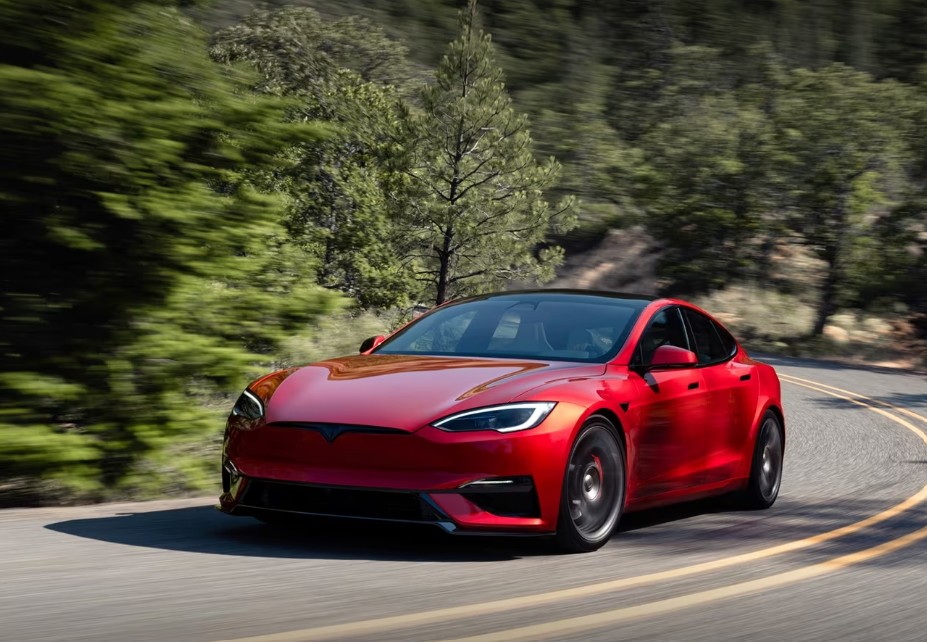
The Tesla Model S feels less like a traditional car and more like a rolling computer on wheels. That sleek silence, minimalist cabin, and absence of a roaring engine can make even seasoned drivers pause and ask a surprisingly simple question: How do we actually turn a Tesla Model S off?
Unlike conventional vehicles with ignition keys and engine shutdown buttons, the Model S approaches power management differently. In many cases, it turns itself on and off automatically. Yet there are moments when we may need to manually power it down, restart systems, or completely shut the car off for maintenance, troubleshooting, or storage.
If you’ve ever stepped out wondering whether the car was truly off—or found yourself hunting through menus trying to power it down—you’re not alone. Let’s unravel everything about turning off a Tesla Model S in the clearest, smartest, and most practical way possible.
Content in this publication
- Why Turning Off a Tesla Model S Feels Different
- Does the Tesla Model S Turn Off Automatically?
- How to Manually Turn Off a Tesla Model S
- When Should We Use the Manual Power Off Option?
- How Long Does It Take for the Tesla Model S to Turn Off?
- Can We Completely Shut Down Every Tesla System?
- How to Turn Off the Tesla Model S Screen
- What Happens If We Leave the Tesla Model S Running?
- How to Ensure the Tesla Model S Is Actually Off
- Does Sentry Mode Prevent the Car From Turning Off?
- How to Turn Off Climate Control in a Tesla Model S
- What Is Camp Mode and Why Does the Car Stay On?
- Can We Turn Off a Tesla Model S Without the Screen?
- How Tesla’s Automatic Sleep Mode Works
- How Much Battery Does a Parked Tesla Model S Lose?
- How to Minimize Battery Drain When the Tesla Is Off
- Can We Turn Off Tesla Model S Completely for Long-Term Storage?
- How to Reboot the Tesla Model S Properly
- Common Mistakes Owners Make When Turning Off a Tesla Model S
- How Tesla Changed the Idea of “Turning Off a Car”
- Is It Safe to Leave a Tesla Model S On Overnight?
- Tesla Model S Power Management Explained Simply
- Final Thoughts on How to Turn Tesla Model S Off
- FAQs
Why Turning Off a Tesla Model S Feels Different
Traditional gasoline cars announce their status loudly. Engines rumble. Exhaust pipes vibrate. Dashboard lights flash.
A Tesla? It whispers.
Because the Model S runs entirely on electricity, there’s no engine noise signaling whether the car is active or inactive. Instead, Tesla designed the vehicle to intelligently manage power automatically.
That means:
- The car wakes up when we approach
- It powers down when we leave
- Many systems stay semi-active in the background
- There’s no traditional “off” button like older cars
This futuristic simplicity is convenient—but it can also confuse first-time owners.
Does the Tesla Model S Turn Off Automatically?
Yes, in most situations, the Model S shuts itself down automatically.
Once we:
- Park the car
- Shift into Park
- Exit the vehicle
- Close the door
- Walk away with the key card, phone key, or key fob
…the vehicle gradually powers down non-essential systems.
Think of it like a smartphone entering sleep mode rather than a laptop fully shutting down.
The car remains intelligent enough to:
- Monitor battery systems
- Stay connected to the network
- Run security functions
- Enable Sentry Mode if activated
- Precondition temperature settings when needed
So while the car appears “off,” parts of it are always quietly awake beneath the surface.
How to Manually Turn Off a Tesla Model S
Sometimes we may want a complete manual shutdown. Tesla includes this feature inside the touchscreen settings.
Steps to Turn Off the Tesla Model S
- Sit in the vehicle
- Shift into Park
- Tap Controls on the touchscreen
- Navigate to Safety
- Scroll down
- Tap Power Off
After tapping Power Off:
- The screen goes dark
- Climate systems stop
- Electronics power down
- The vehicle becomes inactive
However, Tesla notes something important: pressing the brake pedal, touching the screen, or opening a door can wake the car back up instantly.
It’s like putting a sleeping dragon to rest—quiet, but never fully gone.
When Should We Use the Manual Power Off Option?
Most owners rarely need it. But there are situations where manually shutting down the car is useful.
Common Reasons to Turn Off the Model S
Troubleshooting Software Issues
If the touchscreen freezes or behaves oddly, powering down can reset temporary glitches.
Before Maintenance Work
Technicians may recommend shutting down the vehicle before repairs or inspections.
Reducing Battery Drain During Storage
Although Teslas manage energy well, manually powering off systems can help during extended parking periods.
Resetting Vehicle Electronics
Sometimes a shutdown acts like rebooting a computer after it becomes sluggish.
How Long Does It Take for the Tesla Model S to Turn Off?
The process usually takes less than two minutes.
Once the Power Off command is activated:
- Cabin systems deactivate quickly
- Screens fade to black
- Internal electronics enter low-power mode
Still, certain background operations may continue silently for battery management and security purposes.
Can We Completely Shut Down Every Tesla System?
Not entirely.
Tesla vehicles are designed to maintain limited activity even when “off.” Some systems remain operational to preserve battery health and maintain connectivity.
Systems That May Still Run
- Battery thermal management
- Cellular connection
- Security monitoring
- Over-the-air update readiness
- Sentry Mode (if enabled)
This continuous awareness is part of Tesla’s smart ecosystem. The car behaves more like a living digital platform than a dormant machine.
How to Turn Off the Tesla Model S Screen
Sometimes the issue isn’t the whole car—we simply want the screen off.
To Restart or Blank the Screen
We can reboot the touchscreen by:
- Holding both steering wheel scroll buttons
- Waiting until the Tesla logo appears
This restarts the display without shutting down the vehicle completely.
You may be interested in reading Ford Mustang Mach-E Reliability
It’s similar to restarting a tablet while keeping the car operational.
What Happens If We Leave the Tesla Model S Running?
Technically, Teslas don’t “idle” like gas cars. Since there’s no combustion engine, energy use while stationary is much lower.
Still, leaving systems active for long periods can slowly drain battery charge.
Features That Consume Power While Parked
- Climate control
- Cabin overheat protection
- Sentry Mode
- Streaming apps
- Software connectivity
If these features remain enabled, battery loss becomes noticeable over time.
How to Ensure the Tesla Model S Is Actually Off
Many owners feel uncertain after exiting the car because there’s no engine sound confirming shutdown.
Here’s how to check.
Signs the Tesla Model S Is Off
- Touchscreen turns black
- Exterior lights switch off
- Climate fan stops
- Mirrors fold inward (if enabled)
- Doors lock automatically
- No cabin sounds remain
The Tesla mobile app can also confirm whether the vehicle is asleep or active.
Does Sentry Mode Prevent the Car From Turning Off?
Yes, partially.
How Sentry Mode Changes Power Usage
When Sentry Mode is active, the vehicle remains semi-awake to:
- Monitor surroundings
- Record suspicious activity
- Activate security alerts
This increases battery consumption because cameras and processors remain operational.
If we want maximum shutdown efficiency, disabling Sentry Mode helps.
How to Turn Off Climate Control in a Tesla Model S
Climate systems can continue operating after parking if settings allow it.
To Disable Climate Control
- Open the climate menu
- Turn off HVAC manually
- Disable Dog Mode or Camp Mode if active
Otherwise, the cabin may continue cooling or heating after we leave.
What Is Camp Mode and Why Does the Car Stay On?
Camp Mode intentionally keeps the Tesla awake.
Features Enabled During Camp Mode
- Air conditioning
- Music playback
- Interior lighting
- USB charging
- Touchscreen activity
This feature transforms the Model S into a temporary living space. It’s fantastic for road trips but definitely prevents the car from fully powering down.
Can We Turn Off a Tesla Model S Without the Screen?
Yes, but options become limited.
If the screen is frozen:
Use a Soft Reboot
Hold both steering wheel scroll wheels until the display restarts.
If the issue persists:
- Exit the car
- Lock it
- Walk away for several minutes
- Allow the vehicle to sleep naturally
In severe cases, Tesla Service may be required.
How Tesla’s Automatic Sleep Mode Works
Tesla’s sleep mode is remarkably sophisticated.
Instead of shutting everything off abruptly, the car gradually powers down unused systems to conserve energy intelligently.
During Sleep Mode the Vehicle:
- Reduces processor activity
- Minimizes battery draw
- Disables unnecessary electronics
- Maintains essential monitoring
This balance allows the vehicle to remain ready while preserving range.
It’s like a hibernating bear—resting deeply but ready to wake instantly.
How Much Battery Does a Parked Tesla Model S Lose?
Battery drain varies depending on settings and conditions.
Typical Daily Battery Loss
- Sleep mode only: 1–2%
- Sentry Mode active: 5–10%
- Extreme temperatures: potentially more
Cold weather especially increases energy usage because the battery management system regulates temperature continuously.
How to Minimize Battery Drain When the Tesla Is Off
If storing the car for days or weeks, optimization matters.
Best Practices for Reducing Battery Loss
Disable Sentry Mode
This is often the biggest energy saver.
Turn Off Cabin Overheat Protection
Helpful in hot climates, but power-hungry.
Avoid Constant App Checks
Opening the Tesla app repeatedly wakes the car.
Store the Vehicle in Moderate Temperatures
Extreme heat or cold increases battery management activity.
Keep Charge Between 50% and 80%
Ideal for long-term battery health.
You may be interested in readingFord Mustang Mach-E ReliabilityYou may be interested in reading
Ford Mustang Mach-E Insurance CostCan We Turn Off Tesla Model S Completely for Long-Term Storage?
Tesla doesn’t recommend fully disconnecting the vehicle unless specifically instructed.
For long-term storage:
- Keep the car plugged in when possible
- Leave charge levels moderate
- Allow battery management systems to operate
Unlike old cars, Teslas prefer controlled inactivity over complete shutdown.
How to Reboot the Tesla Model S Properly
Sometimes we don’t need a full shutdown—just a restart.
Soft Reboot
Hold both steering wheel scroll wheels.
Harder Reboot
In some versions:
- Hold both scroll wheels
- Press brake pedal simultaneously
- Wait for restart
This can resolve:
- Frozen screens
- Bluetooth issues
- Navigation glitches
- Audio problems
Common Mistakes Owners Make When Turning Off a Tesla Model S
Tesla ownership comes with a learning curve.
Mistake #1: Assuming the Car Never Turns Off
It does—it simply manages power differently.
Mistake #2: Leaving Features Running
Climate settings and Sentry Mode quietly consume energy.
Mistake #3: Constantly Checking the App
Every app wake-up interrupts sleep mode.
Mistake #4: Confusing Screen Activity With Full Vehicle Operation
The screen may sleep while some systems remain active.
How Tesla Changed the Idea of “Turning Off a Car”
Tesla reimagined the driving experience entirely.
In older vehicles, shutting down meant killing the engine completely. In the Model S, “off” is more fluid and intelligent.
The car behaves less like machinery and more like technology:
- Always connected
- Continuously updating
- Instantly responsive
- Smart about energy use
That’s why the traditional concept of turning a car off doesn’t perfectly apply anymore.
And honestly? Once we get used to it, going back to ignition keys feels almost prehistoric.
Is It Safe to Leave a Tesla Model S On Overnight?
Generally, yes.
Tesla vehicles are designed to manage themselves efficiently. However, overnight energy usage depends heavily on active features.
If Left Overnight With:
- Sentry Mode ON → higher battery drain
- Climate ON → moderate drain
- Everything OFF → minimal drain
For everyday overnight parking, the car handles itself beautifully.
Tesla Model S Power Management Explained Simply
If we had to summarize Tesla’s shutdown logic in one sentence, it would be this:
The car powers down what it doesn’t need while keeping essential systems intelligently awake.
That’s the secret.
Instead of acting like a dead machine waiting for ignition, the Model S behaves like a smart device conserving energy dynamically.
Final Thoughts on How to Turn Tesla Model S Off
Learning how to turn off a Tesla Model S is less about pressing a button and more about understanding Tesla’s philosophy.
The vehicle is designed to simplify ownership:
- Walk away, and it sleeps
- Return, and it wakes
- Minimal effort required
Yet Tesla still provides manual controls when needed for maintenance, troubleshooting, or storage.
Once we understand this ecosystem, the confusion fades quickly. The Model S stops feeling strange and starts feeling brilliantly intuitive—like stepping into the future one silent mile at a time.
FAQs
Does the Tesla Model S automatically turn off?
Yes. The car automatically powers down when parked, locked, and left alone with the key no longer nearby.
Go to Controls > Safety > Power Off on the touchscreen.
Can I completely shut down my Tesla Model S?
Not fully. Some background systems remain active for battery management and connectivity.
Why is my Tesla still making noise after turning off?
Cooling fans and battery thermal systems may continue running temporarily after shutdown.
You may be interested in readingFord Mustang Mach-E ReliabilityYou may be interested in reading
Ford Mustang Mach-E Insurance CostYou may be interested in reading
Ford Mustang Mach-E Maintenance ScheduleDoes Sentry Mode keep the Tesla awake?
Yes. Sentry Mode prevents full sleep because cameras and security monitoring stay active.
If you want to know other articles similar to How to Turn Tesla Model S Off you can visit the category Blog.
Dacia Jogger Reliability: Is This Budget Family Car Built to Last?
Is Vauxhall Meriva a Good Car? An Honest Used-Car Guide
Are Vauxhall Meriva Reliable? A Complete Used-Car Guide
Vauxhall Meriva Insurance Group UK: Costs, Ratings and Savings

Is Hyundai i40 a Good Car? An Honest Used-Car Review
Hyundai i40 Years to Avoid: The Complete Used-Car Guide
Leave a Reply
More content of your interest