

Vauxhall Insignia Parking Sensors Not Working: Causes, Fixes, and Prevention Guide

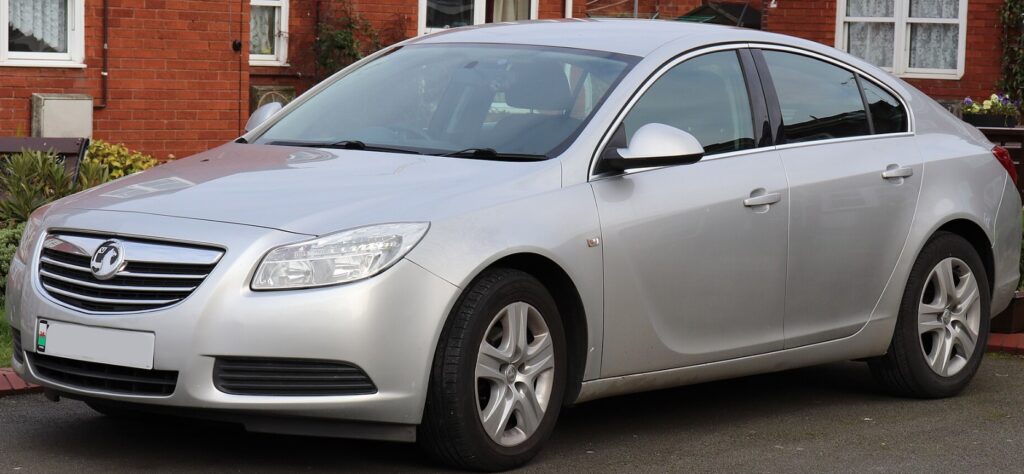
Parking sensors are one of those features we barely notice until they stop working. The moment your Vauxhall Insignia parking sensors not working warning appears, reversing into a tight parking space suddenly feels much more stressful. Fortunately, most parking sensor faults are easier to diagnose than many drivers expect. Whether your system has stopped beeping, displays a parking assist error, or works only intermittently, understanding the possible causes can save you both time and money.
In this guide, we'll explore the most common reasons why parking sensors fail, how to troubleshoot them step by step, and when it's worth replacing a faulty sensor instead of paying for expensive diagnostic work.
Content in this publication
- How Do Vauxhall Insignia Parking Sensors Work?
- Common Signs Your Parking Sensors Are Faulty
- Dirty Sensors: The Simplest Cause
- A Blown Fuse Can Disable Everything
- Faulty Parking Sensors Are Extremely Common
- How to Test Each Sensor at Home
- Broken Wiring Is More Common Than You Think
- Water Damage Inside the Connectors
- Parking Control Module Problems
- Can Cold Weather Affect Parking Sensors?
- Can a Flat Battery Cause Parking Sensor Problems?
- When Diagnostic Scanning Becomes Necessary
- Should You Replace One Sensor or All of Them?
- Tips to Prevent Future Parking Sensor Problems
How Do Vauxhall Insignia Parking Sensors Work?
The Vauxhall Insignia uses ultrasonic parking sensors mounted inside the front and rear bumpers. These sensors emit high-frequency sound waves that bounce off nearby objects. The control module calculates the distance based on the time it takes for those sound waves to return.
When you reverse—or activate the front parking sensors at low speed—the system continuously measures distances around the vehicle. As obstacles get closer, the warning beeps become faster until they turn into a continuous tone indicating immediate danger.
It sounds simple, but the entire system relies on multiple components working together:
- Ultrasonic sensors
- Parking aid control module
- Wiring harnesses
- Fuse protection
- Reverse gear signal
- Dashboard display and speaker
A fault anywhere in this chain can disable the entire system.
Common Signs Your Parking Sensors Are Faulty
Before jumping into repairs, it's important to identify the symptoms.
Some of the most common include:
- No beep when selecting reverse
- Continuous warning tone immediately after engaging reverse
- Parking assist unavailable message
- Parking sensor fault warning on the dashboard
- Sensors working only occasionally
- Front sensors functioning while rear sensors don't
- One sensor constantly clicking louder than others
- Parking camera works but sensors do not
Sometimes the system may activate for only a few seconds before switching itself off, indicating that the control module has detected an electrical fault and disabled the system to prevent false readings.
Dirty Sensors: The Simplest Cause
Believe it or not, dirt causes thousands of unnecessary workshop visits every year.
Road salt, mud, wax, snow, ice, and even heavy rain can interfere with ultrasonic waves. Since the sensors rely on clean surfaces to transmit sound, even a thin layer of grime can reduce performance.
Cleaning them properly is easy:
- Wash the bumper with warm water.
- Use automotive shampoo.
- Avoid abrasive brushes.
- Dry each sensor carefully.
- Remove any wax buildup around the sensor edge.
If the system begins working immediately afterward, you've solved the problem without spending a penny.
A Blown Fuse Can Disable Everything
Many owners overlook the fuse box.
A single blown fuse may disable every parking sensor simultaneously. Because of this, checking the fuse should always be one of the first troubleshooting steps.
Inspect:
- Dashboard fuse box
- Engine bay fuse panel
- Owner's manual for fuse location
- Fuse condition using a tester rather than visual inspection
Replacing an inexpensive fuse has resolved parking sensor failures for some Insignia owners, making it one of the quickest and cheapest fixes to try before replacing components.
Faulty Parking Sensors Are Extremely Common
Each sensor contains delicate ultrasonic electronics exposed to:
- Water
- Road vibration
- Heat
- Freezing temperatures
- Pressure washing
- Stone impacts
Eventually one sensor may fail internally.
Interestingly, one defective sensor can often disable the entire parking assist system.
Typical signs include:
- One sensor feels silent.
- One sensor clicks differently.
- Random warning messages.
- Intermittent operation.
Fortunately, replacement sensors are widely available and are generally inexpensive compared with replacing the complete system.
How to Test Each Sensor at Home
You don't need expensive equipment for a basic inspection.
One popular method is the "click test."
Turn on the ignition without starting the engine.
Select reverse gear while keeping the handbrake engaged.
Place your fingertip lightly on each parking sensor.
A healthy ultrasonic sensor produces tiny vibrations or faint clicking sounds.
Compare every sensor.
If one remains completely silent while the others click normally, you've likely identified the faulty unit.
Although this method isn't perfect, it's surprisingly effective as a first diagnostic step.
Broken Wiring Is More Common Than You Think
The sensors themselves often receive the blame, but damaged wiring is another frequent culprit.
The rear bumper experiences:
- Water spray
- Road debris
- Salt corrosion
- Minor parking impacts
- Flexing from temperature changes
Over time wiring insulation may crack, allowing moisture into the connectors.
Signs of wiring problems include:
- Intermittent faults
- System working only in dry weather
- Fault appearing after heavy rain
- Multiple sensors failing together
Inspect visible wiring carefully whenever the bumper is removed.
Water Damage Inside the Connectors
Moisture and electrical systems rarely mix well.
Connector corrosion increases electrical resistance, preventing the sensor from communicating correctly with the parking module.
Green or white corrosion around connector pins is a strong indication that cleaning or replacing the connector may restore proper operation.
Using dielectric grease during reassembly can help protect the electrical contacts from future moisture intrusion.
Parking Control Module Problems
Although less common than sensor failures, the parking control module itself can develop faults.
Possible symptoms include:
- Entire system offline
- Multiple sensor communication errors
- Diagnostic trouble codes
- Parking assist unavailable warning
- Sensors testing good individually
Module replacement should generally be considered only after eliminating simpler causes first.
Can Cold Weather Affect Parking Sensors?
Absolutely.
Extreme winter conditions may temporarily interfere with ultrasonic performance.
Common winter issues include:
- Ice covering sensors
- Frozen moisture
- Heavy snow accumulation
- Condensation
- Battery voltage dropping in cold temperatures
Many drivers notice their parking sensors return to normal once the weather improves.
Can a Flat Battery Cause Parking Sensor Problems?
Yes.
Modern vehicles rely heavily on stable voltage.
A weak battery may produce unexpected electrical faults affecting comfort systems like parking sensors.
If your Insignia has recently experienced:
- Slow engine cranking
- Battery replacement
- Low-voltage warnings
- Multiple electrical errors
testing the battery should be part of the diagnosis.
Sometimes the parking system is simply reacting to unstable electrical supply rather than suffering a component failure.
When Diagnostic Scanning Becomes Necessary
Basic inspections solve many parking sensor problems, but not all.
If cleaning, fuse inspection, battery testing, and visual wiring checks fail to restore operation, using an OBD diagnostic scanner capable of reading body control modules becomes the next logical step.
Diagnostic equipment can identify:
- Failed sensor location
- Communication faults
- Wiring issues
- Module failures
- Voltage abnormalities
This saves replacing perfectly good components by guesswork.
Should You Replace One Sensor or All of Them?
In most situations, replacing only the failed sensor is sufficient.
Unlike some wear items, parking sensors don't usually require replacement as a complete set.
However, if:
- several sensors have already failed,
- the vehicle has very high mileage,
- or bumper removal is particularly labor-intensive,
replacing multiple aging sensors at once may reduce future repair costs.
Always use quality replacement parts that match the original specifications to ensure accurate ultrasonic performance.
Tips to Prevent Future Parking Sensor Problems
While no electronic component lasts forever, proper care can significantly extend the life of your parking assist system.
Follow these habits:
- Wash sensors regularly, especially during winter.
- Avoid directing high-pressure washers directly at the sensors.
- Repair minor bumper damage promptly.
- Keep electrical connectors dry during repairs.
- Replace damaged clips that allow wiring to move excessively.
- Check battery health annually.
- Address warning messages early instead of waiting for complete failure.
Think of the parking sensor system as another set of eyes. Like any helpful companion, it performs best when it's kept clean, protected, and given a little attention before small issues become expensive repairs.
If you want to know other articles similar to Vauxhall Insignia Parking Sensors Not Working: Causes, Fixes, and Prevention Guide you can visit the category Common Problems.
Toyota Corolla Cross Issues: Common Problems and Fixes

MG HS Problems: Common Faults, Reliability and Years to Avoid (2019–2026)
Toyota Yaris Cross Battery Problems: Causes & Fixes

Volvo XC40 Sound Not Working? Complete Troubleshooting Guide

Mazda Diesel Engine Problems: Common Faults and Fixes
Volkswagen Key Not Detected or No Key Error: Causes and Fixes
Leave a Reply
More content of your interest