

Dacia Jogger Warning Lights: Meanings, Causes, and Actions

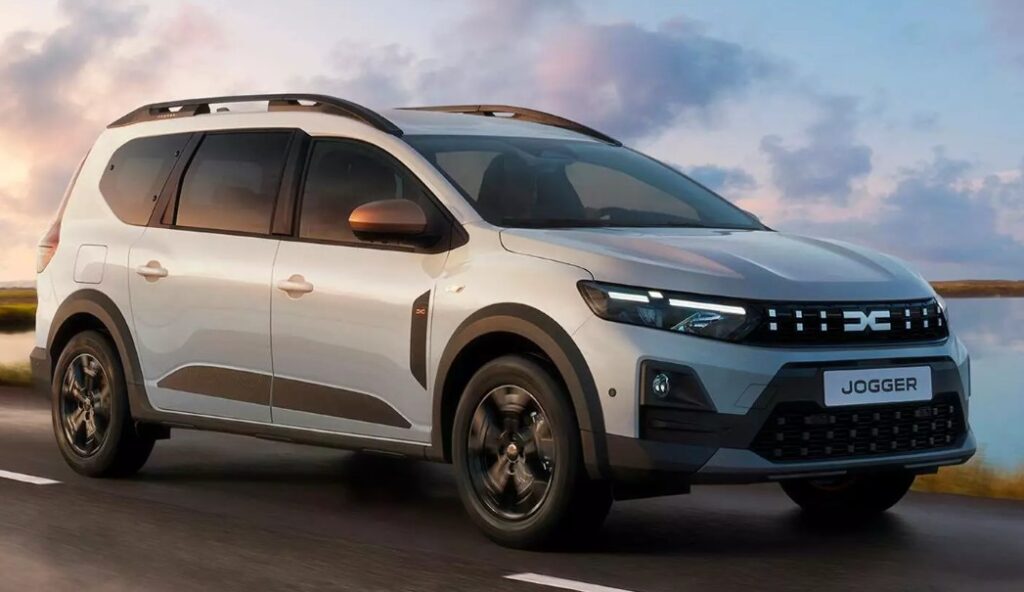
The Dacia Jogger warning lights can turn an ordinary drive into a tense guessing game. One moment, everything feels normal. The next, an unfamiliar symbol appears on the dashboard—perhaps glowing amber, flashing red, or accompanied by a warning message and an urgent beep.
Should we pull over immediately? Can we continue driving? Is it simply reminding us to fasten a seat belt, or is the engine quietly asking for help?
The answer depends on the symbol, its colour, whether it remains illuminated, and how the vehicle behaves. Dacia explains that dashboard indicators may illuminate steadily or flash, appear with an instrument-panel message, and sometimes trigger an audible warning. They may identify a fault or simply confirm that a feature is active, inactive, or on standby.
In this guide, we will decode the most important Dacia Jogger dashboard symbols, explain what usually causes them, and help us decide what to do next without panicking or ignoring a potentially serious problem.
Content in this publication
- Understanding Dacia Jogger Dashboard Warning Colours
- What to Do When a Warning Light Appears
- Dacia Jogger STOP Warning Light
- Engine Oil Pressure Warning Light
- Engine Coolant Temperature Warning Light
- Battery Charging Warning Light
- Brake System Warning Light
- ABS Warning Light
- Electronic Stability Control and Traction Control Light
- Engine Management Warning Light
- Service or Spanner Warning Light
- Tyre Pressure Warning Light
- Airbag Warning Light
- Seat-Belt Warning Light
- Power Steering Warning Light
- Fuel Level Warning Light
- Door, Bonnet, or Tailgate Open Warning
- Diesel Preheating Warning Light
- Diesel Particulate Filter Warning Light
- AdBlue or Exhaust Emissions Warning
- Hill Start Assist Warning
- Active Emergency Braking Warning
- Lane Departure and Road-Sign Recognition Indicators
- Blind-Spot Warning Light
- Hybrid System Warning Lights
- LPG Warning Lights on Bi-Fuel Versions
- Speed Limiter and Cruise Control Lights
- Eco Mode Indicator
- Why Several Warning Lights May Appear Together
- Can Disconnecting the Battery Reset Warning Lights?
- Warning Lights After a Flat Battery or Jump Start
- When Is It Safe to Continue Driving?
- How Mechanics Diagnose Dacia Jogger Warning Lights
- How to Reduce Future Dashboard Warnings
- Final Thoughts on Dacia Jogger Warning Lights
- Frequently Asked Questions
- 1. What does the orange warning light mean on a Dacia Jogger?
- 2. Can I drive my Dacia Jogger with the engine warning light on?
- 3. Why are several dashboard lights showing after changing the battery?
- 4. How do I reset the tyre-pressure warning on a Dacia Jogger?
- 5. What is the most serious Dacia Jogger dashboard warning?
Understanding Dacia Jogger Dashboard Warning Colours
Before examining individual lights, we need to understand the dashboard’s colour language. Think of it like a traffic-light system inside the car.
Red Warning Lights: Stop and Investigate
A red warning light normally points to an urgent safety or mechanical issue. It may involve:
- Low engine oil pressure
- Excessive engine temperature
- A serious braking-system problem
- Battery charging failure
- An unfastened seat belt
- A major electrical or hybrid-system fault
Some red lights are reminders rather than breakdown warnings. The seat-belt symbol, for example, does not mean the engine is failing. However, when a red mechanical warning appears while driving, we should find a safe place to stop as soon as conditions allow.
Never keep driving simply because the car still moves. An engine with no oil pressure may continue running briefly, just as a person can keep walking after an injury. That does not mean continuing is safe.
Amber or Yellow Warning Lights: Check Soon
Amber lights usually mean caution rather than immediate danger. They often indicate that:
- A system has detected a fault
- A driver-assistance feature is unavailable
- A tyre has lost pressure
- The engine-management system needs attention
- Electronic stability control has intervened
- Maintenance is due
We may be able to continue driving carefully, but the issue should not be forgotten. An amber warning is the dashboard’s way of tapping us on the shoulder.
Green, Blue, and White Indicator Lights
Green, blue, or white lights normally confirm that a function is operating. Examples include:
- Dipped headlights
- Main-beam headlights
- Direction indicators
- Cruise control
- Speed limiter
- Electric driving mode
- Eco mode
These lights generally provide information rather than warn of a malfunction.
What to Do When a Warning Light Appears
When an unfamiliar symbol appears, use a calm and structured approach.
- Look at the colour. Red usually demands faster action than amber.
- Check whether it is flashing. A flashing warning is often more urgent than a steady one.
- Read the dashboard message. The Jogger may display instructions such as “Check injection,” “Stop,” or “Check tyre pressure.”
- Listen for warning sounds. Repeated beeps can indicate greater urgency.
- Notice how the vehicle feels. Loss of power, smoke, unusual smells, steering changes, or abnormal noises make the situation more serious.
- Stop safely when necessary. Do not switch lanes abruptly or brake hard simply because a warning appears.
- Consult the correct handbook. Equipment and symbols can vary by model year, trim, engine, and market.
Dacia also provides model-specific handbooks and tutorial material, while noting that features may differ between individual Jogger versions.
Dacia Jogger STOP Warning Light
The red STOP light is among the most serious indicators on the dashboard. It usually appears with another warning light or a message explaining the underlying problem.
Possible accompanying faults include:
- Low engine oil pressure
- Engine overheating
- Brake-system failure
- Serious electrical failure
- Steering assistance failure
- Hybrid-system malfunction
What Should We Do?
Reduce speed smoothly, avoid sharp manoeuvres, and stop somewhere safe. Switch off the engine unless the dashboard gives different instructions.
Do not restart repeatedly in the hope that the warning will disappear. A temporary disappearance does not prove that the fault has repaired itself.
Professional inspection or roadside recovery may be necessary.
Engine Oil Pressure Warning Light
The oil-pressure symbol normally resembles an oil can. It should illuminate briefly when the ignition is switched on and go out after the engine starts.
If it remains on or appears while driving, the engine may not be receiving adequate lubrication.
Common Causes of the Oil Warning Light
Possible causes include:
- Low engine-oil level
- Incorrect oil viscosity
- Oil-pump failure
- Blocked oil filter or pickup
- Internal engine wear
- Faulty oil-pressure sensor
- Damaged wiring
Can We Keep Driving?
No—not until the cause has been assessed.
Stop the engine as soon as it is safe. After waiting for the oil to settle and the engine to cool, check the level on flat ground. Add the correct oil only when necessary and only to the recommended level.
If the level is normal but the warning remains illuminated, do not assume the sensor is faulty. Low pressure can damage bearings, the turbocharger, camshafts, and other internal components within a short distance.
Engine Coolant Temperature Warning Light
The coolant-temperature warning usually resembles a thermometer above waves. It indicates that the engine may be overheating.
Why Might a Dacia Jogger Overheat?
Common possibilities include:
- Low coolant level
- Coolant leak
- Faulty thermostat
- Cooling-fan failure
- Damaged radiator
- Failed water pump
- Air trapped in the cooling system
- Heavy loading in extreme conditions
Immediate Response
Turn off the air conditioning, reduce engine load, and stop safely. If steam is visible, keep away from the bonnet until the engine has cooled.
Never remove the expansion-tank cap while the system is hot. Pressurised coolant can escape violently and cause severe burns.
Once the engine is cold, the coolant level can be checked. Repeated overheating requires diagnosis even if topping up the coolant makes the light disappear.
Battery Charging Warning Light
The battery-shaped symbol does not always mean the battery itself is defective. It usually indicates that the 12-volt charging system is no longer working correctly.
Possible Causes
- Alternator failure
- Loose or damaged auxiliary belt
- Weak battery
- Corroded terminals
- Charging-control fault
- Broken electrical connection
What Happens If We Continue?
The vehicle may keep running temporarily using stored battery power. However, once that energy is exhausted, lights, steering assistance, electronic systems, and eventually the engine may stop working.
Switch off unnecessary electrical equipment and drive only as far as needed to reach a safe location—provided there are no other red warnings, burning smells, or steering problems.
If the temperature warning also appears, stop immediately because a failed belt may have affected both the alternator and the cooling system.
Brake System Warning Light
The red brake warning symbol may appear when the parking brake is applied. If it stays on after the parking brake is fully released, the braking system may have a fault.
Potential reasons include:
- Low brake-fluid level
- Worn brake pads
- Hydraulic leak
- Parking-brake switch problem
- Electronic brake-system malfunction
- General braking-system failure
Dacia identifies an illuminated brake warning, a soft pedal, increased stopping distance, vibration, or pulling during braking as signs that the system needs attention.
How Serious Is It?
Very serious if the pedal feels soft, travels unusually far, or braking performance has changed.
Stop safely and arrange recovery. Brakes are not an area where we should gamble. A car that accelerates poorly is inconvenient; a car that cannot stop properly is dangerous.
ABS Warning Light
The amber ABS light refers to the anti-lock braking system.
When ABS works correctly, it helps prevent the wheels from locking during heavy braking. If the ABS light remains on, conventional braking may still function, but anti-lock assistance could be unavailable.
Common ABS Faults
- Dirty or damaged wheel-speed sensor
- Cracked reluctor ring
- Damaged sensor wiring
- Low battery voltage
- ABS module fault
- Incorrect wheel or tyre installation
Drive cautiously and avoid sudden braking. If the ABS and red brake warnings appear together, stop driving and seek professional help because the wider braking system may be compromised.
Electronic Stability Control and Traction Control Light
The Electronic Stability Program, often shown as a car with wavy skid marks, helps maintain control when the wheels lose grip.
Flashing Stability-Control Light
A flashing light usually means the system is actively correcting wheelspin or instability. This may happen on:
- Wet roads
- Snow or ice
- Loose gravel
- Muddy surfaces
- Fast corners
- Sudden acceleration
Ease off the accelerator and steer smoothly.
Steady Stability-Control Light
A permanently illuminated symbol may mean the system has been switched off or has developed a fault.
Because stability control depends on information from wheel-speed, steering-angle, and yaw sensors, one sensor problem can trigger several dashboard warnings at once.
Engine Management Warning Light
The engine-management light, commonly called the check-engine light, resembles an engine outline.
It monitors systems connected with combustion, emissions, fuel delivery, ignition, and electronic engine control.
Steady Engine Warning Light
A steady amber light may result from:
- Faulty oxygen sensor
- Ignition misfire
- Loose fuel cap on applicable versions
- Fuel-injection problem
- Turbocharger control fault
- Emissions-system malfunction
- Sensor or wiring issue
The Jogger may still drive normally, but the fault should be scanned soon.
Flashing Engine Warning Light
A flashing engine light is more urgent. It may indicate a severe misfire that can overheat and damage the catalytic converter.
Reduce speed, avoid hard acceleration, and stop if the engine shakes, loses power, smells strongly of fuel, or produces unusual noises.
Service or Spanner Warning Light
The spanner symbol can indicate scheduled maintenance or a non-critical operating fault.
It may appear with messages relating to:
- Oil-change interval
- General service requirement
- Electronic fault
- Emissions issue
- Sensor malfunction
- Driver-assistance system
- Tyre-pressure system
A service light does not automatically mean the car is unsafe. However, ignoring it for months is like leaving an unread letter from the bank—we may avoid the message, but the underlying matter remains.
Check the accompanying text and arrange maintenance when appropriate.
Tyre Pressure Warning Light
The tyre-pressure monitoring symbol resembles a horseshoe-shaped tyre containing an exclamation mark.
It may indicate:
- One or more underinflated tyres
- A rapid puncture
- A damaged wheel
- Incorrect tyre pressures after servicing
- A pressure-monitoring reset requirement
- A sensor or system fault
Dacia’s Media Control guidance distinguishes between an orange tyre alert for underinflation and a red alert for a flat tyre.
What Should We Do?
Slow down and avoid sharp steering or heavy braking. Inspect all tyres when safe.
Check pressures while the tyres are cold and inflate them according to the vehicle’s recommended values, usually found on the door-frame label or in the handbook.
Do not inflate every tyre to the number printed on the tyre sidewall. That figure normally represents a maximum specification, not the vehicle’s recommended everyday pressure.
After correcting the pressure, the system may need to be reset through the instrument-panel menu, depending on the Jogger version.
Airbag Warning Light
The airbag or Supplemental Restraint System light usually depicts a seated passenger with a circle in front.
It should illuminate briefly during the self-check and then switch off.
If it stays on, the vehicle may have detected a problem with:
- An airbag module
- Seat-belt pretensioner
- Occupancy sensor
- Under-seat wiring connector
- Steering-wheel clock spring
- Crash sensor
- Restraint-control unit
The car may remain driveable, but one or more airbags or pretensioners might not operate correctly in a collision.
Do not probe airbag connectors with ordinary test equipment. These are pyrotechnic safety devices and should be examined by a qualified technician.
Seat-Belt Warning Light
The red seat-belt reminder appears when an occupied seat has an unfastened belt. It may be accompanied by increasingly persistent beeps as the vehicle moves.
Depending on the Jogger’s equipment, the display may identify individual occupied seats. Dacia documentation describes green indicators for fastened belts, red indicators for occupied seats with unfastened belts, and grey indicators for unoccupied seats.
Bags, shopping, or heavy items placed on a passenger seat may activate the occupancy sensor. Move the object to the floor or luggage area rather than fastening the belt around loose cargo.
Power Steering Warning Light
A steering-wheel symbol may indicate reduced or failed steering assistance.
Possible causes include:
- Low 12-volt battery voltage
- Charging-system problem
- Steering-angle sensor fault
- Electric power-steering motor fault
- Control-module malfunction
- Damaged wiring
The steering wheel may become noticeably heavier, especially at low speeds.
If steering assistance disappears, hold the wheel firmly, avoid abrupt turns, and stop safely. Do not continue through busy traffic if steering requires excessive effort.
Fuel Level Warning Light
The low-fuel symbol resembles a petrol pump. It normally means that only a limited driving range remains.
The distance available varies with:
- Driving speed
- Road gradient
- Traffic
- Vehicle load
- Weather
- Engine choice
- Heating or air-conditioning use
Treat the estimated range as guidance, not a promise. Refuel promptly, particularly before motorway journeys or travel through isolated areas.
Frequently running the tank extremely low can also increase the risk of drawing contamination toward the fuel system.
Door, Bonnet, or Tailgate Open Warning
This indicator means that an opening may not be properly secured.
Before driving, check:
- Front doors
- Rear doors
- Tailgate
- Bonnet, where monitored
A door may appear closed while remaining on the first latch. Dirt, ice, misaligned catches, or a faulty microswitch can also trigger the warning.
The Jogger’s large tailgate deserves particular attention. Loose luggage pressing against it may prevent proper closure.
Diesel Preheating Warning Light
On diesel versions, the coil-shaped glow-plug light should appear when the ignition is switched on, particularly during a cold start.
Wait for it to go out before starting the engine. Dacia’s guidance for key-start diesel vehicles instructs drivers to hold the ignition in the “On” position until the preheating light extinguishes before starting.
What If the Glow-Plug Light Flashes?
A flashing or persistent light after starting may indicate:
- Glow-plug failure
- Injection-system fault
- Engine-management problem
- Emissions fault
- Electrical issue
The engine may become difficult to start, run unevenly, or enter reduced-power mode.
Diesel Particulate Filter Warning Light
Diesel Jogger models may display a warning when soot accumulates in the diesel particulate filter, commonly called the DPF.
Short journeys can prevent the exhaust from reaching the temperature needed for regeneration.
Typical DPF Symptoms
- Amber filter warning
- Increased fuel consumption
- Higher idle speed
- Cooling fan operating after shutdown
- Reduced engine performance
- Stronger exhaust smell
When the handbook permits it and no red warning is present, a sustained drive at an appropriate speed may allow regeneration. However, do not attempt this if the engine is overheating, running badly, or displaying a STOP warning.
Repeated DPF warnings may be caused by more than driving style. Faulty sensors, injectors, thermostats, turbo components, or emissions hardware can prevent successful regeneration.
AdBlue or Exhaust Emissions Warning
Some diesel variants use an exhaust-gas reduction system requiring AdBlue, also known as diesel exhaust fluid.
A warning may indicate:
- Low AdBlue level
- Poor-quality or contaminated fluid
- Frozen or crystallised fluid
- Faulty injector or pump
- NOx sensor fault
- Exhaust-treatment system malfunction
Do not ignore countdown messages. Some systems may eventually prevent engine restarting after the remaining permitted distance reaches zero.
Use fluid that meets the required specification and avoid pouring it into the diesel tank. The two fillers serve completely different systems.
Hill Start Assist Warning
Hill start assist briefly holds brake pressure when we move away on an incline.
A warning or unavailable message may arise from:
- ABS fault
- Stability-control fault
- Brake-switch problem
- Low battery voltage
- Sensor error
The vehicle can often still be driven, but it may roll backwards more easily when starting on a hill.
Leave extra space and use the parking brake where necessary.
Active Emergency Braking Warning
The active emergency braking system can monitor the road ahead and warn of a potential collision. Depending on the situation and specification, it may also apply braking assistance.
A warning may mean the system is:
- Actively responding to a hazard
- Temporarily unavailable
- Switched off
- Obstructed by dirt, snow, rain, or condensation
- Affected by a camera or radar fault
- Unable to operate because of another system error
Clean the windscreen around the forward-facing camera and any relevant sensor areas. If the warning remains after restarting, arrange diagnosis.
Remember that driver-assistance technology is a safety net, not an invisible chauffeur. We remain responsible for braking, steering, and observing the road.
Lane Departure and Road-Sign Recognition Indicators
Depending on trim and model year, the Dacia Jogger may include lane-departure warning, lane-keeping assistance, or traffic-sign recognition.
Road-sign recognition uses a windscreen-mounted camera and, in some markets, mapping data to display detected speed limits.
These systems may become temporarily unavailable because of:
- Dirty windscreen
- Heavy rain
- Fog
- Snow
- Strong glare
- Worn road markings
- Roadworks
- Camera calibration issues
An unavailable message does not necessarily indicate a permanent defect. Clean the relevant area and monitor the system. Persistent warnings require inspection.
Blind-Spot Warning Light
On suitably equipped versions, a light in or near the door mirror indicates a vehicle in the blind-spot detection area. The indicator may flash when we operate the turn signal toward the detected vehicle.
This is normally an operational alert, not a fault.
A separate dashboard message may appear if the system is obstructed or unavailable. Mud, water, snow, bumper damage, or sensor misalignment can interfere with detection.
Always check mirrors and look over the shoulder before changing lanes. The warning system may not detect every motorcycle, bicycle, fast-approaching car, or unusually positioned vehicle.
Hybrid System Warning Lights
The Dacia Jogger Hybrid adds indicators that do not appear on conventional petrol or LPG versions.
READY Indicator
The READY light confirms that the hybrid system is switched on and the vehicle can move, even if the petrol engine is silent.
Never assume the car is off simply because we cannot hear an engine.
Electric Driving Mode Indicator
An electric-mode symbol may show that the Jogger is moving using electrical power.
This is informational rather than a fault warning.
Low Traction Battery Warning
Under demanding low-speed use, the traction battery may reach a low charge level. Dacia states that a yellow warning may appear and electric-motor performance can be limited until the battery recovers sufficient charge.
Drive more smoothly or stop safely in accordance with the dashboard instructions.
Hybrid System Fault
A red or amber hybrid warning may relate to:
- High-voltage battery
- Inverter
- Electric motor
- Cooling system
- Transmission
- Power electronics
- Hybrid-control software
Do not touch orange high-voltage cables or components. A serious hybrid warning requires trained professional assistance.
LPG Warning Lights on Bi-Fuel Versions
Some Jogger models use petrol and LPG.
The LPG display may show:
- Selected fuel mode
- LPG tank level
- Automatic changeover to petrol
- LPG system unavailable
- Injection fault
Automatic switching to petrol can occur when the LPG tank is empty, the engine is cold, or operating conditions are unsuitable.
A persistent LPG fault should be inspected by a technician familiar with factory-installed gas systems. Do not attempt to loosen LPG fittings or investigate leaks using a flame.
Speed Limiter and Cruise Control Lights
Cruise-control and speed-limiter indicators usually confirm that the feature is selected, active, or on standby.
A green symbol often indicates active operation, while another colour may indicate standby.
These systems can disengage when:
- We press the brake or clutch
- The stability-control system intervenes
- Vehicle speed drops outside the operating range
- A sensor fault occurs
- The driver cancels the function
An indicator changing state is not automatically a malfunction. Read the dashboard message before assuming something is wrong.
Eco Mode Indicator
Eco mode adjusts features such as throttle response and climate-control operation to support more economical driving.
The Eco light is informational. It does not indicate reduced engine health.
However, the vehicle may feel less responsive because acceleration is deliberately softened. Pressing the accelerator firmly can still provide additional performance when needed.
Why Several Warning Lights May Appear Together
Multiple warning lights do not always mean several unrelated parts have failed simultaneously.
Modern vehicles share information between control modules. One weak battery, damaged wheel-speed sensor, poor earth connection, or communication fault may trigger warnings for:
- ABS
- Stability control
- Hill start assist
- Tyre-pressure monitoring
- Cruise control
- Emergency braking
- Steering assistance
This is why diagnosis should begin with fault-code scanning, battery testing, and visual inspection rather than replacing parts based only on dashboard symbols.
Can Disconnecting the Battery Reset Warning Lights?
Disconnecting the battery may temporarily clear certain messages, but it is not a proper repair.
It may also:
- Erase stored settings
- Create additional low-voltage faults
- Require system relearning
- Affect windows, locks, or multimedia settings
- Hide useful diagnostic information
- Fail to clear permanent fault codes
A warning that disappears after power is removed can return as soon as the control unit detects the fault again.
Use a diagnostic scanner and repair the cause instead of treating the warning light like a stubborn notification we can swipe away.
Warning Lights After a Flat Battery or Jump Start
Low voltage can make the dashboard resemble a Christmas tree. ABS, steering, stability-control, tyre-pressure, and driver-assistance warnings may all appear after a weak battery or jump start.
Some lights may clear after:
- The battery is fully charged
- The engine is restarted
- The steering wheel is turned from lock to lock
- The vehicle is driven a short distance
- Sensors complete their self-checks
Persistent lights should be scanned. The battery, alternator, terminals, and earth connections should also be tested.
When Is It Safe to Continue Driving?
We can often continue carefully when:
- The warning is amber rather than red
- The vehicle drives normally
- There is no smoke, overheating, or burning smell
- Braking and steering feel normal
- The dashboard does not instruct us to stop
- The light concerns a non-essential assistance feature
We should stop immediately when:
- The STOP light appears
- Oil pressure is lost
- The engine overheats
- Braking performance changes
- Steering becomes dangerously heavy
- A red hybrid or electrical warning appears
- Smoke, steam, or a strong fuel smell is present
- The engine knocks, shakes violently, or loses most of its power
Safety should outrank convenience. Arriving late is better than turning a manageable warning into an expensive failure.
How Mechanics Diagnose Dacia Jogger Warning Lights
A proper diagnostic process may include:
Visual Inspection
The technician checks fluid levels, tyres, wiring, belts, connectors, leaks, and visible damage.
Battery and Charging Tests
Voltage problems can create misleading electronic faults, so the 12-volt system is often tested early.
Diagnostic Code Scan
A compatible scanner reads stored trouble codes from relevant control modules.
Live Data Analysis
Sensor readings can reveal whether a component is producing realistic information.
Mechanical Testing
Depending on the warning, the workshop may perform oil-pressure, cooling-system, brake-fluid, compression, emissions, or fuel-pressure tests.
Road Test
Some faults appear only while the vehicle is moving, accelerating, braking, or reaching operating temperature.
How to Reduce Future Dashboard Warnings
We cannot prevent every electronic or mechanical failure, but consistent maintenance lowers the risk.
- Check engine oil regularly.
- Maintain correct tyre pressures.
- Replace a weak battery before it causes repeated faults.
- Use the correct fuel, oil, coolant, and AdBlue.
- Do not ignore small fluid leaks.
- Keep cameras and sensor areas clean.
- Avoid fitting incorrect wheel and tyre combinations.
- Follow the recommended service schedule.
- Investigate unusual noises before warning lights appear.
- Check outstanding recalls using the vehicle identification number.
Dacia provides a VIN-based recall checker and advises owners to contact a retailer when their vehicle is included in a campaign.
Final Thoughts on Dacia Jogger Warning Lights
The Dacia Jogger warning lights are not designed to confuse us. They are the vehicle’s vocabulary—a collection of colours, symbols, messages, and sounds that describe what is happening beneath the surface.
Red warnings demand urgency. Amber warnings demand attention. Green and blue indicators usually confirm normal operation.
The biggest mistake is not failing to recognise every symbol instantly. The biggest mistake is noticing a warning and continuing to drive without checking what it means.
When in doubt, slow down, read the message, observe how the vehicle behaves, and consult the handbook for the exact model. A five-minute check today can prevent a breakdown, a large repair bill, or a dangerous situation tomorrow.
Frequently Asked Questions
1. What does the orange warning light mean on a Dacia Jogger?
An orange or amber warning usually means that a system requires attention but the vehicle may still be driveable. It can relate to the engine, tyre pressures, emissions, stability control, driver-assistance equipment, or scheduled servicing. Read the accompanying message and arrange diagnosis if the light remains on.
2. Can I drive my Dacia Jogger with the engine warning light on?
You may be able to drive carefully when the light is steady and the engine operates normally. Avoid hard acceleration and arrange a diagnostic scan soon. Stop driving if the light flashes or if the engine shakes, loses power, overheats, smokes, or smells strongly of fuel.
3. Why are several dashboard lights showing after changing the battery?
Low voltage or interrupted power can cause several control systems to lose stored references or record communication faults. Some warnings may clear after the battery is charged, the vehicle is restarted, and a short drive is completed. Persistent warnings require a diagnostic scan.
4. How do I reset the tyre-pressure warning on a Dacia Jogger?
First, inspect all tyres and adjust their cold pressures to the values specified on the vehicle label or in the handbook. Then use the instrument-panel or vehicle-settings menu to initialise the tyre-pressure reference, where fitted. Do not reset the system before correcting an actual pressure problem.
5. What is the most serious Dacia Jogger dashboard warning?
The red STOP warning is one of the most serious, especially when accompanied by an oil-pressure, overheating, braking, steering, electrical, or hybrid-system alert. Stop safely, switch off the engine when appropriate, and follow the dashboard or handbook instructions.
If you want to know other articles similar to Dacia Jogger Warning Lights: Meanings, Causes, and Actions you can visit the category Service and Parts.
Land Rover Defender 90 Tyre Pressure: Complete Guide
Land Rover Defender 90 Weight: Kerb Weight, GVW and Payload Explained
Land Rover Defender 90 Towing Capacity: Complete Guide
Land Rover Defender 90 Boot Space: Size, Dimensions and Practicality
Toyota Hilux Key Battery Replacement: Complete DIY Guide
Toyota Hilux Windscreen Replacement Cost: Prices, Factors, and Money-Saving Tips
Leave a Reply
More content of your interest