

Vauxhall Antara TPMS Reset: Complete Step-by-Step Guide

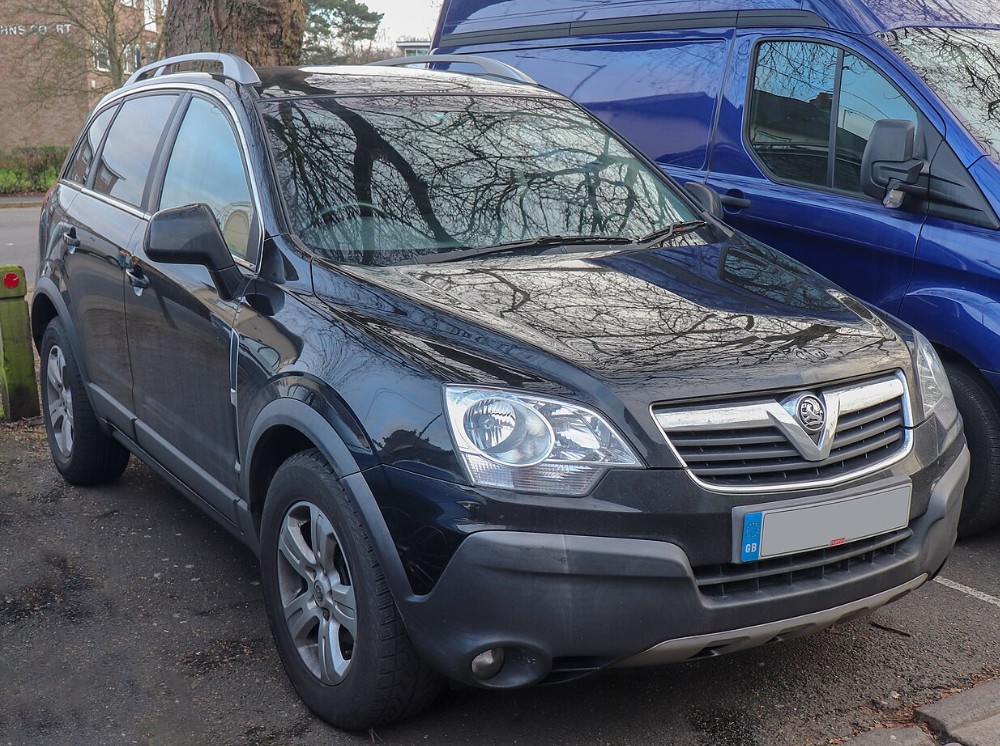
A Vauxhall Antara TPMS warning can be surprisingly stubborn. We check the tyres, add a little air, restart the engine—and that yellow horseshoe-shaped symbol still glows on the dashboard like an unwanted porch light.
The confusing part is that a Vauxhall Antara TPMS reset is not always a simple button press. Depending on what caused the warning, we may only need to correct the tyre pressures, or we may have to perform a complete sensor-position relearn using a compatible TPMS activation tool.
That distinction matters.
The Antara uses wheel-mounted pressure sensors on TPMS-equipped versions. These sensors transmit actual pressure information to the vehicle rather than estimating pressure from wheel speed. The official owner’s manual explains that the system monitors all four wheels, requires pressure sensors in every road wheel, and can display the current pressure through the vehicle’s information system.
In this guide, we will walk through the practical reset procedure, explain when a relearn tool is required, identify the correct wheel sequence, and troubleshoot a warning light that refuses to disappear.
Content in this publication
- What Does the TPMS Light Mean on a Vauxhall Antara?
- Does the Vauxhall Antara Have a TPMS Reset Button?
- Before Starting the Vauxhall Antara TPMS Reset
- Basic Vauxhall Antara TPMS Reset After Low Pressure
- Full Vauxhall Antara TPMS Sensor Relearn Procedure
- Step 1: Inflate All Tyres Correctly
- Step 2: Apply the Parking Brake
- Step 3: Turn the Ignition On
- Step 4: Enter TPMS Learn Mode
- Step 5: Activate the Left-Front Sensor
- Step 6: Activate the Right-Front Sensor
- Step 7: Activate the Right-Rear Sensor
- Step 8: Activate the Left-Rear Sensor
- Step 9: Switch the Ignition Off
- Step 10: Verify the Pressures
- Correct Antara TPMS Relearn Order
- Can We Reset the Antara TPMS Without a Tool?
- Why the Vauxhall Antara TPMS Light Will Not Reset
- One Tyre Is Still Below Specification
- The Tyre Has a Slow Puncture
- A Sensor Battery Has Failed
- The Replacement Sensor Is Incompatible
- The New Sensor Has Not Been Programmed
- The Relearn Sequence Was Interrupted
- A Wheel Without a Sensor Is Installed
- Radio Interference Is Affecting Communication
- The Valve Components Were Reused Incorrectly
- What to Do When the Horn Does Not Sound
- How to Identify a Faulty TPMS Sensor
- How Long Should the Antara TPMS Reset Take?
- Should We Disconnect the Battery to Reset TPMS?
- Can Driving Clear the Antara TPMS Warning?
- Seasonal Temperature Changes and TPMS Warnings
- TPMS Reset After Changing or Rotating Antara Wheels
- TPMS Reset After Replacing a Sensor
- Common Vauxhall Antara TPMS Reset Mistakes
- When Should We Visit a Workshop?
- Final Thoughts on the Vauxhall Antara TPMS Reset
- Frequently Asked Questions
What Does the TPMS Light Mean on a Vauxhall Antara?
TPMS stands for Tyre Pressure Monitoring System. Its job is to warn us when one or more tyres have fallen outside the expected pressure range or when the monitoring system cannot communicate properly with a sensor.
On the Antara, a tyre-pressure warning may appear as:
- A yellow TPMS warning symbol
- A written low-pressure message
- A graphic identifying a particular wheel
- A displayed pressure reading that looks lower than the others
- A warning that remains after wheels or sensors have been changed
The official manual says that a slight pressure deviation may appear with the affected wheel and its current pressure. A more serious pressure loss can generate a stronger warning requiring the driver to stop and inspect the tyre as soon as it is safe.
The light is therefore not something we should erase blindly. It is a messenger, not the villain.
Solid TPMS Light Versus Flashing TPMS Light
A solid light commonly points to an inflation problem. One tyre may be low because of:
- Normal seasonal pressure loss
- A slow puncture
- A leaking valve
- Rim corrosion
- An incorrectly adjusted tyre
- A recent temperature drop
A flashing light that later remains illuminated more often indicates a system problem. Possible causes include:
- A dead sensor battery
- An incompatible replacement sensor
- A sensor that has not been programmed
- A missing wheel sensor
- Incorrect sensor identification
- Communication interference
- A fault in the TPMS receiver or control system
We should not treat these two symptoms as identical. Adding air may resolve a normal low-pressure warning, but it will not repair a sensor with a dead internal battery.
Most Antara models do not have a dedicated dashboard button labelled “TPMS reset.”
That is where many generic instructions lead owners down the wrong road. Advice written for newer Astras, Corsas, Mokkas or Crosslands may tell us to open a tyre menu and press “Set.” The Antara’s direct-sensor system can work differently.
For an ordinary low-pressure warning, the system may update after the tyres are corrected and the vehicle is driven. For wheel-position learning after sensor replacement or rotation, the Antara may need to be placed into a dedicated relearn mode.
On compatible versions, relearn mode can be started by pressing the lock and unlock buttons on the remote control simultaneously until the horn sounds. Some versions may also provide a tyre-learning option through the information display.
Reset and Relearn Are Not the Same Thing
These two terms are often mixed together, but they describe different jobs.
A TPMS Reset
A reset usually means:
- Checking all four tyres
- Correcting their cold pressures
- Restarting the vehicle
- Driving until fresh sensor readings are received
This is normally enough when the warning was caused only by low pressure.
A TPMS Sensor Relearn
A relearn teaches the vehicle:
- Which sensor is fitted
- Which wheel position belongs to that sensor
- The order of the four wheel sensors
We generally need a relearn after:
- Replacing one or more TPMS sensors
- Fitting another set of wheels
- Rotating the wheels
- Installing winter wheels
- Replacing the TPMS control module
- Losing previously stored sensor positions
- Seeing incorrect wheel locations on the display
Think of the reset as correcting the numbers. Think of the relearn as introducing the car to the sensors again.
Before Starting the Vauxhall Antara TPMS Reset
Preparation prevents most failed reset attempts.
Check the Tyres While They Are Cold
Measure the pressures before driving, ideally after the vehicle has been parked for several hours.
The Vauxhall manual states that tyre pressures should be checked when the tyres are cold. It also notes that cold tyres naturally show lower pressure, while warm tyres show higher pressure. Although the monitoring system compensates for temperature when generating warnings, the pressure shown on the display is still the tyre’s actual measured pressure.
Do not release air from a warm tyre simply because the reading has risen during a journey. Once the tyre cools, it may become underinflated.
Use the Correct Pressure Specification
Do not rely on a universal figure copied from another Antara.
Recommended pressure can vary according to:
- Wheel diameter
- Tyre size
- Engine version
- Vehicle load
- Front and rear axle requirements
- Full-load operation
- Market specification
Check the pressure label on the vehicle, often found around the door aperture or fuel-filler area, and compare it with the owner’s manual.
The manual also advises checking tyre pressure at least every 14 days and before long journeys, including the spare where applicable.
Inspect for a Real Leak
Before attempting to clear the light, look for:
- Nails or screws in the tread
- Cuts in the sidewall
- Cracked rubber
- A bent wheel rim
- A damaged valve stem
- Soap bubbles around the valve
- One tyre repeatedly losing air
A TPMS reset should never become a digital bandage over a physical puncture.
Gather the Necessary Equipment
For a basic pressure correction, we need:
- An accurate tyre-pressure gauge
- A tyre inflator
- The correct vehicle pressure specification
For a full relearn, we may also need:
- A compatible TPMS activation tool
- A programmed replacement sensor
- The remote key
- Enough vehicle battery charge
A common GM-compatible activation tool may work, but compatibility should be confirmed for the Antara’s model year and sensor type.
Basic Vauxhall Antara TPMS Reset After Low Pressure
Use this method when no wheels or sensors have been replaced and the warning appeared because of low tyre pressure.
Step 1: Park Safely
Park the Antara on level ground.
Select P on an automatic transmission or neutral/first gear as appropriate on a manual, apply the parking brake, and switch off the ignition.
Step 2: Inspect All Four Tyres
Do not check only the tyre named on the display.
A second tyre may also be low, and differences between tyres can sometimes trigger warnings before one tyre looks visibly flat.
Look for visible damage before adding air.
Step 3: Measure the Cold Pressures
Remove each valve cap and record the pressure in every tyre.
Compare each reading with the pressure label for the exact vehicle and load condition.
Step 4: Correct the Pressures
Inflate or adjust all four tyres to the prescribed cold settings.
The Antara manual specifically advises switching off the ignition when tyre pressure is being increased or reduced on a TPMS-equipped vehicle.
Replace the valve caps securely when finished.
Step 5: Restart the Vehicle
Turn the ignition on and start the engine.
The light may disappear immediately, but it may also remain temporarily because the control unit is still displaying an older sensor reading.
Step 6: Drive the Antara
Drive normally for several minutes at a suitable road speed.
The owner’s manual says the system checks the pressure of all four wheels once per minute when vehicle speed exceeds a specified threshold.
That means the vehicle may need to move before updated readings appear. A stationary engine restart is not always enough.
Step 7: Recheck the Display
After driving, inspect the tyre-pressure display again.
On equipped versions, current pressures can be viewed through the Tyres item in the board-computer menu by using the infotainment system’s BC control.
The pressure readings should look reasonably balanced unless the recommended front and rear specifications differ.
Full Vauxhall Antara TPMS Sensor Relearn Procedure
Use this method when sensors or wheel positions have changed, or when the system no longer recognises the correct sensor locations.
The procedure may vary slightly by year and equipment level, but the commonly documented Antara sequence begins at the left-front wheel and proceeds clockwise.
You may be interested in reading Toyota Corolla AE86 Engine Swap – The Ultimate Guide
Step 1: Inflate All Tyres Correctly
Before entering relearn mode, set all four tyres to the proper cold pressures.
Do not use inflation and deflation as a substitute for an activation tool unless the specific sensor system and service procedure explicitly allow it.
Step 2: Apply the Parking Brake
Park on a level surface and apply the parking brake firmly.
For an automatic Antara, move the selector to P.
Step 3: Turn the Ignition On
Turn the key to the ignition-on position without starting the engine.
The dashboard lights should illuminate, but the engine should remain off.
Step 4: Enter TPMS Learn Mode
Press and hold the lock and unlock buttons together on the remote key.
Continue holding them until the horn sounds.
A horn confirmation indicates that the vehicle has entered the TPMS learning sequence. On some configurations, the left-front indicator may also illuminate to show which wheel should be activated first.
Alternative versions may allow the driver to open a tyre-learning option on the information display and hold the confirmation control until the horn sounds. A documented Antara manual procedure describes both remote-button activation and an infotainment-based “learn tyres” route, depending on equipment.
Step 5: Activate the Left-Front Sensor
Start at the left-front tyre, which is the driver’s front wheel on a UK-market right-hand-drive Antara.
Position the TPMS activation tool against the tyre sidewall close to the valve stem.
Press the tool’s activation button.
Wait for the horn to sound once. That confirms that the sensor identification has been accepted.
Step 6: Activate the Right-Front Sensor
Move to the front tyre on the opposite side.
Place the tool near the valve and activate the sensor.
Wait for another single horn confirmation before moving on.
Step 7: Activate the Right-Rear Sensor
Proceed to the right-rear wheel.
Trigger the sensor and listen for the horn.
Do not jump to another wheel if the vehicle has not confirmed the current sensor.
Step 8: Activate the Left-Rear Sensor
Finish at the left-rear tyre.
Activate the sensor near its valve stem.
After the final sensor is learned, the horn should sound twice, indicating that the full sequence has completed. Published Antara relearn instructions use the order left front, right front, right rear, left rear and specify a double horn at completion.
Step 9: Switch the Ignition Off
Turn the ignition completely off.
This exits the relearn mode and stores the sensor positions.
Step 10: Verify the Pressures
Restart the engine and check the tyre-pressure display.
Take a brief drive if values do not populate immediately. The system may need movement before every sensor transmits an updated reading.
Correct Antara TPMS Relearn Order
The typical sequence is:
- Left front
- Right front
- Right rear
- Left rear
We can remember it as a clockwise lap around the vehicle, beginning at the left-front wheel.
Do not assume that “driver’s side” always identifies the same physical position in online instructions. Many tutorials are written for left-hand-drive vehicles. Follow the actual wheel-position sequence, not an ambiguous reference to driver or passenger sides.
Can We Reset the Antara TPMS Without a Tool?
Sometimes—but only when we are dealing with a pressure warning rather than a sensor-ID relearn.
When No Tool May Be Needed
A tool may not be necessary when:
- The tyres were simply underinflated
- No wheel positions were changed
- No sensors were replaced
- The system still displays all four pressures
- The warning disappears after correction and driving
In that situation, correct inflation and normal driving may be all that is required.
When a TPMS Tool Is Usually Required
A tool is normally needed when:
- A new sensor has been installed
- Wheel positions have been changed
- The display identifies the wrong wheel
- The horn-led relearn procedure is being performed
- A sensor needs to be awakened or tested
- The vehicle cannot detect a replacement wheel
A direct TPMS sensor contains its own electronic identity. The vehicle cannot always learn that identity merely because we drove around the block.
Why the Vauxhall Antara TPMS Light Will Not Reset
A persistent warning does not automatically mean the reset procedure was performed incorrectly.
One Tyre Is Still Below Specification
Pressure gauges can disagree. Cheap pencil gauges and worn inflator gauges may be several PSI apart.
Check all four tyres again with a reliable gauge while cold.
The Tyre Has a Slow Puncture
If the light disappears and returns a day or two later, suspect leakage rather than a software problem.
Inspect the tread, valve core, valve seal, rim bead and wheel condition.
A Sensor Battery Has Failed
TPMS sensors contain small sealed batteries. Once the battery is depleted, the whole sensor commonly has to be replaced.
Typical signs include:
- One wheel showing no reading
- Dashes instead of pressure
- Intermittent communication
- A flashing warning at startup
- Relearn failure at the same wheel every time
The Replacement Sensor Is Incompatible
A sensor can physically fit the valve hole yet still be electronically wrong.
Compatibility factors include:
- Radio frequency
- Sensor protocol
- Model year
- Programmability
- Vehicle application
- Sensor ID configuration
Parts listings for TPMS-equipped Antara variants commonly identify 433 MHz sensors, but the exact replacement should still be verified against the vehicle identification and original equipment specification.
The New Sensor Has Not Been Programmed
Some aftermarket sensors are blank universal units.
They must first be programmed with vehicle-compatible data and then relearned to the Antara. The programming stage and the vehicle relearn stage are separate operations.
The Relearn Sequence Was Interrupted
The procedure can fail if:
- Too much time passes between wheels
- A sensor does not respond
- The wrong wheel is activated
- The ignition is switched off too early
- The vehicle battery voltage drops
- Another nearby sensor is triggered accidentally
Restart the sequence from the beginning rather than trying to continue halfway through.
A Wheel Without a Sensor Is Installed
The Antara’s owner’s manual states that all road wheels must carry pressure sensors for the system to operate normally. Wheels without sensors make the monitoring system unavailable.
This often becomes an issue with:
- Winter wheel sets
- Used alloy wheels
- Temporary replacement wheels
- Aftermarket wheel packages
- A spare wheel installed after a puncture
Radio Interference Is Affecting Communication
The official manual warns that high-power external radio equipment can interfere with the tyre-pressure monitoring system.
This is less common than a low tyre or failed sensor, but it is worth considering when communication problems appear only in a particular location.
The Valve Components Were Reused Incorrectly
The valve stem is not just an ordinary rubber valve on many direct TPMS systems.
The Antara manual advises replacing the TPMS valve cores and sealing rings whenever tyres are changed.
Reusing aged seals can lead to slow leaks, corrosion or damage around the sensor valve.
You may be interested in readingToyota Corolla AE86 Engine Swap – The Ultimate GuideYou may be interested in reading
 Does the Toyota Camry Have CVT Transmission?
What to Do When the Horn Does Not Sound
If pressing the remote buttons produces no horn confirmation, work through these checks.
Confirm the Ignition Position
The ignition must be on, but the engine should generally remain off during sensor learning.
If the key is only in the accessory position, the system may not enter relearn mode.
Check the Remote Key
A weak remote battery or faulty button may prevent the lock-and-unlock command from registering.
Make sure both buttons are being pressed at the same time.
Try the Information-Display Method
Some Antara equipment versions may offer a tyre-learning option through the infotainment or information display instead of—or in addition to—the remote-button method.
Look for wording such as:
- Learn tyres
- Tyre learn
- Tyre programming
- Tyre pressure
- TPMS learn
Menu names can vary by display language and vehicle specification.
Confirm That the Vehicle Has Factory TPMS
Not every Antara has identical equipment.
A vehicle may have:
- Factory direct TPMS
- A different warning configuration
- Aftermarket sensors
- Wheels from another model
- No working sensors in the fitted wheels
Check whether individual tyre pressures appear on the display. If they do, direct TPMS is clearly present.
How to Identify a Faulty TPMS Sensor
The easiest method is to use a professional TPMS diagnostic tool. It can usually read:
- Sensor identification number
- Pressure
- Internal temperature
- Battery status
- Signal strength
- Sensor protocol
Without a diagnostic tool, we can still look for patterns.
No Reading From One Wheel
This usually points toward the sensor, its battery or its programming.
Pressure Reading Frozen
A displayed value that never changes may indicate delayed communication or a sensor fault.
Relearn Stops at One Wheel
If the horn confirms the first two sensors but stays silent at the third, the third sensor becomes the main suspect.
Warning Appears After Tyre Replacement
A tyre fitter may have damaged the sensor during removal or refitting. The valve seal may also be leaking.
Warning Appears After Wheel Rotation
The sensors may still work, but their stored wheel positions may no longer match their physical locations.
How Long Should the Antara TPMS Reset Take?
A simple pressure correction may take only a few minutes, followed by a brief drive.
A full four-wheel relearn is often completed within several minutes once the vehicle is in learn mode and every sensor responds correctly.
The job takes longer when:
- A sensor is asleep
- A tool has poor compatibility
- The wrong frequency sensor is installed
- A replacement sensor requires programming
- The vehicle times out between wheels
- Battery voltage is low
Speed comes from preparation, not frantic button pressing.
Should We Disconnect the Battery to Reset TPMS?
Battery disconnection is not the preferred TPMS reset method.
It may erase unrelated vehicle settings without solving the underlying sensor problem. Depending on the vehicle, disconnecting the battery can affect:
- Clock settings
- Radio settings
- Window memory
- Stored fault information
- Control-module adaptations
A low-pressure warning should be handled by checking the tyres. A sensor-recognition fault should be handled with diagnosis and relearning.
Disconnecting the battery is like turning off the house electricity because one smoke detector is beeping. It may create silence briefly, but it does not replace the battery inside the detector.
Can Driving Clear the Antara TPMS Warning?
Driving may clear the warning when:
- All tyres have been inflated correctly
- Every sensor is functioning
- No sensor positions have changed
- The system only needs updated pressure transmissions
Driving will not reliably fix:
- A dead sensor
- A missing sensor
- An incompatible sensor
- An unprogrammed universal sensor
- A damaged receiver
- A genuine ongoing puncture
The Antara system takes readings while the vehicle is moving above its operating threshold, so a short drive can be part of the normal update process.
Seasonal Temperature Changes and TPMS Warnings
Tyre pressure changes with temperature.
When colder weather arrives, the air inside each tyre contracts and the displayed pressure falls. A tyre that was only just above the warning threshold during a warm afternoon may trigger the light the following cold morning.
The correct response is to measure the tyres cold and adjust them to the placard specification.
Do not overinflate aggressively to prevent future warnings. The goal is correct pressure, not the highest pressure the tyre sidewall can tolerate.
Why All Four Tyres May Look Low at Once
When every reading drops by a similar amount after a weather change, temperature is a likely explanation.
When only one tyre drops rapidly, a leak becomes more likely.
That comparison is one of the most useful advantages of a four-wheel pressure display.
TPMS Reset After Changing or Rotating Antara Wheels
After rotating the wheels, the sensors may continue transmitting normally but appear in the wrong positions on the display.
For example, the dashboard may identify the left-front tyre as low when the actual low tyre is now at the rear.
Perform the full four-wheel position relearn in the prescribed order.
After installing a seasonal wheel set:
- Confirm that every wheel has a compatible sensor.
- Inflate all tyres correctly.
- Program universal sensors if necessary.
- Enter TPMS learn mode.
- Activate each sensor in sequence.
- Verify the wheel positions on the display.
TPMS Reset After Replacing a Sensor
A replacement sensor often requires more than fitting it to the wheel.
The process may include:
- Selecting a sensor compatible with the Antara
- Programming the sensor protocol
- Installing a new seal, core and retaining hardware
- Refitting and balancing the tyre
- Inflating the tyre to specification
- Relearning the sensor to the vehicle
- Checking for leakage
- Confirming the displayed pressure
Skipping the programming or relearn stage may leave the warning illuminated even though the tyre itself is perfectly inflated.
Common Vauxhall Antara TPMS Reset Mistakes
Avoid these frequent errors:
- Resetting before checking for a puncture
- Using warm tyre pressures as the cold target
- Copying pressure figures from another model
- Activating wheels in the wrong order
- Moving to the next wheel before the horn sounds
- Assuming every aftermarket sensor is preprogrammed
- Installing wheels without TPMS sensors
- Using generic instructions for a different Vauxhall
- Confusing a solid pressure warning with a flashing system fault
- Ignoring a tyre that repeatedly loses pressure
The procedure is not especially complicated. Most failures happen because the wrong problem is being solved.
When Should We Visit a Workshop?
Professional diagnosis is sensible when:
- The warning flashes and stays on
- One sensor will not activate
- No wheel-pressure readings appear
- The relearn procedure repeatedly fails
- The tyre loses pressure again
- A valve stem is corroded
- A sensor was damaged during a tyre change
- The fitted sensor type is unknown
- The vehicle shows an additional warning message
- The TPMS control unit has stored diagnostic faults
A tyre shop with a compatible diagnostic tool can test each sensor before removing the tyre. That saves time and avoids replacing good parts through guesswork.
Final Thoughts on the Vauxhall Antara TPMS Reset
A successful Vauxhall Antara TPMS reset begins with identifying what the vehicle is actually asking for.
When the warning is caused by low pressure, we should inspect the tyres, adjust them while cold, restart the vehicle and drive long enough for new readings to arrive.
When sensors or wheels have been replaced or moved, we may need a full relearn. On compatible Antara versions, that means turning the ignition on, entering learn mode through the remote or information system, and activating the sensors in the order left front, right front, right rear and left rear.
The horn confirmations matter. One horn usually confirms each sensor, while two horn sounds at the final wheel indicate that the sequence is complete.
Most importantly, we should never reset the warning simply to make the dashboard look tidy. The system is there to draw attention to low pressure, leaks and sensor faults before they grow into expensive—or dangerous—problems.
Frequently Asked Questions
1. How do I reset the tyre-pressure light on a Vauxhall Antara?
Check all four tyres while cold, inflate them to the vehicle’s specified pressures, restart the engine and drive for several minutes. If the warning was caused only by low pressure, the system should update after receiving new sensor readings.
2. What is the Vauxhall Antara TPMS relearn sequence?
The usual sequence is left front, right front, right rear and left rear. Activate each sensor with a compatible TPMS tool and wait for the horn confirmation before moving to the next wheel.
3. Why is my Antara TPMS light flashing?
A flashing light commonly indicates a monitoring-system fault rather than ordinary low pressure. Possible causes include a dead sensor battery, an incompatible sensor, a missing sensor or a failed relearn.
4. Can I perform an Antara TPMS reset without a relearn tool?
Yes, when the warning is only due to low tyre pressure and all existing sensors remain recognised. A tool is generally needed when replacing sensors, changing wheel positions or performing a complete sensor-ID relearn.
You may be interested in readingToyota Corolla AE86 Engine Swap – The Ultimate GuideYou may be interested in reading
Does the Toyota Camry Have CVT Transmission?You may be interested in reading
 Toyota Camry Trim Levels 2014: A Detailed Guide to Choosing the Best
5. Why did the TPMS light return after I inflated the tyres?
One tyre may have a slow puncture, the pressure may have been measured while warm, or a sensor may be failing. Recheck all tyres cold and inspect the affected wheel for leaks before attempting another reset.
If you want to know other articles similar to Vauxhall Antara TPMS Reset: Complete Step-by-Step Guide you can visit the category Service and Parts.
Vauxhall Antara Gearbox Oil Capacity: Complete Guide
Vauxhall Antara Kerb Weight: Complete UK Guide
Vauxhall Antara Tyre Size: Complete UK Fitment Guide
Vauxhall Antara Clutch Replacement Cost UK: Complete Price Guide
Vauxhall Antara Fuel Tank Capacity: Complete Guide
Vauxhall Antara DPF Light: Meaning, Causes, and Fixes
Leave a Reply
More content of your interest