
Honda Civic Dashboard Warning Lights & Symbols


Honda Civic dashboard warning lights and symbols tell us whether a system is operating normally, a feature is unavailable, or a fault needs attention. Colour is useful, but the shape, flashing pattern, and accompanying message provide the detail we need to decide what to do.
This illustrated guide explains 40 common warnings and indicators, including oil pressure, temperature, brakes, tyre pressure, Honda Sensing, and hybrid READY and EV displays. Each entry includes a small image beside its meaning, followed by practical guidance.
Coverage: common petrol Civic warnings plus selected Civic Hybrid/e:HEV indicators. The coloured Civic-specific illustrations primarily come from Honda’s UK 2026 e:HEV manual. Oil-pressure, temperature, and service images are general Honda references. Older generations, other markets, manual transmissions, and Type R models may have different graphics and additional indicators. Not every item appears on every Civic. Confirm the instructions in the handbook for your exact vehicle.
Content in this publication
- What Do Honda Civic Warning Light Colours Mean?
- Why the Dashboard Lights Up Before Starting
- Urgent Engine, Brake, and Steering Warnings
- Engine, Transmission, and Safety Warnings
- 6. Check Engine or Malfunction Indicator Lamp
- 7. Transmission System Indicator
- 8. ABS Warning Light
- 9. Amber Parking Brake and Brake System Indicator
- 10. SRS Airbag Warning
- 11. Seat Belt Reminder
- 12. Passenger Front Airbag ON/OFF Indicators
- 13. Low Tyre Pressure or Deflation Warning
- 14. Vehicle Stability Assist Indicator
- 15. VSA OFF Indicator
- Messages, Fuel, Security, and Maintenance
- Hybrid and Automatic Brake Hold Indicators
- Parking Assistance and Honda Sensing
- Cruise, Economy, and Everyday Operating Indicators
- 32. Adaptive Cruise Control Status
- 33. Adjustable Speed Limiter Indicator
- 34. ECON Mode Indicator
- 35. Turn Signal and Hazard Indicators
- 36. Deceleration Paddle Selector Indicator
- 37. Lights-On Indicator
- 38. High Beam Indicator
- 39. Auto High Beam or Adaptive Driving Beam Indicator
- 40. Rear Fog Light Indicator
- Why Are Several Civic Warning Lights On Together?
- How Should We Respond to Honda Sensing Warnings?
- Can We Reset a Honda Civic Warning Light?
- Understanding Your Civic’s Dashboard
- Frequently Asked Questions
- 1. What does the yellow information symbol mean on a Honda Civic?
- 2. Can we drive with the Honda Civic check engine light on?
- 3. Why is the tyre-pressure light still on after inflation?
- 4. What is the difference between READY and EV on a Civic Hybrid?
- 5. Does BRAKE HOLD mean the parking brake is applied?
What Do Honda Civic Warning Light Colours Mean?
We can use colour for an initial assessment, but there are exceptions. A red parking-brake lamp may simply show that the brake is applied. An amber rear-fog indicator normally confirms lighting operation rather than a fault.
| Colour | Typical meaning | What we should do |
|---|---|---|
| Red | An urgent fault or important safety status | Read the message immediately. Stop safely for oil-pressure loss, overheating, or an unexplained brake warning. |
| Amber or yellow | A fault, temporary restriction, advisory, or selected function | Identify the symbol. Amber does not automatically mean that continued driving is safe. |
| Green | A system is selected or operating | Confirm that the feature matches the intended setting. |
| Blue | Usually high beam; some versions also have a cold-coolant indicator | Read the shape to distinguish lighting from temperature information. |
| White or grey | Information, standby, or availability | Check whether assistance is merely selected or actually operating. |
Why the Dashboard Lights Up Before Starting
Several lamps illuminate briefly when we switch the ignition or power mode on. This starting check is normal. Some clear after a few seconds; others change after the engine starts, a belt is fastened, or the parking brake is released.
A warning that remains unexpectedly, appears during driving, or fails its prescribed starting check should be investigated. In a hybrid Civic, engine silence does not prove the vehicle is switched off: check READY and follow the correct shutdown procedure.
Urgent Engine, Brake, and Steering Warnings
1. Low Engine Oil Pressure
 | Oil can or low-pressure message · Stop safely and turn the engine off. |
An oil-pressure warning means the engine may not be receiving adequate lubrication. Older Civics may use a dedicated lamp, while newer models can show an explicit message. We should stop the engine as soon as we can do so safely.
Check the oil level using the prescribed procedure, but do not assume a full dipstick proves pressure is healthy. Keep the engine off and arrange assistance if the condition is unresolved. A service reminder is different from an oil-pressure warning.
2. High Coolant Temperature
 | Thermometer or overheating message · Follow the overheating procedure. |
A high-temperature warning or a gauge entering the hot zone calls for prompt attention. Reduce load while finding a safe stopping place, then follow the instructions for the particular engine. The reference thermometer may be replaced by a message on newer clusters.
We should never remove a hot cooling-system pressure cap. Keep clear of escaping steam and do not immediately open the bonnet if steam is present. Normal acceleration and an absence of unusual noises do not make overheating harmless.
3. Red Parking Brake and Brake System Indicator
 | Red brake symbol · Confirm parking-brake status and braking safety. |
This indicator may be normal with the parking brake applied. If it remains after release or appears unexpectedly during driving, it can indicate low fluid or a brake-system problem. Read the accompanying message.
We should stop safely when the cause is unclear, especially if the pedal feels soft, stopping distance increases, or fluid is leaking. A simultaneous amber brake warning needs the specific handbook response. Adding fluid without investigating why it is low does not repair a leak.
4. 12-Volt Battery Charging Warning
 | Battery symbol · The charging system needs attention. |
The battery-shaped warning concerns charging, not simply the age of the battery. On a conventional petrol Civic, it should normally clear after the engine starts. Hybrid electrical systems use a different arrangement.
We should find a safe stopping place, read the message, and obtain advice. Reduce unnecessary electrical loads while retaining equipment needed for visibility and safety. Do not apply an alternator diagnosis to every hybrid warning or assume the remaining battery charge will sustain a long journey.
5. Electric Power Steering Warning
 | Steering wheel and exclamation mark · Assistance may be reduced. |
A persistent EPS warning can indicate a steering-system problem. The steering may feel heavier, particularly at low speed. The symbol cannot identify a particular failed motor, sensor, or connection.
We should slow down carefully and stop safely if control becomes difficult or unpredictable. Arrange diagnosis and use recovery when safe steering cannot be assured. A warning that disappears after restarting but repeatedly returns still needs investigation; cycling the ignition is not a repair.
Engine, Transmission, and Safety Warnings
6. Check Engine or Malfunction Indicator Lamp
 | Amber engine · Arrange diagnosis; flashing is more urgent. |
A steady engine light reports a detected emissions-control problem or, on applicable hybrids, an electric vehicle system problem. A flashing lamp can indicate misfire, with a risk of catalytic-converter damage.
We should avoid heavy acceleration and arrange prompt inspection. Stop safely and obtain advice if the lamp flashes, the engine runs roughly, or power drops significantly. A fuel-cap check is relevant only to versions with that arrangement and should not become the assumed explanation for every fault.
7. Transmission System Indicator
 | Transmission indication · Read flashing states and messages. |
A transmission warning can appear through a blinking shift indication, dedicated graphic, or text, depending on the Civic. A normal steady drive-position display is not itself a fault. Follow the instructions associated with the actual warning.
We should avoid abrupt acceleration and arrange immediate inspection of a reported malfunction. Stop safely if instructed or if the car loses drive or shifts violently. Manual, CVT, conventional automatic, and hybrid drivetrains do not share one universal diagnosis or reset procedure.
8. ABS Warning Light
 | ABS inside a circle · Anti-lock braking may be unavailable. |
A persistent ABS warning can mean that wheel-lock prevention during hard braking is unavailable. Conventional braking may remain, but the loss of assistance matters particularly on slippery surfaces.
We should leave more following distance and arrange inspection. A simultaneous red brake warning deserves extra caution because the problem may extend beyond ABS. Stop safely and obtain assistance if braking feels abnormal or the combined warnings make continued driving unsafe.
9. Amber Parking Brake and Brake System Indicator
 | Amber brake symbol · Check related braking functions. |
The amber warning is separate from the red brake indication. Depending on the Civic, it can concern a braking support function, the electric parking brake, or automatic brake hold. The accompanying message identifies the relevant condition.
We should arrange prompt diagnosis and follow any restriction on parking-brake operation. Secure the vehicle using its prescribed procedure before leaving it. If a red warning also appears or the pedal behaves unusually, stop safely rather than assuming amber means a minor issue.
10. SRS Airbag Warning
 | Occupant and airbag · Restraint-system inspection required. |
The SRS warning can identify problems involving airbags or seat-belt pretensioners. Some protection may not operate as intended during a collision. This is different from the passenger-airbag ON/OFF status display.
We should have a persistent or repeatedly returning warning checked promptly. Do not unplug under-seat wiring or attempt an improvised reset. A lamp that fails the starting check specified in the handbook can also require inspection even though it is not staying illuminated.
11. Seat Belt Reminder
 | Seat belt symbol · Check the driver and passengers. |
The reminder may combine a lamp, chime, and seating-position display. Behaviour depends on the Civic generation and which seats are monitored. Fasten all occupied-seat belts correctly before moving.
We should secure luggage so it does not interfere with occupancy detection or become a hazard. A warning that persists with the belt correctly fastened may need a buckle or sensor check. Never bypass the reminder instead of wearing the belt.
12. Passenger Front Airbag ON/OFF Indicators
 | Airbag status · Confirm whether the passenger airbag is active. |
These indicators describe the passenger front airbag’s state and are separate from the general SRS fault lamp. The deactivation method and duration of ON illumination vary by market and equipment.
We should follow the vehicle’s child-restraint instructions before using that seat. Never place a rear-facing child restraint in front of an active passenger airbag. If the indicated state is unexpected, resolve the issue before carrying a passenger or installing a child seat there.
13. Low Tyre Pressure or Deflation Warning
 | Tyre outline and exclamation mark · Check cold pressures. |
Stop safely and inspect the tyres, especially if the car pulls or vibrates. Use a gauge and the vehicle’s pressure label, selecting the correct specification for the tyres and load. Appearance alone is not a reliable pressure check.
Many Civics use an indirect monitoring or deflation warning system requiring calibration after relevant tyre work or pressure adjustments. We should repair leaks and correct pressures before calibrating. Flashing followed by steady illumination can indicate a monitoring-system fault.
14. Vehicle Stability Assist Indicator
 | Skidding-car symbol · Flashing normally means intervention. |
VSA can adjust engine output and individual wheel braking when grip is limited. Flashing during intervention is normally a cue to ease off and adapt to the road, rather than proof that the system is broken.
A persistent warning can indicate a malfunction. We should arrange inspection and allow for reduced assistance. Stability control cannot make excessive speed, unsuitable tyres, ice, or standing water safe, even when no warning is visible.
15. VSA OFF Indicator
 | Skidding car with OFF · Check the stability-control setting. |
This lamp reports an off or reduced-assistance state. The functions affected depend on the Civic and how its controls are operated. We should not assume every button press disables exactly the same features.
Restore the normal setting when the reason for changing it no longer applies. An unexpected OFF indication that persists despite the correct procedure may require diagnosis. A separate VSA malfunction warning should not be dismissed as a deliberate driver selection.
Messages, Fuel, Security, and Maintenance
16. System Message Indicator
 | Information symbol · Read the complete display message. |
The information indicator draws attention to details elsewhere in the driver display. It does not diagnose a fault by itself. The message may concern an operating instruction, a vehicle condition, or a system needing attention.
We should review the messages when safely parked and note any other illuminated lamps. Record the exact wording before contacting a workshop. The handbook explains how to recall information using the controls fitted to the particular instrument cluster.
17. Low Fuel Warning
 | Fuel pump · Refuel promptly. |
The warning tells us that the remaining reserve is limited. The distance-to-empty estimate changes with traffic, weather, load, and driving style. It is not a guaranteed distance after the light appears.
We should use the fuel specified for the engine and avoid running the tank dry. Civic Hybrid and e:HEV models still need petrol even when they sometimes drive electrically. Investigate an erratic gauge rather than assuming the displayed reserve is always accurate.
18. Immobiliser System Indicator
 | Key/security graphic · Check key recognition if starting fails. |
A brief immobiliser indication can be part of normal starting. Repeated blinking or a related message with a failure to start can mean the car has not recognised the programmed key.
We should use the correct key and follow the procedure for the fitted ignition system. A known working spare may help establish whether the issue follows one key. Do not bypass the immobiliser or assume replacing the remote battery repairs every recognition fault.
19. Security System Alarm Indicator
| Security graphic · Flashing while parked can be normal. |
The security indicator can blink when the alarm is set. That is normally different from a warning appearing during an attempted start. Similar graphics can describe different functions depending on when they appear.
We should compare the indication with the car’s locked state and the handbook. A normal parked security lamp is not a reason to disconnect the battery. If the alarm operates unexpectedly or the key is not recognised, record the symptoms and arrange a check.
20. Maintenance Minder or Service Reminder
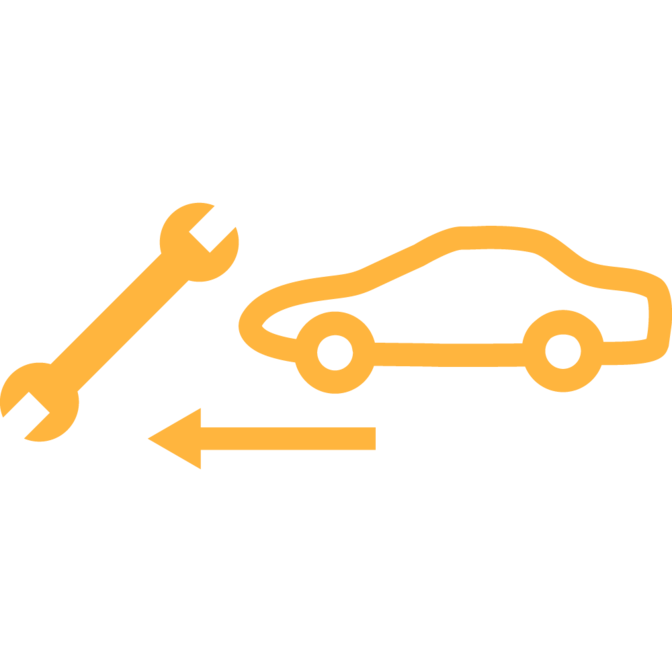 | Spanner or service message · Check which maintenance is due. |
Civics may show Maintenance Minder codes, estimated oil life, or a market-specific service reminder. The reference spanner is a general Honda symbol; the actual display can use different wording. It is separate from an urgent oil-pressure warning.
We should complete the requested work before resetting the reminder. Oil life estimates service need, not the amount of oil in the engine. Clearing the display without servicing changes the information but does not renew the oil or maintain other components.
Hybrid and Automatic Brake Hold Indicators
21. Hybrid Power System Warning
 | Power-system warning · Arrange hybrid-system inspection. |
On Civic Hybrid and e:HEV models, this warning can indicate a problem with the electric drive system. It does not establish that the traction battery needs replacement. Read the full message and arrange prompt professional diagnosis.
We should stop safely if instructed or if the vehicle loses power or behaves abnormally. Do not touch orange high-voltage cables or components. A generic petrol-engine reset procedure is not a repair for an unresolved hybrid-system warning.
22. READY Indicator
 | READY · The hybrid system is operational and the car can move. |
READY means the hybrid Civic is ready to drive. The petrol engine may be silent while the indication is on, so engine noise is not a reliable measure of whether the car is active.
We should finish the normal parking and shutdown procedure before leaving the seat. If READY does not appear when expected, check the instructions rather than repeatedly selecting a drive position. It is normally an operating state, not a fault warning.
23. EV Indicator
 | EV · Electric-motor propulsion with the engine stopped. |
On the referenced system, the EV indicator appears when the motor moves the car and the petrol engine is not operating. It describes a hybrid operating condition and is not, by itself, a battery fault.
The engine can start automatically when required. We should not interpret EV as a promised electric range or continuous electric-only driving. Normal transitions between operating states are expected and do not automatically mean the hybrid system has a malfunction.
24. Automatic Brake Hold System Indicator
 | BRAKE HOLD · The function is switched on. |
The system-on indicator means brake hold is enabled. A separate indication confirms that it is actually holding the stopped car. Being enabled does not mean the Civic is held in every situation.
We should remain ready to press the brake pedal and check the operating conditions. Before leaving, use the normal parking procedure. Temporary brake holding does not replace selecting the correct transmission position and securing the vehicle with its parking brake.
25. Automatic Brake Hold Active Indicator
 | Hold-active symbol · The system is maintaining the stop. |
This separate indicator confirms active brake holding on the referenced Civic system. Driver inputs or changing conditions can affect what happens next, so we should keep supervising the vehicle.
Apply the brake pedal if the car moves or assistance becomes unavailable. Read any related electric parking-brake or brake-hold message. Understanding enabled versus actively holding is particularly useful in traffic, where assuming the wrong state can allow unexpected movement.
Parking Assistance and Honda Sensing
26. Parking Sensor Indicator
 | Parking-sensor graphic · Check for nearby obstacles. |
On the referenced Civic, the indicator blinks when obstacles are detected around the sensors. It is an obstacle alert, not automatically a sensor fault. Check the display and surroundings before moving further.
We should manoeuvre slowly using direct observation, mirrors, and the camera where fitted. Sensors cannot detect every object, and silence does not guarantee clearance. A separate malfunction or obstruction message should be handled according to its instructions, with inspection when required.
27. Collision Mitigation Braking System Warning
 | Amber collision graphic · CMBS is faulty or temporarily unavailable. |
CMBS can report a malfunction or temporary unavailability, such as an obstructed camera view. On the referenced Civic, the amber Safety Support indicator can illuminate alongside it.
We must continue judging distance and braking ourselves. Read the stated reason when parked and follow any windscreen-cleaning guidance. Persistent warnings need diagnosis. Automatic braking has operating limits and should never be assumed to prevent every collision or detect every obstacle.
28. Road Departure Mitigation Warning
 | Amber road-boundary graphic · Check assistance availability. |
This indication can identify a Road Departure Mitigation problem or a temporary restriction, including poor camera visibility. It can appear together with the amber Safety Support indicator.
We should keep full control of steering and speed. Read whether the feature is off, temporarily unavailable, or malfunctioning. If the stated temporary condition clears but the warning remains, arrange inspection rather than repeatedly dismissing it. Normal assistance does not replace watching the road and staying within the lane.
29. Lane Keeping Assist System Warning
 | Amber LKAS · Lane-keeping assistance needs checking. |
An amber LKAS warning differs from the white or green status displays used when the system is selected or operating. Persistent amber illumination can identify a malfunction. Graphics and wording vary between clusters.
We should continue steering actively and arrange inspection when required. Poor markings, weather, bends, and operating limits can reduce assistance without a permanent fault. A normal active indication is not proof that every lane boundary has been recognised.
30. Adaptive Cruise Control Warning
 | Amber ACC · Cruise assistance needs attention. |
An amber ACC indication can identify a malfunction or temporary restriction described by the display. It is separate from the white or green indications for ordinary cruise operation. Low Speed Follow applies only to equipped versions.
We should control the following distance ourselves and remain ready to brake. Do not assume ACC will keep regulating speed after an unavailable message. Have a warning checked if it remains after the stated temporary condition has been resolved.
31. Safety Support Indicator
 | Amber safety-support graphic · Review individual system messages. |
This combined indicator can concern Road Departure Mitigation, CMBS, or the blind-spot information system where fitted. It directs us to more detailed information rather than naming one failed camera or sensor.
We should review the display and continue without relying on affected assistance. Green or grey states have different status meanings on applicable clusters. Persistent amber warnings need diagnosis, while a temporary restriction should be addressed according to its displayed reason.
Cruise, Economy, and Everyday Operating Indicators
32. Adaptive Cruise Control Status
 | White/green ACC · Selected and active states differ. |
The referenced Civic uses different indications for ACC selection and operation. Check the set speed and following-distance display before assuming the car is controlling speed. Other generations may use conventional cruise control or different graphics.
We should remain ready to cancel cruise or brake. Assistance has limitations with changing traffic and poor visibility. A green indicator never removes the need to watch the road or assess the distance to the vehicle ahead.
33. Adjustable Speed Limiter Indicator
 | Limiter graphic · A speed-limiting function is selected or active. |
This indication reports adjustable speed limiter status on equipped models. It differs from cruise control: selecting a speed limit does not necessarily mean the Civic will maintain that speed automatically.
We should verify the limit shown and understand the operating conditions. Continue controlling speed for bends, weather, traffic, and road restrictions. Availability varies by market, so not every Civic has this function or the same steering-wheel controls.
34. ECON Mode Indicator
 | ECON or leaf · An economy-oriented mode is selected. |
ECON identifies an economy-oriented driving setting. The functions affected depend on the Civic, and the indication is normally informational rather than a fault warning.
We should not confuse an economy mode with guaranteed fuel consumption. Temperature, traffic, tyre pressures, load, and driving style all influence the result. If a separate engine or hybrid warning appears, investigate it independently rather than treating it as a normal part of ECON operation.
35. Turn Signal and Hazard Indicators
 | Flashing arrows · Direction indicators or hazard lights are operating. |
A flashing arrow normally confirms the chosen direction indicator. Both arrows flashing together generally indicate hazard operation. Check that the signal matches the manoeuvre and cancels afterwards.
We should inspect the exterior lamps if the flash rate changes unusually or a signal does not work. Hazard lights warn others but do not make an unsafe stopping position safe. Move out of danger when possible and follow the appropriate roadside procedure.
36. Deceleration Paddle Selector Indicator
 | Deceleration level · Hybrid paddle setting, not a fault. |
On equipped hybrid Civics, the paddles adjust the selected deceleration level. The display describes that setting and should not be confused with the manual gear indication of a conventional automatic gearbox.
We should remain ready to use the brake pedal. Available deceleration depends on operating conditions, and the paddles do not replace normal braking or the parking brake. Check the handbook before assuming that a particular setting behaves identically on every journey.
37. Lights-On Indicator
 | Paired lamps · Exterior lighting is selected. |
This indicator confirms the exterior-lighting state described in the handbook. It is normally a status indication rather than a malfunction. Its relationship with position lights, headlights, and automatic settings depends on the model.
We should verify actual illumination at night and in poor weather. Daytime running lights and an illuminated dashboard do not necessarily mean the full night-time lighting setup is active. Use the controls deliberately when automatic operation is unsuitable.
38. High Beam Indicator
 | Blue headlamp · Main-beam headlights are on. |
The blue headlamp normally confirms high-beam operation or headlight flashing. It is an everyday status indicator rather than a fault requiring repair.
We should dip the headlights as needed to avoid dazzling others. Check the stalk and automatic lighting settings if main beam appears unexpectedly. The driver remains responsible for appropriate lighting even when assistance is fitted and functioning normally. The symbol confirms operation; it cannot decide whether the road conditions justify high beam.
39. Auto High Beam or Adaptive Driving Beam Indicator
 | Headlamp with A · Automatic lighting conditions are met. |
Depending on equipment, this indication relates to auto high beam or adaptive driving beam. It appears when the relevant operating conditions are met on the referenced Civic. The two feature names should not be treated as identical technology on every model.
We should supervise illumination and override it when necessary. Weather, road layout, and detection limitations affect performance. An unavailable or malfunction message deserves attention even if the lights still work manually.
40. Rear Fog Light Indicator
 | Amber fog lamp · The rear fog light is on. |
This is an exception to the idea that every amber light indicates a fault. It normally confirms that the bright rear fog light has been selected on equipped Civics.
We should switch it off when visibility improves so it does not dazzle following drivers. Check the lighting controls if the symbol appears unexpectedly. Its shape and purpose matter more than colour alone, especially when comparing it with an actual lighting-system malfunction warning.
Sources and illustrations: Honda Civic e:HEV official indicator guide, Honda owner’s manuals, and Honda’s warning-symbol reference. The oil and temperature illustrations are general Honda reference shapes; newer Civics may display equivalent warnings as text.
Why Are Several Civic Warning Lights On Together?
Multiple warnings can share an underlying cause. A low-voltage event or another vehicle fault can affect several assistance systems. Seeing ACC, CMBS, and a safety-support warning together does not establish that three separate parts have failed.
We should respond to the most urgent instruction first. Stop safely for low oil pressure, overheating, abnormal braking or steering, severe running problems, or a message telling us not to drive. Once parked, record the wording and whether the lights were steady or flashing. Mention recent battery work, tyre changes, or other relevant events when arranging diagnosis.
Some Honda systems have specific reinitialisation instructions after the 12-volt battery has been disconnected. This does not justify driving to clear unexplained critical warnings. Use a procedure only when it matches the actual condition and the car can be operated safely.
How Should We Respond to Honda Sensing Warnings?
A Honda Sensing warning can describe a fault, temporary unavailability, or a selected off setting. Poor camera visibility and operating limits differ from a permanent malfunction. The message matters more than assuming every warning means a broken sensor.
When parked, check the stated reason and follow the handbook’s cleaning guidance for the windscreen or other sensing areas. Do not adjust camera hardware. Have the vehicle checked if warnings remain after temporary conditions clear. We must continue steering, braking, and watching surrounding traffic whenever assistance is unavailable.
Can We Reset a Honda Civic Warning Light?
Correct the underlying condition before using a prescribed reset or calibration. For tyre pressure, check cold pressures and repair leaks first. For Maintenance Minder, complete the required work before resetting the service information.
We should not disconnect the battery or erase codes simply to clear the dashboard. Stored information can help diagnose an intermittent problem. An extinguished light does not prove a repair has been completed, particularly when engine, braking, steering, airbag, or hybrid warnings keep returning.
Understanding Your Civic’s Dashboard
The most useful approach is to combine each symbol with its colour, behaviour, and message. READY, EV, normal cruise status, and lighting indicators describe operation. Critical engine or brake warnings require the action specified for that system.
We can use this illustrated guide to recognise common Civic symbols, then confirm the instructions for the exact vehicle. Solving the underlying issue matters more than finding a way to turn the light off.
Frequently Asked Questions
1. What does the yellow information symbol mean on a Honda Civic?
It directs us to a system message in the driver display. Read the full wording and any related warning lights. The information symbol by itself does not identify a specific failed component.
2. Can we drive with the Honda Civic check engine light on?
A steady lamp with normal running still requires prompt diagnosis and the handbook’s guidance. A flashing lamp, severe misfire, significant power loss, overheating, or another urgent warning calls for a safe stop and advice. Colour alone cannot establish whether continued driving is safe.
3. Why is the tyre-pressure light still on after inflation?
Verify all relevant cold pressures against the vehicle label and check for leaks. The system may require calibration after pressure adjustment or tyre work. We should follow the exact procedure; persistent warnings or flashing followed by steady illumination can require diagnosis.
4. What is the difference between READY and EV on a Civic Hybrid?
READY means the hybrid system is operational and the vehicle can move, even with a silent petrol engine. EV indicates motor propulsion with the engine stopped on the referenced system. We still need to park and shut down properly before leaving.
5. Does BRAKE HOLD mean the parking brake is applied?
No. The system-on indication means brake hold is enabled, while a separate active indication confirms that it is maintaining a temporary stop. We should use the normal parking procedure, including the appropriate transmission position and parking brake, before leaving the vehicle.
If you want to know other articles similar to Honda Civic Dashboard Warning Lights & Symbols you can visit the category Service and Parts.
Kia Picanto Dashboard Warning Lights & Symbols: Complete Guide

Hyundai i20 Dashboard Warning Lights Guide

Vauxhall Antara Dashboard Lights: Complete Warning Symbol Guide
Hyundai i10 Dashboard Warning Lights and Their Meanings: Complete Guide
Peugeot 308 Dashboard Symbols, Warning Lights & Fault Guide

Hyundai Kona Dashboard Warning Lights
Leave a Reply
More content of your interest