
BYD Shark 6 Tips and Tricks: 20 Features Every Owner Should Know

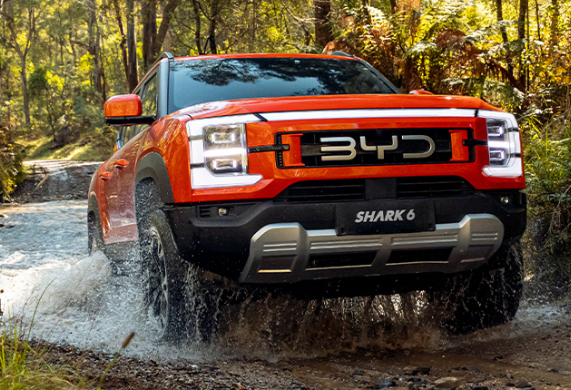
The BYD Shark 6 is much more than a plug-in hybrid pickup with impressive power. Once we start digging through the menus, energy-management settings, cameras, driving modes, and smart-key functions, we discover quite a few features that are easy to overlook.
Some of the most useful BYD Shark 6 tips and tricks involve learning how to manage the battery rather than simply leaving the vehicle in its default settings. Others can make towing, off-road driving, charging, parking, camping, and everyday commuting considerably easier.
The Shark 6 uses BYD's DMO, or Dual Mode Off-road, architecture, combining a turbocharged petrol engine, electric drive and a Blade Battery. The system is designed to work both as an efficient electrified daily vehicle and as an off-road-capable pickup.
Let's look at the settings and tricks we think owners should learn first.
Content in this publication
- Quick BYD Shark 6 Tips and Tricks
- 1. Learn How Target SOC Works
- 2. Understand AUTO vs SAVE Mode
- 3. Don't Assume EV Mode Means the Engine Can Never Start
- 4. Keep More Battery Available Before Demanding Driving
- 5. Use the Correct Terrain Mode
- 6. Don't Leave Terrain Mode Activated on Normal Roads
- 7. Use Vehicle-to-Load as a Portable Power Source
- 8. Change the V2L Timer When Necessary
- 9. Let the Engine Support V2L When Appropriate
- 10. Be Careful With V2L Power Limits
- 11. Schedule Charging for Off-Peak Hours
- 12. Fully Charge the Battery Regularly
- 13. Avoid Leaving the Battery Extremely Full or Empty During Long Storage
- 14. Turn Your Phone Into an NFC Key
- 15. Know Where to Place the Phone When NFC Doesn't Work
- 16. Control the Windows With the Smart Key
- 17. Use the Key Fob to Find the Shark 6 in a Car Park
- 18. Use the Transparent Around-View Camera
- 19. Use the Camera When Connecting a Trailer
- 20. Adjust the Head-Up Display Properly
- How to Get Better Fuel Economy From a BYD Shark 6
- BYD Shark 6 Tips for Off-Road Driving
- BYD Shark 6 Tips for New Owners
- Common BYD Shark 6 Mistakes to Avoid
- Is the BYD Shark 6 Easy to Live With?
- BYD Shark 6 Tips and Tricks FAQs
- Final Thoughts
Quick BYD Shark 6 Tips and Tricks
| Feature | Useful trick |
|---|---|
| Target SOC | Lower it when we can charge at our destination |
| SAVE mode | Use it when we want battery remaining later |
| EV mode | Best suited to shorter urban journeys when conditions allow |
| HEV mode | Useful for longer trips and maintaining battery reserves |
| V2L | Power appliances, tools or camping equipment |
| Scheduled charging | Charge during cheaper off-peak electricity periods |
| Digital key | Use a compatible phone or wearable as a vehicle key |
| Smart key | Hold the lock/unlock button to operate the windows |
| Around-view camera | Use transparent and 3D views in tight areas |
| Terrain modes | Choose the mode that matches the surface |
| Sand driving | Start with plenty of battery charge |
| HUD | Adjust height and brightness instead of accepting the default position |
| OTA updates | Keep vehicle software current when updates are available |
Feature availability can vary depending on country, model year and trim, so some menu names or functions may differ slightly.
1. Learn How Target SOC Works
One of the most important Shark 6 tricks is understanding target SOC, or target state of charge.
Instead of thinking about the Shark 6 as a traditional hybrid that manages everything completely in the background, we can tell the vehicle approximately how much battery energy we would like it to preserve.
The target SOC function allows the vehicle to attempt to maintain battery charge around the selected balance point while operating in hybrid conditions.
Use a Lower SOC When Charging Is Available Later
If we're travelling somewhere where charging will be easy, a lower target SOC generally makes sense.
Using a lower target SOC when charging is available at the destination allows greater use of electric propulsion and can help reduce fuel consumption.
For example, imagine we're driving:
Home → office → home charger.
There usually isn't much benefit in carrying a large electrical reserve all day if we know we can plug in again when we get home.
Use a Higher SOC When Charging Will Be Difficult
The opposite strategy works for road trips, remote areas, towing and off-road adventures.
If we're heading somewhere without convenient charging, maintaining additional battery reserve gives the hybrid system more electrical energy to work with.
That doesn't necessarily mean setting the highest possible value every time. The useful trick is simply to plan ahead.
2. Understand AUTO vs SAVE Mode
The Shark 6's energy-management settings can significantly change how the vehicle uses petrol and electricity.
AUTO prioritizes fuel economy while also considering battery preservation.
SAVE gives greater priority to maintaining battery charge and attempts to keep the battery closer to the selected target SOC.
When AUTO Makes Sense
AUTO is usually the easiest choice for ordinary mixed driving.
We can let the Shark 6 decide when electric propulsion, petrol power or a combination of both makes the most sense.
When SAVE Can Be Useful
SAVE becomes particularly interesting when we know we'll need electrical energy later.
For example, we could preserve battery charge during a highway section and use more of that stored energy once we reach:
- city traffic;
- an off-road section;
- a campsite;
- a worksite where we intend to use V2L;
- a section where quiet electric driving is desirable.
That makes SAVE one of the most practical BYD Shark 6 tricks for longer journeys.
3. Don't Assume EV Mode Means the Engine Can Never Start
It's easy to assume that selecting EV means the petrol engine will remain off under every circumstance.
That's not necessarily how the Shark 6 works.
The vehicle may automatically transition into HEV operation under certain conditions, including rapid acceleration, higher speeds, steep climbs, very high or low temperatures and low battery SOC.
So if the engine suddenly starts while we're expecting electric driving, it doesn't automatically indicate a fault.
The vehicle may simply be protecting the powertrain or responding to higher power demand.
4. Keep More Battery Available Before Demanding Driving
A useful Shark 6 performance trick is to avoid arriving at demanding terrain with an almost-depleted battery.
The electric motors aren't only there to improve efficiency. Battery power also contributes to the pickup's performance.
A higher battery SOC can help provide enough electrical discharge power when stronger acceleration is required.
That matters when we're planning:
- steep hill climbs;
- sand driving;
- overtaking;
- towing;
- demanding off-road sections.
If we know difficult terrain is coming, preserving battery earlier in the journey can therefore be useful.
5. Use the Correct Terrain Mode
The Shark 6 isn't a conventional mechanical 4WD where we simply select high or low range and forget about it.
Its DMO platform can alter power delivery and electronic control strategies depending on the terrain.
Available terrain modes can include Snow, Mud, Sand and, on applicable configurations, Mountain.
Snow Mode
Snow mode is intended for firm surfaces covered by loose or slippery material such as snow, ice, grass or gravel.
The vehicle adjusts its control systems to improve traction.
This mode can also be useful on some loose gravel roads where smooth torque delivery is more important than aggressive throttle response.
Mud Mode
Mud mode changes drive-force delivery and stability-control parameters for soft, rutted and muddy surfaces.
The important trick here is to select it before we're already stuck.
Maintaining steady progress through mud can also be more effective than unnecessarily stopping halfway through difficult sections.
Sand Mode
Sand places unusually high power demands on a vehicle.
The Shark 6 therefore manages energy differently in Sand mode. The vehicle can automatically set a higher target SOC to preserve sufficient battery energy for driving in sand.
That makes starting with a fully charged or highly charged battery a good idea before serious sand driving.
Charging before a difficult sand trip isn't just about maximizing electric range; it can help ensure the entire hybrid system has plenty of energy available.
6. Don't Leave Terrain Mode Activated on Normal Roads
More aggressive terrain settings aren't performance modes for everyday asphalt driving.
Once we're back on normal pavement, switch back to the appropriate standard road-driving mode.
Doing so allows the Shark 6's stability, efficiency and powertrain systems to operate as intended for normal conditions.
7. Use Vehicle-to-Load as a Portable Power Source
V2L is easily one of the best BYD Shark 6 features.
Vehicle-to-Load allows energy stored in the vehicle battery to power external electrical equipment.
Depending on market and configuration, the Shark 6 can provide power through V2L connections and cargo-area outlets.
That can make the Shark 6 useful for:
- camping equipment;
- laptops;
- lighting;
- refrigerators;
- power tools;
- other compatible electrical devices.
8. Change the V2L Timer When Necessary
Here's a BYD Shark 6 trick many owners may miss.
When external V2L discharging begins, the system may use a default discharge duration that can be changed through the Charging and Discharging section of the infotainment system.
If we're camping overnight or powering equipment for an extended period, check the timer rather than assuming V2L will continue indefinitely.
The vehicle can also stop discharging early if battery energy or fuel becomes insufficient.
9. Let the Engine Support V2L When Appropriate
Another clever Shark 6 feature is its ability to use the petrol engine to support electrical generation when the battery becomes low.
When SOC becomes low during V2L operation, the vehicle may be able to start the engine and generate electricity under appropriate conditions.
This essentially turns the vehicle into a much more flexible mobile energy source.
However, never allow the petrol engine to run in an enclosed area. Exhaust gases can be dangerous.
10. Be Careful With V2L Power Limits
V2L doesn't mean we can connect unlimited electrical equipment.
Check the rating of the outlet and the equipment being powered before connecting high-load appliances.
Exceeding the rated output or connecting too many devices can activate overload protection.
We should also keep electrical connections dry and immediately stop using V2L if cables, connectors or outlets appear damaged.
11. Schedule Charging for Off-Peak Hours
Owners who charge at home should explore Smart Charging.
The Shark 6 allows charging schedules to be configured through the infotainment system.
We can usually select:
- charging start time;
- charging end time;
- repeat days.
If our electricity provider offers cheaper overnight tariffs, scheduling the Shark 6 to charge during those periods can lower running costs without requiring us to connect the cable manually at the exact start time.
Scheduled charging availability and operation may depend on the charger and market configuration.
12. Fully Charge the Battery Regularly
There is plenty of conflicting generic advice online about PHEV battery charging, but following manufacturer guidance is usually the safest approach.
Regular AC charging and periodically charging the high-voltage battery fully can help the battery-management system operate as intended.
Owners who constantly use only a narrow battery percentage range may want to include an occasional full charge as part of their normal charging routine.
13. Avoid Leaving the Battery Extremely Full or Empty During Long Storage
If the pickup won't be driven for an extended period, battery-storage strategy changes.
For longer periods of inactivity, keeping the battery around a moderate state of charge is generally preferable to leaving it almost completely empty or fully charged for an extended time.
Owners should also follow the vehicle's storage and battery-maintenance recommendations if the Shark 6 will remain parked for several weeks or months.
14. Turn Your Phone Into an NFC Key
Depending on market and smartphone compatibility, the Shark 6 supports an NFC digital key.
A compatible smartphone or wearable can be registered so it can unlock, lock and authorize the vehicle to start.
The exterior NFC reader is located around the designated NFC area near the driver's side mirror.
This can be especially convenient when we don't want to carry the conventional key everywhere.
15. Know Where to Place the Phone When NFC Doesn't Work
Simply holding the phone somewhere near the door isn't always enough.
The phone's NFC antenna must be positioned close to the vehicle's NFC reader.
The exact NFC antenna location varies between smartphones, although it is commonly near the upper rear portion of the device.
Inside the vehicle, the phone or wearable may also need to be placed at the designated NFC location to authorize starting.
Learning these positions beforehand avoids frustration when we actually need the digital key.
16. Control the Windows With the Smart Key
This is one of the easiest hidden Shark 6 tricks.
Depending on configuration, holding the lock or unlock button on the key fob can operate the windows.
This can be particularly useful when the cabin has been parked in direct sunlight and we want to lower the windows before getting inside.
Always make sure nobody is near the windows when closing them remotely.
17. Use the Key Fob to Find the Shark 6 in a Car Park
Another smart-key feature is vehicle locating.
When the anti-theft system is armed, pressing the appropriate key-fob button can cause the vehicle to produce an audible signal and flash its indicators.
It isn't revolutionary, but it's the sort of small function that's easy to forget until we actually need it in a large parking area.
18. Use the Transparent Around-View Camera
The Shark 6 camera system offers much more than a basic reversing camera.
Depending on configuration, the Around View Monitor can provide perspectives including:
- front and rear views;
- left and right views;
- 2D around view;
- 3D around view;
- transparent vehicle view;
- wide-angle perspectives.
The transparent view stitches together camera imagery to help us visualize areas that would otherwise be hidden below or immediately around the vehicle.
This can be especially useful when parking a large pickup or negotiating obstacles off-road.
However, the image underneath the vehicle isn't a live X-ray. The underbody image is reconstructed using previously captured camera footage and updates as the vehicle moves.
We should therefore never rely on it alone when navigating obstacles.
19. Use the Camera When Connecting a Trailer
Owners who tow should spend some time exploring the panoramic-camera menus.
Depending on configuration, the Shark 6 can provide camera views and guidance that make reversing toward a trailer hitch easier.
Instead of repeatedly getting out of the vehicle to judge hitch alignment, the camera system can make positioning considerably easier.
The camera still shouldn't replace physically checking that the trailer has been correctly connected and secured.
20. Adjust the Head-Up Display Properly
Many owners leave the HUD exactly where the factory placed it.
That isn't necessary.
The Shark 6 head-up display can be adjusted for settings such as:
- height;
- brightness;
- image angle;
- display preferences.
The trick is to configure it from our normal driving position after adjusting the seat.
If the HUD appears too low, too bright or distracting at night, change the settings rather than switching it off immediately.
A correctly positioned HUD lets us see important information while keeping our eyes closer to the road ahead.
How to Get Better Fuel Economy From a BYD Shark 6
Getting the best efficiency from the Shark 6 requires treating it like a plug-in hybrid rather than a conventional petrol pickup.
Whenever practical, we should charge regularly and use electricity for shorter everyday journeys instead of relying on the petrol engine to replenish a depleted battery.
A useful routine is:
Home charging → EV-heavy urban driving → AUTO mode for mixed travel → SAVE when we need battery later → recharge whenever convenient.
Smooth acceleration also helps.
Hard acceleration and repeated full-throttle driving demand much more energy from both the battery and petrol engine.
Tyre pressure, payload, towing weight, terrain, climate control, speed and temperature will also affect real-world energy use and range.
BYD Shark 6 Tips for Off-Road Driving
The Shark 6 has considerable electronic assistance, but technology can't overcome every mistake.
Before going off-road, we should:
- make sure the battery has sufficient charge;
- choose the correct terrain mode before encountering the difficult section;
- inspect tyre pressures;
- understand the vehicle's ground clearance;
- avoid blindly relying on the camera system;
- check the route before entering deep mud, sand or water.
After driving through mud or sand, inspect the vehicle underneath and around the brakes.
Accumulated sand, mud and debris should be cleaned away when necessary.
And because accessories, trays, loads and vehicle configuration can affect clearance and wading capability, never assume a published maximum applies unchanged to a modified vehicle.
BYD Shark 6 Tips for New Owners
During the first few weeks, we wouldn't try to configure everything at once.
Start by learning four systems:
SOC management, EV/HEV behavior, charging and the camera system.
Once those feel natural, move on to scheduled charging, digital keys, V2L and terrain modes.
The Shark 6 can also support over-the-air software updates depending on market and specification, meaning certain menus or features may change as the software evolves.
It is therefore worth occasionally reviewing settings after major software updates.
Common BYD Shark 6 Mistakes to Avoid
A powerful PHEV ute becomes much easier to live with once we stop treating it exactly like either a conventional petrol pickup or a pure EV.
Common mistakes include:
- constantly driving with a depleted battery;
- saving electricity unnecessarily when we're about to reach a charger;
- arriving at demanding off-road terrain without sufficient SOC;
- using Sand or Mud mode on paved roads;
- relying exclusively on cameras around obstacles;
- forgetting the V2L timer;
- assuming every electrical appliance can safely be connected;
- ignoring tyre pressure;
- never exploring the energy-management settings.
The better we understand how DMO manages petrol and electric power together, the more useful the Shark 6 becomes.
Is the BYD Shark 6 Easy to Live With?
For a vehicle with a relatively sophisticated plug-in hybrid powertrain, everyday operation can be quite straightforward.
We can simply charge it, drive it and allow AUTO mode to manage much of the energy strategy.
But the real advantage comes when we start using the additional functionality.
Target SOC lets us preserve battery for later. SAVE mode makes longer journeys easier to plan. V2L turns the pickup into a portable source of electricity. The NFC key reduces dependence on the conventional fob. Transparent camera views make manoeuvring easier, while the dedicated terrain modes allow the DMO system to adapt to different surfaces.
Those are the features that transform the Shark 6 from simply being a powerful hybrid ute into a genuinely versatile one.
BYD Shark 6 Tips and Tricks FAQs
What is the best SOC setting for the BYD Shark 6?
There isn't one ideal target SOC for every journey.
If we can easily charge when we arrive, a lower target SOC can allow the vehicle to use more stored electrical energy.
If charging won't be available later, a higher SOC can preserve more battery energy for the remainder of the trip.
The best setting therefore depends on where we're going and when we'll next be able to charge.
Should I use AUTO or SAVE mode in the BYD Shark 6?
AUTO is generally suitable for everyday driving because it allows the vehicle to manage efficiency and battery use automatically.
SAVE gives more priority to preserving battery charge, making it useful when we want electrical energy available later.
For example, SAVE can be useful on the highway before entering a city, campsite or off-road area.
Can the BYD Shark 6 power appliances?
Yes, compatible Shark 6 versions support Vehicle-to-Load functionality.
This allows the vehicle to power suitable appliances, camping equipment, electronics and tools.
Always check the maximum output rating before connecting high-power equipment.
Can I use my phone as a BYD Shark 6 key?
Compatible vehicles and smartphones can use BYD's digital-key technology.
Depending on the market, the phone can be used near the vehicle's NFC reader for locking, unlocking and authorizing the vehicle to start.
Compatibility varies between phones, operating systems and vehicle versions.
Does the BYD Shark 6 have a transparent camera view?
Applicable Shark 6 versions offer an Around View Monitor with multiple perspectives, potentially including transparent, 2D and 3D views.
The transparent view can help us visualize the area beneath and immediately around the vehicle.
However, it remains a driver-assistance feature and shouldn't replace physically checking the surroundings.
Final Thoughts
The best BYD Shark 6 tips and tricks aren't gimmicks. Most of them help us use the hybrid system more intelligently.
Learning how target SOC, AUTO, SAVE, EV and HEV modes interact can improve the way we manage fuel and battery energy.
Keeping sufficient battery reserve before towing or off-road driving can also help ensure the electric side of the powertrain is available when demand increases.
Then there are features that are simply convenient: scheduled charging, NFC phone access, remote window operation, towing-camera assistance, transparent around-view cameras, adjustable HUD settings and V2L power.
We can drive the Shark 6 without learning any of these features.
But once we understand them, the vehicle becomes significantly easier—and more interesting—to use.
If you want to know other articles similar to BYD Shark 6 Tips and Tricks: 20 Features Every Owner Should Know you can visit the category Tips.
Leapmotor C10 Tips and Tricks: The Complete Owner’s Guide
How to Open Ford Edge With Manual Key: Complete Step-by-Step Guide
How to Start Ford Edge With Remote: The Complete Step-by-Step Guide
How to Open Toyota Sequoia Trunk From Inside: Complete Guide

BYD Seal Hidden Features: The Secret Functions Every Owner Should Know
BYD Seal Tips and Tricks: The Ultimate Guide to Unlocking Your EV’s Full Potential
Leave a Reply
More content of your interest