
How to Start Ford Edge With Remote: The Complete Step-by-Step Guide

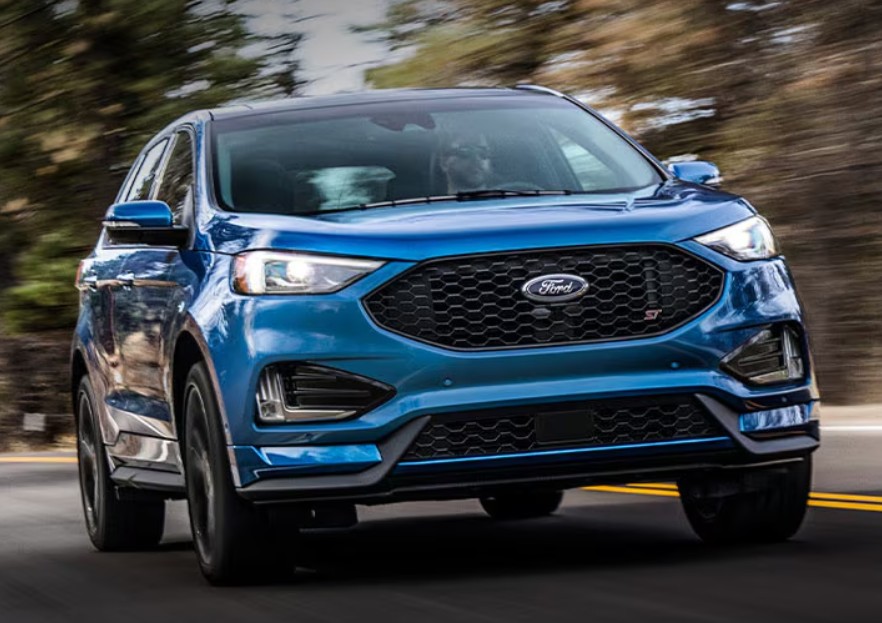
There's something satisfying about stepping into a Ford Edge that's already warm on a frosty morning or refreshingly cool on a scorching afternoon. Remote start transforms that small daily routine into a noticeable convenience—and once you've used it, it's hard to imagine going back.
If you're wondering how to start Ford Edge with remote, you've landed in the right place. We'll walk through every method, explain which model years support remote start, troubleshoot common issues, cover FordPass app controls, and share practical tips that make the feature work reliably.
Whether you drive a 2015 Edge or a brand-new model, this guide has everything you need.
Why Remote Start Is One of the Ford Edge's Best Features
Remote start isn't just about comfort. It also helps prepare your vehicle before you drive.
Benefits include:
- Cooling the cabin before summer trips.
- Warming the interior during winter.
- Defrosting windows more quickly.
- Preconditioning the climate system.
- Saving time during busy mornings.
The system is designed with safety in mind, so the vehicle remains locked while the engine runs remotely until an authorized key is detected.

How Ford Edge Remote Start Works
The remote start system allows the engine to start without entering the vehicle.
The process is surprisingly simple:
- Lock the vehicle.
- Press the remote start button twice.
- The engine starts.
- Climate settings activate automatically.
- The vehicle remains secured.
Think of it like sending your SUV a wake-up call before you arrive.
Which Ford Edge Models Have Remote Start?

Availability depends on model year and trim level.
| Model Year | Remote Start Availability |
|---|---|
| 2015 | Available on select trims |
| 2016 | Available |
| 2017 | Available |
| 2018 | Available |
| 2019 | Widely available |
| 2020 | Standard on many trims |
| 2021 | Standard or optional |
| 2022 | Available |
| 2023 | Standard on many models |
| 2024 | Standard on many trims |
Some base trims may require an optional equipment package.
How to Start Ford Edge With Remote Using the Key Fob

This is the method most owners use every day.
Step 1: Make Sure the Vehicle Is Locked
Press the Lock button once.
The doors must be locked before remote start works.
Look for the circular arrow button.
Press it twice within three seconds.
Step 3: Watch for Confirmation
The Ford Edge confirms the command by:
- Flashing parking lights.
- Starting the engine.
- Running the climate system.
If nothing happens, we'll cover troubleshooting later.
The remote start button is easy to recognize.
It looks like:
- A circular arrow.
- Sometimes labeled with an "x2."
Don't confuse it with:
- Lock
- Unlock
- Panic
- Liftgate release
The circular arrow is the one you're after.
How Far Away Can You Start a Ford Edge?
Range depends on your key fob and surroundings.
Typical distances include:
| Situation | Approximate Range |
|---|---|
| Open parking lot | 200–300 feet |
| Residential area | 100–200 feet |
| Obstructed buildings | Less |
Walls, garages, and interference can reduce range significantly.
How to Start Ford Edge With FordPass App

Many newer Ford Edge models include connected services through FordPass, allowing remote start almost anywhere with cellular coverage.
Setting Up FordPass
You'll need:
- A compatible Ford Edge.
- A Ford account.
- The FordPass app.
- Vehicle activation.
Once connected, remote controls appear inside the app.
Starting the Vehicle
Open the app.
Tap:
Start
The command is sent through Ford's connected network instead of the key fob.
FordPass vs Key Fob: Which Is Better?
| Feature | Key Fob | FordPass |
|---|---|---|
| Short-range use | Excellent | Good |
| Long-distance use | No | Yes |
| Works indoors | Limited | Yes |
| Vehicle status | No | Yes |
| Lock/unlock remotely | Yes | Yes |
The key fob is faster nearby.
FordPass shines when you're inside an office or shopping mall.
What Happens After Remote Start?
Once the engine starts:
- Climate control activates.
- Heated seats may turn on (if configured).
- Heated steering wheel may activate.
- Defrosters can engage automatically.
- The doors stay locked.
The vehicle is designed so no one can simply drive away.
How to Drive After Remote Starting
Many new owners wonder what comes next.
It's simple.
- Unlock the vehicle.
- Enter with the key.
- Press the brake pedal.
- Press the Start button if required.
- Shift into gear.
This transfers control from remote mode to normal driving mode.
How Long Does Remote Start Run?
The Ford Edge usually runs for:
- About 10 minutes by default.
Some models allow:
- 15 minutes.
- Extended run settings.
You can usually change this through the vehicle settings.
How to Extend the Remote Start Time
Need a little more warm-up time?
Many models let you:
- Remote start normally.
- Press the remote start button again.
- Extend the run cycle.
The maximum runtime depends on your model year and settings.
Adjusting Remote Start Settings

Inside the SYNC system, you'll often find customization options.
Possible settings include:
Climate Control
Choose:
- Last settings
- Auto mode
Auto mode is usually the most convenient.
Seat Heating
If equipped, you can enable:
- Heated seats
- Ventilated seats
These activate automatically based on outside temperature.
Steering Wheel Heating
Some trims allow automatic activation.
A warm steering wheel on a freezing morning feels surprisingly luxurious.
Why Isn't My Ford Edge Remote Start Working?
Sometimes the engine refuses to start remotely.
Fortunately, most causes are easy to identify.
1. The Vehicle Isn't Locked
Always press Lock first.
This is the most common mistake.
2. The Hood Is Open
The system disables remote start if the hood isn't fully closed.
This prevents accidents during maintenance.
3. Low Key Fob Battery
A weak battery reduces signal strength.
Signs include:
- Short range
- Delayed response
- No remote start
Replacing the battery usually solves it.
4. Low Vehicle Battery
If the 12-volt battery is weak, remote start may be disabled automatically.
The vehicle protects itself from becoming completely discharged.
5. Check Engine Light
An active engine warning can disable remote start.
The system won't allow remote operation if it detects certain faults.
How to Replace the Ford Edge Key Fob Battery
4
A fresh battery often restores normal operation.
Tools Needed
- Small flat screwdriver
- Replacement battery (often CR2450 or CR2032 depending on model)
Steps
- Remove the emergency key.
- Open the fob carefully.
- Replace the battery.
- Reassemble.
- Test remote start.
Always verify the correct battery type for your model year.
Can You Install Remote Start on a Ford Edge That Doesn't Have It?
Yes.
Many owners add:
- Factory-style systems
- Dealer-installed kits
- Aftermarket remote start systems
Factory Kits
Advantages include:
- Better integration
- Original-style controls
- Reliable operation
Aftermarket Systems
These may offer:
- Longer range
- Smartphone control
- Two-way confirmation
Professional installation is recommended.
Winter Tips for Using Remote Start
Cold weather is where remote start really shines.
Best practices include:
- Start the vehicle 5–10 minutes early.
- Let the defroster clear frost.
- Avoid excessive idling.
- Check battery health before winter.
Remember that modern engines don't need extremely long warm-up periods.
Summer Tips for Remote Start
Remote start is just as valuable during hot weather.
Use it to:
- Cool the cabin.
- Reduce steering wheel temperature.
- Make leather seats more comfortable.
Parking in the shade makes the cooling process even more effective.
Safety Features Built Into Ford Edge Remote Start
Ford designed multiple safeguards.
These include:
- Locked doors during operation.
- Automatic engine shutoff after timeout.
- Brake pedal takeover requirement.
- Hood-open protection.
- Key authentication before driving.
These features balance convenience with security.
Common Remote Start Myths
Let's clear up a few misconceptions.
"It Damages the Engine"
False.
Modern Ford engines are designed to handle remote start.
"It Wastes Huge Amounts of Fuel"
Not really.
A few minutes of remote operation uses relatively little fuel compared to overall driving.
"Anyone Can Drive Away"
No.
Without an authorized key, the vehicle won't drive normally.
Remote Start Troubleshooting Checklist
If your Ford Edge won't remote start, work through this list.
- Doors locked
- Hood closed
- Key fob battery healthy
- Vehicle battery charged
- No Check Engine Light
- Remote start enabled
- Within operating range
Most issues can be solved within minutes.
Remote Start Best Practices
To get the most from the system:
- Replace key fob batteries every few years.
- Keep the vehicle battery healthy.
- Use FordPass for long-distance control.
- Customize climate settings.
- Test the system periodically.
A little maintenance keeps the feature dependable year-round.
Final Thoughts
Learning how to start Ford Edge with remote is surprisingly simple once you know the sequence: lock the vehicle, press the remote start button twice within three seconds, and watch for the confirmation lights. From there, your SUV handles the rest by starting the engine, activating climate control, and keeping the doors locked until you're ready to drive.
Whether you're warming up before a winter commute, cooling the cabin on a hot afternoon, or using the FordPass app from across town, remote start is one of those features that quickly becomes part of your daily routine. Keep your key fob battery fresh, make sure the hood is fully closed, and check that remote start is enabled in your vehicle settings to enjoy reliable performance every time.
Frequently Asked Questions
1. How do I remote start my Ford Edge with the key fob?
Press the Lock button once, then press the remote start (circular arrow) button twice within three seconds.
2. Why won't my Ford Edge remote start?
Common causes include an unlocked vehicle, open hood, low key fob battery, weak vehicle battery, or an active Check Engine Light.
3. Can I remote start my Ford Edge with my phone?
Yes, many newer models support remote start through the FordPass app after the vehicle is connected to your Ford account.
4. How long will a Ford Edge run after remote start?
Most models run for about 10 minutes, though some allow longer runtimes through vehicle settings.
5. Can I add remote start if my Ford Edge didn't come with it?
Yes. Many Ford Edge models can be equipped with a factory or aftermarket remote start system, and professional installation is recommended for the best integration.
If you want to know other articles similar to How to Start Ford Edge With Remote: The Complete Step-by-Step Guide you can visit the category Tips.
BYD Shark 6 Tips and Tricks: 20 Features Every Owner Should Know
Leapmotor C10 Tips and Tricks: The Complete Owner’s Guide
How to Open Ford Edge With Manual Key: Complete Step-by-Step Guide
How to Open Toyota Sequoia Trunk From Inside: Complete Guide
BYD Seal Hidden Features: The Secret Functions Every Owner Should Know
BYD Seal Tips and Tricks: The Ultimate Guide to Unlocking Your EV’s Full Potential
Leave a Reply
More content of your interest