When a warning appears in the Mazda CX-30, we need more than the name of the symbol. We need to know whether to stop, check something simple or arrange an inspection. The colour, flashing behaviour and message on the display all help us make that decision.
This Mazda CX-30 dashboard warning lights guide explains the main symbols and the correct next action. We cover engine oil, charging, brakes, automatic transmission, AWD, tyre pressure and i-ACTIVSENSE, along with normal indicators such as AUTOHOLD and the lighting displays.
Coverage: common CX-30 indicators, illustrated using Mazda’s 2025 US-market handbook graphics. Features, wording and symbols vary by year, market and engine. i-stop, AWD and some assistance functions are optional or market-specific. Diesel and Mazda M Hybrid versions can have additional warnings; use the handbook supplied for your exact vehicle.
Follow the specific instruction; amber does not always permit continued driving.
Green or white
An operating function, readiness or standby
Check the selected setting and remain responsible for driving.
Blue headlamp
Main beams are on
Dip the lights when required.
Flashing warning
Its meaning depends on the system
Distinguish normal intervention from an urgent fault using the message.
For example, a flashing traction-control indicator can be normal during loss of grip, while a flashing engine warning needs prompt attention. A red seat-belt reminder requires fastening a belt; a red oil warning requires stopping the engine. We should never use colour alone to decide how far we can drive.
Startup checks and normal illuminated indicators
Several warning lamps briefly illuminate when the ignition is switched on. That is part of the normal check. A lamp that stays on after starting or appears during a journey needs its meaning checked, unless it is an expected status indication such as the applied parking brake.
Read the vehicle-status information when available and save the exact warning wording after stopping safely. A generic description such as “a yellow light” leaves out the details needed to judge urgency.
Engine, oil, cooling and charging warnings
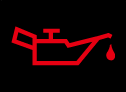
Engine oil pressure warning
Urgency: stop safely and switch off the engine.The red oil-can warning concerns engine lubrication pressure. It is different from an oil-change reminder and can indicate a serious problem even when the dipstick level is correct.Park on level ground, switch off and check the oil using the handbook’s waiting period and method. Add the specified oil only if the level is low. If the warning remains after following Mazda’s procedure, or the cause is uncertain, do not drive; arrange recovery. Avoid repeated restarts or leaving the engine idling with a pressure warning.
Engine oil level warning
Urgency: stop safely and check the level before continuing.This warning identifies an oil-level condition rather than a scheduled service. Mazda warns against continuing with the engine oil level warning displayed. Read the message and verify the level on level ground using the correct procedure.Use the specified oil and avoid overfilling. If the warning does not clear after the level has been properly corrected, seek inspection. A warning that repeatedly returns deserves investigation for the underlying cause instead of becoming a routine top-up habit.
Charging-system warning
Urgency: stop safely and arrange assistance.The battery symbol indicates a fault in the vehicle’s electrical charging system. It does not simply report that the key-fob battery is low. Continued driving can result in the engine stopping unexpectedly as electrical power becomes insufficient.Move to a safe location and contact assistance rather than trying to finish the journey with accessories switched off. A new battery is not automatically the repair: charging equipment, wiring and connections require diagnosis. If other urgent warnings appear, follow their instructions as well.
High engine coolant temperature warning
Urgency: stop safely and follow the overheating procedure.The thermometer symbol warns that coolant temperature is too high. Flashing and steady illumination may represent different stages, but neither should be ignored while the temperature is rising. Avoid high engine load and stop in a safe location.Follow the exact overheating procedure, including the distinction between steam present and no steam. Do not open a hot cooling-system cap or approach escaping steam. An overheating engine, coolant leak or warning that does not clear needs professional help before further driving.
Check engine warning light
Urgency: prompt diagnosis; more urgent with flashing or rough running.The engine outline indicates a fault detected by engine or emissions monitoring. Possible causes vary, so the symbol alone does not identify a particular sensor or mechanical part. Read any additional message and note whether the light is steady or flashing.Mazda advises avoiding high-speed driving and obtaining inspection when the warning remains on or flashes. If the engine shakes, loses substantial power, smells strongly of fuel or develops another stop warning, stop safely and request assistance. Do not keep driving hard to test whether the light clears.
Brake and steering warning lights
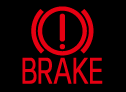
Red brake-system warning
Urgency: stop if it remains unexpectedly or braking is abnormal.This warning can indicate a braking-system problem or low brake fluid. Interpret it with the parking-brake state and accompanying message. A red brake fault is not something to postpone because the car still seems able to stop.If the warning remains with the parking brake released, stop safely and arrange inspection. A soft pedal, unusually long travel or reduced stopping performance makes further driving unsafe. Adding fluid alone does not prove that a leak or braking fault has been repaired.
ABS warning light
Urgency: prompt inspection; immediate safe stop with the red brake warning.An isolated ABS fault can leave ordinary braking available while anti-lock operation is lost. Increase following distance, avoid abrupt braking and obtain inspection. Do not assume the warning points to one particular wheel sensor without diagnostic testing.If ABS and the red brake-system light illuminate together, Mazda instructs us to stop safely and contact a dealer. The braking system may not operate normally. Do not treat that combination as a routine isolated ABS fault or continue because the pedal initially feels normal.
Brake control system warning
Urgency: arrange inspection promptly; stop if braking changes.This amber indication can identify a brake-control malfunction. Systems involved in controlling braking or holding the vehicle may not perform normally, and the message helps identify the condition.Do not rely on an assistance function to compensate for changed brake performance. If the pedal, stopping distance or holding ability is abnormal, stop safely and obtain help. Have persistent warnings diagnosed rather than attempting a reset through the parking-brake switch.
Electric parking brake indicator
Urgency: normal when applied; investigate unexpected flashing.A steady parking-brake indicator normally confirms that the brake is applied. Check that it releases before moving away. Flashing or an associated fault message requires the handbook’s troubleshooting response.Keep the foot brake applied while determining whether the vehicle is securely held. If the parking brake will not release or hold correctly, arrange assistance. Do not repeatedly accelerate against it, and do not leave the vehicle unsecured while trying different switch sequences.
Electric power steering warning
Urgency: stop safely and follow Mazda’s restart/check procedure.A steering-wheel warning indicates a power-steering problem. Assistance may be reduced or steering effort may change. Keep a firm grip and avoid sudden manoeuvres while moving to a safe place.Once safely parked, switch off and follow the handbook’s restart/check procedure after waiting. Obtain inspection if the warning remains or returns. If the wheel becomes difficult to control, do not continue the journey. A temporary improvement after restarting is useful information for a technician, but it is not proof that the problem is resolved.
AUTOHOLD active indicator
Urgency: normally status only.The active indicator confirms that AUTOHOLD is holding the stopped vehicle when the required conditions are met. It is different from a brake-system fault warning and does not mean the parking brake has necessarily been applied in the same way.Confirm the vehicle is actually held before releasing foot-brake pressure. If the function is unavailable or reports a malfunction, use the foot brake and normal parking procedure. AUTOHOLD does not replace securing and switching off the car before leaving the driver’s seat.
Transmission, AWD and traction-control symbols
Automatic transmission warning
Urgency: stop safely; do not continue with a persistent warning.The transmission warning can indicate an electrical or control-system problem. Mazda specifically cautions against driving with the automatic transmission warning illuminated because damage can result.Stop safely and follow any model-specific instruction. If the warning remains or the transmission engages unpredictably, request assistance and inspection. Do not keep shifting between drive and reverse to test it. A normal gear-position display is different from this fault indication, and a generic transmission reset is not a repair.
AWD warning light
Urgency: follow the message and obtain help if it persists.On equipped vehicles, an AWD warning can relate to a system fault, overheating or abnormal wheel conditions. Steady and flashing indications can have different meanings, so do not assume every AWD alert permits continued normal driving.Stop safely when directed and follow the handbook’s cooling or inspection procedure. Check tyre specification and pressures if the message calls for it, especially after tyre work. Do not continue spinning the wheels or demanding maximum traction. Persistent warnings require diagnosis.
TCS/DSC indicator
Urgency: normal when intervening; inspect a steady fault.A flashing skidding-car indicator can show traction or stability control actively helping during a loss of grip. Ease off the accelerator and adapt speed to the road. The system cannot overcome unlimited speed or poor tyre grip.A warning that remains on with a malfunction message needs inspection. Shared sensor information can cause ABS, stability-control and related warnings to appear together. Diagnose the underlying cause before assuming several independent control units have failed.
TCS OFF indicator
Urgency: confirm the selected setting.This confirms that traction-control operation has been switched off where the vehicle allows it. It can be an intentional setting rather than a malfunction, but it changes the assistance available when the driven wheels lose grip.Restore normal operation when the temporary reason for deactivation has passed. Do not use the OFF switch to hide an unexplained system warning. Follow the instructions for your version, as the functions affected and reactivation behaviour can vary.
Off-Road Traction Assist indicator
Urgency: normally status only on equipped versions.This identifies selection of the available off-road traction assistance function. It is not the same as an AWD fault light, and the function is not fitted to every CX-30.Use it only as described in the handbook and appropriate to the terrain. It does not give the vehicle unlimited ground clearance or grip. If another warning appears or progress requires excessive wheelspin, reassess the situation rather than relying on the selected mode to prevent damage.
Sport mode indicator
Urgency: status only.SPORT normally shows that the selected driving mode changes powertrain response. It is not an engine or transmission malfunction by itself.Confirm that the mode suits the conditions. A Sport label does not override a separate transmission or engine warning. If a fault message appears at the same time, respond to that message and do not assume the behaviour is simply normal Sport-mode operation.
Tyres, fuel, maintenance and general warnings
Tyre pressure monitoring warning
Urgency: check the tyres promptly.A steady low-pressure indication calls for checking tyre pressures and inspecting for damage. Use the vehicle’s cold-pressure label for the fitted tyres and load. A tyre that looks normal can still be substantially underinflated.Flashing can indicate a TPMS malfunction, which means monitoring may be unreliable. Do not confuse a system fault with confirmation that the tyres are correctly inflated. Correct pressures or repair a puncture first, then follow the CX-30 handbook if the indication remains. Avoid a reset procedure copied from another brand.
Master warning light
Urgency: determined by the accompanying message.The warning triangle draws attention to information that needs to be read. It is not a diagnosis of one specific failed part. Check the instrument-panel message or vehicle-status screen when safely stopped.Address the most urgent instruction first if several warnings are present. Clearing the message from the screen does not fix the underlying condition. Record the exact wording so a workshop can identify what happened rather than relying on the colour of the triangle alone.
Wrench maintenance indicator
Urgency: check the maintenance information and arrange the required service.The wrench usually concerns scheduled maintenance or an oil-related service requirement as defined by the maintenance monitor. It is different from the red oil-pressure warning and the amber engine warning.Check the service information and have the required work completed. Reset the maintenance data only after servicing and according to the correct procedure. A reset does not change the oil or repair an engine fault. Usage conditions can affect when the maintenance reminder appears.
Low fuel warning
Urgency: refuel immediately.This appears when the remaining fuel is near empty; some displays add flashing and a chime as the condition becomes more urgent. The warning timing can change with vehicle posture and fuel movement.Use the correct fuel as soon as practical. Do not treat the remaining-range estimate as a guaranteed distance. Hills, temperature, traffic and driving style affect consumption, and deliberately running the tank empty can leave the vehicle stopped in an unsafe place.
Check fuel cap warning
Urgency: inspect the cap promptly when safely parked.On equipped displays, this indicates that the fuel cap needs checking. Stop safely, switch off as appropriate and check that the cap is correctly installed and secure according to the handbook.Do not assume every engine warning is caused by a loose cap. If this indication persists after the cap is properly fitted, or an engine fault remains, obtain inspection. A damaged cap or another system problem requires diagnosis rather than repeated tightening.
Low washer-fluid warning
Urgency: refill before visibility becomes a problem.This reports low washer-fluid quantity on equipped models. Refill the washer reservoir with suitable fluid for the climate, taking care not to confuse it with the coolant or brake-fluid reservoir.Although usually less urgent than a mechanical warning, an empty washer system matters on dirty, wet or salted roads. Stop if the windscreen cannot be kept clear enough to drive safely. A persistent alert after refilling may need inspection of the level-sensing system.
Restraints, keys and open-panel warnings
Airbag and seat-belt pretensioner warning
Urgency: obtain inspection promptly.If this warning remains after the startup check, the restraint system may not provide its intended protection. The problem can involve airbags, pretensioners or associated monitoring, and the symbol does not identify the affected component.Do not disconnect under-seat connectors or probe airbag wiring to silence it. Tell the technician about recent interior work or seat movement. A passenger-airbag deactivation indicator is a separate status display and should not be interpreted as the same warning.
Front seat-belt reminder
Urgency: fasten the required belt before driving.Check the driver’s and occupied front passenger seat’s belts. Ensure each buckle is properly latched and the belt is correctly routed. A flashing reminder and chime while moving need attention; stop safely before helping another occupant.Objects on a seat can affect some occupancy systems, but first check the people in the vehicle. Never use a dummy buckle. A persistent alert with correctly fastened belts can require inspection of the buckle or detection system.
Rear seat-belt reminder
Urgency: check rear-seat occupants and their belts.Rear belt indicators help identify belt status and changes during the journey. Their presentation depends on the instrument panel and equipment. A warning about an unfastened rear belt should prompt a check of the corresponding occupant.Stop somewhere safe before adjusting a child restraint or helping a passenger. Do not rely solely on the indicator to verify correct restraint installation: the buckle may be latched while the belt or seat is incorrectly routed.
Rear Seat Alert
Urgency: check the rear seating area before leaving.Where fitted, this reminder prompts the driver to check behind before exiting. It should not be confused with the rear seat-belt status display, and it is not a guarantee that every occupant or object has been detected.Always inspect the rear seats and ensure no child, dependent person or animal is left unattended. Treat the reminder as an additional prompt rather than a replacement for a deliberate check each time you park.
Red KEY warning
Urgency: read the message and arrange inspection when required.A red key indication can report a keyless-system or starting-related problem. The exact message and whether the light flashes help distinguish the condition. It does not always mean the remote’s battery is simply low.Check that the correct key is present and follow the handbook’s backup recognition procedure if starting is affected. Avoid repeated attempts to bypass the immobiliser. A persistent malfunction with a working key requires professional diagnosis.
Green KEY indicator or flashing key-battery reminder
Urgency: status-dependent; replace the key battery when instructed.A green key indication can have a different role from the red malfunction warning. A flashing green indication on applicable versions can advise that the key battery needs attention.Read the specific message and use the correct replacement battery and orientation. Do not confuse the small key battery with the vehicle’s main electrical battery. If key detection remains unreliable after a proper replacement, have the system checked.
Door, liftgate or bonnet open warning
Urgency: stop safely and secure the indicated opening.The display identifies an opening that is not fully closed. Check the actual highlighted area rather than assuming it is a passenger door; the liftgate or bonnet can also require attention.Stop safely, inspect for obstructions and latch the panel properly. If the warning remains after it is securely closed, a latch or switch may need inspection. Do not repeatedly slam the panel or attempt to open and close anything while the car is moving.
i-ACTIVSENSE and driver-assistance indicators
i-ACTIVSENSE warning
Urgency: drive under your own control and read the message.This indicates a problem or restriction affecting an equipped safety-assistance function. It is different from the normal i-ACTIVSENSE status display and does not necessarily mean every assistance feature is available.Maintain your own braking, following distance and lane position. If the message identifies an obscured camera or sensor, park safely before cleaning the specified external area. Persistent faults require inspection. Do not test automatic braking by deliberately approaching an obstacle.
i-ACTIVSENSE status indicator
Urgency: normally status only.This indicates the status of selected assistance functions. The colour and design can change with operating conditions, settings and the instrument panel. A green status indication should not be treated as a promise that the system can handle every road situation.Keep watching the road and responding to traffic. Weather, markings, glare and sensor visibility can limit assistance. Read any new message if the display changes rather than assuming that a status symbol and a malfunction symbol have the same meaning.
i-ACTIVSENSE functions switched off
Urgency: confirm the settings and drive accordingly.An OFF indication can reflect a deliberate change to the relevant assistance settings. It does not automatically identify a hardware failure. The functions affected depend on the version and selected controls.Check which features are disabled and restore the desired settings when appropriate. Do not use the OFF control to hide a fault warning. If assistance is unexpectedly unavailable after checking the settings, consult the message and arrange inspection if needed.
Smart Brake Support OFF
Urgency: remember that this assistance is unavailable.This shows that the relevant Smart Brake Support function is disabled or unavailable as described by the display. It is separate from the red warning for the main braking system.Keep full responsibility for avoiding collisions and braking in time. Review the setting and any explanatory message. If the system reports a fault rather than intentional deactivation, have it checked. Reactivating a setting does not repair an underlying sensor or control problem.
Mazda Radar Cruise Control indicator
Urgency: normally status only.The MRCC display describes the adaptive-cruise operating state. Green and white indications can distinguish active regulation and standby depending on the display. Check the set speed and following-distance information as well as the symbol.Remain prepared to brake and steer. If MRCC becomes unavailable, control the vehicle normally and read the message when safe. The system does not make every bend, stationary obstacle or poor-weather situation safe at the selected speed.
i-stop and lighting indicators
Amber i-stop warning
Urgency: check the message and obtain inspection for a fault.Where fitted, i-stop can be disabled or report a malfunction. Amber illumination and flashing need to be interpreted using the handbook; they should not be confused with the normal green engine-stop status.Battery condition, temperature and other requirements can prevent an automatic stop without proving a broken component. Read the display before replacing parts. A persistent malfunction warning needs diagnosis rather than repeatedly switching the feature off and on.
Green i-stop indicator
Urgency: normally status only.This normally relates to the automatic engine-stop function on equipped vehicles. The exact steady or flashing behaviour depends on the operating state, so consult the relevant display description if it is unexpected.The engine can restart automatically when operating conditions change. Before leaving the driver’s seat or working near the engine, use the full shutdown procedure. A temporarily quiet engine is not proof that the car is switched off.
High Beam Control warning
Urgency: use manual lighting and arrange inspection if persistent.An amber HBC warning indicates a problem with the high-beam assistance function. It is different from the green indicator confirming that automatic assistance has been selected.Control the beams manually as needed and make sure forward visibility is adequate. If the warning remains, have the system inspected. A camera-related message may help identify an obstruction, but persistent faults should not be dismissed after simply wiping the windscreen.
Exterior lights warning
Urgency: check the lights promptly.This reports a problem with exterior lighting. Inspect the actual lamps while parked safely and read any message naming the affected function. LED units and control-system faults may require specialist repair rather than a simple bulb replacement.Do not continue a night journey if the available lighting is inadequate. A dashboard indicator showing that lights are selected does not prove that every exterior lamp is functioning correctly.
High Beam Control active or selected
Urgency: status only unless accompanied by a fault.This identifies the automatic high-beam function’s status. It is distinct from the blue main-beam symbol, which tells us that the main beams themselves are on.Watch for approaching and preceding traffic and override the system when needed. Automatic operation can be limited by reflections, bends, weather or unusual lighting. Keep the camera area clear and remain responsible for avoiding glare.
Main-beam headlights
Urgency: status only; dip when necessary.The blue headlamp means the main beams are illuminated. It is normal when suitable for the road and traffic, and does not require resetting.Dip the beams for other road users and when conditions require it. If the blue symbol appears unexpectedly, check the lighting stalk. Selecting automatic assistance does not remove the need for manual intervention when the beam choice is inappropriate.
Exterior lights indicator
Urgency: status only.This confirms the relevant exterior-lighting selection. Check the actual lighting mode when visibility deteriorates; an illuminated instrument panel alone does not confirm that the correct external lights are on.Use the appropriate headlights in rain, fog or darkness according to conditions and local rules. If an additional exterior-lighting warning appears, inspect the lamps rather than assuming this normal status indicator proves they all work.
Direction indicators
Urgency: status only unless operation is abnormal.Flashing arrows confirm the selected turn signals. Both sides flash with the hazard function. Cancel the signal when the manoeuvre is complete.An unusual flash rate or an accompanying lighting warning justifies checking the exterior lamps while safely parked. Hazard lights can warn others of a problem but cannot make a dangerous stopping position safe.
Common CX-30 warning combinations
Combination
What to prioritise
ABS plus red brake warning
Stop safely and request assistance; this is more serious than an isolated ABS fault.
Engine warning plus rough running
Reduce load and stop safely if performance is abnormal; obtain diagnosis.
Master warning plus another lamp
Read the message and follow the most urgent instruction.
Multiple assistance warnings
Control the vehicle yourself and investigate the shared restriction or fault.
Oil warning plus wrench
Respond to the oil warning first; a maintenance reset does not address lubrication.
Why several warnings can appear together
Vehicle systems share electrical power, communications and sensor information. One underlying issue can therefore produce several messages, but it is also possible to have separate faults. We should not assume that every warning means a different failed component or dismiss the entire display as “just the battery”.
Note whether the warnings appeared at startup, after tyre work, after a battery replacement or during a particular manoeuvre. A workshop may need access to brake, steering, transmission and assistance modules as well as engine codes. A basic engine-code reader cannot necessarily inspect every relevant system.
Can we reset a Mazda CX-30 warning light?
Correct the cause first. A service-monitor reset, replacing a key battery and repairing a brake-system fault are different jobs. Clearing codes does not establish that a vehicle is safe, and disconnecting the battery can remove useful information without fixing anything.
Save the warning wording and diagnostic codes before any reset. If a condition clears after restarting, report that behaviour to the workshop rather than assuming it was harmless. Persistent or recurring warnings need an explanation.
A practical response when a warning appears
Keep control: watch the road and avoid abrupt manoeuvres.
Identify urgent instructions: oil pressure, overheating, charging faults and abnormal braking need priority.
Read the complete display: note the colour, flashing and accompanying text.
Match the handbook: use the correct year, engine and equipment instructions.
Check only safe items: cold tyre pressures and authorised fluid checks can help; hot coolant and restraint wiring require different handling.
Arrange the right help: request recovery when continued driving is unsafe or Mazda instructs against it.
Conclusion
Mazda CX-30 warning lights are easier to understand when we combine the symbol with its message and operating state. Separate oil pressure from maintenance, an automatic-transmission fault from a normal mode display, and i-ACTIVSENSE warnings from status indicators. Follow urgent instructions, investigate recurring faults and correct the cause before attempting a reset.
Frequently asked questions
1. Can I drive my Mazda CX-30 with the check engine light on?
Mazda advises avoiding high-speed driving and obtaining inspection if the light remains on or flashes. If the engine runs roughly, loses substantial power or develops another urgent warning, stop safely and seek assistance. The symbol alone does not tell us which component has failed.
2. What does the wrench light mean on a CX-30?
It normally concerns maintenance information or a service requirement. Check the maintenance monitor and complete the required work before resetting it. It is different from an oil-pressure warning and cannot be used to judge whether an engine with another warning is safe to run.
3. Is the i-ACTIVSENSE warning a serious engine problem?
It generally concerns a safety-assistance function or its availability rather than identifying an engine fault. Read the message and drive using your own braking and steering decisions. A persistent warning needs inspection, especially if cleaning an identified sensor obstruction does not restore operation.
4. What should I do if the transmission warning appears?
Stop safely and follow the vehicle’s displayed instruction. Mazda cautions against driving with the automatic-transmission warning illuminated because damage may result. If it remains or gear engagement is abnormal, arrange assistance instead of repeatedly shifting or trying a generic reset.
5. How do I clear a CX-30 tyre pressure warning?
Inspect the tyres, repair any puncture and adjust pressures to the specified cold values. Then follow the instructions for the fitted monitoring system. Flashing can indicate a monitoring fault rather than low pressure alone. Do not use a reset to hide an unresolved pressure or sensor problem.
If you want to know other articles similar to Mazda CX-30 Dashboard Warning Lights Explained you can visit the category Service and Parts.
Auto Guide
I show you the best reviews of all car brands, the information we collect and show is verified by our mechanics, we hope that everything you read here is useful to buy the car of your dreams














































More content of your interest