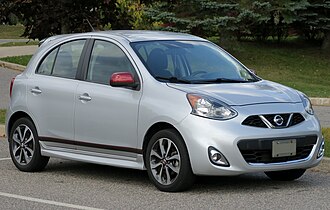
Nissan Micra dashboard symbols and warning lights show us when a system needs attention, when a safety feature is working and when an everyday function is selected. The most important first step is to read the symbol together with its colour, flashing pattern and any message. A red oil-pressure light needs an immediate safe stop; a blue main-beam indicator normally just confirms a lighting setting.
This illustrated guide explains common Micra warning lights, what they mean and what we should do next. We cover engine, braking and steering warnings, tyre pressure, Intelligent Key, diesel-specific indicators and driver-assistance features.
Scope: this guide is based primarily on Nissan’s May 2021 K14 owner’s manual for combustion-engine Micra models, including equipment-dependent petrol and diesel entries. Earlier Micra generations and different markets may use different graphics or procedures. The new all-electric Micra has a different warning system and is outside this guide’s scope. Images are representative standard symbols, including artwork from other Nissan models and other manufacturers; they are not exact reproductions of every Micra cluster.
What do the colours of Nissan Micra warning lights mean?
Colour or behaviour
How we should interpret it
Red
An urgent fault or safety reminder. Oil pressure, overheating and persistent brake warnings require prompt action. An unfastened belt or applied parking brake has its own straightforward explanation.
Amber or yellow
A fault, limited function or condition needing attention. Read the message and arrange the appropriate check rather than ignoring the warning.
Green, white or blue
Usually a function or operating-status indication. Blue commonly identifies main beam; green often confirms a lighting or assistance function.
Flashing
The meaning depends on the system. Flashing traction control can show normal intervention, while a flashing engine warning can indicate misfiring.
Several lamps illuminate when we switch on the ignition. Some stay on until the engine starts; others go out after their self-check. Judge a possible fault against the handbook’s expected sequence. A light that fails to appear during a required check can also need attention, so darkness is not always proof that a system is healthy.
Red warning lights and urgent safety reminders
Engine oil pressure warning light
Red oil canIf this light illuminates or flickers with the engine running, stop safely and switch the engine off immediately. The problem may be inadequate lubrication pressure, which can damage the engine quickly.The symbol does not measure oil level. We can check the dipstick using the handbook procedure, but a normal reading does not prove pressure is safe. Do not keep the engine idling to see whether the light disappears. Arrange professional assistance for a running-engine pressure warning.
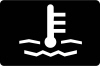
Engine temperature warning light
Red thermometer — where fittedA high-temperature warning means the engine may be overheating. Pull over safely and follow the overheating procedure for your exact Micra. The temperature gauge or information display may provide additional detail.Do not open a hot coolant cap or reach into an engine bay with escaping steam. Coolant loss, a persistent warning or unusual engine behaviour calls for assistance. We should not assume that adding water and immediately continuing will resolve a cooling-system fault.
Brake system and parking brake warning
Red brake symbolThis light can show that the parking brake is applied. Release it fully and confirm that the light goes out before moving. If it stays on while driving, low brake fluid or a braking-system fault may be involved.Stop safely and read any message. If the fluid is below the minimum, the pedal feels abnormal or there is leakage, do not continue driving before the system is checked. Arrange recovery rather than treating topping up as proof that the brakes are safe.
Battery charging warning light
Red battery symbolThe battery icon normally appears with the ignition on before the engine starts. If it remains on or returns while driving, the charging system may not be supplying electrical power correctly.Stop safely and switch the engine off. The K14 handbook includes checking the alternator drive belt; only inspect accessible parts when it is safe to do so. Do not continue with a loose, broken or missing belt. If the belt looks normal, the charging system still needs diagnosis.
Seat belt warning light
Red belt reminderThe belt reminder alerts us to an unfastened belt in a monitored seating position. Depending on equipment, the car can also show rear-seat belt status and sound a chime.Check that everyone is correctly restrained before moving. Remove heavy bags from passenger seats if they are triggering an occupancy warning, and make sure a belt is not trapped or incorrectly latched. A persistent warning with the seat empty or the buckle properly fastened requires inspection.
SRS airbag warning light
Red restraint-system warningThe airbag warning should follow its normal start-up check and then go out. A light that stays on, flashes unexpectedly or does not appear during the expected check can indicate a problem with airbags or seat-belt pretensioners.Have it inspected promptly. This is different from the passenger-airbag OFF status lamp. We should not unplug restraint wiring or install devices to hide the warning, because a suppressed light does not restore the protection the system is intended to provide.
Door or tailgate open warning
Red opening/vehicle graphic — where fittedThis warning indicates that a door or the tailgate may not be securely closed. The information display can identify an opening, depending on the cluster fitted.Stop before checking the latches and close each affected opening properly. A warning that remains can involve a latch switch, but we should physically confirm that the panel is secured before assuming an electrical fault. Do not let a passenger attempt to open and slam a door while the car is moving.
Amber engine, steering and diesel warnings
Check engine light: malfunction indicator
Amber engine-shaped symbolA steady malfunction indicator means the engine-control system has detected a problem. Arrange diagnosis promptly, even if the car seems to drive normally. The symbol does not tell us which component needs replacing.Flashing can indicate a misfire. Reduce demands on the engine and avoid hard acceleration, heavy loads and steep climbs. If the car shakes, loses substantial power or cannot be driven safely, stop and seek assistance. A scan should guide testing, not automatically trigger replacement of the first part named.
Electric power steering warning
Steering-wheel warning — colour depends on displayThis warning indicates a possible fault in electric steering assistance. The Micra may still steer mechanically, but the effort required can become much greater, especially at low speeds or during sharp turns.Grip the wheel firmly and move to a safe location. Arrange inspection promptly, and request recovery if steering is too difficult to control safely. Adding hydraulic steering fluid is not a general solution for an electric-assistance warning; the system must be diagnosed correctly.
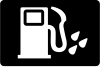
Low fuel warning light
Amber fuel-pump symbol — where fittedThe fuel-pump warning means the tank is getting low. Refuel soon instead of waiting for the gauge or estimated range to reach zero. The remaining-distance display is an estimate, not a guaranteed reserve.We should not assume that every Micra retains the same number of litres when the warning appears. Tank capacity, display design and driving conditions vary. If the fuel indication behaves erratically or stays low after filling, have the level-sensing system checked.
Glow plug or diesel preheating indicator
Amber coil — diesel engines onlyThe coil indicates that diesel preheating is taking place before starting. Wait for it to go out as described in the manual. It may remain illuminated longer when the engine is cold.Normal preheating is not evidence of failed glow plugs. If the indicator behaves abnormally, starting is difficult or other engine warnings appear, arrange a diagnostic check. Petrol Micra models do not use this diesel starting indicator, so always establish the engine type before interpreting it.
Water in fuel filter warning
Fuel-filter warning — applicable diesel versionsWater contamination in a diesel fuel filter needs prompt attention. The K14 manual associates a warning that remains on or flashes irregularly with possible water in the filter.Contact a qualified workshop so the filter can be checked and serviced correctly. Ignoring water contamination can damage the fuel system and engine. Do not assume that adding more diesel, using a fuel additive or clearing the warning code will remove the water already collected in the filter.
Intelligent Key warning or indicator
Key symbol — green/amber behaviour varies by clusterOn applicable segment-display Micras, a flashing green Intelligent Key indicator can signal a weak key battery. Yellow flashing can warn that the key is outside while the ignition is on; steady yellow can indicate a key-system or steering-lock fault.Read the exact message and check that the correct key is inside the car. Replace a weak key battery with the specified type. For starting difficulties, use the handbook’s emergency procedure instead of repeatedly pressing the start button without addressing the cause.
Master warning triangle
Amber general warning — read the displayThe triangle with an exclamation mark directs us to a more specific warning on the vehicle information display. It is an attention signal, not the name of a failed component.Stop somewhere safe before reading or photographing a long message. Record the wording and any other lights. The next step may be a simple correction or professional inspection, depending on the cause. We should never diagnose a battery, engine or sensor failure from the triangle alone.
Brake assistance, tyre pressure and stability control
ABS warning light
Amber ABSAn isolated ABS warning indicates that anti-lock braking may be unavailable. Conventional braking can remain, but the wheels may lock more readily during hard braking. Allow extra space and avoid abrupt inputs.Arrange a prompt system check. If the red brake warning appears too, do not treat the situation as an isolated sensor issue. Stop safely and obtain assistance, particularly if pedal feel or braking performance has changed. The combination needs a proper assessment of the braking system.
Low tyre pressure and TPMS warning
Amber tyre symbol with an exclamation markStop safely and check all road tyres for damage and low pressure. Use a gauge and set cold pressures to the vehicle placard, accounting for the intended load. A warm tyre can give a different reading.A warning that flashes before staying on can indicate a TPMS malfunction rather than simply low pressure. After correcting pressures, use your version’s registration or reset procedure. Do not reset first and assume that a light going out proves the tyres are correctly inflated.
SLIP and stability-control indicator
Amber skidding-car symbolA flashing SLIP indicator usually means the stability or traction system is intervening because grip is limited. Ease off the accelerator and adapt your driving to the surface. Intervention cannot overcome the physical limits of the tyres.If the light stays on, especially with ESP OFF, the system may be unavailable or faulty. Arrange inspection. A warning does not necessarily identify a failed stability-control unit, because related wheel-speed information, electrical supply or other inputs may be involved.
ESP OFF indicator
Amber disabled-system statusESP OFF indicates that stability assistance has been switched off on applicable versions. It is different from a flashing slip symbol showing normal intervention. Check the selected setting and any accompanying message.Restore the normal assistance setting for everyday road driving using the handbook instructions. If the indicator appears without a deliberate selection or remains with the SLIP light, have the system checked. Disabling ESP is not a repair for a recurring stability or traction-control warning.
Hill Start Assist indicator
Function status — where fittedHill Start Assist can briefly help hold the Micra while we move from the brake pedal to the accelerator on a slope. The indicator can illuminate when operating conditions are met and flash during the holding phase.It is a temporary aid, not a parking brake. Keep control of the vehicle and be ready to apply the brake yourself. Do not assume the system will hold indefinitely or work on every incline, load condition or road surface.
Driver-assistance warnings and passenger-airbag status
Intelligent Emergency Braking warning
Amber collision-braking warning — where fitted; artwork variesThis warning can show that Intelligent Emergency Braking is switched off or unavailable. The exact behaviour differs between the basic and pedestrian-detection systems and between instrument displays. Read the setting and message together.Check for obstruction around accessible sensors and follow the cleaning instructions. If the warning persists with the system enabled and sensors clear, arrange inspection. We must control braking ourselves at all times; an assistance warning is not permission to rely on automatic intervention.
Intelligent Lane Intervention indicator
Green selected status; orange alert/fault — where fittedOn the referenced K14, the lane-intervention indicator can show green when the function is switched on. An orange flashing alert can accompany drifting close to detected lane markings, while persistent orange may indicate a fault.Keep your hands on the wheel and correct the vehicle’s position smoothly. Poor markings and weather can limit detection. Read the exact message and have a persistent malfunction checked. The representative lane graphic may differ from the one on your Micra’s display.
Front passenger airbag OFF indicator
Passenger-airbag status — where fittedThis indicator confirms that the front passenger airbag is deactivated on applicable versions. It is a status indication and should not be confused with the separate SRS malfunction light.Check that the setting is appropriate for the passenger and seating arrangement. Never place a rear-facing child restraint in front of an active passenger airbag. Follow both the vehicle handbook and the restraint manufacturer’s instructions; do not rely on the presence of a dashboard symbol without confirming the correct configuration.
Lighting and normal operating indicators
Stop/Start system indicator
Operating status — where fittedThe Stop/Start indicator can show that the engine has been stopped automatically. A different display state or message can explain why an automatic stop is unavailable. Not every missed stop indicates a fault.Battery condition, temperature and other operating requirements can prevent activation. Read any explicit malfunction message separately and investigate repeated faults. When parking, switch the vehicle off properly before leaving; an engine that is temporarily stopped by the system can restart when its operating conditions change.
Dipped beam indicator
Green headlamp symbolThis indicator confirms that the low-beam headlights are operating. It is normally a lighting status, not an engine or electrical-system warning.Check the selected lighting setting when visibility falls. Daytime running lights do not necessarily provide the same lighting arrangement as dipped headlights, and an illuminated dashboard is not proof that the correct exterior lights are on. Select suitable lighting for darkness, rain and other poor-visibility conditions rather than relying only on how bright the instrument panel looks.
High beam indicator
Blue headlamp symbolThe blue symbol means main beam is on. It normally needs no repair; it tells us to consider whether the stronger beam is appropriate for the traffic and surroundings.Dip the headlights to avoid dazzling other road users. If the symbol appears unexpectedly, check the stalk and any automatic function. We should distinguish this ordinary blue status from an amber lighting fault or from the high-beam-assist symbol that merely shows automatic control is selected.
High beam assist indicator
Automatic lighting status — where fittedThe headlamp-with-A symbol identifies the high-beam-assist function on equipped cars. The actual use of main beam depends on the system’s settings and what it detects ahead.Continue supervising the lights and switch manually when necessary. Weather, road geometry and unusual lighting can affect automatic detection. An enabled-assistance symbol does not guarantee that main beam is currently on, so check the separate blue indicator when deciding which beam is actually being used.
Front fog light indicator
Green fog-lamp symbol — where fittedThis symbol confirms that the front fog lamps are switched on. It is an ordinary function indication rather than a malfunction warning.Use fog lamps only where conditions and local rules justify them. Switch them off when they are no longer needed, and remember that front fog lamps do not replace correctly selected dipped headlights. If the dashboard indicator is on but an exterior lamp is not working, inspect the lamp safely and arrange repair.
Rear fog light indicator
Amber fog-lamp symbolThe rear fog indicator is amber even though it normally shows a selected function rather than a defect. It means the bright rear fog lamp is operating.Switch it off when visibility improves so it does not dazzle following drivers or make brake lights less obvious. Do not confuse its direction and shape with the front-fog symbol. A persistent indicator after changing the switch setting should be checked against the vehicle’s lighting instructions.
Side light indicator
Green position-light symbolThe side-light indicator confirms that the relevant exterior position lights are illuminated. It can appear with other lighting modes according to the switch setting and automatic-light operation.It does not prove that dipped beam is providing enough light to drive after dark. Check the lighting controls and the actual road illumination. If a dashboard symbol appears normal but an exterior lamp has failed, the lamp still needs attention; status indicators are not a substitute for occasional physical checks.
Turn signal and hazard indicators
Green flashing arrowsOne arrow usually shows the selected turn signal; both flash when the hazard warning lights operate. These are normal dashboard indicators rather than fault warnings.An unusually fast flash or missing indication can point to a lamp or circuit problem. Check the exterior lights from a safe position and repair failed signals promptly. We should not assume other drivers can see our intended turn merely because a clicking sound is coming from the dashboard.
Why the same symbol can mean different things on different Micras
A Micra’s generation, market and equipment determine its warning display. A diesel has preheating and fuel-filter concerns that do not apply to a petrol car. A basic instrument cluster may communicate with a lamp, while a higher-specification version can add a written message. The newer electric Micra requires its own handbook for battery and electric-drive warnings.
We should establish the vehicle year and engine before following a reset sequence or repair suggestion. The symbol identifies a system; it rarely proves which part has failed. Two cars showing an engine warning can have completely different causes.
What should we do when several warning lights appear together?
Prioritise safe control of the vehicle. Changes in braking, steering, engine temperature or power matter more than working through a list of icons. Stop safely when required, then record the warnings and the circumstances in which they appeared.
Multiple warnings can have a shared cause, but we should not assume they are harmless. For example, related control systems can lose access to the same information. A workshop may need to read several control modules rather than only generic engine codes. Keep useful details such as recent repairs, battery problems and whether the warnings appeared at start-up or while driving.
Can we reset Nissan Micra dashboard warning lights ourselves?
Simple reminders often clear once their cause is corrected: fastening a belt, closing a door or releasing the parking brake. Tyre-pressure monitoring may need a model-specific reset or registration step after the tyres have been inspected and correctly inflated.
Fault warnings are different. Disconnecting the battery or erasing codes does not repair a failed component and can remove diagnostic evidence. Record the problem, identify the cause and verify the repair first. A service reminder is also separate from an oil-pressure or engine-management warning; resetting the service interval will not fix either fault.
Conclusion
Understanding Nissan Micra dashboard symbols starts with the icon, colour and accompanying message. We should stop promptly for serious oil-pressure, temperature and brake warnings, arrange diagnosis for persistent system faults, and recognise ordinary indicators such as main beam and fog lamps. Using the correct handbook for the vehicle’s generation and engine helps us choose the right response without guessing at repairs.
Reference: Nissan Micra K14 owner’s manual, May 2021, particularly Instruments and Controls and the related emergency procedures. Nissan’s electric Micra information identifies the newer model outside this guide’s scope. Representative illustrations include Nissan handbook artwork and standard-symbol artwork used in the linked image sources. Exact equipment and instructions vary by vehicle.
Frequently asked questions
1. What does the triangle with an exclamation mark mean on a Nissan Micra?
It is the master warning light. Read the information display to identify the actual condition. The triangle alone does not establish an engine, battery or brake fault. We should base the response on the accompanying instruction and any other warning lights.
2. Can I drive with the Micra’s check engine light on?
A steady light with otherwise normal operation needs prompt diagnosis. A flashing light can indicate misfiring, so reduce engine load. If the engine shakes, power drops substantially or safe driving is affected, stop and seek assistance rather than continuing the journey.
3. Why is the tyre-pressure light still on after inflation?
The pressures may need to be registered or reset using the correct procedure, and the system may require driving before it updates. Check for damage and confirm all cold pressures first. A flashing-then-steady warning can indicate a TPMS fault that inflation alone will not fix.
4. What does a flashing green key symbol mean?
On the applicable K14 segment display, it can mean the Intelligent Key battery is running low. Replace it with the specified battery type. Other colours and flashing patterns have different meanings, so check your own cluster’s message and handbook before assuming the cause.
5. Is the passenger airbag OFF light a fault?
It can be a normal confirmation that the passenger airbag has been deactivated. Check that the setting is appropriate for the passenger or child-restraint arrangement. The separate SRS warning indicates a possible restraint-system malfunction and requires professional inspection.
If you want to know other articles similar to Nissan Micra Dashboard Symbols and Warning Lights you can visit the category Service and Parts.
Auto Guide
I show you the best reviews of all car brands, the information we collect and show is verified by our mechanics, we hope that everything you read here is useful to buy the car of your dreams











More content of your interest