Vauxhall Insignia warning lights help us distinguish an urgent mechanical problem from a safety reminder or a feature that is simply switched on. The quickest way to understand a symbol is to combine its colour, whether it is steady or flashing, and the message in the Driver Information Centre. A red oil can needs a very different response from a green cruise-control indicator.
This guide explains the main Insignia dashboard symbols, what they mean and what we should do next. It covers common features across the original Insignia and later Grand Sport, Sports Tourer and Country Tourer versions. Equipment, engines and instrument displays vary, so not every symbol appears on every car.
The images are representative recognition aids rather than exact reproductions of every instrument cluster. Use the description and the handbook for your particular vehicle to confirm a symbol, especially before attempting a reset or a particulate-filter cleaning procedure.
Identify it immediately. Stop safely for oil pressure, overheating or a brake-system fault.
Yellow or amber
A fault, warning, disabled feature or operating information
Read the message and arrange the appropriate action.
Green
A feature is activated or operating
Confirm that its operation is intended.
Blue
Usually high-beam headlights
Dip the lights when necessary.
White
A selected feature or standby status on equipped displays
Check whether the function is merely enabled or actively controlling the car.
Colour is a starting point, not a diagnosis. A red seat-belt symbol asks us to secure an occupant, while a red oil-pressure warning can mean that continued engine operation risks severe damage. Flashing also has different meanings: ESC flashing can indicate normal intervention, but an engine light flashing can indicate a catalyst-damaging fault.
Why do dashboard lights appear when we switch on the ignition?
Most control indicators illuminate briefly during a functionality check. The oil-pressure and charging indicators can remain illuminated before the engine starts because the engine is not yet producing normal running oil pressure and the alternator is not charging.
The concern is a light that stays on unexpectedly after starting, returns while driving or appears with a warning message. A lamp that never illuminates during a check specified in the handbook may also need attention.
Red warning lights: stop safely when the fault requires it
Engine oil pressure warning
Urgency: stop safely, switch off and obtain assistance.The red oil can warns that engine lubrication may be interrupted. It is not an oil-change reminder, and a normal reading on the dipstick does not prove that oil pressure is safe. Continuing can cause serious engine damage.Move out of traffic safely and switch off. Do not remove an ignition key while the vehicle is still moving. Check the level only when it is safe and according to the handbook, but do not restart repeatedly to see whether the lamp disappears. Later Insignia instructions specify keeping the engine off and having the vehicle towed to a workshop. Correct oil quantity cannot by itself rule out a pressure fault.
Brake and clutch system warning
Urgency: stop if it remains after releasing the parking brake.The red brake symbol can indicate low brake or clutch fluid. On versions with a manual parking brake, it can also illuminate when the handbrake is applied. We should confirm that the brake is fully released before interpreting a persistent light.If it remains illuminated while driving, stop and do not continue the journey. A low fluid level, abnormal pedal feel or visible leakage makes immediate inspection essential. Adding fluid without finding the reason for the loss is not a complete repair. Arrange professional help rather than testing the brakes at speed.
Battery charging-system warning
Urgency: stop safely and switch off the engine.The battery symbol with the engine running means the battery is not being charged correctly. Vauxhall also warns that engine cooling may be interrupted and brake assistance may become ineffective. This is more serious than a reminder to buy a new battery.Stop safely, switch off and obtain assistance. The cause could involve the alternator, belt, wiring or another charging-system component. We should not assume that driving farther will recharge the battery or that switching off a few accessories makes the fault safe to ignore.
Engine coolant temperature warning
Urgency: stop safely and switch off.A red thermometer symbol or an overheating message means the engine coolant temperature is too high. Depending on the display, a gauge may also show an abnormal reading. Steam, leakage or a strong coolant smell adds to the concern.Stop the engine and allow the system to cool before any level check. Never open a hot pressurised coolant cap. If the level is correct but the warning appeared, the cooling system still needs inspection. If there is a leak or overheating returns, arrange recovery rather than continuing with repeated top-ups.
Airbag and seat-belt pretensioner warning
Urgency: have the safety-system fault inspected immediately.The airbag symbol normally goes out after its initial check. If it stays on, appears while driving or fails to perform the specified check, the restraint system may have a fault. Airbags or belt tensioners may not operate as intended in a collision.We should arrange professional diagnosis even if the car otherwise drives normally. Do not unplug airbag connectors or probe the wiring to extinguish the lamp. A proper repair addresses the cause and verifies that the safety system functions correctly.
Seat-belt reminder
Urgency: secure all occupants before driving.The seat-belt indicator can illuminate or flash and may be accompanied by a chime. Some Insignia displays also show the status of rear-seat belts, with different colours or symbols according to the instrument version.Check every occupied seat and secure the correct buckle. Objects on a passenger seat can sometimes affect occupancy detection. If a correctly fastened belt still triggers the warning, have the buckle or related sensing system checked instead of bypassing it.
Door or tailgate open warning
Urgency: stop safely and secure the opening.A red vehicle or open-door graphic means a door or the tailgate is open or not fully latched. The display may identify the affected opening. It is a reminder about the vehicle’s physical condition, rather than an engine fault.Close the opening securely before moving. If the warning appears on the road, stop somewhere safe before checking it. A warning that persists despite proper closure may indicate a latch or switch problem and should be investigated.
Electric parking brake, ABS and steering symbols
Electric parking brake applied or flashing
Urgency: steady can be normal; persistent flashing means do not drive.A steady red parking-brake indicator normally confirms that the electric parking brake is applied. Flashing can mean that it has not fully applied or released. The difference is important: we cannot assume the car is secured or ready to move merely because the symbol is visible.With the vehicle stopped, depress the brake pedal and follow the handbook’s release-and-apply procedure. If the red indicator continues flashing, do not drive and seek workshop assistance. Secure the vehicle appropriately and do not rely on an uncertain parking brake on a slope.
Electric parking brake fault
Urgency: immediate inspection; avoid parking on inclines.A separate yellow parking-brake fault indicator means the system may be operating with reduced performance. On relevant versions, flashing can indicate service mode. This yellow fault lamp is different from the red applied-status indicator.Follow the exact handbook instructions for your display and obtain workshop assistance. The vehicle must be secured against rolling. Do not repeatedly operate the switch or attempt to drive against a brake that may still be applied.
Anti-lock braking system warning
Urgency: arrange prompt inspection.If the ABS light remains on after its check or illuminates while driving, the anti-lock system has a fault. Conventional braking can remain operational, but without the regulation that helps prevent wheel lock during hard braking.Allow greater safety margins and avoid abrupt braking. If the red brake warning appears as well, or pedal behaviour changes, stop and obtain assistance. We should not interpret every group of brake-related warnings as merely a failed wheel sensor without checking the actual fault.
Power steering or variable-effort steering warning
Urgency: assess steering control and arrange diagnosis.On equipped Insignia versions, a steering warning indicates a fault in the assistance or variable-effort system. Steering effort can change; the wheel may become unusually heavy or feel different from normal.Keep control of the vehicle and stop safely if steering becomes difficult or unpredictable. A steering warning does not identify a single failed component or justify adding fluid without checking which steering system is fitted. Have the cause diagnosed rather than continuing because the wheel still turns.
Apply brake or clutch pedal indicator
Status: an operating instruction unless it persists unexpectedly.A pedal symbol asks us to press the appropriate pedal for the operation requested. Depending on the version, this can relate to starting, releasing the electric parking brake or another interlock. Earlier Insignia instructions specifically describe an apply-footbrake indication for parking-brake release.Read the message and press the correct pedal fully. If the car does not recognise the pedal despite correct operation, an interlock or switch may need inspection. Do not force the selector or bypass the starting and brake-release safeguards.
Engine management, servicing and emissions warnings
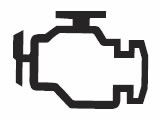
Check-engine light or malfunction indicator
Urgency: immediate workshop advice; flashing needs particular attention.The amber engine-shaped light indicates an emissions-control fault. A steady light can mean that permitted emissions limits are exceeded; on later versions it can also prevent exhaust-filter cleaning. The symbol alone does not identify an oxygen sensor, EGR valve or any other particular part.If it flashes, Vauxhall warns of a fault that could damage the catalytic converter. Ease off the accelerator and seek immediate assistance. Stop safely if flashing persists, the engine runs roughly, power drops severely or another serious warning appears. We should diagnose the cause rather than repeatedly clearing the code.
Car with a spanner: Service Vehicle Soon
Urgency: read the accompanying message and arrange diagnosis.A car-and-spanner symbol or “Service Vehicle Soon” message can indicate that the vehicle needs workshop attention. It should not automatically be interpreted as the routine oil-change reminder. An accompanying message or code helps identify the affected system.Record the wording and any change in performance. A scan tool must be capable of reading the relevant Vauxhall systems; a basic emissions-only reader may not reveal every fault. Resetting the oil-life display is not a repair for an unrelated Service Vehicle Soon warning.
Diesel preheating indicator
Status: wait for preheating before starting when indicated.The yellow coil symbol shows that diesel preheating is active. It may appear only briefly or mainly in colder conditions. Start the engine when the indicator goes out, following the vehicle’s normal starting instructions.A coil symbol does not mean that every diesel running problem is caused by the glow plugs. If starting is difficult, the indication behaves abnormally or a fault message remains, arrange diagnosis. Petrol models do not use this diesel preheating indication.
Diesel particulate filter or exhaust-filter warning
Urgency: follow the engine-specific cleaning instructions promptly.Older diesel Insignias can use a dedicated particulate-filter lamp. A steady light can request cleaning; flashing can indicate that the filter has reached a higher filling level and needs immediate action according to the handbook. Later cars may present an exhaust-filter message instead, and some petrol engines also have a particulate filter.Do not assume that one motorway-speed rule applies to every engine. The June 2021 manual gives different cleaning instructions for petrol and diesel vehicles. Use the procedure for your exact version and attempt it only when road conditions and other warnings make it safe. If cleaning is reported as impossible, the engine light appears or power is reduced, seek immediate workshop assistance instead of trying to force regeneration.
AdBlue low-level or emissions-system warning
Urgency: address the message before a restart restriction occurs.On equipped diesel models, an AdBlue warning can indicate that the fluid level is low. The display may provide a remaining-distance countdown. Refill as instructed before the system prevents the engine from restarting.Use the specified AdBlue and the correct filler; never put it in the diesel tank. A warning about an emissions or AdBlue-system fault is not necessarily cured by adding fluid. If the tank has been correctly replenished but the message or countdown persists, arrange diagnosis. Do not assume that clearing a code will remove the underlying restart restriction.
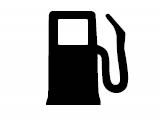
Low fuel warning
Urgency: refuel promptly.A fuel-pump symbol indicates a low fuel level. On some later displays, flashing is a more urgent indication that fuel is used up. Estimated remaining range varies with conditions and should not be treated as a guaranteed distance.Never deliberately run the tank dry. A diesel that runs out of fuel may require the prescribed priming or bleeding procedure before it can restart. Refuelling early is preferable to repeated starting attempts after fuel starvation.
Tyre pressure, stability and traction-control indicators
Tyre pressure monitoring system warning
Urgency: stop safely and inspect the tyres.A steady tyre-pressure symbol indicates pressure loss. Check for a puncture or visible damage and measure pressures using the vehicle’s pressure label for the tyre size and load. Make the normal comparison with cold tyres.Flashing followed by steady illumination can indicate a system fault or a wheel without a compatible pressure sensor. That does not prove that the tyres are correctly inflated. Inspect and correct the tyre condition first, then follow the appropriate sensor or relearn procedure. A reset cannot repair a puncture.
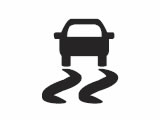
Electronic Stability Control and traction control
Urgency: ease off during intervention; investigate a persistent fault.A flashing skidding-car symbol normally means the system is actively intervening. Engine output may be reduced and individual brakes may be applied to help manage grip. Smooth inputs and a lower speed are the appropriate response.If the indicator stays on, a fault may be present. The vehicle can have reduced stability assistance, particularly on a slippery road. Arrange diagnosis and consider accompanying ABS or other warnings. Electronic assistance cannot overcome unsuitable speed, worn tyres or a lack of available grip.
Electronic Stability Control OFF
Status: stability control has been deactivated.The ESC OFF indication confirms that the corresponding system has been switched off or reduced according to the vehicle’s settings. Earlier and later displays can differ in their steady or flashing presentation.Restore the normal setting when the reason for deactivation has passed. If the status cannot be restored or appears without explanation, check the handbook and arrange inspection. Switching a system off is not a way to repair its fault warning.
Traction Control OFF
Status: traction control is deactivated.The traction-control-off symbol indicates that the function intended to limit wheelspin has been disabled. It is distinct from the flashing skidding-car indication that shows intervention.Use the normal setting for ordinary driving. If a temporary deactivation is recommended for a specific situation in the handbook, restore it afterwards. Unexpected or persistent OFF indications deserve investigation, especially when other chassis warnings are present.
Driver assistance, visibility and convenience symbols
Lane departure warning or Lane Keep Assist
Status: interpret the colour according to the generation.Earlier lane-departure systems warn about an unintended lane change, while later Lane Keep Assist can provide a steering correction. Their colour meanings are not identical. On later systems, white can mean switched on but inactive, green active, yellow a correction and flashing yellow a significant lane departure.Keep steering actively and do not depend on the system to recognise every marking. Rain, poor markings and an obstructed camera can limit operation. Read a malfunction message separately from normal intervention or a temporary lack of detected lanes.
Parking assist warning
Urgency: check sensors and park using direct observation.A parking-assist warning can indicate a fault, blocked sensors or interference. Dirt, ice and snow can prevent ultrasonic sensors from working properly. Some messages describe temporary unavailability rather than a failed component.Clean the sensors gently when parked and check the system again in suitable conditions. If the fault remains, arrange inspection. We should continue to check mirrors, cameras and the surroundings directly; parking assistance cannot reliably identify every low object or moving hazard.
Vehicle detected ahead and following-distance warning
Status: detection is not the same as a fault.On equipped later Insignias, green can indicate that a vehicle has been detected ahead in the same lane. Yellow can mean that the gap is too small or that we are approaching the vehicle too quickly.Increase the gap or brake as the traffic situation requires. A detection symbol does not guarantee that the car will stop for us. Sudden changes in traffic and sensor limitations still require the driver’s attention.
Cruise control indicator
Status: distinguish enabled from actively controlling speed.The cruise-control symbol commonly appears white when the system is switched on and green when a speed is set or control is active. The chosen speed may also be displayed in the Driver Information Centre.Conventional cruise control does not automatically maintain a gap to the car ahead. Equipped adaptive-cruise versions use additional status and distance information. Confirm which system is fitted and remain ready to brake, particularly when approaching slower traffic or changing road conditions.
Immobiliser warning
Urgency: check key recognition if the engine will not start.A flashing immobiliser symbol indicates that the security system has detected a problem and the engine may not start. It is different from a routine key-battery reminder, although the accompanying message may help identify a recognition issue.Use the handbook’s starting instructions and, where appropriate, try a known working spare key. Do not repeatedly crank the engine or assume that disconnecting the battery will resolve the problem. Persistent immobiliser faults need diagnosis.
Passenger airbag deactivated indicator
Status: verify the correct setting for the occupant.A passenger-airbag OFF indicator confirms that the front passenger airbag has been disabled where the vehicle provides this facility. It is separate from the general airbag-system fault lamp.Check the setting against the occupant and child-restraint instructions. Never use a rear-facing child seat in front of an active passenger airbag. If the switch position and displayed status do not agree, resolve the problem before using that seating position.
Low windscreen washer fluid
Urgency: replenish suitable washer fluid.The windscreen-and-spray symbol or corresponding message indicates a low washer-fluid level on equipped vehicles. It is usually a maintenance reminder rather than an engine fault, but poor windscreen visibility can quickly become a safety issue.Refill with suitable screenwash for the conditions, using the correct reservoir. If the message remains after filling, or the washers do not spray, inspect for leakage or a system fault. Do not confuse washer fluid with engine coolant.
Headlight, fog-light and turn-signal indicators
Adaptive Forward Lighting or LED headlight warning
Urgency: distinguish a fault from a configured lighting mode.A yellow lighting-system warning can indicate an adaptive or LED headlight fault. Depending on the generation, a brief flashing indication after starting can instead relate to a selected headlight pattern for driving in different traffic arrangements.Read the message and the exact handbook definition before assuming a lamp unit has failed. Persistent faults need inspection, especially if night-time visibility is reduced. Avoid relying on automatic beam functions when their operation is uncertain.
High-beam indicator
Status: main-beam headlights are on.The blue headlamp symbol illuminates with the high beams or headlight flash. It is a normal operating indicator, not an engine warning.Dip the headlights when necessary to avoid dazzling other road users. If the symbol and the actual lights do not agree, check the exterior lighting safely and arrange repair.
High Beam Assist indicator
Status: automatic high-beam assistance is activated.The headlamp-with-A symbol relates to automatic switching between dipped and main beams on equipped cars. It is not the same as the blue indicator confirming that main beams are actually illuminated.Monitor the road and override the system when needed. Weather, visibility and unusual light sources can affect detection. We remain responsible for preventing glare to other drivers.
Front fog-light indicator
Status: front fog lamps are switched on.The green front fog-light symbol confirms that the fitted front fog lamps are selected. Their purpose is different from ordinary main beams.Use them only in appropriate visibility conditions and according to local rules. Switch them off when they are no longer needed. This indicator by itself is not a bulb-failure warning.
Rear fog-light indicator
Status: the rear fog lamp is illuminated.The yellow rear fog symbol confirms that the bright rear fog lamp is on. Its colour can be mistaken for a fault warning, but it normally describes a selected lighting function.Turn it off when visibility improves. Leaving it on unnecessarily can dazzle following drivers and make normal brake-light changes harder to distinguish.
Exterior lights indicator
Status: the exterior lights are switched on.The green lights-on symbol confirms an exterior-lighting setting. The exact combination of lamps depends on the switch position and the automatic-lighting configuration.Do not assume that an illuminated dashboard or daytime running lights guarantee suitable night-time lighting. Check that the correct headlights and rear lamps are operating for the conditions.
Turn signals and hazard lights
Status: the selected direction indicators are flashing.One flashing arrow normally identifies the selected direction signal; both flash with the hazard lights. Rapid flashing can indicate a failed indicator lamp, an associated fuse problem or a trailer-light issue on relevant vehicles.Check the exterior lamps safely and repair any fault. During a breakdown, hazards warn other drivers but do not make an unsafe stopping location safe. Move out of danger when possible.
Important Insignia dashboard messages without one universal icon
Change Engine Oil Soon and remaining oil life
An oil-life or oil-change message concerns scheduled oil servicing, not a live measurement of oil pressure. It is separate from the red oil can and from a general Service Vehicle Soon fault indication. The calculated remaining oil life is not an oil-level reading either.
Arrange the specified oil and filter service and reset the monitoring system only after the work has been completed. A reset without an oil change merely alters the reminder; it does not restore the oil’s condition.
Engine Power Is Reduced
Reduced power can be a protective response to an engine-management or emissions problem. It does not identify a particular turbocharger, sensor or filter fault. Record the other messages and warnings instead of selecting parts to replace from the wording alone.
Avoid demanding acceleration. Stop safely if the car cannot maintain a safe speed, runs roughly or shows a red warning. Have the relevant systems scanned and tested before assuming that restarting has fixed it.
Adaptive cruise, speed limiter and pedestrian detection
Equipped later cars can display separate adaptive-cruise, speed-limiter and pedestrian-detection information. White and green often distinguish selection from active operation, while an alert calls for a response to the traffic situation.
Read the selected speed and distance settings carefully. A pedestrian-detected symbol is not proof that automatic braking will prevent a collision. Likewise, traffic-sign recognition can be incomplete or incorrect; the driver must observe the actual signs.
What should we do when several warning lights appear together?
Prioritise the most urgent warning and any loss of safe braking, steering or engine operation. Multiple alerts can arise because connected systems share information, but we should not assume that a cluster of warnings is always just a weak battery.
Once safely parked, record the exact messages and when they appeared. Preserve diagnostic codes and the circumstances of the fault before clearing anything. A workshop can then distinguish a primary problem from secondary systems that have become unavailable.
Can we reset Vauxhall Insignia warning lights ourselves?
Simple reminders normally clear when their cause is corrected: a door is shut, a belt is fastened or fuel is added. Other systems need the correct repair and, where specified, a reset or relearn procedure for the exact model.
Battery disconnection and code clearing are not universal repairs. They can remove information that would help diagnose an intermittent problem. Use equipment capable of reading the affected system, not only generic engine emissions codes. A warning disappearing temporarily is not proof that the underlying fault has been resolved.
Conclusion
The best way to understand Vauxhall Insignia warning lights is to match the symbol with its colour, behaviour and message. We can then distinguish a normal operating indicator from a fault requiring inspection or a safe stop. Give oil pressure, overheating, charging and braking warnings the attention their instructions require, and use the correct handbook for generation-specific procedures. Diagnose the cause before attempting to clear the display.
Frequently Asked Questions
1. What does the car-with-a-spanner symbol mean on an Insignia?
It indicates that the vehicle needs attention and may accompany a fault message or code. Do not automatically treat it as the routine oil-change reminder. Record the message and arrange diagnosis; resetting oil life will not repair an unrelated Service Vehicle Soon fault.
2. Can we drive with a flashing electric parking-brake light?
A persistently flashing red parking-brake indicator can mean the brake is not fully applied or released. Follow the handbook’s stationary brake-pedal and release/apply procedure. If it keeps flashing, do not drive and seek assistance. Secure the car carefully against rolling.
3. Does the Insignia DPF warning always need a motorway drive?
No. The required cleaning conditions depend on the engine and model year, and some warnings mean cleaning is no longer possible. Follow the exact handbook procedure only when it is safe. An engine fault, reduced power or a persistent cleaning-failure message needs workshop attention.
4. Why does the tyre-pressure light flash before staying on?
That sequence can indicate a TPMS fault or a wheel without a suitable sensor. Check actual tyre pressures and tyre condition as well, because a monitoring fault does not guarantee the tyres are safe. Arrange sensor diagnosis or the appropriate relearn after correcting the underlying issue.
5. Is a red oil light the same as Change Engine Oil Soon?
No. The red oil-pressure light can indicate interrupted lubrication and requires a safe stop with the engine switched off. Change Engine Oil Soon is a servicing message. A correct oil level or a recent oil change does not prove that a red pressure warning is harmless.
If you want to know other articles similar to Vauxhall Insignia Warning Lights: The Complete Guide to Dashboard Symbols and Their Meanings you can visit the category Service and Parts.
Auto Guide
I show you the best reviews of all car brands, the information we collect and show is verified by our mechanics, we hope that everything you read here is useful to buy the car of your dreams









































More content of your interest