

GMC Sierra No Sound: Causes, Diagnosis, and Easy Fixes

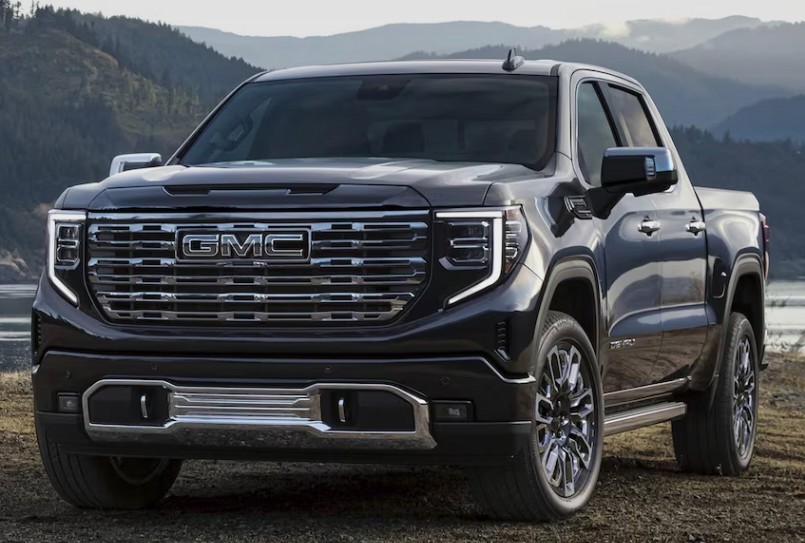
A GMC Sierra with no sound can make even a short drive feel strangely empty. The radio screen may glow, your favorite station may appear, and the volume indicator may climb—but the cabin remains as quiet as a library at midnight.
Sometimes the problem affects every audio source. In other cases, the radio works but Bluetooth calls do not, warning chimes disappear, or sound only comes from one speaker. These details matter because the Sierra’s audio system is not just a radio connected to a few speakers. Depending on the model year and trim, it may include an infotainment module, amplifier, digital communication network, active noise cancellation system, steering-wheel controls, and multiple software layers.
That sounds complicated, but we do not need to tear the dashboard apart immediately. Many GMC Sierra no sound problems come from temporary software glitches, incorrect settings, phone connection conflicts, weak battery voltage, blown fuses, or amplifier issues.
Let’s work through the symptoms logically, beginning with the easiest checks and moving toward the more technical possibilities.
Content in this publication
- Why Does My GMC Sierra Have No Sound?
- Identify Which Sounds Are Missing
- Start With the Volume and Mute Controls
- Check the Balance and Fade Settings
- Restart the GMC Sierra Infotainment System
- Disconnect Bluetooth and Test Again
- GMC Sierra Apple CarPlay Has No Sound
- GMC Sierra Android Auto Has No Sound
- Inspect the Radio and Amplifier Fuses
- Could the Factory Amplifier Be Faulty?
- Low Battery Voltage Can Cause Audio Problems
- Check for Software Updates
- Speaker and Door-Wiring Problems
- Active Noise Cancellation and Audio Interference
- Scan the Truck for Diagnostic Trouble Codes
- A Practical GMC Sierra No-Sound Diagnostic Order
- What Not to Do
- When Should We Visit a GMC Dealer or Audio Specialist?
- How Much Can a GMC Sierra No-Sound Repair Cost?
- How to Prevent Future Sierra Audio Problems
- Conclusion
- Frequently Asked Questions
Why Does My GMC Sierra Have No Sound?
A Sierra can lose sound for several different reasons. The most common possibilities include:
- The infotainment system has frozen
- The audio source has been muted
- The balance or fade setting has shifted
- Bluetooth audio is connected incorrectly
- Apple CarPlay or Android Auto has stopped responding
- An audio-related fuse has blown
- The factory amplifier has lost power
- Battery voltage is too low
- A speaker or wiring connector has failed
- The radio module needs a software update
- The vehicle communication network has developed a fault
Before we choose a repair, we need to identify exactly what has gone silent.
Can you still hear the turn-signal clicks? Do parking sensors make noise? Does sound work from FM radio but not Bluetooth? Does the audio return after restarting the truck?
Each answer points us down a different road.
Identify Which Sounds Are Missing
“GMC Sierra no sound” may describe several separate problems. Sorting the symptoms into categories can save us hours of unnecessary testing.
No Sound From Any Audio Source
This means FM, AM, satellite radio, Bluetooth, USB, Apple CarPlay, and Android Auto are all silent.
When every entertainment source fails, we should suspect a shared component, such as:
- Infotainment software
- Audio amplifier
- Radio fuse
- Amplifier fuse
- Radio module
- Power or ground connection
- Vehicle communication network
A single damaged speaker would not normally silence the entire truck. A central failure is more likely.
Radio Works but Bluetooth Has No Sound
If regular radio audio works, the speakers and amplifier are probably functioning. The problem is more likely related to the phone, Bluetooth connection, media settings, or audio routing.
Your phone may be connected for calls but not media. It may also be sending sound to headphones, another vehicle, or a nearby Bluetooth device.
Music Works but Warning Chimes Are Missing
The warning chimes in many modern Sierra models play through the vehicle’s speakers rather than through a separate dashboard buzzer.
If music works but seat-belt alerts, parking warnings, or turn-signal sounds have disappeared, the issue may involve:
- Chime-volume settings
- Instrument cluster communication
- Radio software
- Amplifier communication
- A specific speaker channel
Do not ignore missing safety alerts. Entertainment audio may be optional, but warning sounds can help prevent accidents.
Sound Comes From Only One Side
Audio from only the left, right, front, or rear usually points toward a speaker-channel problem rather than total radio failure.
Possible causes include:
- Incorrect balance or fade settings
- Damaged speaker wiring
- A loose door connector
- Failed speaker
- Moisture inside a door
- Defective amplifier channel
We should always inspect the sound settings before removing panels. A setting can imitate a wiring failure perfectly.
Start With the Volume and Mute Controls
This may sound almost too simple, but modern infotainment systems can mute audio in several ways.
Press the physical power or volume knob once. Then turn the volume upward while music is actively playing. Watch the screen for a mute symbol or volume indicator.
Also check:
- Steering-wheel mute button
- Phone volume during Bluetooth playback
- Navigation voice volume
- CarPlay or Android Auto media volume
- Individual application volume
- Conversation enhancement settings
- Teen Driver audio restrictions, where equipped
Some volume categories are adjusted independently. For example, turning the knob while a navigation instruction is speaking may change guidance volume instead of music volume.
Test With More Than One Source
Switch between FM radio, Bluetooth, USB, and satellite radio if equipped.
This quick comparison tells us whether the fault is source-specific or system-wide. If FM works but Bluetooth does not, replacing the amplifier would be like replacing the roof because one window is stuck.
Check the Balance and Fade Settings
Open the infotainment sound menu and locate the balance and fade controls. Confirm that the listening position is centered.
A child, passenger, accidental screen touch, or previous owner may have moved the sound completely toward one corner of the truck.
Set:
- Left and right balance to center
- Front and rear fade to center
- Equalizer to a neutral preset
- Surround or Bose settings to default, if equipped
After centering everything, play a familiar song and listen to each door individually.
Restore the Audio Settings to Default
If the menu offers a reset option, restore the audio settings without immediately erasing the entire infotainment system.
A simple audio reset may correct:
- Strange equalizer behavior
- Missing speaker channels
- Unbalanced output
- Excessively low volume
- Source-specific configuration errors
Restart the GMC Sierra Infotainment System
Like a smartphone, the Sierra’s infotainment system can freeze even when the display appears normal. The interface may respond while the audio process has crashed behind the scenes.
Start with a normal restart:
- Park the truck safely.
- Turn off the ignition.
- Open the driver’s door.
- Wait several minutes for the modules to shut down.
- Close the door.
- Restart the truck.
- Test the radio before reconnecting your phone.
Opening the door matters because some modules remain awake after the ignition is switched off.
Perform a Soft Infotainment Reboot
The exact reboot procedure varies by model year and infotainment version. Some systems can be restarted by holding a combination of physical buttons, while newer units may provide a restart option within the settings menu.
Use the procedure listed in the owner’s manual for your particular Sierra. Avoid randomly holding buttons because a combination that works on one generation may do something different on another.
Why a Full Sleep Cycle Can Work
Vehicle modules do not always turn off immediately. They may stay active to save settings, manage retained accessory power, communicate with connected services, or finish background processes.
Allowing the truck to sit locked and untouched for several minutes gives the system time to shut down fully. When restarted, the audio modules perform a clean initialization rather than continuing from the frozen state.
Disconnect Bluetooth and Test Again
Bluetooth problems can make the radio appear broken when the truck is actually waiting for audio from the wrong device.
Turn off Bluetooth on every nearby phone. Then select FM radio manually.
If FM sound returns, the issue likely involves the paired device rather than the truck’s speakers or amplifier.
Delete and Re-Pair the Phone
Remove the Sierra from your phone’s Bluetooth list. Then remove the phone from the truck’s saved devices.
Restart both devices and pair them again from scratch.
When reconnecting, confirm that permission is enabled for:
- Media audio
- Phone calls
- Contacts
- Messages, if desired
- Apple CarPlay or Android Auto
Check the Phone’s Audio Output
While music is playing, open your phone’s audio-output menu. Verify that the sound is being sent to the GMC system rather than:
- Phone speaker
- Wireless headphones
- Smartwatch
- Portable speaker
- Another nearby vehicle
Bluetooth can behave like a distracted waiter, delivering your order to the wrong table while everything appears normal.
GMC Sierra Apple CarPlay Has No Sound
CarPlay audio problems often appear after a phone update, cable change, wireless connection interruption, or infotainment glitch.
Begin by testing regular FM radio. If the radio works, the core audio hardware is probably healthy.
Then try these steps:
- Disconnect the iPhone.
- Close the music or podcast application.
- Restart the iPhone.
- Restart the infotainment system.
- Reconnect using a known-good cable.
- Raise the phone and truck volume.
- Test a different audio application.
For wireless CarPlay, switch Wi-Fi and Bluetooth off and back on before reconnecting.
Siri, navigation directions, phone calls, and media may use different volume levels.
Adjust the volume while Siri or navigation is actively speaking. If we adjust it after the voice stops, we may only change the music volume.
GMC Sierra Android Auto Has No Sound
Android Auto can develop similar audio-routing conflicts.
Try the following:
- Update Android Auto and the phone operating system
- Clear the Android Auto application cache
- Test with a certified data cable
- Remove the vehicle from Android Auto settings
- Delete the phone from the Sierra
- Pair the devices again
- Disable battery optimization for the audio application
- Confirm media audio is enabled in Bluetooth settings
If one application is silent but another works, the problem is probably inside the application rather than the truck.
Inspect the Radio and Amplifier Fuses
A blown fuse can leave the display working while the speakers remain silent. The screen, radio module, amplifier, and infotainment controls may use separate circuits.
Do not assume that an illuminated display proves every audio component has power.
Locate the Correct Fuse Diagram
Fuse locations and labels vary by Sierra generation, cab configuration, trim level, and audio system.
Check:
- Owner’s manual
- Fuse-box cover
- Passenger-side instrument-panel fuse block
- Driver-side instrument-panel fuse block
- Underhood electrical center
Look for labels related to the radio, infotainment system, amplifier, human-machine interface, display, or accessory power.
How to Check a Fuse Properly
A fuse can look intact while still being electrically open. The most reliable approach is to test both sides with a multimeter or fuse tester.
If a fuse is blown:
- Replace it with the same amperage rating.
- Never install a higher-rated fuse.
- Turn on the system.
- Observe whether the fuse blows again.
A fuse that fails repeatedly is not the real problem. It is a messenger telling us there may be a short circuit, damaged component, or pinched wire.
Do Not Replace Fuses Repeatedly
Installing fuse after fuse without diagnosing the cause can overheat wiring and create a fire risk. If the replacement fails immediately, stop and have the circuit inspected.
Could the Factory Amplifier Be Faulty?
Many higher-trim GMC Sierra models use a separate factory amplifier, particularly those equipped with premium Bose audio.
The radio may generate or manage the signal, but the amplifier supplies power to the speakers. If the amplifier loses power, ground, communication, or internal function, the screen can operate normally while the cabin remains silent.
Common Signs of Amplifier Trouble
A failing amplifier may produce:
- No sound from any speaker
- Sound that cuts in and out
- Popping noises
- Distorted audio
- Sound only after the cabin warms up
- Audio that returns after restarting
- Missing warning chimes
- Intermittent communication fault codes
A completely dead amplifier is possible, but power and ground should be tested before replacing it.
Check for Moisture Near the Amplifier
Depending on the year and cab configuration, the amplifier may be installed under a seat, behind trim, or in another protected cabin area.
Water from a leaking window, clogged drain, wet carpet, spilled drink, or poor body seal can reach electrical connectors. Corrosion then behaves like rust spreading through a tiny metal city.
Look for:
- Damp carpet
- Water stains
- Green or white corrosion
- Loose connectors
- Bent terminals
- Signs of previous repairs
Disconnecting modules without proper procedures can set fault codes or damage connectors, so use care.
Low Battery Voltage Can Cause Audio Problems
Modern vehicles depend on stable voltage. A weak battery may still start the engine while causing the radio, amplifier, cameras, sensors, or network modules to behave unpredictably.
Possible low-voltage symptoms include:
- Blank or frozen infotainment screen
- No audio after startup
- Random reboots
- Bluetooth disconnections
- Settings that reset
- Warning messages
- Sound that returns after driving
Test the Battery and Charging System
Have the battery tested if it is old, recently discharged, or slow to crank. Also inspect the terminals for looseness and corrosion.
A healthy charging system should maintain stable voltage while the engine is running. However, exact readings can vary with temperature, battery state, and smart-charging operation.
Do not replace the radio before checking the truck’s electrical foundation. A weak battery can make expensive modules look guilty when they are only confused.
Check for Software Updates
Software controls a surprising amount of the Sierra’s audio behavior. Updates may address freezing, Bluetooth compatibility, display problems, phone integration, or unexpected loss of sound.
Check the infotainment settings for update information. Some vehicles support over-the-air updates, while others require dealer programming.
Before starting an update:
- Park in a safe place
- Maintain sufficient battery charge
- Do not disconnect power
- Follow the on-screen instructions
- Allow the process to complete
An interrupted update can create a larger problem than the original audio fault.
When a Dealer Reprogramming May Be Needed
Professional programming may be necessary when:
- The radio module has corrupted software
- A replacement module has been installed
- The amplifier requires vehicle-specific configuration
- Over-the-air updates fail
- A manufacturer bulletin applies
- Multiple modules have lost communication
Replacement modules are not always plug-and-play. Some must be programmed to the truck’s vehicle identification number and equipment configuration.
Speaker and Door-Wiring Problems
If only one or two speakers are silent, inspect the affected area rather than blaming the entire infotainment system.
Door wiring flexes every time the door opens. Over thousands of cycles, wires can weaken near the rubber conduit between the body and door.
Symptoms of a Damaged Speaker Wire
Watch for:
- Sound that changes when the door moves
- Crackling over bumps
- Speaker cutting in and out
- One silent door
- Power-window or lock problems in the same door
When several electrical functions fail in one door, a shared connector or harness fault becomes more likely.
Test the Speaker Before Replacing It
A technician can test speaker resistance, wiring continuity, and amplifier output. This prevents replacing a good speaker when the real problem is a broken wire or dead amplifier channel.
Avoid probing modern circuits carelessly. Some speaker systems share components with active noise cancellation or other modules.
Active Noise Cancellation and Audio Interference
Some Sierra configurations use microphones and speakers to reduce unwanted cabin noise. The system listens for low-frequency sounds and creates opposing sound waves.
When an active noise cancellation component malfunctions, we may notice:
- Booming
- Humming
- Pressure-like noise
- Strange bass
- Intermittent audio
- Sound changes after aftermarket modifications
Installing an aftermarket amplifier, subwoofer, head unit, or exhaust system can alter how the system behaves.
Aftermarket Equipment Can Complicate Diagnosis
If the no-sound issue began after installing accessories, inspect the installation first.
Common problems include:
- Incorrect remote turn-on wiring
- Poor grounding
- Disconnected factory amplifier
- Wrong interface module
- Cut speaker wires
- Incompatible signal converter
- Loose harness adapters
- Blown accessory fuse
Factory audio networks may use digital signals rather than traditional analog speaker outputs. Connecting equipment as though the truck were an older vehicle can create unexpected failures.
Scan the Truck for Diagnostic Trouble Codes
A basic engine-code reader may not access the modules responsible for audio. We need a scan tool capable of communicating with the body, radio, infotainment, amplifier, instrument cluster, and network systems.
Relevant codes may indicate:
- Lost communication with the amplifier
- Radio module internal failure
- Speaker circuit fault
- Low-voltage history
- Configuration mismatch
- Communication bus problem
- Module programming error
Why Network Codes Matter
Modern modules communicate like members of a group conversation. If one stops responding, another module may report that silence.
A “lost communication” code does not automatically prove the missing module is defective. It may have:
- Lost power
- Lost ground
- A damaged connector
- A broken communication wire
- Internal failure
- Incorrect programming
Professional diagnosis confirms the supporting circuits before condemning the module.
A Practical GMC Sierra No-Sound Diagnostic Order
To avoid wasting time and money, use this sequence:
- Confirm which sounds and sources are affected.
- Check mute, volume, balance, and fade.
- Test FM radio without a phone connected.
- Restart the phone and infotainment system.
- Allow the truck to complete a full shutdown cycle.
- Delete and re-pair Bluetooth devices.
- Test CarPlay or Android Auto with another cable.
- Check the battery and charging system.
- Inspect relevant fuses.
- Look for water or corrosion near audio components.
- Check for software updates.
- Scan all vehicle modules for fault codes.
- Test amplifier power, ground, and communication.
- Test individual speakers and wiring.
- Program or replace modules only after confirmation.
This order begins with free checks and gradually moves toward repairs that require tools, trim removal, or professional programming.
What Not to Do
When the Sierra goes silent, frustration can push us toward shortcuts. Avoid these common mistakes:
- Do not install a larger fuse
- Do not disconnect random modules with the ignition on
- Do not assume the display and amplifier share one fuse
- Do not replace the radio before testing the amplifier
- Do not buy a speaker without checking balance settings
- Do not perform a full factory reset before saving important settings
- Do not use random internet button combinations for another model year
- Do not ignore signs of water intrusion
- Do not repeatedly jump-start a weak battery without testing it
The smartest repair is not the fastest guess. It is the shortest verified path between symptom and cause.
When Should We Visit a GMC Dealer or Audio Specialist?
Basic settings, phone pairing, fuse checks, and restarts are reasonable DIY steps. More advanced electrical diagnosis may require professional equipment.
Seek assistance when:
- The replacement fuse blows again
- The amplifier has no power or communication
- Water has entered an electrical module
- Multiple vehicle systems fail together
- The infotainment system reboots repeatedly
- A replacement module requires programming
- Wiring repairs involve network circuits
- Warning chimes remain unavailable
- The problem began after collision or water damage
A GMC dealer may be best for factory programming and technical bulletins. A qualified automotive electrician or experienced audio specialist may be better for wiring faults or aftermarket-system problems.
Choose a technician who understands modern data networks, not just traditional radios and speakers.
How Much Can a GMC Sierra No-Sound Repair Cost?
The cost depends entirely on the cause. A settings correction or system reboot costs nothing. A fuse is inexpensive, although diagnosing why it blew may require labor.
Costs rise when the problem involves:
- Harness repair
- Water-damaged connectors
- Premium amplifier replacement
- Infotainment module replacement
- Dealer programming
- Extensive network diagnosis
- Aftermarket system correction
Before approving an expensive module, ask whether power, ground, communication, software, and wiring were tested. A proper diagnosis should explain why the part failed—not merely that replacing it might help.
How to Prevent Future Sierra Audio Problems
We cannot prevent every electronic failure, but a few habits reduce the risk.
Keep the battery healthy, especially if the truck sits for long periods. Avoid allowing water bottles or drinks to spill near seats and consoles. Investigate wet carpet immediately. Use quality USB cables and compatible accessories.
When installing aftermarket equipment, use interfaces designed specifically for the Sierra’s year, trim, and factory audio package.
It also helps to:
- Keep phone software updated
- Remove unused Bluetooth devices
- Complete infotainment updates properly
- Avoid disconnecting the battery during updates
- Repair window or roof leaks quickly
- Secure amplifier and speaker connections
- Scan unexplained electrical problems early
Electronics often whisper before they fail completely. Brief dropouts, random reboots, and occasional distortion may be the first warning signs.
Conclusion
A GMC Sierra with no sound does not automatically need a new radio. The silence may come from a muted source, incorrect balance setting, frozen infotainment system, Bluetooth conflict, weak battery, blown fuse, failed amplifier, damaged speaker wire, or software problem.
We should begin by identifying exactly which sounds are missing. Then we can test another source, disconnect paired devices, restart the system, check the settings, inspect the battery, and verify the fuses.
If every source and every warning chime is silent, the shared amplifier, radio module, power supply, or communication network deserves closer attention. If only one source fails, the problem is more likely tied to the connected device or application. If one speaker is silent, focus on that channel, door harness, and speaker.
The key is to diagnose before replacing parts. Modern audio systems are connected like a chain of dominoes; one small interruption can make the entire cabin go quiet. With a logical testing order, however, we can usually identify the guilty link without turning the dashboard into a puzzle scattered across the garage floor.
Frequently Asked Questions
Why does my GMC Sierra radio turn on but have no sound?
The display and radio controls may receive power separately from the amplifier. A software freeze, muted source, blown amplifier fuse, failed factory amplifier, low battery voltage, or communication problem can leave the screen working while every speaker remains silent.
How do I reset the sound system in my GMC Sierra?
Start by turning the truck off, opening the driver’s door, and allowing the modules to shut down for several minutes. Restart the vehicle and test FM radio before reconnecting a phone. Use only the infotainment reset procedure specified for your Sierra’s model year.
Why does my GMC Sierra have no Bluetooth sound?
The phone may be connected for calls but not media, or audio may be routed to another Bluetooth device. Delete the pairing from both the phone and truck, restart both systems, reconnect, and confirm that media audio is enabled.
Can a bad battery cause the GMC Sierra radio to lose sound?
Yes. Low or unstable voltage can cause infotainment and amplifier modules to freeze, reboot, lose communication, or initialize incorrectly. Test the battery and charging system before replacing expensive audio components.
Why are my Sierra’s radio and warning chimes both silent?
Entertainment audio and warning chimes may share the truck’s speakers and amplifier. When both disappear, check the amplifier, related fuses, power and ground connections, module communication, software, and stored diagnostic trouble codes.
If you want to know other articles similar to GMC Sierra No Sound: Causes, Diagnosis, and Easy Fixes you can visit the category Common Problems.
BYD Shark 6 Problems: Common Issues, Faults, and What Owners Should Know

Mitsubishi Pajero Sport Touch Screen Not Working: Causes, Fixes, and Troubleshooting Guide
Mitsubishi Pajero Sport DPF System Service Required: Causes, Diagnosis, and Fixes
Mitsubishi Pajero Sport Problems: Common Faults, Symptoms, and What Owners Should Know
Peugeot RCZ Engine Fault Repair Needed: Causes, Diagnosis, and Fixes
Peugeot RCZ Problems: Common Faults, Warning Signs, and What to Check
Leave a Reply
More content of your interest