

Volkswagen Key Not Detected or No Key Error: Causes and Fixes

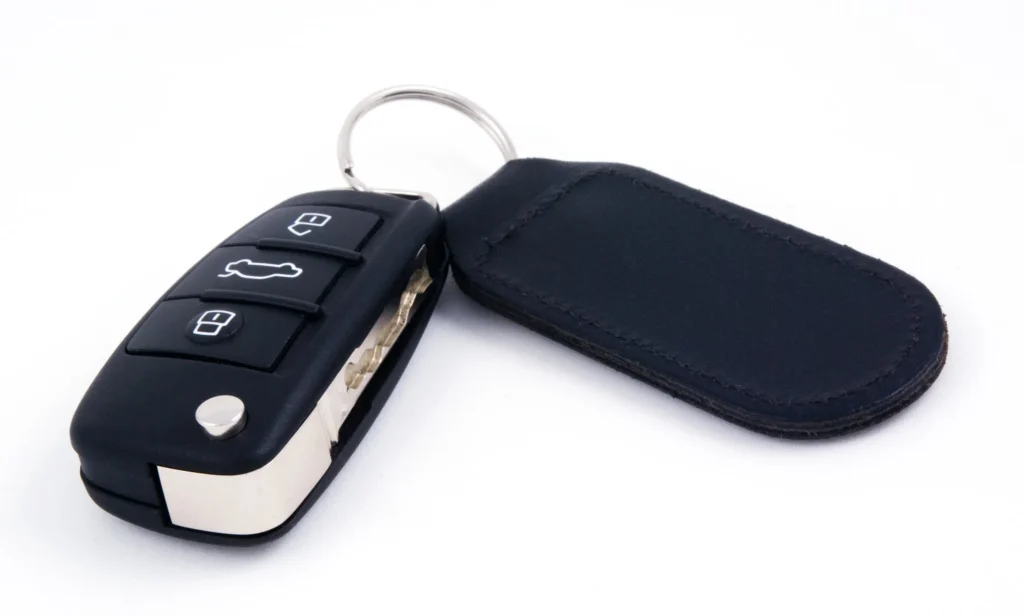
Seeing a Volkswagen Key Not Detected or No Key message on your dashboard can be frustrating, especially when your car refuses to start even though the key is right in your pocket.
This warning is relatively common in Volkswagen vehicles equipped with Keyless Access, also known as the KESSY system. It can appear in models such as the Golf, Tiguan, Passat, Jetta, Atlas, Taos, Polo, T-Roc, and other VW vehicles with push-button starting.
Fortunately, a Volkswagen key detection problem does not always mean an expensive repair. In many cases, the issue comes from something simple, such as a weak key fob battery, electronic interference, or a temporary communication problem.
In this guide, we'll explain why your Volkswagen says Key Not Detected, how to start your vehicle when the key isn't recognized, and what to do if the error keeps returning.
Content in this publication
- What Does Volkswagen Key Not Detected Mean?
- Volkswagen Key Not Detected: Quick Fixes
- 1. Weak or Dead Volkswagen Key Fob Battery
- 2. Volkswagen Key Fob Is Not Inside the Vehicle
- 3. Electronic Interference With the Volkswagen Key
- 4. How to Start a Volkswagen With Key Not Detected
- 5. Volkswagen Key Not Detected After Battery Replacement
- 6. Damaged Volkswagen Key Fob
- 7. Volkswagen KESSY System Malfunction
- 8. Weak Volkswagen 12V Battery
- 9. Volkswagen Immobilizer Problem
- 10. Volkswagen Key Not Detected While Driving
- 11. Volkswagen Key Not Detected but Key Is Inside
- 12. Volkswagen Key Not Detected After Changing the Car Battery
- 13. Volkswagen Key Not Detected by Model
- 14. How to Open a Volkswagen With a Dead Key Fob
- 15. How to Diagnose a Volkswagen No Key Error
- 16. How Much Does It Cost to Fix Volkswagen Key Not Detected?
- 17. How to Prevent Volkswagen Key Detection Problems
- 18. When Should You Visit a Volkswagen Dealer?
- Frequently Asked Questions
- 1. Why Does My Volkswagen Say Key Not Detected When the Key Is Inside?
- 2. Can I Start My Volkswagen With a Dead Key Fob Battery?
- 3. Why Is My Volkswagen Key Not Detected After Changing the Battery?
- 4. Will My Volkswagen Stop While Driving If the Key Is Not Detected?
- 5. Do I Need to Reprogram My Volkswagen Key After Replacing the Battery?
- Conclusion
What Does Volkswagen Key Not Detected Mean?
The Volkswagen Key Not Detected message means your vehicle cannot confirm the presence of an authorized key through its electronic key recognition system.
In vehicles with Keyless Access, the car communicates wirelessly with the key fob to determine whether an authorized key is present.
When you press the start button, the system checks for a valid key before allowing the engine to start.
If communication fails, your dashboard may display messages such as:
- Key Not Detected
- No Key
- Key Not in Vehicle
- No Key in Range
- Keyless System Fault
- Key Battery Low
- Key Not Recognized
The exact wording depends on your Volkswagen model, production year, and instrument cluster.
Although these messages may seem similar, they do not necessarily indicate the same problem.
For example, a low key battery warning indicates that the remote battery needs attention, while a keyless system malfunction may involve the vehicle's electronic components.
Is the Volkswagen No Key Warning Serious?
Not necessarily.
A temporary key detection error is often relatively easy to resolve. However, a persistent warning deserves attention because it can eventually prevent your Volkswagen from starting.
If the vehicle is already running and the key is no longer detected, the engine generally continues operating rather than shutting off immediately.
However, you may not be able to restart it after switching it off.
For this reason, we should never ignore repeated key recognition warnings.
Volkswagen Key Not Detected: Quick Fixes
Before replacing parts or visiting a workshop, we recommend trying these basic solutions.
| Possible problem | Quick solution | Difficulty |
|---|---|---|
| Weak key fob battery | Replace the battery | Easy |
| Key too far away | Bring the key inside the vehicle | Easy |
| Signal interference | Move the key away from electronic devices | Easy |
| Temporary detection failure | Switch the ignition off and retry | Easy |
| Dead key fob battery | Use the emergency start procedure | Easy |
| Damaged key fob | Test a spare key | Easy |
| Weak vehicle battery | Have the 12V battery tested | Moderate |
| Keyless system malfunction | Professional diagnostic inspection | Advanced |
If your Volkswagen refuses to start, the emergency start procedure described below is one of the most useful things to try.
1. Weak or Dead Volkswagen Key Fob Battery
A weak key fob battery is one of the first things we should check when a Volkswagen displays a No Key or Key Not Detected message.
The key fob contains a small battery that powers its wireless functions.
Over time, the battery loses capacity, reducing the strength or reliability of communication with the vehicle.
Symptoms of a Weak Volkswagen Key Battery
Common signs include:
- The keyless entry system works intermittently.
- The vehicle sometimes fails to recognize the key.
- You must stand closer to the car to unlock it.
- The remote buttons become less responsive.
- A key battery warning appears on the dashboard.
- The vehicle starts only after several attempts.
Sometimes, the remote locking buttons will continue working even when the keyless starting function becomes unreliable.
This can make the problem confusing because the key appears to work normally.
How to Replace a Volkswagen Key Fob Battery
Replacing the battery is usually straightforward.
- Remove the emergency mechanical key if your fob has one.
- Locate the battery compartment cover.
- Carefully open the compartment using the method specified for your key design.
- Remove the old battery without damaging the contacts.
- Check the battery type and orientation.
- Install a new battery of the correct specification.
- Close the key fob securely.
- Test the remote locking and engine starting functions.
Many Volkswagen key fobs use a CR2032 coin-cell battery, but this is not universal. Some designs require a different battery.
Important: Always check the marking on the original battery or your owner's manual before buying a replacement.
Never force the cover open, and keep coin-cell batteries away from children because swallowing one can cause severe internal injuries.
Will Replacing the Battery Fix the Error?
If the problem was caused by insufficient key fob battery power, installing the correct replacement often restores normal operation.
However, if your Volkswagen still says Key Not Detected after replacing the battery, we should investigate other possible causes.
2. Volkswagen Key Fob Is Not Inside the Vehicle
This may sound obvious, but it is another common reason for the No Key warning.
Volkswagen's Keyless Access system needs to recognize an authorized key in the appropriate detection area.
If the key is outside the vehicle, the engine may not start.
The warning can also appear when someone carrying the key exits the vehicle while the engine is running.
For example, imagine we're driving a Volkswagen Tiguan and stop to drop off a passenger.
If that passenger accidentally takes the key fob with them, the dashboard may display a warning indicating that the key is no longer inside.
How to Fix It
Check whether the key is:
- In your pocket.
- Inside a handbag.
- Under a seat.
- In the center console.
- Inside the luggage compartment.
- With someone who recently left the vehicle.
Move the key into the front passenger compartment and try starting the vehicle again.
If the warning disappears, the system may simply have been unable to locate the key.
3. Electronic Interference With the Volkswagen Key
Electronic interference can interrupt communication between your Volkswagen and its key fob.
Modern vehicles use radio-frequency technology to communicate with electronic keys.
Under certain conditions, nearby devices or objects can interfere with these signals.
Potential sources include:
- Mobile phones positioned directly beside the key.
- Other electronic keys or access cards.
- Certain electronic accessories.
- Metal containers or heavily shielded bags.
- Strong radio-frequency interference in the surrounding area.
This does not mean every phone or electronic device will cause a problem.
However, interference is worth investigating when the warning appears only in certain locations or under particular circumstances.
How to Reduce Key Signal Interference
We recommend following these steps:
- Remove the key from your bag or pocket.
- Separate it from your mobile phone and other electronic devices.
- Keep it away from metal objects.
- Place it in an open area inside the front cabin.
- Try starting the vehicle again.
If the problem occurs only in one parking area, environmental interference could be contributing to the issue.
4. How to Start a Volkswagen With Key Not Detected
One of the most useful features of many Volkswagen vehicles is the emergency start function.
This allows the vehicle to recognize an authorized key through a backup reading system when normal wireless detection fails.
A dead key fob battery does not always prevent your Volkswagen from starting.
However, the emergency procedure and backup reader location vary depending on the vehicle.
Emergency Start Procedure for Many Volkswagen Models
Many Volkswagen models with push-button starting use a backup reading area near the right side of the steering column.
Follow these steps:
- Sit in the driver's seat with your authorized Volkswagen key.
- Make sure the automatic transmission is in Park.
- Press and hold the brake pedal.
- Press the engine start button.
- Immediately hold the key fob against the designated area on the right side of the steering column trim.
- Allow the vehicle to recognize the key.
- Follow any instructions displayed on the instrument cluster.
Depending on the model and situation, the ignition may activate automatically and the engine may start.
This procedure is documented for several Volkswagen vehicles, including certain Golf, Jetta, and Tiguan versions.
For other models, the backup reader may be located elsewhere.
Always confirm the correct position in your vehicle's owner's manual.
Why Does the Emergency Start Work?
The emergency start system uses a short-range key recognition method rather than relying solely on the normal remote communication signal.
This allows the immobilizer to identify an authorized key in certain situations where the key fob battery is weak or discharged.
It is a temporary solution, not a repair for an underlying keyless system fault.
Once the vehicle starts, we recommend addressing the original problem before relying on the emergency procedure again.
What If the Emergency Start Does Not Work?
If the vehicle still refuses to recognize the key:
- Verify that you're using the correct backup reader location.
- Try the procedure again according to the owner's manual.
- Check that the brake pedal is fully depressed.
- Confirm the transmission is in Park.
- Test your spare Volkswagen key.
- Check for additional dashboard warnings.
If neither authorized key works through the emergency reader, the problem could involve the immobilizer, reader, vehicle electrical system, or another starting-system component.
At that point, professional diagnosis is appropriate.
5. Volkswagen Key Not Detected After Battery Replacement
Sometimes, the Key Not Detected message appears immediately after replacing the key fob battery.
This does not automatically mean the new battery is defective or that the key has lost its programming.
Several relatively simple issues can cause this situation.
Incorrect Battery Installation
The battery may have been installed in the wrong orientation.
Check the positive and negative markings inside the key fob.
Remove the battery and reinstall it according to the manufacturer's instructions if necessary.
Wrong Battery Type
A battery may physically fit inside the compartment without being the correct specification.
Always use the battery type recommended for that specific key.
Poor Battery Contact
If the battery isn't seated correctly, the electrical contacts may not make a reliable connection.
Inspect the battery compartment for dirt, corrosion, bent contacts, or damage.
Avoid forcing or bending the metal contacts.
Key Synchronization Problems
Some Volkswagen remote keys may require synchronization after certain battery or remote-control issues.
The synchronization procedure varies by model.
For this reason, we recommend checking the owner's manual rather than following a generic button-pressing sequence intended for a different Volkswagen.
If the key still fails to operate normally, a Volkswagen specialist can determine whether synchronization or additional programming is required.
6. Damaged Volkswagen Key Fob
Physical damage can also prevent a Volkswagen key from being recognized.
Even if the exterior looks normal, the internal components may have suffered damage from an impact, moisture, or corrosion.
Common causes include:
- Dropping the key onto a hard surface.
- Water entering the housing.
- Damaged internal circuitry.
- Corrosion around battery contacts.
- Previous improper battery replacement.
- Damage to the key's transponder or antenna components.
How to Identify a Damaged Key
The easiest comparison is to use a spare key.
If the spare starts the vehicle normally while the original consistently fails, the faulty key deserves closer inspection.
However, a spare-key test alone doesn't always identify which internal component has failed.
A qualified automotive locksmith or Volkswagen dealership can inspect the key and determine whether it can be repaired or must be replaced.
7. Volkswagen KESSY System Malfunction
KESSY is Volkswagen's keyless access and starting technology.
Depending on the model, it allows us to unlock doors and start the vehicle without manually inserting the key into an ignition lock.
The system relies on communication between the key and electronic components installed inside the vehicle.
If one of these components fails, the car may display a Key Not Detected warning even when the fob battery is new.
Possible KESSY System Problems
Potential faults include:
- Interior key detection antenna problems.
- Damaged electrical wiring.
- Faulty connections.
- Problems with the keyless access control electronics.
- Starting authorization communication faults.
- Low voltage affecting electronic control modules.
Signs of a KESSY Malfunction
We may notice that:
- The key battery has already been replaced.
- Both original keys experience the same problem.
- Keyless door unlocking stops functioning reliably.
- The warning appears frequently.
- The emergency start method works, but normal recognition does not.
- Other electrical warnings appear simultaneously.
These symptoms do not prove that the KESSY control module has failed.
A proper diagnostic scan is necessary to determine whether the problem comes from an antenna, wiring, control module, or another component.
8. Weak Volkswagen 12V Battery
The vehicle's own battery can sometimes contribute to electronic key recognition problems.
This is different from the small battery inside the key fob.
A weak 12V battery may cause unstable electrical operation, especially during starting.
Modern Volkswagen vehicles rely on numerous electronic control units, and insufficient voltage can lead to unusual warning messages or communication faults.
Symptoms of a Weak Vehicle Battery
Watch for:
- Slow engine cranking.
- Multiple dashboard warnings.
- Flickering interior lights.
- Electrical systems resetting unexpectedly.
- Difficulty starting the engine.
- Keyless functions behaving inconsistently.
The presence of these symptoms does not necessarily mean the battery is the only issue.
How to Check the Vehicle Battery
A workshop can perform a battery and charging-system test.
This helps determine whether the battery is healthy and whether the electrical system is providing sufficient voltage.
If your Volkswagen repeatedly displays several unrelated electrical warnings, checking the 12V system is a sensible diagnostic step.
The 12V system also matters in electric Volkswagens, including the ID.4, although their starting and electrical architecture differs from combustion-engine vehicles.
9. Volkswagen Immobilizer Problem
The electronic immobilizer is a security system designed to prevent the vehicle from being started with an unauthorized key.
Although it works alongside key recognition, an immobilizer fault is not the same as an ordinary dead key fob battery.
If the immobilizer cannot authenticate the key, the vehicle may refuse to start.
Key Not Detected vs. Immobilizer Fault
| Feature | Key detection problem | Immobilizer problem |
|---|---|---|
| Main issue | Key presence is not recognized | Key authorization fails |
| Common cause | Weak battery or signal issue | Authorization or security-system fault |
| Remote buttons | May still work | May still work |
| Emergency start | May solve the problem | May not solve the problem |
| Spare key test | Useful | Useful |
| Professional diagnosis | If the problem persists | Usually necessary for a genuine fault |
A persistent immobilizer or starting authorization warning should be investigated by a qualified technician.
We should avoid attempting to bypass or disable the immobilizer because doing so can compromise vehicle security and may create additional faults.
10. Volkswagen Key Not Detected While Driving
Another situation that concerns drivers is seeing the No Key warning while the vehicle is already moving.
This can happen if the key leaves the vehicle or becomes temporarily undetectable.
Will the Engine Shut Off?
In normal operation, a Volkswagen with Keyless Access generally does not shut off its running engine solely because the key is no longer detected.
This is an important safety feature.
However, the vehicle may warn us that the key is missing.
Once the engine is turned off, restarting may not be possible without an authorized key.
What Should We Do?
If this warning appears while driving:
- Remain calm and continue driving safely.
- Have a passenger check whether the key is inside the vehicle, if possible.
- Avoid searching for the key yourself while driving.
- Stop in a safe location when practical.
- Verify that the key is present before switching off the engine.
- Arrange assistance if the key is missing or the warning persists.
Never assume the vehicle will restart normally after being switched off.
11. Volkswagen Key Not Detected but Key Is Inside
This is one of the most confusing versions of the problem.
We may have the original key directly beside us, yet the dashboard insists that no authorized key is present.
Several explanations are possible.
The Key Is in a Poor Detection Position
Try moving the key from a handbag, deep pocket, or closed compartment into an unobstructed position in the front cabin.
The Key Battery Is Nearly Empty
The key may still function intermittently even when its battery is too weak for reliable detection.
Signal Interference Is Present
Separate the fob from electronic devices and metal objects.
The Vehicle Has a Keyless System Fault
If both keys fail and battery replacement makes no difference, further diagnosis is necessary.
Our recommendation: Before assuming the vehicle has an expensive electronic fault, test the spare key and the official emergency start procedure.
Those two checks can help narrow down the problem considerably.
12. Volkswagen Key Not Detected After Changing the Car Battery
Key detection warnings can occasionally appear after the vehicle's 12V battery has been disconnected or replaced.
Possible reasons include temporary electronic faults, poor electrical connections, or a separate problem that was not resolved by the battery replacement.
What Should We Check?
First, confirm that the replacement battery has been installed correctly and that its connections are secure.
If the vehicle starts normally and no warnings remain, the issue may have been temporary.
If the Key Not Detected message continues:
- Test both authorized keys.
- Verify the vehicle battery condition.
- Check for other electrical warnings.
- Have relevant fault codes scanned.
- Investigate communication and key recognition faults.
Replacing the vehicle battery does not ordinarily mean that every original Volkswagen key must be reprogrammed.
We should avoid paying for key programming unless diagnosis indicates it is actually necessary.
13. Volkswagen Key Not Detected by Model
The overall causes are similar across Volkswagen vehicles, but the warning wording, emergency key reader position, and starting procedure can vary.
| Volkswagen model | What to check first |
|---|---|
| Golf / GTI / Golf R | Key battery, interior detection, emergency reader |
| Tiguan | Key battery, Keyless Access function, spare key |
| Passat | Remote battery, key recognition, immobilizer warning |
| Jetta | Key battery, interference, emergency start procedure |
| Atlas / Atlas Cross Sport | Key location, weak battery, keyless system |
| Taos | Remote battery, backup reader, vehicle battery |
| Polo | Key battery, starting authorization, Keyless Access |
| T-Roc | Key battery, steering-column backup reader where fitted |
| Arteon | Key detection, key fob condition, KESSY |
| ID.4 | Key battery, specified center-console emergency reader |
These checks are general diagnostic starting points, not confirmation of a particular fault.
Volkswagen Golf Key Not Detected
If your Golf displays this warning, start by checking the key battery and trying your spare key.
On many Golf versions with Keyless Access, the emergency key recognition area is located near the right side of the steering column.
Follow the starting procedure specified for your generation.
Volkswagen Tiguan No Key Error
In the Tiguan, the error may result from a weak key battery, interference, or a problem with the keyless access system.
If the keyless door handles also stop responding, investigate the key battery and keyless access operation before considering more complex repairs.
Volkswagen Passat Key Not Detected
For the Passat, we recommend testing whether the problem affects both authorized keys.
If one key works normally and the other does not, a key-specific issue becomes more likely.
If neither works, inspect the vehicle's electrical and key recognition systems.
Volkswagen Jetta Key Not Detected
Certain Jetta versions with push-button starting have an emergency reader near the steering column.
This may allow starting with a discharged key battery.
Always verify the correct procedure for your Jetta's production year.
Volkswagen ID.4 Key Not Detected
The Volkswagen ID.4 uses an electric drive system and has different starting behavior from conventional combustion-engine models.
On certain ID.4 model years, emergency key recognition involves placing the remote key in the specified cup holder or center-console storage area.
Pressing the brake pedal or using the start control may then activate the vehicle.
Important: Do not assume the ID.4 uses the same steering-column emergency reader as a Golf or Tiguan. Consult the manual for your specific model year.
14. How to Open a Volkswagen With a Dead Key Fob
If the key battery is completely discharged, you may also find that the remote buttons cannot unlock the vehicle.
Fortunately, many Volkswagen keys contain a mechanical emergency key.
Using the Mechanical Emergency Key
Depending on the model:
- Locate the emergency key release on the fob.
- Remove the mechanical key.
- Find the driver's door lock cylinder.
- Remove the protective lock cover if your model has one, following the owner's manual.
- Insert the mechanical key and unlock the door.
The vehicle's alarm may sound when the door is opened mechanically.
On models where this applies, switching on the ignition with an authorized key can deactivate the alarm.
After entering the vehicle, follow the emergency starting instructions for your model.
Using the mechanical key opens the door; it does not replace electronic authorization required to start the vehicle.
15. How to Diagnose a Volkswagen No Key Error
If basic troubleshooting fails, we should follow a systematic diagnostic process rather than replacing components randomly.
Step 1: Test the Spare Key
A working spare key suggests that the original key may be responsible.
If both fail, the problem may involve the vehicle, a shared environmental factor, or another issue.
Step 2: Replace the Correct Key Battery
Use a fresh, correctly specified battery.
Check the battery orientation and contact condition.
Step 3: Test Keyless Entry and Starting Separately
Determine whether:
- Remote lock and unlock buttons work.
- The exterior keyless door handles respond.
- Push-button starting works.
- The emergency start procedure works.
This comparison helps distinguish different types of key recognition failures.
Step 4: Check the 12V Battery
If other electrical problems are present, test the vehicle's battery and charging system.
Step 5: Read Diagnostic Trouble Codes
A VW-compatible diagnostic scanner may identify faults in relevant electronic modules.
Depending on the model, diagnostic information may involve access/start authorization, body control, immobilizer, or keyless entry components.
A generic engine-code reader may not provide all the information needed.
Step 6: Inspect the Keyless System
A qualified technician can investigate:
- Key detection antennas.
- Electronic control modules.
- Electrical connectors.
- Related wiring.
- Starting authorization faults.
Proper testing helps avoid unnecessary replacement of expensive electronic parts.
16. How Much Does It Cost to Fix Volkswagen Key Not Detected?
The cost depends on the underlying cause.
Replacing a small key battery is usually inexpensive, while replacing a keyless access component or obtaining a fully programmed replacement key can cost substantially more.
| Repair | General cost level |
|---|---|
| Key fob battery replacement | Low |
| Key battery contact cleaning | Low |
| Key synchronization | Low to moderate |
| Electrical diagnosis | Moderate |
| Replacement key fob and programming | Moderate to high |
| Keyless antenna repair | Moderate |
| Keyless access control module repair | Potentially high |
| Immobilizer-related repair | Variable, potentially high |
Actual prices vary by country, Volkswagen model, parts availability, and labor rates.
Before approving an expensive repair, we recommend confirming the fault through testing.
A new key fob will not necessarily solve a problem caused by the vehicle's keyless recognition system.
17. How to Prevent Volkswagen Key Detection Problems
Although electronic faults cannot always be prevented, some basic habits can reduce the risk of recurring key problems.
Replace the Key Battery When Warning Signs Appear
Do not wait until the remote stops functioning completely.
If you notice reduced range or intermittent unlocking, check the key battery.
Protect the Key From Moisture and Impacts
Avoid dropping the key or exposing it to water.
Internal damage can be expensive to repair.
Keep a Working Spare Key
A spare key makes troubleshooting easier and can prevent an inconvenient situation if the primary key fails.
Periodically verify that the spare works.
Avoid Storing the Key Near Strong Interference Sources
Separate the fob from objects or devices that appear to affect its operation.
Maintain the Vehicle's 12V Battery
A healthy electrical system supports reliable operation of modern vehicle electronics.
Investigate Recurring Warnings
If the No Key message appears repeatedly, even after replacing the fob battery, do not assume it is normal behavior.
Early diagnosis may prevent a situation in which the vehicle refuses to start.
18. When Should You Visit a Volkswagen Dealer?
Professional assistance is recommended when:
- Both authorized keys consistently fail.
- The vehicle refuses to start using the official emergency procedure.
- The immobilizer warning remains active.
- The keyless system displays repeated malfunction messages.
- The issue persists after checking the batteries.
- The key has suffered significant physical damage.
- Electronic fault codes indicate a starting authorization problem.
A dealership or qualified automotive locksmith with suitable Volkswagen diagnostic equipment can determine whether the problem involves the key, vehicle electronics, or immobilizer.
For replacement keys, proof of vehicle ownership and appropriate programming procedures may be required.
Frequently Asked Questions
1. Why Does My Volkswagen Say Key Not Detected When the Key Is Inside?
Your Volkswagen may display this message because the key fob battery is weak, electronic interference is affecting communication, the key is in a poorly detected position, or the keyless recognition system has a fault.
Try moving the key into an unobstructed position, replacing its battery, and testing a spare key.
If the error continues, further diagnosis may be necessary.
2. Can I Start My Volkswagen With a Dead Key Fob Battery?
Yes, many Volkswagens with Keyless Access have an emergency starting procedure that can recognize an authorized key even when its battery is discharged.
On several models, this involves holding the key near the right side of the steering column after pressing the start button.
Other vehicles, including certain ID.4 versions, use a different backup reader location.
Always follow the instructions for your particular vehicle.
3. Why Is My Volkswagen Key Not Detected After Changing the Battery?
Possible causes include an incorrectly installed battery, the wrong battery type, poor electrical contact, a faulty replacement battery, or a separate problem with the key or vehicle.
Some keys may also require synchronization.
Check the owner's manual before attempting any synchronization procedure.
4. Will My Volkswagen Stop While Driving If the Key Is Not Detected?
Normally, losing key detection while driving does not immediately shut off the running engine.
However, the dashboard may display a warning, and the vehicle may refuse to restart after being switched off.
Check that the authorized key is inside the vehicle and stop safely if the warning persists.
5. Do I Need to Reprogram My Volkswagen Key After Replacing the Battery?
Not usually. A normal key fob battery replacement does not generally require full immobilizer reprogramming.
However, certain remote-control synchronization issues can occur.
If the key stops working after battery replacement, verify the installation and consult the model-specific instructions before paying for programming.
Conclusion
A Volkswagen Key Not Detected or No Key error can have several causes, but it does not automatically indicate a serious mechanical or electronic failure.
In many cases, the problem comes from a weak key fob battery, temporary interference, or difficulty recognizing the key inside the vehicle.
We recommend starting with the simplest checks: confirm that the key is present, replace its battery if necessary, remove potential interference, and try the official emergency start procedure.
If your Volkswagen still refuses to recognize the key, testing a spare and checking the vehicle's 12V battery can help narrow down the issue.
When both keys fail or immobilizer-related warnings persist, professional diagnosis is the safest next step.
By identifying the cause before replacing expensive components, we can often restore reliable keyless operation while avoiding unnecessary repair costs.
If you want to know other articles similar to Volkswagen Key Not Detected or No Key Error: Causes and Fixes you can visit the category Common Problems.
Toyota RAV4 Issues: Common Problems, Worst Years, and What Owners Should Know

The Most Common Kia Ceed Problems: Reliability, Known Faults, Repair Costs and What to Watch For

Common Kia Sportage Problems: What Owners Should Know
Toyota Yaris Cross Common Problems: Reliability, Known Issues, and What Owners Should Know

Toyota Corolla Cross Issues: Common Problems and Fixes

MG HS Problems: Common Faults, Reliability and Years to Avoid (2019–2026)
Leave a Reply
More content of your interest