

Ford Explorer Key Fob Battery Replacement: The Complete Guide for Every Model

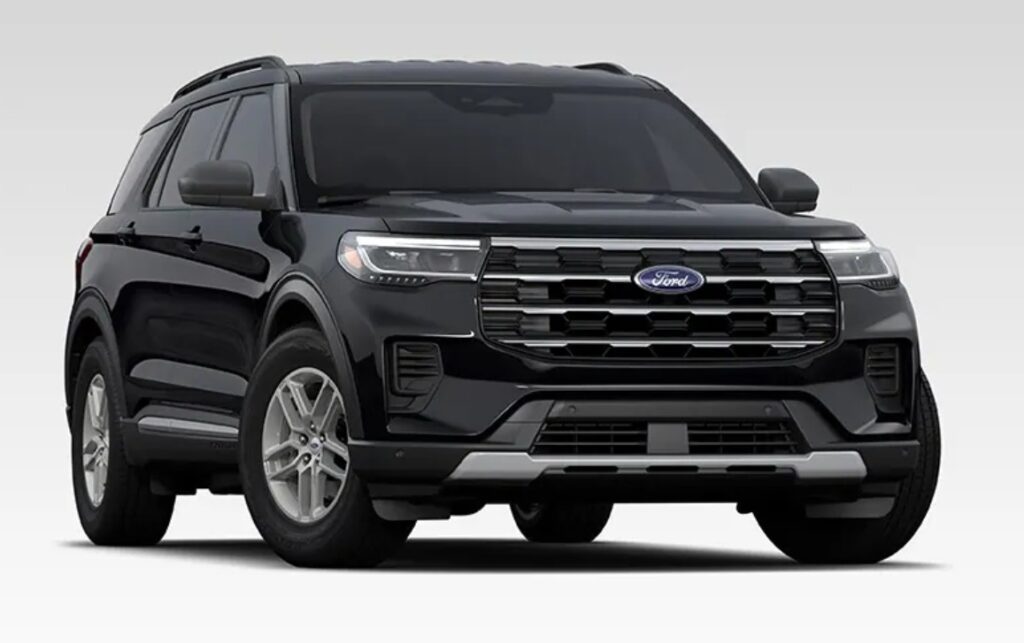
Few things are as frustrating as walking toward your Ford Explorer, pressing the unlock button, and getting absolutely no response. It feels a bit like trying to start a conversation with someone wearing noise-canceling headphones—your signal simply isn't getting through.
In many cases, the culprit is surprisingly simple: a depleted key fob battery.
Understanding Ford Explorer key fob battery replacement can save us time, money, and unnecessary trips to the dealership. The process is quick, inexpensive, and straightforward when we know the right steps.
In this comprehensive guide, we'll explore everything from battery types and warning signs to step-by-step replacement procedures, troubleshooting tips, and maintenance practices that help extend battery life.
Content in this publication
- Why the Ford Explorer Key Fob Battery Matters
- Common Signs Your Ford Explorer Key Fob Battery Is Dying
- What Battery Does a Ford Explorer Key Fob Use?
- Ford Explorer Model Years and Battery Types
- Tools Needed for Ford Explorer Key Fob Battery Replacement
- Preparing for Battery Replacement
- Step-by-Step Ford Explorer Key Fob Battery Replacement
- Do You Need to Reprogram the Key Fob?
- What If the Key Fob Still Doesn't Work?
- Understanding Ford Explorer Intelligent Access Systems
- Can You Start a Ford Explorer With a Dead Key Fob Battery?
- How Long Does a Ford Explorer Key Fob Battery Last?
- Tips to Extend Key Fob Battery Life
- Dealer Replacement vs DIY Replacement
- Common Mistakes During Battery Replacement
- When Should You Replace the Key Fob Battery Preventively?
- Environmental Disposal of Old Batteries
- Ford Explorer Key Fob Battery Replacement Cost
- Final Thoughts
- Frequently Asked Questions
- 1. What battery does a Ford Explorer key fob use?
- 2. How often should I replace my Ford Explorer key fob battery?
- 3. Do I need to reprogram my Ford Explorer key after changing the battery?
- 4. Can I start my Ford Explorer if the key fob battery is dead?
- 5. Why does my key fob still not work after replacing the battery?
Why the Ford Explorer Key Fob Battery Matters
Modern Ford Explorer models rely heavily on electronic key fobs. These compact devices do much more than lock and unlock doors.
They often control:
- Remote locking and unlocking
- Remote engine start
- Panic alarm activation
- Liftgate access
- Keyless entry systems
- Push-button ignition functionality
Without a functioning battery, many of these conveniences become unavailable.
Think of the battery as the heartbeat of the key fob. Once it weakens, the entire system begins to struggle.
Common Signs Your Ford Explorer Key Fob Battery Is Dying
Before complete failure occurs, the key fob usually provides warning signs.
Reduced Operating Range
One of the first symptoms is a shorter communication distance.
If we previously unlocked the vehicle from across a parking lot but now need to stand close to the driver's door, the battery is likely weakening.
Intermittent Functionality
Buttons may work inconsistently.
Sometimes the lock button responds immediately, while other times multiple presses are required.
Vehicle Warning Messages
Many newer Ford Explorer models display messages such as:
- Key Battery Low
- Replace Key Battery Soon
- No Key Detected
These notifications should never be ignored.
Delayed Response
The vehicle may respond slowly after button presses.
A delay often indicates reduced battery voltage.
What Battery Does a Ford Explorer Key Fob Use?
The exact battery depends on the model year and key fob design.
Most Common Ford Explorer Key Fob Batteries
The majority of Ford Explorer key fobs use:
- CR2450 battery
- CR2032 battery
These are coin-cell lithium batteries widely available online and in retail stores.
How to Confirm the Correct Battery
Before purchasing a replacement:
- Open the key fob.
- Remove the existing battery.
- Check the battery number.
- Purchase an identical replacement.
Using the same specification ensures proper operation.
Ford Explorer Model Years and Battery Types
Battery requirements can vary slightly between generations.
2011–2019 Ford Explorer
Many key fobs from this period commonly use a CR2450 battery.
2020–Present Ford Explorer
Several newer smart key systems also utilize CR2450 batteries, although verifying the existing battery remains essential.
Older Ford Explorer Models
Some older units may use CR2032 batteries.
Always inspect the original battery before replacement.
Tools Needed for Ford Explorer Key Fob Battery Replacement
The good news is that specialized tools are rarely necessary.
Typically, we only need:
- New battery
- Small flat-head screwdriver
- Plastic pry tool (optional)
- Soft cloth
Most replacements take less than five minutes.
Preparing for Battery Replacement
Before opening the key fob, it's helpful to prepare a clean workspace.
Choose a Flat Surface
A table prevents small components from being lost.
Handle Batteries Carefully
Avoid touching battery surfaces excessively.
Natural oils from our fingers can reduce electrical contact quality.
Work Slowly
The plastic housing is durable but not indestructible.
Gentle pressure is usually sufficient.
Step-by-Step Ford Explorer Key Fob Battery Replacement
Step 1: Remove the Emergency Key
Most Ford Explorer smart keys contain a hidden mechanical key.
Locate the release button.
Press it while pulling the emergency key outward.
The key should slide free easily.
Step 2: Locate the Separation Slot
After removing the emergency key, inspect the opening.
Most key fobs feature a small slot designed for separation.
Step 3: Open the Key Fob Housing
Insert a flat-head screwdriver carefully into the slot.
Twist gently.
The two halves of the housing should separate.
Avoid forcing the casing.
Step 4: Remove the Old Battery
Observe the battery orientation before removal.
Pay attention to:
- Positive side placement
- Battery positioning
- Contact points
Remove the battery carefully.
Step 5: Install the New Battery
Insert the replacement battery in the same orientation.
Ensure:
- Positive side faces correctly
- Battery sits flat
- Contacts remain secure
Improper installation may prevent operation.
Step 6: Reassemble the Key Fob
Align both housing halves.
Press them together firmly until they snap into place.
Step 7: Reinsert the Emergency Key
Slide the mechanical key back into position.
Listen for a click indicating proper installation.
Step 8: Test Functionality
Check:
- Lock button
- Unlock button
- Panic button
- Remote start
- Liftgate controls
All functions should operate normally.
Do You Need to Reprogram the Key Fob?
This is one of the most common concerns among Ford Explorer owners.
Fortunately, battery replacement alone typically does not require reprogramming.
The key's internal programming remains stored even when the battery is removed.
Simply replacing the battery should restore normal functionality.
What If the Key Fob Still Doesn't Work?
Occasionally, a fresh battery does not solve the problem.
Check Battery Orientation
Incorrect polarity is a common mistake.
Verify that the positive and negative sides match the original configuration.
Inspect Battery Contacts
Bent or dirty contacts may prevent power transfer.
Clean gently if necessary.
Confirm Battery Quality
Cheap batteries sometimes arrive partially discharged.
Use reputable brands whenever possible.
Try a Second Battery
Even new batteries can occasionally be defective.
Testing another battery eliminates uncertainty.
Understanding Ford Explorer Intelligent Access Systems
Many modern Explorers feature Intelligent Access technology.
This system enables:
- Push-button start
- Passive unlocking
- Automatic key recognition
When battery levels drop, these features may become unreliable.
Replacing the battery promptly helps maintain seamless operation.
Can You Start a Ford Explorer With a Dead Key Fob Battery?
In most cases, yes.
Ford engineers designed backup procedures specifically for this scenario.
Using the Emergency Key
The hidden mechanical key can unlock the driver's door.
Backup Start Location
Many Ford Explorer models include a designated area where the key fob can be placed for emergency starting.
The vehicle reads a passive chip embedded in the key.
Consult the owner's manual for the exact location.
How Long Does a Ford Explorer Key Fob Battery Last?
Battery life varies based on usage.
Generally, a key fob battery lasts:
- 2 to 4 years
Factors influencing lifespan include:
- Frequency of use
- Temperature exposure
- Remote start usage
- Battery quality
Heavy users may require replacement sooner.
Tips to Extend Key Fob Battery Life
Small habits can significantly increase battery longevity.
Avoid Extreme Temperatures
Excessive heat accelerates battery degradation.
Keep the key fob out of direct sunlight.
Repeated button usage consumes power.
Store the Key Properly
Avoid leaving it inside vehicles exposed to high temperatures.
Use Quality Batteries
Premium lithium batteries often provide longer service life.
Dealer Replacement vs DIY Replacement
Many owners wonder whether they should visit a dealership.
DIY Advantages
Benefits include:
- Lower cost
- Immediate solution
- Convenience
- Minimal tools required
Dealer Advantages
Dealership service may be beneficial when:
- Key fob damage exists
- Programming issues occur
- Intelligent access systems malfunction
For simple battery replacement, DIY is usually sufficient.
Common Mistakes During Battery Replacement
Avoiding mistakes prevents frustration.
Using the Wrong Battery
Always match the original battery number.
Forcing the Housing Open
Excessive force can crack the plastic shell.
Touching Internal Electronics Excessively
Minimize unnecessary handling.
Ignoring Orientation
Incorrect battery placement prevents operation.
When Should You Replace the Key Fob Battery Preventively?
Waiting for complete failure isn't ideal.
Many owners replace batteries every:
- 2 years
- 3 years during routine maintenance
Preventive replacement reduces the likelihood of unexpected inconvenience.
Environmental Disposal of Old Batteries
Coin-cell batteries should never be discarded carelessly.
Instead:
- Recycle at battery collection points
- Use electronics recycling centers
- Follow local disposal regulations
Responsible disposal protects the environment.
Ford Explorer Key Fob Battery Replacement Cost
One reason this maintenance task is popular among DIY enthusiasts is affordability.
Typical costs include:
| Service | Estimated Cost |
|---|---|
| Battery Only | $3–$10 |
| DIY Replacement | $3–$10 |
| Dealer Service | $20–$60+ |
The actual replacement process often takes less time than brewing a cup of coffee.
Final Thoughts
A dead key fob battery may seem like a small inconvenience, but it can quickly disrupt our daily routine. Fortunately, Ford Explorer key fob battery replacement is one of the easiest maintenance tasks any owner can perform.
With the correct battery, a few simple tools, and a careful approach, we can restore full functionality within minutes. Whether driving an older Explorer or a newer intelligent-access model, staying ahead of battery failure ensures uninterrupted convenience and peace of mind.
Rather than waiting for the key fob to stop working completely, replacing the battery proactively is a simple investment in reliability. After all, the smallest components often have the biggest impact on our driving experience.
Frequently Asked Questions
1. What battery does a Ford Explorer key fob use?
Most Ford Explorer key fobs use either a CR2450 or CR2032 lithium coin battery. Always verify the existing battery before purchasing a replacement.
2. How often should I replace my Ford Explorer key fob battery?
Most batteries last between two and four years depending on usage and environmental conditions.
3. Do I need to reprogram my Ford Explorer key after changing the battery?
No. In most cases, replacing the battery does not erase the key fob's programming.
4. Can I start my Ford Explorer if the key fob battery is dead?
Yes. Most models include a backup method using the emergency key and a designated starting location for the key fob.
5. Why does my key fob still not work after replacing the battery?
Possible causes include incorrect battery installation, poor battery quality, damaged contacts, or internal key fob issues.
If you want to know other articles similar to Ford Explorer Key Fob Battery Replacement: The Complete Guide for Every Model you can visit the category Service and Parts.
Vauxhall Astra Dashboard Warning Lights
Citroen C1 Warning Lights
Mitsubishi Colt Dashboard Symbols: Complete Guide to Warning Lights and Indicators
Kia Niro Dashboard Warning Lights & Symbols

Jaecoo 7 Dashboard Symbols

Ford Fiesta Dashboard Warning Lights & Symbols
Leave a Reply
More content of your interest