
Nissan X Trail 360 Camera Not Working: Causes, Fixes, and Troubleshooting Guide

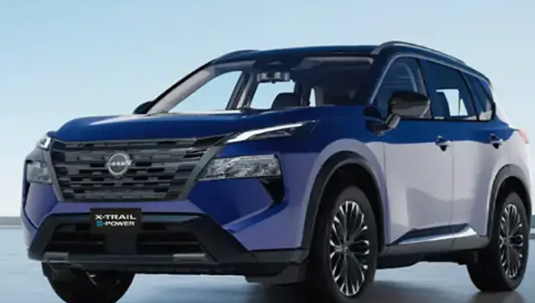
A Nissan X Trail 360 camera not working can turn an ordinary parking maneuver into something surprisingly frustrating. One moment, we are used to seeing a neat bird’s-eye view of the vehicle and everything around it; the next, the screen is black, frozen, blurry, or stubbornly refuses to appear.
Fortunately, a failed 360-degree camera system does not automatically mean an expensive camera replacement.
The Nissan system, commonly known as the Around View Monitor or Intelligent Around View Monitor on certain versions, depends on several components working together. Cameras, wiring, the infotainment display, electrical power, control modules, and vehicle signals all have roles to play. One small interruption can make the whole system behave as though it has packed its suitcase and left.
In this guide, we’ll work through the most likely causes, simple fixes we can try at home, symptoms that point toward individual cameras, and situations where professional diagnostic equipment becomes the smarter option.
Content in this publication
- What Does the Nissan X Trail 360 Camera System Do?
- Common Nissan X Trail 360 Camera Problems
- Why Is My Nissan X Trail 360 Camera Not Working?
- 1. Check Whether the Camera Lenses Are Dirty
- 2. Restart the Nissan X Trail
- 3. Check the 12-Volt Battery Condition
- 4. Inspect the Relevant Fuses
- 5. Inspect the Rear Camera and Tailgate Area
- 6. Check the Cameras in the Door Mirrors
- 7. Consider a Faulty Front Camera
- 8. Check for Water or Moisture Damage
- 9. Look for Damaged Wiring or Loose Connectors
- 10. The Infotainment Screen May Be the Problem
- 11. Check Whether Reverse Activation Is Working
- 12. Nissan X Trail 360 Camera Black Screen
- 13. Nissan X Trail 360 Camera Is Blurry
- 14. Nissan X Trail 360 Camera Image Is Misaligned
- 15. Could the Parking Sensors Cause the Problem?
- 16. Can We Reset the Nissan X Trail 360 Camera?
- 17. Does the 360 Camera Need Calibration?
- 18. What a Diagnostic Scan Can Reveal
- 19. Nissan X Trail 360 Camera Not Working After an Accident
- 20. Nissan X Trail Camera Not Working After Repair Work
- 21. Should We Replace the Camera Ourselves?
- 22. How Much Does Nissan X Trail 360 Camera Repair Cost?
- 23. Can We Drive With the 360 Camera Not Working?
- 24. Best Order for Troubleshooting a Nissan X Trail 360 Camera
- 25. When Should We Visit a Nissan Dealer or Auto Electrician?
- How to Prevent Future X Trail Camera Problems
- Conclusion: Fixing a Nissan X Trail 360 Camera That Is Not Working
- Frequently Asked Questions
- 1. Why is my Nissan X Trail 360 camera screen completely black?
- 2. Why does my Nissan X Trail reversing camera work but the 360 view does not?
- 3. Can disconnecting the battery fix a Nissan X Trail camera problem?
- 4. Does a replacement Nissan X Trail 360 camera need calibration?
- 5. How do I know which Nissan X Trail 360 camera is faulty?
What Does the Nissan X Trail 360 Camera System Do?
The X-Trail’s 360-degree camera system combines images from several cameras positioned around the vehicle.
Depending on the model year and equipment level, cameras may be located at the front of the vehicle, beneath or around the exterior mirrors, and at the rear. The system electronically stitches those feeds together to produce the familiar overhead-style view.
The image is not actually coming from a camera floating above the roof, of course. Software creates that perspective from multiple camera feeds.
That explains something important when diagnosing a fault: one bad camera can disrupt much more than one small portion of the display.
A failing side camera, for instance, might produce a black section in the composite view. A communication or head-unit problem could take down every camera at once.
Common Nissan X Trail 360 Camera Problems
A malfunction does not always look the same.
Some owners may find that reversing produces no camera picture whatsoever. Others still see the reversing camera but lose the bird’s-eye image. Sometimes everything works after starting the vehicle and then disappears several minutes later.
Typical symptoms can include:
- Completely black camera screen
- Blue or blank display
- Frozen camera image
- One side of the 360 view appearing black
- Rear camera working but 360 view missing
- Front or mirror camera not displaying
- Camera screen appearing intermittently
- Display not switching when reverse is selected
- Distorted or badly aligned overhead image
- Screen showing a camera-system warning
- Camera view disappearing after battery work
- Image flickering when the tailgate or mirrors move
Those symptoms give us valuable clues. Instead of immediately replacing parts, we can use the behavior of the system to narrow down what has actually failed.
Why Is My Nissan X Trail 360 Camera Not Working?
There is no single universal cause.
A dirty lens might produce a terrible image without creating an electronic fault. A damaged camera might remove only one section of the view. A blown fuse or failed infotainment unit can disable the entire system.
The most common possibilities include dirty or obstructed lenses, temporary software glitches, low battery voltage, electrical supply problems, faulty cameras, damaged wiring, loose connectors, mirror damage, tailgate wiring problems, infotainment faults, configuration issues, and camera calibration problems.
We should start with the easiest possibilities before reaching for expensive components.
1. Check Whether the Camera Lenses Are Dirty
This sounds almost embarrassingly simple, but it is worth checking first.
The cameras sit outside the vehicle, where they face rain, mud, salt, road grime, wax, dust, and everything else the road throws at them. The rear camera is particularly vulnerable because airflow can pull dirt toward the back of the vehicle.
Clean each visible camera lens gently with a soft microfiber cloth.
Avoid scratching the lens or attacking it with harsh chemicals.
A dirty camera normally causes a cloudy, hazy, dark, or distorted picture rather than a completely dead system, so if the display is entirely black, we probably need to look deeper.
What If Only One Section of the 360 View Is Black?
This is a particularly useful symptom.
If three portions of the Around View Monitor appear normal but one area is black, distorted, or missing, the fault may be associated with the camera responsible for that area or its wiring.
For example, an abnormal image along one side deserves inspection of the corresponding mirror camera and mirror wiring before we condemn the entire infotainment system.
It is like a four-person video call: if three faces appear normally and one disappears, the internet connection for everybody probably isn’t the first suspect.
2. Restart the Nissan X Trail
Modern vehicle electronics occasionally glitch.
If the camera suddenly stopped working even though nothing was damaged or repaired recently, shutting the vehicle down completely and restarting it may restore operation.
Park safely, switch the vehicle off, lock it if appropriate, and allow the electrical systems to shut down normally before restarting.
We should not expect a restart to cure a genuinely defective camera, broken wire, or failed module. Still, temporary software errors happen, so this simple step costs nothing.
Try the Camera Again in Different Modes
After restarting, check more than one activation method if the vehicle provides them.
Test the system when reverse is selected and, where applicable, using the camera or Around View Monitor button.
This little experiment tells us more than it might appear.
If the camera works when manually activated but does not appear when reverse is selected, the cameras themselves may be perfectly healthy. The problem could instead involve the signal telling the system that the vehicle has entered reverse.
If nothing works under any circumstance, a common electrical, communication, display, or control fault becomes more plausible.
3. Check the 12-Volt Battery Condition
A weak 12-volt battery can create wonderfully confusing electrical symptoms.
We tend to associate battery trouble with an engine that will not start, yet modern vehicles contain numerous control modules that expect a stable voltage supply. When voltage becomes marginal, electronic systems may behave unpredictably.
That can mean screens rebooting, warning messages appearing, accessories failing temporarily, or cameras becoming unavailable.
If the X-Trail has recently experienced slow starting, repeated jump-starts, a flat battery, or unexplained electrical warnings, testing the 12-volt battery makes sense.
Can a New Battery Cause the 360 Camera to Stop Working?
Sometimes the timing can be related.
Disconnecting or replacing the battery interrupts power to multiple vehicle systems. A temporary initialization or stored configuration issue may appear afterward.
However, we should resist the temptation to assume that every post-battery camera fault needs calibration.
First confirm what the system is actually doing.
If the camera image is present but geometrically wrong, calibration becomes more relevant. If the display is completely dead, we should first investigate power, communication, wiring, and camera availability.
4. Inspect the Relevant Fuses
A fuse is another logical checkpoint when the whole camera system fails suddenly.
The complication is that fuse locations and circuit assignments vary according to X-Trail generation, market, engine, equipment package, and model year.
That is why pulling a random fuse based on a forum comment about another X-Trail is a poor strategy.
Use the fuse information for the exact vehicle and identify circuits related to the display, audio/navigation system, camera system, or associated control modules.
If a blown fuse is discovered, replacing it with the correct rating may restore operation.
But there is an important catch.
A Fuse That Blows Again Is a Warning
If the replacement fuse fails immediately or soon afterward, do not keep feeding the circuit new fuses.
A repeatedly blown fuse points toward an underlying electrical problem such as a short circuit, damaged wiring, water intrusion, or a defective component.
The fuse is the messenger, not the villain.
Finding and repairing the electrical cause is more important than repeatedly replacing the fuse.
5. Inspect the Rear Camera and Tailgate Area
When a Nissan X Trail reversing camera is not working, the rear of the vehicle deserves close attention.
The camera can suffer from moisture, physical damage, corrosion, connector problems, or wiring faults.
Tailgate wiring also experiences repeated movement because the harness flexes whenever the tailgate opens and closes.
That makes the area especially interesting if the fault changes when the tailgate moves.
Watch for an Intermittent Rear Camera
Suppose the picture works with the tailgate in one position but flickers or disappears after opening or closing it.
That behavior is a major diagnostic clue.
Rather than blaming software immediately, we would investigate wiring and connectors in the moving section of the tailgate harness.
Intermittent wiring problems can be maddening because everything may look normal during a workshop visit. Reproducing the conditions under which the failure occurs is often half the battle.
6. Check the Cameras in the Door Mirrors
The exterior mirror cameras are crucial to the bird’s-eye image.
They are also mounted in relatively exposed locations.
If a mirror has recently been struck, replaced, folded forcefully, repaired, or removed for bodywork, and the 360-degree camera stopped working shortly afterward, that connection deserves investigation.
A damaged camera or poor electrical connection can affect the associated portion of the Around View Monitor.
Did the Problem Begin After Mirror Replacement?
Timing matters enormously during troubleshooting.
If the system worked on Monday, the mirror was replaced on Tuesday, and the camera failed immediately afterward, we should not start Wednesday by replacing the infotainment display.
Check that the correct mirror and compatible camera equipment were installed. Inspect connectors and wiring, and determine whether calibration or configuration procedures apply to the repair.
The same reasoning applies after collision repairs.
7. Consider a Faulty Front Camera
When the front portion of the composite image is missing, distorted, or unavailable, the front camera circuit becomes another suspect.
Physical damage, connector issues, contamination, moisture, and wiring faults can all interfere with the signal.
The key is to identify whether the problem is isolated to one viewpoint or affects the entire camera system.
An isolated failure points us toward a specific camera or its connection. A complete blackout pushes diagnosis toward common components shared by every camera.
8. Check for Water or Moisture Damage
Electronics and water have never been particularly good friends.
Camera housings, electrical connectors, and wiring can be affected by moisture intrusion, particularly following heavy rain, flooding, pressure washing, body repairs, or damaged seals.
Condensation inside a camera lens is an obvious warning sign.
But water-related electrical problems can also remain hidden inside connectors.
If the problem consistently appears after rain or washing the vehicle and improves when everything dries, that pattern deserves attention.
Randomly replacing components without investigating moisture could result in the new component developing exactly the same problem.
9. Look for Damaged Wiring or Loose Connectors
The camera system is only as reliable as the network connecting its components.
Even a perfectly functional camera becomes useless if its image signal or power supply cannot reach the control system.
Wiring faults may result from accidents, bodywork, mirror replacement, tailgate repairs, accessory installation, rodents, corrosion, or ordinary movement in flexing harnesses.
Visual inspection can reveal obvious damage, but electrical testing may be necessary when the fault is hidden inside insulation or a connector.
Why Intermittent Faults Often Point Toward Connections
A camera that is permanently internally damaged will often remain permanently defective.
A loose connector or partially fractured wire can behave differently.
Vibration, temperature, rain, mirror movement, or tailgate movement may temporarily restore or interrupt electrical contact.
Consequently, a camera that works only occasionally should not automatically be diagnosed as a bad camera.
The connector can be just as guilty.
10. The Infotainment Screen May Be the Problem
Remember that a working camera needs somewhere to display its image.
If the infotainment unit is freezing, rebooting, displaying other menus incorrectly, or suffering broader electrical issues, the camera fault may originate in the display or head unit rather than the external cameras.
This is especially worth considering when every camera disappears at the same time while other infotainment symptoms are also present.
A workshop can use diagnostic information and electrical testing to determine whether the cameras are producing signals and whether the relevant modules are communicating.
Replacing cameras one by one without that testing can become an expensive guessing game.
11. Check Whether Reverse Activation Is Working
There is another useful diagnostic distinction.
Does the display change at all when reverse is selected?
If the camera works through a manual camera button but fails to activate automatically in reverse, we should think beyond the camera hardware.
The vehicle must communicate that reverse has been selected so the display knows when to activate the appropriate view.
A reverse-signal or communication issue can therefore mimic a camera problem.
This is why symptoms matter more than the vague statement “my camera doesn’t work.”
The better question is: exactly what does the system do when reverse is selected?
12. Nissan X Trail 360 Camera Black Screen
A completely black display deserves a systematic approach.
First determine whether the infotainment screen itself continues operating normally.
If menus, audio information, navigation, and settings remain visible but selecting the camera produces a black image, the failure lies more specifically within the camera system or the pathway carrying its images.
If the entire display is dead, the diagnosis changes dramatically.
Now power supply, fuses, the infotainment unit, connectors, and other shared components climb much higher on our suspect list.
Black Screen Versus One Black Camera Segment
These two symptoms should not be treated as identical.
A completely black camera mode suggests a common failure.
One black wedge or side of the overhead image suggests an individual camera or circuit.
That distinction alone can prevent quite a bit of unnecessary parts swapping.
13. Nissan X Trail 360 Camera Is Blurry
A blurry picture does not necessarily indicate an electronic failure.
Begin with the basics: clean the lens and inspect it for scratches, condensation, cracking, or surface damage.
If a specific camera remains permanently blurry despite having a clean exterior lens, internal moisture or camera deterioration becomes possible.
Image quality should also be considered in context. Camera resolution on older vehicles will naturally look different from the high-definition cameras in newer vehicles.
What matters most diagnostically is whether the image recently changed.
A gradual expectation that an older camera should look like a new smartphone is one thing. A camera that was clear yesterday and foggy today is another.
14. Nissan X Trail 360 Camera Image Is Misaligned
Sometimes the camera technically works but the bird’s-eye image looks wrong.
Perhaps parking lines no longer match reality. Maybe one part of the vehicle appears shifted, stretched, or improperly stitched to another camera image.
This moves camera positioning and calibration higher on the list.
Calibration can become relevant after certain repairs affecting camera mounting position, mirrors, body components, or related equipment.
A 360 system depends on precise camera geometry. Moving a camera slightly can be like nudging one piece of a jigsaw puzzle—the picture still exists, but the edges stop matching.
Do Not Adjust Cameras Randomly
We should avoid loosening or repositioning cameras in an attempt to straighten the picture by eye.
A camera that appears physically close enough may still be improperly aligned for the software.
Where calibration is required, the proper workshop procedure and equipment are preferable to improvisation.
15. Could the Parking Sensors Cause the Problem?
The parking sensors and cameras are related parking-assistance technologies, but they are not the same thing.
Parking sensors generally detect nearby obstacles and provide audible or graphical warnings. Cameras provide visual images.
Consequently, a parking sensor warning does not automatically prove that a camera has failed.
Likewise, a dead camera does not necessarily mean the parking sensors will stop working.
If both systems fail simultaneously, however, we should consider whether they share a broader electrical, communication, or control issue.
16. Can We Reset the Nissan X Trail 360 Camera?
There is no single universal “360 camera reset” procedure that applies to every X-Trail ever produced.
The available infotainment system, software, vehicle generation, and regional specification matter.
A basic vehicle power cycle may clear temporary glitches. Certain infotainment systems may also provide restart procedures, but we should use instructions appropriate to the exact fitted unit rather than copying button combinations intended for another Nissan multimedia system.
And remember: a reset cannot repair a broken wire, flooded camera, corroded connector, or physically damaged component.
Resetting electronics has become the automotive equivalent of turning the Wi-Fi router off and back on. Sometimes it works brilliantly. Sometimes the cable is simply unplugged.
17. Does the 360 Camera Need Calibration?
Possibly—but calibration and repair are not interchangeable.
Calibration becomes particularly relevant when the cameras are producing images but those images are geometrically incorrect.
If a camera produces no image whatsoever, we first want to know whether it has power, ground, communication, and a functioning signal path.
Calibration will not magically revive dead hardware.
Professional calibration may involve controlled positioning, specified targets or reference conditions, diagnostic equipment, and procedures appropriate to that particular Nissan system.
This is one area where accuracy matters. A surround-view system that displays an incorrectly positioned obstacle can be worse than having no camera at all because it encourages misplaced confidence.
18. What a Diagnostic Scan Can Reveal
Once the simple checks are exhausted, proper diagnostic equipment becomes extremely valuable.
Modern vehicle modules can record fault information relating to electrical circuits, communication problems, lost signals, camera availability, and system configuration.
A scan can therefore change the repair process from “which part should we replace first?” to “which circuit is actually reporting a problem?”
That is a substantial improvement.
Generic code readers may not provide access to every manufacturer-specific module involved in the Around View Monitor system. A Nissan-capable diagnostic platform or appropriately equipped professional workshop may reveal considerably more information.
19. Nissan X Trail 360 Camera Not Working After an Accident
Collision history deserves special attention.
Even relatively minor impacts can damage camera mounting points, wiring, connectors, mirrors, bumpers, trim panels, or control components.
The camera does not necessarily need to shatter to cause problems.
Slight movement can affect the stitched image, while hidden wiring damage can cause intermittent or complete loss of signal.
If the system failed immediately after an accident or body repair, tell the technician. That history dramatically changes where diagnosis should begin.
20. Nissan X Trail Camera Not Working After Repair Work
This situation follows the same logic.
Problems appearing immediately after repairs are often connected to something that was disturbed.
Perhaps a connector was not completely seated. Perhaps incompatible replacement equipment was installed. Perhaps a harness became pinched during reassembly. Perhaps calibration is required after a component changed position.
That does not mean the technician necessarily damaged anything; sometimes an already weakened connection simply reveals itself during disassembly.
Nevertheless, chronological evidence matters.
A problem that begins immediately after another component was removed or replaced gives us a valuable starting point.
21. Should We Replace the Camera Ourselves?
Physical replacement can appear straightforward, particularly when online videos make the job look like a five-minute adventure.
Reality can be less cooperative.
Before buying a replacement camera, confirm that the camera itself has actually failed.
A new camera will not solve damaged wiring, missing power, communication faults, infotainment problems, or an incorrectly configured system.
Compatibility is another consideration. Camera specifications can vary between vehicles, trim levels, markets, and model years.
Matching a part because “it fits an X-Trail” is not always enough.
OEM Versus Aftermarket Camera Replacement
An original-equipment camera offers the greatest likelihood of matching the system for which it was designed, assuming the correct part is selected.
Aftermarket options may cost less, but compatibility and image characteristics can vary.
Since the 360-degree system combines several feeds into one calculated image, consistency matters more here than with a simple stand-alone reversing camera.
This is not the ideal place to choose a replacement component purely because it is the cheapest listing available.
22. How Much Does Nissan X Trail 360 Camera Repair Cost?
There is no useful universal figure because the repair could range from cleaning a lens to replacing a camera, repairing a harness, fixing an infotainment fault, or performing diagnosis and calibration.
Location also matters enormously. Labour rates and Nissan part prices vary between countries.
Instead of asking only, “How much is a camera?” we should ask the workshop for a breakdown covering diagnosis, the defective component, labour, calibration if required, and any additional wiring repair.
That produces a much more meaningful estimate.
Paying for proper diagnosis can actually save money when the alternative is replacing several perfectly functional cameras.
23. Can We Drive With the 360 Camera Not Working?
A failed parking camera does not automatically make the X-Trail impossible to drive, but we must never depend on electronic cameras as our only means of observing the vehicle’s surroundings.
Use mirrors, direct observation, and normal careful driving techniques.
Be particularly cautious when reversing around children, pedestrians, animals, low objects, walls, or busy parking areas.
If additional warning lights or electrical systems have failed alongside the camera, the situation deserves closer attention because the issue may extend beyond the camera system itself.
And if the rearward visibility required for safe operation is compromised for any reason, address the issue promptly.
24. Best Order for Troubleshooting a Nissan X Trail 360 Camera
A sensible diagnostic sequence saves time and reduces unnecessary spending.
We would start by identifying exactly which camera views are missing, then clean and inspect all external lenses. Restart the vehicle and test camera activation both in reverse and through the camera button where fitted. Look for recent battery trouble, repairs, collisions, mirror replacement, or tailgate work.
Next, check appropriate fuses using information specific to the exact vehicle, inspect accessible wiring and connectors, and pay particular attention to components associated with whichever portion of the image has failed.
If the fault remains, professional diagnostic scanning and circuit testing should come before randomly purchasing cameras.
That order matters.
The cheapest repair is usually the one based on evidence rather than guesswork.
25. When Should We Visit a Nissan Dealer or Auto Electrician?
Home inspection reaches its limit fairly quickly once the problem moves beyond cleaning lenses, checking obvious damage, and verifying accessible fuses.
Professional diagnosis is sensible when the complete 360 system remains unavailable, an individual camera repeatedly disappears, the fuse keeps blowing, wiring damage is suspected, the image is badly misaligned, the problem started after collision repair, water intrusion is evident, or system calibration may be required.
A Nissan dealer may have manufacturer-specific diagnostic resources and repair information. A competent independent auto electrician or specialist with suitable Nissan-compatible equipment can also be an excellent option.
The crucial point is capability, not the logo above the workshop door.
Ask whether the shop can diagnose the Around View Monitor system, rather than merely install a reversing camera.
How to Prevent Future X Trail Camera Problems
We cannot prevent every electrical failure, but basic care helps.
Keep camera lenses clean using non-abrasive materials. Be careful when pressure washing around cameras and electrical seams. Address cracked mirror housings or damaged exterior trim before moisture gets an invitation inside.
After an accident, mirror replacement, tailgate repair, or bodywork near a camera, test the entire surround-view system before considering the job complete.
It is also wise to deal with a deteriorating 12-volt battery before low voltage begins creating a parade of strange electronic symptoms.
Above all, pay attention to patterns.
Does the problem happen after rain? Only when the mirror folds? Only with the tailgate closed? Only on cold mornings?
Intermittent faults leave fingerprints. We simply need to notice them.
Conclusion: Fixing a Nissan X Trail 360 Camera That Is Not Working
When the Nissan X Trail 360 camera is not working, replacing the camera should not be our automatic first move.
Start with the symptom.
A dirty or blurry image points us toward the lens. One missing section suggests an individual camera or circuit. An intermittent picture after opening the tailgate raises suspicion around wiring. A whole-system blackout makes power, communication, infotainment, and shared control components more important. A distorted bird’s-eye image after repairs can make calibration particularly relevant.
In other words, the system is more like an orchestra than a single instrument. Four cameras can be perfectly healthy, but if power, wiring, processing, or communication goes silent, the final performance falls apart.
Begin with simple inspection, follow the evidence, and use model-specific repair information whenever electrical work is involved.
If those checks do not identify the fault, a proper diagnostic scan and electrical test are far better investments than throwing replacement parts at the vehicle and hoping something sticks.
Frequently Asked Questions
1. Why is my Nissan X Trail 360 camera screen completely black?
A complete black screen may result from a power-supply problem, blown fuse, wiring fault, infotainment issue, failed module, communication problem, or camera-system fault. If only one portion of the 360 image is black, investigate the corresponding camera and circuit first.
2. Why does my Nissan X Trail reversing camera work but the 360 view does not?
If the rear camera displays correctly but the complete surround view does not, the rear camera is clearly capable of producing an image. Another camera, its wiring, the image-processing system, or related configuration could be preventing the composite 360-degree view from operating correctly.
3. Can disconnecting the battery fix a Nissan X Trail camera problem?
A power cycle may occasionally clear a temporary electronic glitch, but disconnecting the battery is not a universal repair. It will not fix damaged wiring, a defective camera, water intrusion, or a failed electronic component. Battery disconnection can also affect other vehicle settings, so model-specific procedures should be followed.
4. Does a replacement Nissan X Trail 360 camera need calibration?
Calibration requirements depend on the model, camera position, system design, and type of repair performed. Calibration becomes especially important when a camera has been repositioned or the stitched image is geometrically incorrect. Follow the repair procedure applicable to the exact X-Trail.
5. How do I know which Nissan X Trail 360 camera is faulty?
Look carefully at the displayed image. If one specific area of the bird’s-eye view is consistently black, distorted, or missing while the other views operate normally, the camera serving that area or its wiring becomes a strong suspect. Confirm the diagnosis electrically before buying replacement parts.
If you want to know other articles similar to Nissan X Trail 360 Camera Not Working: Causes, Fixes, and Troubleshooting Guide you can visit the category Common Problems.
Toyota Corolla Cross Issues: Common Problems and Fixes

MG HS Problems: Common Faults, Reliability and Years to Avoid (2019–2026)
Toyota Yaris Cross Battery Problems: Causes & Fixes

Volvo XC40 Sound Not Working? Complete Troubleshooting Guide

Mazda Diesel Engine Problems: Common Faults and Fixes
Volkswagen Key Not Detected or No Key Error: Causes and Fixes
Leave a Reply
More content of your interest