

Tesla Model 3 Tips and Tricks

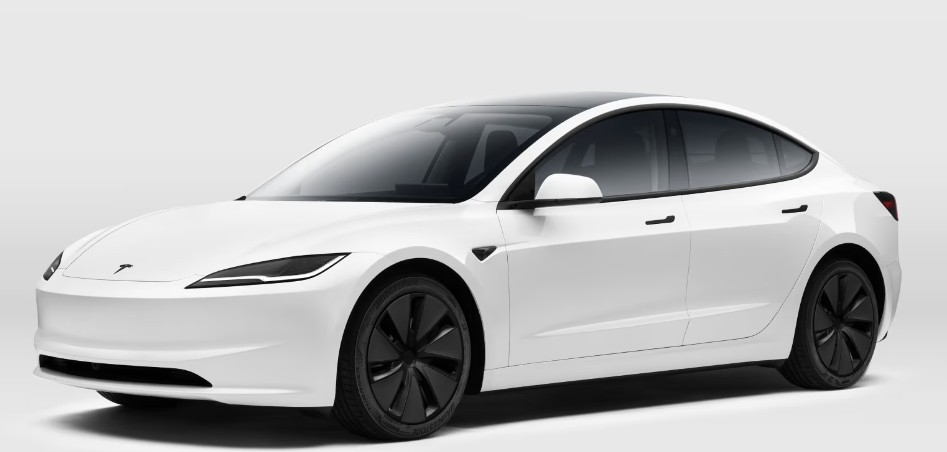
The Tesla Model 3 is not just another electric car. It feels more like a rolling smartphone mixed with a spaceship and wrapped in minimalist luxury. Yet many owners only scratch the surface of what this EV can actually do. Beneath that clean dashboard and giant touchscreen lies a treasure chest of hidden features, clever settings, and practical shortcuts that can completely transform daily driving.
Some tricks save battery. Others make the cabin smarter. A few simply make us grin like kids discovering a secret level in a video game.
Whether we just bought a Tesla or have been driving one for years, there’s always another hidden gem waiting inside the software. Let’s unlock the best Tesla Model 3 tips and tricks that can make ownership smoother, cheaper, safer, and far more enjoyable.
Content in this publication
- Why the Tesla Model 3 Feels Different From Traditional Cars
- Master One-Pedal Driving Early
- Customize Steering Modes for Different Driving Styles
- Use Scheduled Departure to Save Battery and Time
- Create Driver Profiles for Multiple People
- Hidden Navigation Tricks That Many Owners Miss
- Optimize Charging Habits for Longer Battery Life
- Master the Tesla Mobile App
- Enable Sentry Mode for Better Security
- Hidden Entertainment Features You Should Try
- Use Voice Commands More Often
- Unlock Hidden Efficiency Gains
- Cabin Overheat Protection Is a Summer Lifesaver
- Use Dog Mode for Pets
- Learn Supercharger Etiquette
- Customize the Touchscreen Layout
- Understand Regenerative Braking in Rain and Snow
- Activate Joe Mode for Quiet Alerts
- Use Camp Mode for Adventures
- Hidden Safety Features Worth Knowing
- Improve Long-Distance Road Trips
- Keep Software Updated Regularly
- Take Advantage of Chill Mode
- Keep the Interior Minimal but Practical
- Use Autopilot Responsibly
- Small Daily Habits That Make Ownership Better
- Why Tesla Ownership Feels Addictive
- Conclusion
- FAQs
Why the Tesla Model 3 Feels Different From Traditional Cars
Driving a Tesla changes the way we think about cars. Traditional vehicles age like milk. Teslas age more like apps — constantly updating and evolving.
That means the car we bought six months ago might already have:
- Better range optimization
- New entertainment features
- Enhanced autopilot functions
- Improved charging behavior
- Updated UI layouts
- Fresh security options
It’s like waking up and discovering our car learned a new skill overnight.
Master One-Pedal Driving Early
What Is One-Pedal Driving?
One-pedal driving allows the car to slow down aggressively when we lift our foot off the accelerator. Instead of relying heavily on brakes, regenerative braking converts momentum into electricity and sends it back to the battery.
It feels strange at first.
Then suddenly, normal cars feel ancient.
Why It Changes Everything
Benefits include:
- Better energy efficiency
- Less brake wear
- Smoother driving
- Easier city traffic control
- Reduced fatigue during commutes
Once mastered, it becomes almost addictive. Traffic jams become less annoying because we rarely touch the brake pedal.
Customize Steering Modes for Different Driving Styles
The Tesla Model 3 offers several steering settings:
Comfort
Light steering effort ideal for city driving.
Standard
Balanced everyday feel.
Sport
Heavier steering for sharper response.
Many owners never change this setting after delivery, but switching between them can dramatically alter how the car feels.
Sport mode especially makes the car feel planted like a performance sedan hugging the road.
Use Scheduled Departure to Save Battery and Time
Why Preconditioning Matters
Cold batteries behave like sleepy athletes. They need warming up before peak performance.
Scheduled Departure allows the Tesla to:
- Warm the battery
- Preheat the cabin
- Optimize charging timing
This improves:
- Driving range
- Charging speed
- Winter efficiency
- Cabin comfort
Instead of entering an icebox at 7 AM, we step into a warm cocoon ready to move.
Create Driver Profiles for Multiple People
Sharing a Tesla without profiles is chaos.
Seat positions shift. Mirrors move. Climate preferences disappear. Spotify accounts collide.
What Driver Profiles Save
- Seat position
- Mirror settings
- Steering wheel position
- Climate preferences
- Navigation favorites
- Driving mode preferences
Each driver essentially gets their own digital cockpit.
Add Multiple Stops
Tesla navigation can handle road trips surprisingly well.
We can add:
- Restaurants
- Charging stops
- Hotels
- Scenic detours
The system automatically recalculates battery consumption along the route.
Battery Arrival Prediction
One underrated feature is arrival battery percentage prediction.
This helps reduce range anxiety dramatically because we know exactly how much battery we’ll have left when arriving.
The estimate adapts dynamically based on:
- Speed
- Weather
- Elevation
- Wind
- Traffic
It’s eerily intelligent.
Optimize Charging Habits for Longer Battery Life
Avoid Charging to 100% Daily
One of the most important Tesla Model 3 tips is understanding battery health.
For daily driving:
- Keep charge between 20% and 80%
- Reserve 100% for long trips
This reduces long-term battery degradation.
Think of the battery like a rubber band. Constantly stretching it fully wears it out faster.
Use Home Charging Whenever Possible
Home charging is:
- Cheaper
- Gentler on the battery
- More convenient
Waking up every morning with a “full tank” changes daily life more than most people expect.
Master the Tesla Mobile App
The Tesla app is essentially a remote control for the car.
Useful Features Inside the App
Remote Climate Control
Cool or heat the cabin before entering.
Remote Locking
Forgot to lock the car? Fix it from anywhere.
Live Camera Viewing
Check surroundings remotely using Sentry Mode cameras.
Charge Monitoring
Track charging progress in real time.
Summon Features
Move the car slowly in tight spaces.
The app often feels more futuristic than the car itself.
Enable Sentry Mode for Better Security
What Sentry Mode Does
Sentry Mode transforms the Tesla into a rolling security system.
When activated, the car:
- Uses external cameras
- Detects suspicious activity
- Records footage
- Alerts potential intruders
It’s like having a digital guard dog that never sleeps.
When to Use It
Ideal for:
- Parking garages
- Airports
- Busy streets
- Overnight parking
- Shopping centers
Just remember it can consume noticeable battery power if left active continuously.
Tesla cabins become mini lounges while charging.
Built-In Entertainment Options
- Netflix
- YouTube
- Disney+
- Spotify
- Arcade games
- Browser access
Charging stops feel less like interruptions and more like intermissions.
Caraoke Is Surprisingly Fun
Yes, singing inside the car sounds ridiculous.
Until we try it.
Tesla’s karaoke system can turn road trips into concerts on wheels.
Use Voice Commands More Often
Many owners underuse Tesla voice controls.
Yet they can control:
- Navigation
- Climate
- Music
- Phone calls
- Glovebox access
- Seat heaters
Examples of Helpful Commands
- “Navigate to nearest Supercharger”
- “Set temperature to 21 degrees”
- “Open glovebox”
- “Call Mom”
It reduces touchscreen interaction while driving.
Reduce Aggressive Acceleration
The Tesla Model 3 is brutally quick.
That instant torque tempts us constantly.
But rapid acceleration drains energy much faster.
Smooth acceleration dramatically improves:
- Range
- Tire longevity
- Passenger comfort
Sometimes driving efficiently becomes its own little game.
Watch Tire Pressure Carefully
Low tire pressure reduces efficiency noticeably in EVs.
Checking pressure regularly can:
- Improve range
- Enhance safety
- Extend tire life
Even a small PSI drop can quietly steal miles from every drive.
Cabin Overheat Protection Is a Summer Lifesaver
What It Does
Cabin Overheat Protection prevents the interior from becoming dangerously hot.
This protects:
- Electronics
- Interior materials
- Passenger comfort
Especially useful during summer heat waves.
Battery Trade-Off
The feature consumes some battery, so we should balance comfort against energy usage.
Still, returning to a cooler cabin often feels worth it.
Use Dog Mode for Pets
Why Dog Mode Is Genius
Dog Mode keeps the cabin climate-controlled while displaying a message on the screen telling people the pet is safe.
The display typically says:
“My owner will be back soon.”
This reduces panic from concerned strangers.
Important Reminder
Always monitor battery levels carefully when using Dog Mode for extended periods.
Learn Supercharger Etiquette
The Tesla Supercharger network remains one of Tesla’s biggest advantages.
But etiquette matters.
Best Practices
- Move once charging finishes
- Avoid blocking stalls
- Keep cables organized
- Charge only what we need for the next leg
Charging to 80% is usually much faster than waiting for 100%.
Road trips become smoother when everyone follows good charging manners.
Customize the Touchscreen Layout
Tesla’s UI is highly flexible.
Quick Customization Ideas
- Reorganize favorite apps
- Pin commonly used controls
- Adjust map orientation
- Change display brightness
- Customize driving visualization
Small tweaks can make daily interactions far more intuitive.
Understand Regenerative Braking in Rain and Snow
Why Conditions Matter
Regenerative braking behaves differently on slippery roads.
In rain or snow:
- Braking feel can change
- Traction systems intervene more often
- Battery regen may reduce in cold weather
Learning how the car responds improves confidence during difficult conditions.
Winter Driving Tip
Use Chill Mode in icy weather for smoother acceleration and safer traction.
Activate Joe Mode for Quiet Alerts
What Is Joe Mode?
Joe Mode lowers notification volumes so passengers — especially children — aren’t disturbed by loud alerts.
Simple feature.
Massive sanity saver.
Parents quickly understand why this exists.
Use Camp Mode for Adventures
Camp Mode turns the Tesla into a mini hotel room.
Features Include
- Continuous climate control
- Interior lighting
- USB charging
- Entertainment access
Perfect for:
- Camping trips
- Long rests
- Festivals
- Overnight road adventures
Some owners even sleep in the Model 3 surprisingly comfortably.
Dashcam Recording
Tesla can continuously record driving footage.
Useful for:
- Insurance claims
- Accident evidence
- Security incidents
A properly configured USB drive is essential.
Automatic Emergency Braking
The car can intervene automatically during potential collisions.
It’s not magic.
But it’s an impressive extra layer of protection.
Improve Long-Distance Road Trips
Precondition Before Supercharging
Navigating to a Supercharger automatically warms the battery for faster charging.
This can dramatically reduce waiting time.
Especially in cold weather.
Pack Charging Adapters
A small adapter kit can save an entire trip.
Useful additions include:
- J1772 adapter
- Mobile charger kit
- Extension cords
- CCS adapter if compatible
Road-trip preparedness reduces stress enormously.
Keep Software Updated Regularly
Tesla software updates can add:
- Performance boosts
- New games
- UI redesigns
- Safety improvements
- Efficiency enhancements
Best Practices for Updates
- Connect to Wi-Fi at home
- Install updates overnight
- Read patch notes carefully
Some updates genuinely make the car feel brand-new again.
Take Advantage of Chill Mode
Not every drive needs neck-snapping acceleration.
Benefits of Chill Mode
- Smoother acceleration
- Better efficiency
- More comfortable passengers
- Reduced tire wear
Sometimes the calmest driving style creates the most enjoyable ride.
Keep the Interior Minimal but Practical
Tesla interiors thrive on simplicity.
Useful Accessories
- Matte screen protector
- Center console organizers
- Wireless charging pads
- Floor liners
- Hidden storage bins
A clutter-free cabin complements Tesla’s futuristic design philosophy beautifully.
Use Autopilot Responsibly
The Tesla Autopilot system is impressive, but it still requires attentive drivers.
What Autopilot Does Well
- Highway lane centering
- Adaptive cruise control
- Traffic assistance
- Fatigue reduction
What It Does Not Replace
- Human awareness
- Judgment
- Responsibility
The best Tesla drivers treat Autopilot like a co-pilot, not a chauffeur.
Small Daily Habits That Make Ownership Better
Sometimes the smallest tricks create the biggest improvements.
Daily Tesla Habits
- Precondition before driving
- Keep tire pressure correct
- Clean cameras regularly
- Avoid excessive fast charging
- Monitor energy graphs
- Use navigation even on familiar trips for battery prediction
Over time, these habits maximize:
- Battery health
- Efficiency
- Comfort
- Convenience
Why Tesla Ownership Feels Addictive
There’s a reason many Tesla owners struggle to return to traditional cars.
The experience becomes strangely seamless.
We stop visiting gas stations. The car updates itself. The app controls everything remotely. Charging becomes routine. Acceleration feels surreal. Silence replaces engine noise.
Driving transforms from mechanical transportation into something more digital and intuitive.
The Tesla Model 3 isn’t perfect. No car is.
But once we learn its hidden tricks and master its ecosystem, it starts feeling less like a vehicle and more like an intelligent companion quietly adapting to our lives.
Conclusion
The Tesla Model 3 offers far more than instant acceleration and futuristic styling. Hidden beneath its minimalist design lies an ecosystem packed with clever features, efficiency tools, comfort settings, and practical innovations that many drivers overlook.
By mastering regenerative braking, optimizing charging habits, using the mobile app intelligently, and exploring hidden software features, we can transform everyday driving into something smoother, smarter, and surprisingly fun.
The beauty of Tesla ownership is that the learning never truly stops. Every update brings new possibilities, and every feature discovered feels like uncovering another secret passage in a high-tech world on wheels.
And honestly? That sense of discovery is part of what makes the Tesla Model 3 so compelling.
FAQs
Yes. The Tesla Model 3 includes many hidden features such as Camp Mode, Joe Mode, Dog Mode, voice commands, entertainment apps, and customizable driving settings.
What is the best charging habit for Tesla Model 3 battery life?
For daily use, keeping the battery between 20% and 80% helps reduce long-term battery degradation.
Can the Tesla Model 3 improve with software updates?
Absolutely. Tesla frequently releases over-the-air updates that add features, improve efficiency, and enhance vehicle performance.
Is Sentry Mode worth using all the time?
Sentry Mode offers excellent security protection, but it consumes battery power. It’s best used strategically in higher-risk parking areas.
What is the most useful Tesla Model 3 trick for new owners?
Many new owners find one-pedal driving and scheduled preconditioning to be the biggest game changers for comfort and efficiency.
If you want to know other articles similar to Tesla Model 3 Tips and Tricks you can visit the category Tips.
BYD Shark 6 Tips and Tricks: 20 Features Every Owner Should Know

Leapmotor C10 Tips and Tricks: The Complete Owner’s Guide

How to Open Ford Edge With Manual Key: Complete Step-by-Step Guide
How to Start Ford Edge With Remote: The Complete Step-by-Step Guide
How to Open Toyota Sequoia Trunk From Inside: Complete Guide

BYD Seal Hidden Features: The Secret Functions Every Owner Should Know
Leave a Reply
More content of your interest