

How to Drive Tesla Model 3 2021: The Complete Beginner-to-Pro Guide

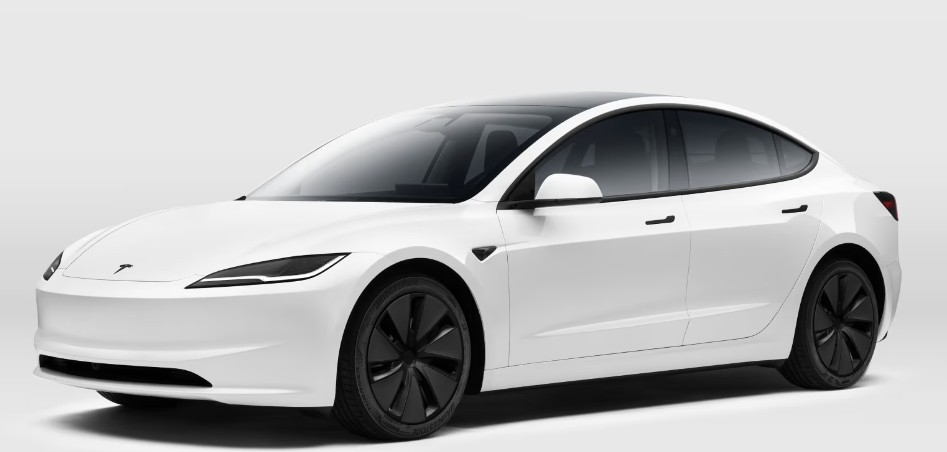
Driving a 2021 Tesla Model 3 feels less like operating a traditional car and more like stepping into the future with wheels. The first time we sit behind the minimalist dashboard, touch the giant center screen, and shift using a tiny stalk instead of a chunky gear lever, it can feel strangely exciting—almost like piloting a spaceship disguised as a sedan.
But here’s the truth many people discover after their first drive: the Tesla Model 3 is surprisingly easy to drive.
In fact, once we understand regenerative braking, one-pedal driving, Autopilot, and the touchscreen controls, going back to a gasoline car can feel like rewinding technology by ten years.
This guide walks through everything we need to know about how to drive a Tesla Model 3 2021 properly, safely, and confidently. Whether we just bought one, rented one, or are thinking about owning one, this article covers the real-world experience—not robotic instruction manual language.
Content in this publication
- Why the Tesla Model 3 2021 Feels Different From Other Cars
- Getting Inside the Tesla Model 3
- Adjusting the Driver Settings Before Driving
- Understanding the Tesla Model 3 Gear Selector
- How to Start Driving the Tesla Model 3
- Mastering Tesla’s Instant Acceleration
- What Is One-Pedal Driving?
- How Regenerative Braking Works
- Learning Smooth One-Pedal Driving
- Using the Brake Pedal Properly
- How to Reverse the Tesla Model 3
- Understanding the Tesla Touchscreen While Driving
- Best Driving Mode for Beginners
- How to Use Tesla Autopilot Safely
- Driving the Tesla Model 3 in Traffic
- How to Park a Tesla Model 3
- Charging the Tesla Model 3 Correctly
- Understanding Charging Types
- Best Charging Habits for Battery Health
- Driving Long Distances in a Tesla Model 3
- How Weather Affects Driving a Tesla
- Driving the Tesla Model 3 in Rain
- Common Mistakes New Tesla Drivers Make
- Hidden Tesla Model 3 Features Worth Knowing
- How Safe Is the Tesla Model 3 2021?
- Tips for Becoming a Better Tesla Driver
- Is Driving a Tesla Model 3 Easy?
- Conclusion
- FAQs
Why the Tesla Model 3 2021 Feels Different From Other Cars
The 2021 Tesla Model 3 doesn’t behave like a normal gasoline-powered vehicle. There’s no engine vibration. No gear shifts. No ignition sound. No traditional dashboard clutter screaming for attention.
Instead, everything feels smooth and silent, like gliding across pavement on magnetic rails.
Some of the biggest differences include:
- Instant acceleration
- Regenerative braking
- One-pedal driving
- Touchscreen-based controls
- Near-silent cabin
- Advanced driver-assistance systems
- Smartphone integration
The learning curve is small, but the experience changes how we think about driving forever.
Getting Inside the Tesla Model 3
Using the Key Card
The 2021 Model 3 comes with a Tesla key card. Think of it like a hotel key mixed with futuristic magic.
To unlock the car:
- Hold the key card against the B-pillar near the driver’s door
- Wait for the mirrors to unfold
- Open the door normally
To start driving:
- Place the key card behind the cup holders on the center console
- Press the brake pedal
That’s it.
No engine start button exists.
Using the Tesla Phone Key
Most owners use their smartphones instead of the key card.
After connecting the Tesla app, the car automatically unlocks when we approach. It feels seamless, almost like the car recognizes us personally.
This feature alone makes traditional car keys feel ancient.
Adjusting the Driver Settings Before Driving
Before hitting the road, we should personalize the car.
Seat and Steering Wheel Setup
All adjustments happen through the touchscreen.
Go to:
Controls → Quick Controls
From there we can adjust:
- Seat position
- Steering wheel height
- Steering wheel depth
- Mirrors
Once finished, save the profile so the car remembers everything automatically.
Mirror Calibration Matters More Than You Think
The Tesla Model 3 has excellent visibility, but because the cabin is quiet and fast, spatial awareness becomes extremely important.
Proper mirror adjustment helps with:
- Lane changes
- Parking
- Autopilot confidence
- Blind spot awareness
Small tweaks create a huge difference.
Understanding the Tesla Model 3 Gear Selector
Unlike most vehicles, the 2021 Model 3 uses a stalk on the right side of the steering wheel.
How to Shift Gears
- Push down → Drive
- Push up → Reverse
- Press button on end → Park
Simple.
But the first few attempts can feel awkward if we’ve driven traditional cars for years.
Our muscle memory fights back at first.
How to Start Driving the Tesla Model 3
Once seated:
- Press the brake pedal
- Shift into Drive
- Release the brake gently
- Press the accelerator smoothly
That’s all.
No warm-up. No engine rumble. No waiting.
The car is always ready.
Mastering Tesla’s Instant Acceleration
Why the Model 3 Feels So Fast
Electric torque arrives instantly.
Even the standard 2021 Model 3 accelerates aggressively compared to many gasoline sedans.
The sensation can surprise first-time drivers because the power delivery feels continuous—like a roller coaster quietly pushing us forward.
Avoid Flooring It Immediately
Many new Tesla drivers make the same mistake:
They slam the accelerator too hard.
The result?
An unintended neck-snapping launch.
Instead:
- Apply gradual pressure
- Learn pedal sensitivity
- Practice in open roads first
Smooth driving makes the Tesla feel luxurious instead of chaotic.
What Is One-Pedal Driving?
One-pedal driving is one of Tesla’s defining features.
When we lift our foot off the accelerator, the car slows down automatically through regenerative braking.
Instead of wasting energy as heat, the Tesla converts momentum back into battery power.
It’s brilliant.
How Regenerative Braking Works
The sensation feels strange initially.
The car slows aggressively without touching the brake pedal.
Think of it like engine braking in a manual car—but much stronger and smoother.
Over time, many drivers barely use the brake pedal at all.
Benefits of Regenerative Braking
- Extends battery range
- Reduces brake wear
- Makes driving smoother
- Improves efficiency
- Creates better control in traffic
Once mastered, traditional braking can suddenly feel clumsy.
Learning Smooth One-Pedal Driving
The Secret Is Foot Modulation
Driving smoothly in a Tesla is all about precise pedal control.
Imagine balancing a marble on a spoon while walking.
You may be interested in reading Which Tesla Model S Is the Fastest?
Tiny movements matter.
To improve:
- Ease off the accelerator slowly
- Anticipate stops earlier
- Avoid abrupt pedal lifts
- Practice in low-traffic areas
Within a few days, it becomes second nature.
Using the Brake Pedal Properly
Even with regenerative braking, the brake pedal still matters.
We use it for:
- Emergency stops
- Sudden traffic changes
- Steep hills
- Final stopping precision
Tesla braking systems feel responsive and sharp, so gentle pressure usually works best.
How to Reverse the Tesla Model 3
Reversing is incredibly easy thanks to cameras.
Steps to Reverse
- Press brake pedal
- Push gear stalk upward
- Use mirrors and rear camera
- Control speed carefully
The backup camera is crisp and wide-angle, making parking much less stressful.
Trust Cameras—but Not Blindly
Technology helps, but it shouldn’t replace awareness.
Always check:
- Mirrors
- Blind spots
- Pedestrians
- Curbs
- Cyclists
A Tesla is smart, but the driver must stay smarter.
Understanding the Tesla Touchscreen While Driving
The center display controls nearly everything.
At first, this setup can feel overwhelming because there are few physical buttons.
But after a week, the interface feels natural.
Essential Touchscreen Functions
Climate Controls
Adjust:
- Temperature
- Fan speed
- Seat heaters
- Defrost settings
Navigation
Tesla navigation is excellent because it integrates charging stops automatically.
Media
We can use:
- Spotify
- Bluetooth audio
- Streaming apps
- Radio
Driving Modes
Change:
- Steering feel
- Acceleration settings
- Regenerative braking preferences
Best Driving Mode for Beginners
The 2021 Model 3 offers different acceleration settings.
Chill Mode
Perfect for beginners.
Benefits include:
- Smoother acceleration
- Easier city driving
- Better passenger comfort
- Reduced accidental launches
Standard Mode
Provides the full Tesla punch.
Fast, responsive, addictive.
Many owners eventually switch permanently to Standard because it feels exhilarating.
How to Use Tesla Autopilot Safely
Autopilot is one of Tesla’s most talked-about features.
But it’s essential to understand something clearly:
Autopilot is a driver-assistance system—not self-driving magic.
Activating Autopilot
To enable basic Autopilot:
- Drive on clearly marked roads
- Pull down twice on the right stalk
- Watch for blue lane markings
The car can then:
- Maintain lane position
- Adjust speed automatically
- Follow traffic flow
Keep Hands on the Wheel
Tesla constantly monitors driver attention.
We must:
- Keep hands lightly on the wheel
- Stay alert
- Watch traffic continuously
Autopilot reduces fatigue, but responsibility never leaves the driver.
Driving the Tesla Model 3 in Traffic
Traffic is where Tesla ownership becomes surprisingly relaxing.
One-pedal driving reduces fatigue dramatically.
Instead of constant brake-throttle-brake chaos, we glide more naturally through congestion.
Autopilot also helps maintain spacing automatically.
The result?
Rush hour feels less like a battlefield and more like a controlled rhythm.
How to Park a Tesla Model 3
Parking is easier than most sedans because visibility tools are excellent.
Parking Tips
- Use cameras actively
- Watch curb distance
- Move slowly
- Trust sensor warnings carefully
The compact dimensions of the Model 3 help tremendously in urban environments.
Parallel Parking Feels Easier
Thanks to the instant torque and camera visibility, fine adjustments become effortless.
The car responds immediately, almost like moving a video game joystick with real-world precision.
Charging the Tesla Model 3 Correctly
Driving an EV also means learning charging habits.
How to Charge
- Open charge port
- Plug connector in
- Wait for charging confirmation
- Monitor charging through app
Simple.
Understanding Charging Types
Home Charging
The most convenient option.
We wake up every morning with a “full tank.”
Supercharging
Tesla Superchargers provide ultra-fast charging during trips.
Perfect for road travel.
Public Chargers
Third-party chargers also work with adapters when needed.
Best Charging Habits for Battery Health
To preserve battery longevity:
- Keep daily charging around 80%
- Avoid frequent 100% charging
- Don’t leave battery extremely low
- Precondition battery before Supercharging
Think of battery care like maintaining athletic endurance—not sprinting constantly.
Driving Long Distances in a Tesla Model 3
Road trips in a Tesla are different—but not difficult.
Tesla navigation plans charging stops automatically.
You may be interested in readingWhich Tesla Model S Is the Fastest?You may be interested in reading
Does the Tesla Model S Have Full Self Driving?The experience becomes surprisingly enjoyable because breaks feel intentional rather than annoying.
Instead of endless gas station chaos, we recharge ourselves while the car recharges too.
Road Trip Essentials
Bring:
- Charging adapters
- Phone cable
- Snacks
- Tire inflator
- Emergency kit
Preparation transforms range anxiety into confidence.
How Weather Affects Driving a Tesla
Cold Weather
Cold temperatures reduce battery efficiency.
Expect:
- Lower range
- More energy usage
- Slower charging speeds
Preconditioning helps significantly.
Hot Weather
Extreme heat increases climate-control usage.
Fortunately, Tesla’s thermal management system performs exceptionally well compared to many EV rivals.
Driving the Tesla Model 3 in Rain
The Model 3 handles rain confidently because of:
- Low center of gravity
- Battery weight distribution
- Traction control systems
Still, instant torque means slippery roads require smoother pedal inputs.
Gentle acceleration matters.
Common Mistakes New Tesla Drivers Make
Overusing Acceleration
Tesla power feels addictive.
But aggressive launches drain range and wear tires faster.
Ignoring Regenerative Braking Learning Curve
Many beginners brake too hard because they haven’t adapted yet.
Patience solves this quickly.
Relying Too Much on Autopilot
Autopilot assists drivers—it doesn’t replace them.
Attention always matters.
Charging to 100% Constantly
Daily full charging isn’t necessary for most owners.
Battery longevity improves with smarter charging habits.
Dog Mode
Keeps pets comfortable while displaying a message on-screen for worried pedestrians.
Camp Mode
Perfect for resting inside the vehicle during trips.
Sentry Mode
Uses external cameras for security monitoring.
Like having a robotic guard dog watching the car 24/7.
Over-the-Air Updates
Tesla improves features remotely through software updates.
The car evolves over time—almost like a smartphone gaining new abilities.
How Safe Is the Tesla Model 3 2021?
The 2021 Model 3 earned outstanding crash safety ratings.
Why?
Because EV architecture changes everything.
Without a large front engine block, Tesla engineered impressive crumple zones and structural rigidity.
Key safety features include:
- Automatic emergency braking
- Collision avoidance
- Stability control
- Lane departure warnings
- Multiple airbags
Safety feels deeply integrated into the vehicle’s DNA.
Tips for Becoming a Better Tesla Driver
Drive Smoothly
Efficiency rewards calm driving.
Learn Energy Usage
Monitor battery consumption patterns over time.
Tesla route planning improves charging confidence.
Practice One-Pedal Driving Daily
It eventually becomes intuitive.
Stay Updated on Software Changes
Tesla updates frequently improve features and usability.
Is Driving a Tesla Model 3 Easy?
Yes—after a short adjustment period.
Initially, it feels unfamiliar.
Then it becomes addictive.
Finally, it feels normal.
And suddenly, traditional cars start feeling noisy, outdated, and unnecessarily complicated.
The 2021 Tesla Model 3 blends technology, efficiency, performance, and simplicity into one remarkably approachable package. Whether we’re commuting, road-tripping, or simply cruising through city streets, the experience feels refreshingly modern.
Driving one isn’t just transportation.
It’s a glimpse into where cars are heading next.
Conclusion
Learning how to drive a 2021 Tesla Model 3 is easier than most people expect. The biggest differences—regenerative braking, one-pedal driving, touchscreen controls, and instant acceleration—may seem intimidating at first, but they quickly become intuitive.
The secret is patience.
Spend a few days adapting to the car’s rhythm, and the driving experience transforms into something smoother, quieter, and far more engaging than conventional vehicles.
The Model 3 doesn’t merely change how we drive.
It changes how driving feels.
FAQs
Can beginners drive a Tesla Model 3 easily?
Yes. Most beginners adapt within a few days. The car is intuitive, smooth, and easy to control once we learn regenerative braking.
Do we need to use the brake pedal often in a Tesla Model 3?
Not usually. One-pedal driving handles much of the slowing process through regenerative braking.
Is the Tesla Model 3 2021 fast?
Absolutely. Even base models deliver instant acceleration that feels quicker than many gasoline sports sedans.
You may be interested in readingWhich Tesla Model S Is the Fastest?You may be interested in reading
Does the Tesla Model S Have Full Self Driving?You may be interested in reading
Are Tesla Model S Good in Snow?Can we drive long distances comfortably in a Tesla Model 3?
Yes. Tesla navigation automatically plans charging stops, making road trips simple and practical.
Is Autopilot fully self-driving?
No. Autopilot is an advanced driver-assistance system that still requires full driver attention and supervision.
If you want to know other articles similar to How to Drive Tesla Model 3 2021: The Complete Beginner-to-Pro Guide you can visit the category Driving.
Dacia Jogger MPG: Real-World Fuel Economy Explained
Vauxhall Meriva MPG: Real-World Fuel Economy Guide

Hyundai i40 MPG: Real-World Fuel Economy Guide
Kia Rio Fuel Consumption: Real-World Efficiency, MPG Insights & Smart Driving Tips
Kia Rio Miles Per Gallon: Real MPG, Efficiency Tips & What to Expect
Citroen C1 Fuel Consumption: The Real-World Guide to MPG, Costs, and Smarter Driving
Leave a Reply
More content of your interest