

Hyundai Veloster Key Fob Battery Replacement: Complete DIY Guide

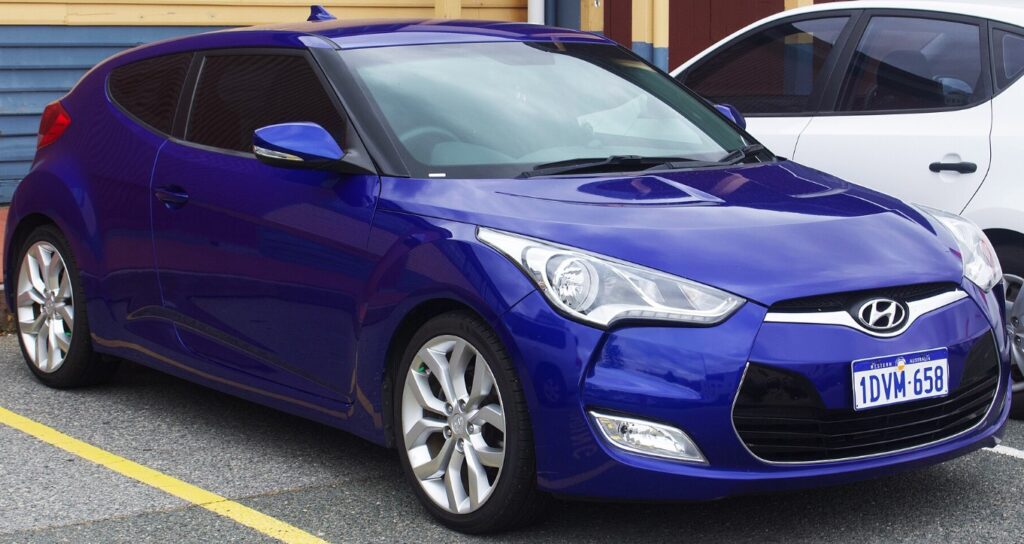
A Hyundai Veloster key fob is one of those little conveniences we barely notice—until it stops working. One day, we press the unlock button and the doors pop open instantly. The next, we’re standing beside the car pressing the same button three or four times like we’re trying to send Morse code.
Fortunately, a weak key fob battery is usually one of the simplest Veloster problems to fix.
A Hyundai Veloster key fob battery replacement can normally be completed at home in only a few minutes. We don't need expensive diagnostic equipment, advanced mechanical experience, or a trip to the dealership. In most cases, all we need is the correct coin-cell battery and a small flat tool for opening the remote.
Still, there are a few details worth knowing. Different Veloster model years and key designs may use slightly different batteries, and forcing the casing open incorrectly can damage the plastic clips.
So, before we start prying things apart, let's look at how the Veloster key fob works, which battery it commonly uses, how to replace it correctly, and what to do if the remote still refuses to cooperate afterward.
Content in this publication
- What Battery Does a Hyundai Veloster Key Fob Use?
- Signs Your Hyundai Veloster Key Fob Battery Is Dying
- What You'll Need for Hyundai Veloster Key Fob Battery Replacement
- How to Replace a Hyundai Veloster Key Fob Battery
- Step 1: Remove the Mechanical Key
- Step 2: Locate the Key Fob Opening Slot
- Step 3: Carefully Separate the Housing
- Step 4: Identify the Existing Battery Orientation
- Step 5: Remove the Old Battery
- Step 6: Install the New Key Fob Battery
- Step 7: Reassemble the Hyundai Veloster Key Fob
- Step 8: Reinstall the Mechanical Key
- How to Test the Key Fob After Battery Replacement
- What If the Veloster Key Fob Doesn't Work After Changing the Battery?
- How Long Does a Hyundai Veloster Key Fob Battery Last?
- How Much Does Hyundai Veloster Key Fob Battery Replacement Cost?
- Can We Start a Hyundai Veloster With a Dead Key Fob Battery?
- Common Mistakes When Changing a Veloster Key Fob Battery
- How to Make Your Hyundai Veloster Key Fob Last Longer
- When Should We Replace the Entire Hyundai Veloster Key Fob?
- Should We Replace Both Veloster Key Fob Batteries at Once?
- Hyundai Veloster Key Fob Battery Replacement Checklist
- Is Hyundai Veloster Key Fob Battery Replacement Worth Doing Yourself?
- Final Thoughts on Hyundai Veloster Key Fob Battery Replacement
- Frequently Asked Questions
- 1. What battery does a Hyundai Veloster key fob take?
- 2. Do I need to reprogram my Hyundai Veloster key after changing the battery?
- 3. Why is my Hyundai Veloster key fob still not working with a new battery?
- 4. How do I know when my Veloster key fob battery needs replacing?
- 5. Can I start my Hyundai Veloster if the key fob battery is dead?
What Battery Does a Hyundai Veloster Key Fob Use?
Many Hyundai Veloster key fobs use a CR2032 3-volt lithium coin battery, although the exact battery can vary depending on the model year and key-fob design.
That's important.
We should never buy a replacement battery solely because a random package online says "fits Hyundai Veloster." The safest method is surprisingly simple: open the key fob and check the identification printed directly on the original battery.
Coin-cell batteries look almost identical from the outside. A CR2025 and CR2032, for example, have the same diameter but different thicknesses.
Installing the wrong one can result in weak contact, a casing that won't close properly, or a remote that works only intermittently.
CR2032 vs CR2025 Key Fob Batteries
Two battery numbers commonly encountered in automotive remotes are CR2032 and CR2025.
Both are lithium 3-volt batteries, but their dimensions differ slightly.
The numbers actually help explain the size:
- CR2032: approximately 20 mm wide and 3.2 mm thick
- CR2025: approximately 20 mm wide and 2.5 mm thick
That tiny 0.7 mm difference might sound meaningless, but inside a tightly designed key fob it can matter considerably.
Think of it like putting the wrong thickness of card into a precisely cut slot. It may almost fit, yet "almost" isn't good enough for reliable electrical contact.
How to Confirm Your Veloster Battery Type
Before purchasing anything, we recommend checking three things:
- Open the key fob carefully.
- Read the battery number printed on the existing coin cell.
- Replace it with the exact same specification.
If the original battery is missing or unreadable, consult the owner's manual or verify the battery according to the specific key-fob part number.
Signs Your Hyundai Veloster Key Fob Battery Is Dying
Key fob batteries rarely announce their retirement dramatically. They usually fade gradually.
At first, everything seems normal. Then the operating range gets shorter. Eventually, we find ourselves practically touching the door handle with the remote before anything happens.
Common warning signs include:
- Reduced locking or unlocking range
- Buttons requiring multiple presses
- Intermittent remote operation
- Weak response from the panic button
- Smart-entry functions becoming inconsistent
- Vehicle occasionally failing to recognize the smart key
- Key fob working better when held close to the vehicle
These symptoms don't guarantee that the battery is responsible, but a battery replacement is usually the cheapest and easiest troubleshooting step.
Reduced Remote Range
A healthy Veloster key fob should communicate with the vehicle from a reasonable distance.
If we once unlocked the car from across a parking lot but suddenly need to stand a few feet away, declining battery voltage may be the culprit.
The transmitter still works—it just doesn't have the same punch.
Another classic symptom is inconsistent button operation.
Press unlock once: nothing.
Press it again: nothing.
Press it a third time: suddenly everything works.
That stop-and-start behavior frequently appears when the battery can no longer supply reliable power to the transmitter.
Smart Key Not Detected
Veloster models equipped with push-button start may occasionally display a key-detection warning when the smart-key battery becomes weak.
However, we shouldn't assume every "key not detected" problem is caused by the battery. Interference, damaged electronics, immobilizer issues, or vehicle-side faults may create similar symptoms.
Still, changing a low-cost coin battery is a sensible first move.
What You'll Need for Hyundai Veloster Key Fob Battery Replacement
This isn't a toolbox-heavy repair.
For most Hyundai Veloster remotes, we need only a few basic items:
- Correct replacement coin-cell battery
- Small flat-head screwdriver or plastic pry tool
- Clean, dry workspace
- Soft cloth or towel
A plastic pry tool is particularly useful because it reduces the chance of marking the edges of the remote.
Why a Soft Work Surface Helps
Key fobs contain small components.
Opening one over a cluttered garage bench is asking for trouble. One tiny piece falls into the darkness, and suddenly our five-minute battery job becomes an archaeological excavation.
A towel or cloth prevents the remote from sliding and makes small parts easier to spot.
How to Replace a Hyundai Veloster Key Fob Battery
Now we get to the main job.
The exact housing can differ slightly between Veloster generations, but the overall process is similar.
Step 1: Remove the Mechanical Key
Many Veloster smart keys include an emergency mechanical key hidden inside the remote.
Look for a release tab or small button on the key fob.
Press or slide it while pulling the mechanical key outward.
Don't force it. The key should slide free once the release mechanism is properly engaged.
Why the Mechanical Key Matters
Besides unlocking the driver's door if the remote battery dies completely, removing the mechanical key often exposes the seam or opening used to separate the key-fob housing.
In other words, Hyundai cleverly hides the doorway to the battery compartment behind the emergency key.
Step 2: Locate the Key Fob Opening Slot
After removing the mechanical key, inspect the edge of the remote.
You should see either a small notch or seam where the two halves of the casing meet.
This is where we insert the screwdriver or pry tool.
The key here is finesse.
A key fob isn't a jar lid. Brute force doesn't help.
Step 3: Carefully Separate the Housing
Insert the flat tool gently into the opening.
Twist slightly rather than pushing deeply.
The casing should begin to separate.
Once a small gap appears, work around the edge until the two halves release.
Avoid inserting the screwdriver too far into the remote because internal circuit-board components can be surprisingly delicate.
Step 4: Identify the Existing Battery Orientation
Before touching the old battery, take a quick look at how it sits inside the holder.
Better yet, take a photo with your phone.
Pay attention to whether the positive side marked with a "+" symbol faces upward or downward.
This tiny step can save unnecessary confusion later.
Step 5: Remove the Old Battery
Lift or slide the battery out of its retaining clips.
If it's tight, use a small plastic tool rather than aggressively digging underneath it with a metal screwdriver.
We want to replace the battery—not perform accidental surgery on the circuit board.
Step 6: Install the New Key Fob Battery
Insert the fresh battery using the same orientation as the original.
Make sure it sits flat and securely beneath the retaining contacts.
Avoid touching both flat faces of the battery excessively. While ordinary handling usually isn't catastrophic, keeping the battery clean helps maintain good electrical contact.
Step 7: Reassemble the Hyundai Veloster Key Fob
Align the two halves of the remote casing.
Press them together around the perimeter.
You should hear or feel the clips snap back into position.
Check the entire seam afterward. If one corner remains open, don't simply squeeze harder. Reopen the housing and make sure the battery or internal components aren't preventing proper closure.
Step 8: Reinstall the Mechanical Key
Slide the emergency key back into the remote until it clicks securely into place.
Now the physical part of the replacement is complete.
How to Test the Key Fob After Battery Replacement
Testing should be simple.
Stand near the Hyundai Veloster and try:
- Lock
- Unlock
- Trunk or hatch release, if equipped
- Panic button
- Passive entry, if equipped
- Push-button starting
Then walk farther away and test the locking range.
If everything responds immediately, we're done.
Does a Hyundai Veloster Key Fob Need Reprogramming After Battery Replacement?
Usually, no.
Replacing the battery does not normally erase the key fob's programming. The remote remains paired with the vehicle because the pairing information isn't stored in the disposable battery.
That's good news because it means this maintenance job normally ends when we snap the case closed.
However, if the remote was already malfunctioning before the battery replacement, a new battery won't magically repair damaged electronics.
What If the Veloster Key Fob Doesn't Work After Changing the Battery?
This is where things get interesting.
We replace the battery, proudly close the remote, press unlock…and nothing happens.
Before assuming the key fob has died, let's check the simple possibilities.
Check the Battery Orientation
This is probably the easiest mistake to make.
Remove the battery and confirm that the positive and negative sides match the original installation.
A reversed coin battery won't power the remote correctly.
Confirm the Battery Size
A battery may fit inside the compartment while still being the wrong specification.
If the original remote used a CR2032 and we installed a thinner battery, the contacts might not press firmly enough against it.
Always compare the numbers.
Try Another New Battery
Fresh packaging doesn't guarantee a healthy battery.
Coin cells can lose charge during long storage, particularly when they're old, poorly stored, or from questionable brands.
If the remote remains dead, testing another recently purchased battery is worthwhile.
Inspect the Battery Contacts
Look at the metal contacts holding the battery.
Do they appear bent, dirty, or corroded?
If the contacts aren't pressing against the battery firmly, the remote may lose power intermittently.
Don't bend delicate tabs aggressively. They're small and can snap.
If the casing was opened forcefully, something inside may have shifted.
Check that the rubber button pad and circuit board are seated correctly.
Also inspect for:
- Moisture damage
- Corrosion
- Cracked solder joints
- Broken plastic supports
- Missing battery contacts
- Visible impact damage
At this stage, the problem may require key-fob repair or replacement rather than another battery.
How Long Does a Hyundai Veloster Key Fob Battery Last?
A key fob battery often lasts several years, but there's no universal lifespan.
Usage habits, environmental conditions, battery quality, key design, and smart-key communication frequency can all affect longevity.
A remote used constantly may drain its battery faster than one used occasionally.
Can Cold Weather Affect Key Fob Batteries?
Yes.
Cold temperatures can temporarily reduce battery performance.
A marginal battery that behaves normally in warm weather might become unreliable on a freezing morning.
That's one reason weak batteries sometimes seem to "fail overnight" when winter arrives.
The battery didn't necessarily lose all its energy in a few hours. The cold simply exposed how weak it had already become.
Can Heat Damage a Key Fob Battery?
Excessive heat isn't friendly either.
Leaving a remote for long periods in extremely hot environments can accelerate battery deterioration and potentially affect the remote's internal components.
We don't need to treat a key fob like a museum artifact, but basic care goes a long way.
How Much Does Hyundai Veloster Key Fob Battery Replacement Cost?
DIY replacement is typically inexpensive because coin-cell batteries are widely available.
The cost rises if we visit a dealership, locksmith, or repair shop because we're paying for labor and convenience rather than just the battery.
For most owners, this is one of those jobs where doing it ourselves makes perfect sense.
We're basically replacing a button-sized battery—not rebuilding the transmission.
DIY vs Dealer Replacement
DIY has several advantages:
- Lower cost
- No appointment
- Takes only a few minutes
- Minimal tools required
- No specialized automotive knowledge necessary
Professional help becomes more useful when the remote has physical damage, programming problems, or internal electronic faults.
Can We Start a Hyundai Veloster With a Dead Key Fob Battery?
On Veloster models with smart-key push-button start, a dead remote battery doesn't always mean we're stranded.
Many proximity-key systems include a backup method that allows the vehicle to recognize the transponder even when the remote battery is depleted.
Depending on the configuration, this may involve holding or pressing the key fob directly against the start button while applying the brake or clutch as normally required.
The exact procedure should be verified in the owner's manual for the specific Veloster model year.
What About Unlocking the Door?
Remember that mechanical key we removed earlier?
That's its moment to shine.
If the remote won't unlock the doors electronically, the hidden physical key can usually be used to unlock the driver's door manually.
It feels almost old-fashioned, but it's a useful backup when electronics decide to take the day off.
Common Mistakes When Changing a Veloster Key Fob Battery
This job is straightforward, but a few mistakes appear repeatedly.
Using Too Much Force
Plastic key-fob housings contain clips that can break.
If the casing isn't opening, check the seam and tool position rather than increasing force.
Installing the Wrong Battery
"Looks the same" isn't a battery specification.
Match the exact number printed on the original.
Reversing the Battery
Always note the positive and negative orientation before removing the old cell.
Damaging the Battery Holder
Tiny battery clips aren't designed for aggressive bending.
Work carefully around them.
A new battery cannot fix:
- Water-damaged circuitry
- Broken buttons
- Cracked solder connections
- Vehicle receiver problems
- Lost key programming
- Immobilizer faults
- Physical remote damage
The battery is the first suspect, not the only suspect.
How to Make Your Hyundai Veloster Key Fob Last Longer
We can't make a coin battery immortal, but a little care can extend the life of the remote itself.
Keep the key fob away from excessive moisture, avoid dropping it, and don't store it where buttons can remain pressed continuously.
It's also smart to keep spare batteries at home.
They cost little, take almost no space, and prevent a weak remote from becoming an irritating surprise.
Avoid Water Exposure
Key fobs and swimming pools aren't friends.
If a remote becomes soaked, remove the battery and address the moisture quickly rather than repeatedly pressing buttons.
Activating electronics while moisture is present can worsen damage.
Use a Protective Key Fob Cover
A soft protective cover can reduce damage from drops and scratches.
This can be especially worthwhile if the key shares a pocket with coins, metal keys, or other objects.
Don't Ignore Early Warning Signs
When the operating range starts shrinking noticeably, replacing the battery early makes sense.
There's little advantage in squeezing the final electrons out of a $3 coin cell.
When Should We Replace the Entire Hyundai Veloster Key Fob?
Battery replacement should restore normal operation when low voltage is the actual problem.
But sometimes the remote itself reaches the end of the road.
Consider replacement or professional repair when:
- Buttons are physically broken
- The casing is severely damaged
- Water has entered the electronics
- The circuit board is corroded
- Battery contacts are broken
- A known-good battery doesn't power the remote
- The remote has lost communication with the vehicle
- Multiple replacement batteries fail to solve the issue
A replacement key may also require programming, cutting, or immobilizer pairing depending on the type.
Should We Replace Both Veloster Key Fob Batteries at Once?
If we have two original remotes of similar age, replacing both batteries at roughly the same time can be practical.
Why?
Because their batteries may have experienced similar aging.
If one remote begins losing range today, the spare could follow soon afterward.
Changing both isn't mandatory, but it can prevent the classic scenario where we reach for the "backup" remote only to discover that it's equally exhausted.
Hyundai Veloster Key Fob Battery Replacement Checklist
Before calling the job complete, let's run through a quick checklist:
- Confirm the correct coin-cell battery number
- Remove the mechanical emergency key carefully
- Open the remote at the designated seam
- Note the original battery orientation
- Remove the old battery without damaging contacts
- Install the replacement securely
- Snap the casing together completely
- Reinstall the mechanical key
- Test lock and unlock functions
- Test smart entry and push-button start if equipped
If every box is checked, the Veloster remote should be ready for another few years of daily button-pressing duty.
Is Hyundai Veloster Key Fob Battery Replacement Worth Doing Yourself?
Absolutely, in most cases.
Few automotive maintenance jobs offer such a satisfying ratio of effort to result.
We spend a few dollars, use one tiny tool, and restore a feature we rely on every day.
There's also something strangely satisfying about fixing an annoying problem before it grows into a dealership visit.
The important thing is to work gently. The battery is cheap. The remote isn't.
Final Thoughts on Hyundai Veloster Key Fob Battery Replacement
A Hyundai Veloster key fob battery replacement is one of the easiest maintenance tasks we can handle ourselves.
The basic process is simple: identify the correct battery, remove the mechanical key if applicable, open the casing carefully, duplicate the original battery orientation, install the new cell, and test the remote.
For many Veloster key designs, a CR2032 3-volt battery is commonly encountered, but we should always verify the exact battery already installed before purchasing a replacement.
If the remote still doesn't work after installing a known-good battery, we can move beyond battery troubleshooting and inspect the contacts, buttons, circuit board, and vehicle recognition system.
Most of the time, though, the solution really is that simple.
A tiny battery can make a sophisticated smart key feel completely useless. Swap that little silver disc, and suddenly everything is back to normal—as if the key fob had simply needed its morning coffee.
Frequently Asked Questions
1. What battery does a Hyundai Veloster key fob take?
Many Hyundai Veloster key fobs commonly use a CR2032 3-volt lithium coin battery. However, battery type may vary by model year and key design, so we recommend checking the number printed on the original battery before replacing it.
2. Do I need to reprogram my Hyundai Veloster key after changing the battery?
Normally, no. Simply replacing the key-fob battery does not usually erase the remote's programming. If the key doesn't work afterward, verify battery orientation, battery type, and internal contacts before assuming reprogramming is necessary.
3. Why is my Hyundai Veloster key fob still not working with a new battery?
Possible causes include an incorrectly installed battery, wrong battery size, defective replacement battery, damaged contacts, worn buttons, water damage, circuit-board failure, or a communication problem between the key and vehicle.
4. How do I know when my Veloster key fob battery needs replacing?
Typical symptoms include reduced remote range, inconsistent button response, needing to press buttons repeatedly, unreliable passive entry, or occasional smart-key detection warnings.
5. Can I start my Hyundai Veloster if the key fob battery is dead?
Many Veloster models with push-button start include a backup method for recognizing the smart key even when its battery is depleted. This may involve holding the key fob against the start button. Check the owner's manual for the exact procedure applicable to your model year.
If you want to know other articles similar to Hyundai Veloster Key Fob Battery Replacement: Complete DIY Guide you can visit the category Service and Parts.
Vauxhall Mokka Tyre Pressure Reset: Complete Guide
How to Reset the Tire Pressure System on Your Hyundai Tucson

Hyundai Kona Tire Pressure: Complete PSI Guide

Vauxhall Corsa Timing Belt Replacement Cost UK 2026

Mazda CX-5 Tire Size Chart: 2013–2026 Guide

How to Reset a Honda Civic: Complete Step-by-Step Guide
Leave a Reply
More content of your interest