

Ram 1500 Key Fob Battery Replacement: Complete DIY Guide

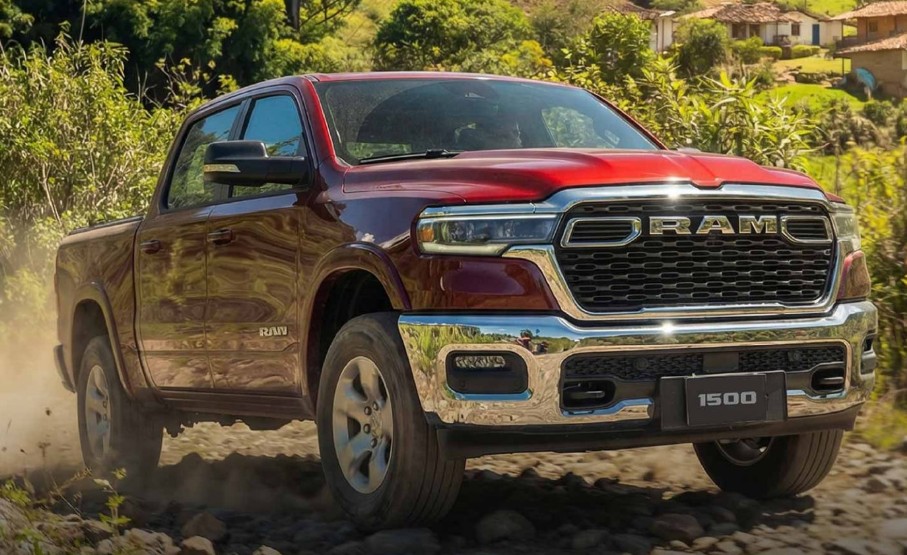
A Ram 1500 key fob is one of those little conveniences we barely notice—until it stops working. One day, we press the unlock button from across the parking lot and the truck responds instantly. The next, we’re standing beside the driver’s door pressing the button like we’re trying to send Morse code.
Fortunately, a weak key fob usually doesn’t mean the remote itself has failed. In many cases, all we need is a simple Ram 1500 key fob battery replacement.
The job is inexpensive, requires almost no mechanical knowledge, and usually takes only a few minutes. Still, there are a few details worth getting right. Ram 1500 key designs have changed through the years, battery orientation matters, and forcing the case apart can turn a five-minute repair into an unnecessarily expensive one.
In this guide, we’ll walk through the entire process, from recognizing a weak battery to opening the fob, choosing the correct replacement battery, installing it, testing the remote, and troubleshooting problems afterward.
Content in this publication
- What Battery Does a Ram 1500 Key Fob Use?
- Signs Your Ram 1500 Key Fob Battery Is Dying
- How Often Should a Ram 1500 Key Fob Battery Be Replaced?
- Tools Needed for Ram 1500 Key Fob Battery Replacement
- Ram 1500 Key Fob Battery Replacement Step by Step
- Does a Ram 1500 Key Fob Need Reprogramming After Battery Replacement?
- How to Start a Ram 1500 With a Dead Key Fob Battery
- Can We Unlock the Ram 1500 If the Key Fob Battery Is Dead?
- Why Is My Ram 1500 Saying Key Fob Not Detected?
- What If the Ram 1500 Key Fob Still Doesn't Work After Battery Replacement?
- Can a Weak Key Fob Battery Affect Remote Start?
- Can Extreme Weather Drain a Ram 1500 Key Fob Battery?
- Should We Replace Both Ram Key Fob Batteries at the Same Time?
- Best Battery for a Ram 1500 Key Fob
- How Much Does Ram 1500 Key Fob Battery Replacement Cost?
- How to Avoid Damaging the Key Fob During Battery Replacement
- Can We Change the Ram Key Fob Battery Without Tools?
- Ram 1500 Key Fob Battery Replacement by Generation
- How Long Does Ram 1500 Key Fob Battery Replacement Take?
- Can We Drive With a Low Key Fob Battery Warning?
- What Happens If the Key Fob Battery Dies While Driving?
- Should We Keep a Spare CR2032 in the Ram 1500?
- Ram 1500 Key Fob Battery Replacement Mistakes to Avoid
- How Do We Know the Replacement Worked?
- When Should We Replace the Entire Ram 1500 Key Fob?
- Dealer vs Automotive Locksmith for Ram Key Fob Problems
- A Simple Ram 1500 Key Fob Maintenance Routine
- Final Thoughts on Ram 1500 Key Fob Battery Replacement
- Frequently Asked Questions
What Battery Does a Ram 1500 Key Fob Use?
Many modern Ram 1500 key fobs use a CR2032 3-volt lithium coin-cell battery. It’s one of the most common batteries used in automotive remotes, watches, scales, small electronics, and other compact devices.
However, we shouldn’t automatically assume every Ram 1500 from every generation uses exactly the same battery.
Ram has produced several key and remote designs, including traditional remote-head keys, proximity fobs, push-button-start remotes, and newer multifunction fobs. Battery requirements can vary depending on the truck's model year and key design.
The safest method is simple: open the key fob and read the battery number printed directly on the old battery before buying a replacement.
Is CR2032 the Most Common Ram 1500 Key Fob Battery?
Yes, CR2032 batteries are widely used in newer Ram 1500 key fobs.
A CR2032 battery is approximately:
- 20 mm in diameter
- 3.2 mm thick
- 3 volts
- Lithium-based
- Non-rechargeable
The numbers actually tell us something. "20" refers roughly to the battery's diameter, while "32" corresponds to its thickness.
That matters because batteries that look nearly identical aren't necessarily interchangeable.
Can We Use a Different Coin Battery?
We shouldn't substitute a different battery simply because it fits into the compartment.
A CR2025, for example, has the same diameter as a CR2032 but is thinner. It may physically fit some holders, yet it can create poor electrical contact.
Likewise, installing a thicker battery than specified may place unnecessary pressure on the circuit board or prevent the key fob housing from closing properly.
The best rule is simple: replace the existing battery with the same battery number.
Signs Your Ram 1500 Key Fob Battery Is Dying
Key fob batteries usually weaken gradually rather than dying without warning.
Think of the battery like a flashlight slowly losing brightness. The remote may still function, but its performance becomes less predictable.
One of the earliest signs is reduced operating range.
Maybe the key used to unlock the truck from 30 feet away, but now we have to stand beside the driver's door. Eventually, we may need to press a button repeatedly before anything happens.
Common Weak Key Fob Battery Symptoms
We may notice:
- Reduced locking or unlocking range
- Buttons that work intermittently
- Multiple button presses required
- Delayed response from the truck
- Remote start becoming unreliable
- Passive entry working inconsistently
- A key fob battery warning on the instrument display
- The truck failing to recognize the fob occasionally
These symptoms often point toward a battery approaching the end of its useful life.
Could the Problem Be Something Other Than the Battery?
Absolutely.
A dead battery is the simplest explanation, but it isn't the only possibility.
Key fob problems can also result from:
- Damaged buttons
- Corrosion inside the remote
- Water exposure
- A cracked circuit board
- Dirty battery contacts
- A damaged battery holder
- Radio-frequency interference
- Programming or synchronization problems
- Vehicle electrical issues
That's why replacing the battery is usually our first diagnostic step rather than our final conclusion.
How Often Should a Ram 1500 Key Fob Battery Be Replaced?
There is no universal replacement interval.
Many key fob batteries can last several years, but actual lifespan depends heavily on how the remote is used and stored.
A fob used dozens of times every day may exhaust its battery sooner than one that spends most of its life sitting quietly on a shelf.
Passive-entry systems can also communicate with the vehicle more frequently than basic remotes.
Factors That Can Shorten Key Fob Battery Life
Battery longevity may be affected by:
- Frequent remote start use
- Repeated lock/unlock operation
- Extreme heat or cold
- Cheap or old replacement batteries
- Keeping the fob close to the truck continuously
- Moisture exposure
- Internal electrical faults
- Buttons being pressed accidentally inside a pocket or bag
We don't necessarily need to replace the battery on a strict schedule. Instead, we can replace it when range or responsiveness noticeably declines.
Tools Needed for Ram 1500 Key Fob Battery Replacement
One of the best things about this job is how little equipment we need.
In many cases, we can replace the battery using only the emergency key built into the fob.
Depending on the key design, we may also find these useful:
- A small flat-blade screwdriver
- A plastic trim-opening tool
- A clean cloth
- The correct replacement coin battery
Using a plastic tool is ideal because it reduces the chance of scratching the case.
Should We Use a Knife to Open the Key Fob?
It's technically possible, but it's not a great idea.
A knife can slip surprisingly easily, damaging the housing—or our fingers.
A tiny flat screwdriver or plastic pry tool gives us far more control.
Think precision, not force.
Ram 1500 Key Fob Battery Replacement Step by Step
The exact housing design differs slightly between Ram generations, but the general replacement process is very similar.
We'll use the typical modern Ram proximity-style key fob as our example.
Step 1: Remove the Emergency Key
Look for the small release button or sliding latch on the back or side of the key fob.
Press or slide the release mechanism while pulling the metal emergency key out of the housing.
This mechanical key can normally be used to unlock the driver's door when the electronic remote isn't working.
Set it aside somewhere safe.
Step 2: Locate the Key Fob Seam
Inspect the perimeter of the remote.
You'll notice a narrow seam where the two halves of the plastic housing meet.
Some Ram key fobs also have a small notch specifically designed for opening the case.
Don't Force the Housing
This is where people often make mistakes.
The plastic shell is held together by clips. We don't need to attack it like we're opening a stubborn paint can.
Insert the emergency key, small screwdriver, or plastic pry tool gently into the appropriate notch.
Twist slightly until the case begins to separate.
Step 3: Carefully Separate the Two Halves
Once one section opens, work slowly around the edge.
The remaining clips should release with light pressure.
Avoid pulling the case apart violently because internal components may sit close to the housing.
We want the remote to open like a book—not explode across the kitchen table.
Step 4: Find the Coin-Cell Battery
Inside the fob, we'll see the round silver battery.
Before removing it, pay attention to its orientation.
Look for the "+" symbol.
Depending on the fob design, the positive side may face upward or downward. Rather than relying on memory or a generic online diagram, we should note exactly how the original battery sits in our specific remote.
Taking a quick phone photo before removing it can save confusion later.
Step 5: Remove the Old Battery
Use a fingernail, plastic tool, or small screwdriver to gently lift the battery from its retaining clips.
Avoid bending the contacts.
Those tiny metal tabs provide electrical connection to the circuit board. If they become distorted, even a brand-new battery may not work properly.
Step 6: Confirm the Battery Number
Read the marking on the old battery.
If it says CR2032, install another CR2032.
If your particular fob specifies something different, use that exact type instead.
This step eliminates guesswork.
Step 7: Install the New Battery
Place the replacement battery into the holder using the same orientation as the original.
Press gently until it sits flat and securely beneath the retaining clips.
Don't touch the battery excessively with greasy or dirty fingers. A clean, dry battery surface helps maintain reliable contact.
Step 8: Reassemble the Key Fob
Align both halves of the housing.
Press around the perimeter until the clips snap securely into place.
Check that there are no obvious gaps.
Then slide the emergency key back into its slot.
Step 9: Test the Remote
Stand near the truck and test:
- Lock
- Unlock
- Panic button
- Remote start, if equipped
- Passive-entry door handle operation, if equipped
If all functions respond normally, the replacement is complete.
Does a Ram 1500 Key Fob Need Reprogramming After Battery Replacement?
Normally, no.
Replacing the battery doesn't typically erase the key fob's programming.
The fob contains programming information that isn't dependent on the removable coin battery for long-term memory.
So once the fresh battery is installed correctly, the key should generally communicate with the truck again without any additional setup.
Why Might the Fob Not Work Immediately?
If the fob remains dead after battery replacement, don't assume it needs programming right away.
First check the basics:
- Is the battery installed in the correct direction?
- Is the replacement battery actually fresh?
- Are the metal contacts touching the battery?
- Did the circuit board move during disassembly?
- Is the case properly closed?
A backward battery is especially common.
The remote looks perfectly normal from the outside, but electrically it's as useful as a lamp with the plug sitting beside the socket.
How to Start a Ram 1500 With a Dead Key Fob Battery
A dead remote battery doesn't necessarily mean we're stranded.
Ram trucks with push-button start are designed with backup key detection methods.
Depending on model year and configuration, the vehicle may still detect the transponder inside the fob when the remote is positioned very close to the start button.
Typical Emergency Starting Method
If the truck says the key isn't detected, try pressing the brake pedal and using the nose or end of the key fob to push the START/STOP button.
The truck may be able to recognize the key's internal transponder even though the remote battery is too weak for normal wireless operation.
Exact emergency procedures can differ by model year, so the owner's manual remains the best reference for a specific truck.
Can We Unlock the Ram 1500 If the Key Fob Battery Is Dead?
Usually, yes.
Remember the metal emergency key we removed earlier?
That's its purpose.
Ram's proximity-style fobs generally contain a hidden mechanical key that can be used to unlock the driver's door.
The key cylinder may be visible or partially concealed depending on the truck's design.
Once inside, we can use the emergency start procedure if necessary.
Why Is My Ram 1500 Saying Key Fob Not Detected?
A weak battery is one of the most common reasons, but the message isn't exclusively a battery warning.
The truck may display a key-detection message when the vehicle cannot establish proper communication with the remote.
Possible Causes of a Key Not Detected Message
Potential causes include:
- Weak key fob battery
- Completely dead key fob battery
- Electronic interference
- Damaged key fob
- Vehicle battery voltage problems
- Key fob outside the cabin
- Internal antenna problems
- Programming issues
Before assuming an expensive electronic failure, replace the small coin battery first.
It's the automotive equivalent of checking whether a computer is plugged in before replacing the motherboard.
What If the Ram 1500 Key Fob Still Doesn't Work After Battery Replacement?
If the remote worked poorly before the battery change and now doesn't work at all, inspect the replacement carefully.
Start with the easiest possibilities.
Check Battery Orientation
Remove the new battery and compare its position with the old one.
Confirm that the positive and negative sides match the markings or original orientation.
Try Another Fresh Battery
Coin batteries can occasionally arrive discharged, especially if they have been stored for years.
Use a fresh battery from a reputable manufacturer.
If we have a multimeter, we can also check battery voltage.
Inspect the Battery Contacts
Look closely at the metal tabs surrounding the battery.
They should make firm contact.
If a clip was accidentally pushed away during removal, the battery may sit inside the fob without actually powering it.
Inspect for Corrosion
Was the key dropped into water?
Spent a rainy afternoon in a cup holder?
Gone through the washing machine?
Moisture can leave white, green, or dark corrosion around the circuit board or battery terminals.
Minor contamination may sometimes be cleaned, but significant circuit damage may require key replacement.
Try the Spare Key
A spare key can tell us a lot.
If the spare works perfectly, the problem is likely isolated to the original key fob.
If neither fob works, the issue may lie with the truck rather than both remotes simultaneously.
Can a Weak Key Fob Battery Affect Remote Start?
Yes.
Remote start requires the fob's signal to reach the truck reliably.
As the battery weakens, the usable range may shrink substantially.
We might notice that locking the truck still works nearby while remote start only works occasionally.
That's because marginal battery voltage can produce inconsistent transmitter performance.
Replacing the battery often restores normal range.
Can Extreme Weather Drain a Ram 1500 Key Fob Battery?
Extreme temperatures can affect battery performance.
Cold temperatures can temporarily reduce the output of lithium coin cells. A marginal battery that worked adequately in mild weather may suddenly appear almost dead on a freezing morning.
High temperatures aren't ideal either. Long-term heat exposure can accelerate battery deterioration and affect electronics.
Where Should We Keep the Key Fob?
Avoid leaving the fob:
- On the dashboard in direct sunlight
- Inside a hot vehicle for long periods
- In damp locations
- Next to strong magnets
- Directly beside certain electronic devices for extended periods
Ordinary everyday storage is fine. We simply want to avoid unnecessary extremes.
Should We Replace Both Ram Key Fob Batteries at the Same Time?
If both key fobs are the same age, it can make sense.
Suppose the primary remote's battery has finally died after several years. The spare battery has been aging during that same period, even if the remote hasn't been used as frequently.
Replacing both is inexpensive preventive maintenance.
That said, it isn't mandatory.
Best Battery for a Ram 1500 Key Fob
The most important feature isn't fancy packaging—it's using the correct size and voltage.
For a fob requiring CR2032, choose a genuine 3-volt CR2032 lithium battery from a reputable manufacturer.
Avoid mystery batteries with questionable storage history.
Does Battery Brand Matter?
Brand isn't everything, but quality control matters.
A good coin cell should provide consistent voltage and reasonable shelf life.
More important than the logo is buying batteries from a trustworthy retailer where inventory turns over regularly.
A premium battery that has been sitting in a hot warehouse for eight years isn't automatically better than a fresh mainstream alternative.
How Much Does Ram 1500 Key Fob Battery Replacement Cost?
Replacing the battery ourselves is usually extremely inexpensive compared with replacing the entire key fob.
The battery itself typically costs only a few dollars, depending on brand, package size, and retailer.
A dealership, locksmith, auto-parts store, or battery retailer may also replace it for us, although labor charges or service fees vary.
DIY Replacement vs Professional Replacement
Doing it ourselves makes sense when:
- The fob housing is undamaged
- We're comfortable opening it carefully
- The battery is easy to identify
- The remote previously worked normally
Professional help may be smarter when:
- The case is cracked
- Buttons are broken
- The key has water damage
- The remote won't work with multiple new batteries
- The truck won't recognize the key
- Internal contacts appear damaged
How to Avoid Damaging the Key Fob During Battery Replacement
The process is simple, but rushing is where problems begin.
Use Gentle Pressure
Plastic key housings aren't designed to withstand heavy prying.
If the case isn't opening, double-check where the release notch is located rather than applying more force.
Avoid Touching the Circuit Board
There's usually no reason to remove or handle the electronic board.
Leave it in place whenever possible.
Some fob designs contain a removable rubber membrane between the buttons and circuit board.
If it shifts during disassembly, reinstall it carefully before closing the housing.
Check the Seal Before Closing
If the fob uses a sealing gasket, make sure it sits correctly in its groove.
A poorly seated seal can reduce moisture resistance.
Can We Change the Ram Key Fob Battery Without Tools?
Sometimes.
The built-in emergency key may double as a convenient tool for separating the housing.
If the case has a designated pry point, we may be able to complete the entire replacement without touching a screwdriver.
However, don't force the emergency key into random seams. Key housings differ.
Ram 1500 Key Fob Battery Replacement by Generation
Ram 1500 keys have evolved considerably.
Older models may use a physical ignition key integrated with remote buttons, while newer trucks commonly use proximity fobs for push-button start and passive entry.
Older Ram 1500 Remote Keys
Older remote-head keys generally combine the mechanical ignition key and remote-control electronics into one unit.
Battery replacement often involves separating the key housing at its seam.
The correct battery should always be confirmed from the existing remote.
Newer Ram 1500 Proximity Fobs
Newer proximity keys typically include:
- Lock
- Unlock
- Panic
- Remote start
- Tailgate functions on some models
- Hidden emergency key
These remotes commonly use coin-cell batteries and are generally straightforward to open.
More Buttons Don't Necessarily Mean a Different Battery
A fob with remote start and power-tailgate buttons may look far more sophisticated than a basic version, yet both can use the same coin-cell format.
We still shouldn't assume. Reading the old battery remains the simplest confirmation.
How Long Does Ram 1500 Key Fob Battery Replacement Take?
Once we're familiar with the housing, the job often takes less than five minutes.
First-time replacement may take slightly longer because we're figuring out where the clips and battery holder are located.
There's no prize for speed.
Working slowly is far cheaper than snapping a plastic retaining tab.
Can We Drive With a Low Key Fob Battery Warning?
Usually, a low key fob battery warning doesn't mean the truck is about to shut down.
Once the vehicle is running, the remote's coin battery generally isn't responsible for keeping the engine operating.
However, ignoring the warning isn't wise.
The bigger concern is what happens next time we park, turn the engine off, and try to restart.
A battery that is weak today may become effectively dead tomorrow.
What Happens If the Key Fob Battery Dies While Driving?
Normally, the engine doesn't simply shut off because the key fob battery dies.
The truck has already authenticated the key during startup.
A warning may appear if communication with the fob is lost, but the vehicle is designed to continue operating rather than suddenly switching off in traffic.
After stopping the engine, however, restarting may require the backup key-detection procedure.
Should We Keep a Spare CR2032 in the Ram 1500?
Keeping a spare battery can be convenient, but storage matters.
Leaving lithium coin cells exposed inside a glove compartment isn't ideal.
Keep spare batteries sealed in their original packaging and away from children.
Coin batteries are extremely dangerous if swallowed.
Also remember that extreme cabin temperatures can shorten battery life, so storing the only replacement battery permanently inside a scorching-hot truck isn't necessarily the best strategy.
Ram 1500 Key Fob Battery Replacement Mistakes to Avoid
A basic battery replacement can go wrong when we overlook small details.
The most common mistakes include:
- Buying the wrong battery size.
- Installing the battery backward.
- Breaking plastic clips while prying.
- Bending battery contacts.
- Touching or dislodging circuit-board components.
- Losing the emergency key.
- Assuming the fob needs reprogramming immediately.
- Using an old replacement battery.
- Ignoring signs of moisture damage.
- Forcing the housing closed when something is misaligned.
Most are easy to avoid by slowing down.
How Do We Know the Replacement Worked?
The simplest test is range and consistency.
After installing the new battery, try locking and unlocking the truck several times.
Then walk gradually farther away.
If a weak battery was causing the issue, we should notice a clear improvement in responsiveness.
Remote start and passive-entry functions should also behave normally.
When Should We Replace the Entire Ram 1500 Key Fob?
A new battery can't repair physical or electronic damage.
Replacement may become necessary when:
- The circuit board is cracked
- The battery holder is broken
- Multiple buttons have failed
- Severe corrosion is present
- The housing is badly damaged
- The key has repeatedly been exposed to water
- The transmitter no longer communicates with the truck
Before purchasing an entirely new key, however, it's worth getting the existing unit inspected by a qualified automotive locksmith or dealer.
Key replacement can cost considerably more than a coin battery.
Dealer vs Automotive Locksmith for Ram Key Fob Problems
If battery replacement doesn't fix the issue, we usually have two main professional options: a dealership or automotive locksmith.
Dealerships have access to factory procedures and equipment.
Automotive locksmiths may offer convenient key testing, replacement, cutting, and programming services depending on the model.
Price, availability, and capability vary locally, so comparing options can be worthwhile.
A Simple Ram 1500 Key Fob Maintenance Routine
Key fobs don't require much maintenance.
A few habits can help them survive years of daily use:
- Keep the housing dry.
- Avoid dropping the key onto hard surfaces.
- Replace weak batteries promptly.
- Keep spare keys in a safe location.
- Don't attach extremely heavy keychains.
- Clean exterior buttons gently.
- Inspect cracked cases before moisture gets inside.
We can think of the key fob as a tiny computer that spends its life getting tossed onto tables, dropped into cup holders, stuffed into pockets, and occasionally sent flying across parking lots.
A little care goes a long way.
Final Thoughts on Ram 1500 Key Fob Battery Replacement
A Ram 1500 key fob battery replacement is one of the easiest pieces of vehicle maintenance we can handle ourselves.
When the remote's range shrinks, buttons become inconsistent, or the truck displays a low key fob battery warning, the coin-cell battery is a logical place to start.
For many modern Ram 1500 fobs, a CR2032 3-volt lithium battery is commonly used, although we should always confirm the battery number inside our specific remote before replacing it.
From there, the procedure is straightforward: remove the emergency key, gently separate the housing, note the battery orientation, replace it with the correct type, snap the case together, and test every function.
Most importantly, there's usually no need to reprogram the key just because we've changed its battery.
Sometimes maintaining a modern pickup sounds intimidating because everything seems connected to computers, sensors, modules, and software. Yet this particular repair remains refreshingly simple. A small battery, a few careful movements, and we're back to unlocking the Ram from across the driveway instead of waving the key at it like a magic wand that's forgotten the spell.
Frequently Asked Questions
1. What battery does a Ram 1500 key fob take?
Many modern Ram 1500 key fobs use a CR2032 3-volt lithium coin-cell battery. However, key designs vary by model year, so we recommend opening the remote and confirming the battery number printed on the existing battery before purchasing a replacement.
2. Do I have to reprogram my Ram 1500 key fob after replacing the battery?
Normally, no. Replacing the key fob battery doesn't typically erase its programming. After installing the correct battery in the proper orientation, the remote should generally begin working again without reprogramming.
3. Why won't my Ram key fob work with a new battery?
Check battery orientation first. Then confirm that the battery is fresh, the correct size, and making proper contact with the metal terminals. If the remote still doesn't function, inspect it for corrosion, damaged buttons, broken contacts, or circuit-board problems.
4. How do I start my Ram 1500 when the key fob battery is dead?
On many push-button-start Ram trucks, we can press the brake and use the key fob itself to press or closely approach the START/STOP button. The vehicle may recognize the internal transponder even when the remote battery is dead. Procedures vary by model year, so consult the owner's manual for the exact emergency-start method.
5. How long does a Ram 1500 key fob battery last?
Key fob batteries commonly last several years, although there is no fixed lifespan. Frequency of use, temperature, battery quality, passive-entry operation, and storage conditions can all affect longevity. Replacing the battery when remote range or reliability begins declining is usually sufficient.
If you want to know other articles similar to Ram 1500 Key Fob Battery Replacement: Complete DIY Guide you can visit the category Service and Parts.
Vauxhall Mokka Tyre Pressure Reset: Complete Guide
How to Reset the Tire Pressure System on Your Hyundai Tucson

Hyundai Kona Tire Pressure: Complete PSI Guide

Vauxhall Corsa Timing Belt Replacement Cost UK 2026
Mazda CX-5 Tire Size Chart: 2013–2026 Guide

How to Reset a Honda Civic: Complete Step-by-Step Guide
Leave a Reply
More content of your interest