

Peugeot 206 BSI Reset: A Complete Step-by-Step Guide

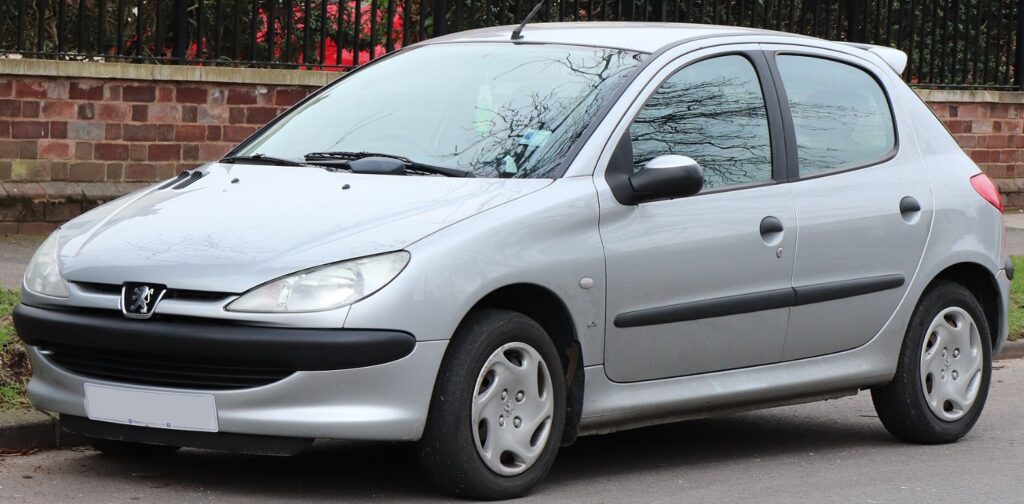
A Peugeot 206 BSI reset can feel like a mysterious ritual the first time we hear about it. The instructions often involve opening a window, removing the key, waiting in silence, disconnecting the battery, and reconnecting everything in a very specific order. It sounds less like vehicle maintenance and more like waking a sleeping computer without startling it.
Yet there is logic behind the process.
The BSI, or Built-in Systems Interface, acts as the electronic control hub for many Peugeot 206 functions. It helps coordinate the central locking, electric windows, interior lights, immobilizer, indicators, windscreen wipers, dashboard communication, and several other electrical systems.
When the BSI becomes confused after a weak battery, an abrupt battery disconnection, voltage fluctuations, or an electrical repair, the car may begin behaving strangely. Lights may flash unexpectedly. The remote key may stop locking the doors. The wipers may move on their own. The engine may crank but refuse to start.
In some situations, a carefully performed Peugeot 206 BSI reset can restore normal communication between the vehicle’s electronic systems. However, it is not a magical cure for every electrical problem. We need to understand when the reset is appropriate, how to perform it safely, and when professional diagnosis is the wiser route.
Content in this publication
- What Is the BSI in a Peugeot 206?
- What Does a Peugeot 206 BSI Reset Actually Do?
- When Might a Peugeot 206 BSI Reset Help?
- Before Starting the Peugeot 206 BSI Reset
- Peugeot 206 BSI Reset Procedure
- Step 1: Prepare the Vehicle
- Step 2: Remove the Ignition Key
- Step 3: Wait for the BSI to Enter Sleep Mode
- Step 4: Disconnect the Battery
- Step 5: Leave the Battery Disconnected
- Step 6: Reconnect the Battery
- Step 7: Wait Before Activating the Car
- Step 8: Switch On the Side Lights
- Step 9: Insert the Key and Switch On the Ignition
- Step 10: Start the Engine
- How to Resynchronize the Peugeot 206 Remote Key
- What Not to Do During a BSI Reset
- Can a BSI Reset Damage the Peugeot 206?
- Peugeot 206 BSI Reset After Battery Replacement
- Peugeot 206 BSI Reset After a Flat Battery
- What If the Peugeot 206 Will Not Start After the Reset?
- BSI Reset Versus BSI Reprogramming
- How to Tell Whether the BSI Is Actually Faulty
- Common Causes of Peugeot 206 BSI Problems
- Diagnostic Checks Before Replacing the BSI
- Can We Reset the BSI Without Disconnecting the Battery?
- Will a Peugeot 206 BSI Reset Clear Fault Codes?
- How Often Should We Perform a BSI Reset?
- Peugeot 206 BSI Reset Troubleshooting
- When to Seek Professional Help
- How to Prevent Future BSI Problems
- Final Thoughts on the Peugeot 206 BSI Reset
- Frequently Asked Questions
- 1. How long should the battery remain disconnected during a Peugeot 206 BSI reset?
- 2. Can a BSI reset fix a Peugeot 206 that will not start?
- 3. Do I need to reprogram the key after disconnecting the battery?
- 4. Why must the driver’s window remain open during the reset?
- 5. What should I do if the electrical faults return after the reset?
What Is the BSI in a Peugeot 206?
BSI stands for Built-in Systems Interface. In simple terms, it is a central electronic module that allows multiple systems in the Peugeot 206 to communicate with one another.
Rather than giving every electrical feature its own isolated control unit, Peugeot designed the vehicle so that many components exchange information through the BSI. Think of it as the conductor of an orchestra. The lights, locks, immobilizer, dashboard, wipers, and key system may be separate instruments, but the BSI helps keep them playing the same tune.
The BSI receives information from switches, sensors, control modules, and the ignition system. It then sends commands to the relevant component. When everything works correctly, we barely notice it. When communication breaks down, however, the symptoms can seem completely unrelated.
A failing window, flashing headlights, and an immobilizer warning may appear to be three separate faults. In reality, they may share one common cause: unstable voltage or interrupted BSI communication.
What Systems Does the BSI Control?
Depending on the Peugeot 206 model, year, trim level, and electrical configuration, the BSI may influence or manage:
- Central locking
- Remote key operation
- Engine immobilizer authorization
- Electric windows
- Interior lighting
- Exterior lighting
- Indicators and hazard lights
- Windscreen wipers
- Washer functions
- Instrument cluster communication
- Alarm functions
- Courtesy lights
- Some climate-control signals
- Communication with the engine control unit
- Door-open and warning messages
This explains why a BSI-related fault can produce such an unusual collection of symptoms. The module sits at the crossroads of the vehicle’s electrical network.
What Does a Peugeot 206 BSI Reset Actually Do?
A BSI reset does not rewrite software, repair damaged circuits, or replace faulty hardware. Instead, the procedure allows the vehicle’s electronic network to shut down completely before power is removed and restored.
Modern vehicle modules do not always switch off the moment we remove the ignition key. They may remain active for several minutes while storing information, checking inputs, or entering sleep mode.
If we disconnect the battery while the BSI is still active, we can interrupt this process. That interruption may cause communication errors, corrupted temporary data, immobilizer problems, or unpredictable electrical behaviour.
The reset procedure helps the BSI:
- Enter sleep mode correctly
- Shut down without interruption
- Clear some temporary communication errors
- Reinitialize after battery reconnection
- Restore communication with connected modules
- Relearn certain electrical functions
- Re-establish remote-key synchronization in some cases
The waiting periods matter. They are not decorative pauses. They give the electronic systems time to finish their internal processes.
When Might a Peugeot 206 BSI Reset Help?
A reset may be worth considering when electrical problems begin immediately after:
- A flat or weak battery
- A jump-start
- Battery replacement
- Battery disconnection
- Alternator repair
- Electrical work
- Fuse-box work
- Radio installation
- Incorrect battery reconnection
- A sudden voltage drop
- Long-term vehicle storage
It may also help when several electronic features fail at the same time without an obvious mechanical explanation.
Common Symptoms of BSI Confusion
Possible symptoms include:
- The remote key no longer locks or unlocks the doors
- The engine cranks but does not start
- The immobilizer warning remains illuminated
- Electric windows stop operating
- Dashboard lights behave strangely
- The headlights turn on unexpectedly
- Indicators flash incorrectly
- Windscreen wipers operate without command
- Interior lights remain on
- The horn activates unexpectedly
- Central locking cycles by itself
- Warning messages appear after battery replacement
- The radio or clock loses normal operation
- Multiple unrelated electrical systems fail together
These signs do not automatically prove that the BSI is defective. A weak battery, poor earth connection, damaged wiring, faulty fuse box, defective key transponder, or failed component can create similar symptoms.
That is why we should see the BSI reset as an initial recovery procedure, not as a final diagnosis.
Before Starting the Peugeot 206 BSI Reset
Preparation matters. Rushing the process can turn a minor electrical inconvenience into a much larger problem.
Before beginning, we should confirm that the battery is sufficiently charged. A reset performed with a severely discharged battery may fail because the modules receive unstable voltage during reconnection.
Tools and Conditions We Need
Prepare the following:
- The correct ignition key
- Access to the vehicle battery
- A suitable spanner or socket for the battery terminal
- A battery with adequate charge
- The driver’s window lowered
- The bonnet open
- All doors closed
- Electrical accessories switched off
- A quiet area where the car can remain undisturbed
Lowering the driver’s window is especially useful. Once the battery is disconnected, the central locking may not work normally. The open window gives us access to the ignition and interior without opening a door during the reset sequence.
Check the Battery First
Before blaming the BSI, inspect the battery condition.
A Peugeot 206 can develop strange electronic symptoms when battery voltage drops too low. The starter may still turn, yet the BSI and engine control module may not receive stable voltage.
Check for:
- Loose battery terminals
- White or green corrosion
- Damaged cables
- A swollen battery case
- Poor earth connections
- Low resting voltage
- Slow cranking
- Repeated clicking during startup
- Lights dimming heavily while cranking
A healthy, fully charged 12-volt battery commonly measures around 12.6 volts with the engine switched off. A noticeably lower reading may indicate partial discharge, although temperature, battery age, and recent vehicle use can influence the result.
If the battery is weak, charging or replacing it may be more important than resetting the BSI.
Peugeot 206 BSI Reset Procedure
The following is a commonly used BSI power-reset sequence for many Peugeot 206 vehicles. Exact behaviour may vary by model year, equipment level, and electrical system version.
We should perform each step calmly and in order.
Step 1: Prepare the Vehicle
Park the Peugeot 206 safely, switch off the engine, engage the handbrake, and remove unnecessary electrical loads.
Turn off:
- Headlights
- Interior lights
- Radio
- Heater fan
- Air conditioning
- Windscreen wipers
- Phone chargers
- Aftermarket accessories
Open the bonnet so the battery can be reached later.
Lower the driver’s window and then close all doors.
Step 2: Remove the Ignition Key
Make sure the ignition is completely switched off and remove the key.
Do not leave the key in the ignition barrel. Do not operate the remote control. Do not open the doors again unless absolutely necessary.
The vehicle now needs time to begin shutting down its electronic systems.
Step 3: Wait for the BSI to Enter Sleep Mode
Wait for at least three minutes without touching anything electrical.
During this period:
- Do not open a door
- Do not press the remote buttons
- Do not operate the windows
- Do not switch on the lights
- Do not press the brake pedal
- Do not turn the ignition
- Do not use the horn
Silence is the goal. We are allowing the BSI to finish its tasks and enter sleep mode.
Some technicians prefer waiting five minutes to reduce the risk of interrupting the shutdown process. The important point is not to rush.
Step 4: Disconnect the Battery
After the waiting period, disconnect the negative battery terminal first.
Depending on the battery layout, access may be slightly awkward. Use the correct tool and avoid allowing the spanner to contact both battery terminals or nearby metal components.
Once disconnected, move the cable away from the terminal so it cannot spring back into contact.
Why Remove the Negative Terminal First?
The negative terminal is normally connected to the vehicle body. Removing it first reduces the risk of creating an accidental short circuit while using a metal tool near the positive terminal.
For a basic BSI reset, disconnecting the negative terminal is often sufficient. If both terminals must be removed for another repair, the usual sequence is negative first, then positive.
Step 5: Leave the Battery Disconnected
Wait approximately 10 to 15 minutes.
This period allows residual electrical energy to dissipate and gives the connected modules time to power down completely.
Avoid reconnecting the battery immediately. A two-minute interruption may not be long enough for every module to reset properly.
Do not repeatedly touch the terminal against the battery post. A clean, decisive reconnection is preferable.
Step 6: Reconnect the Battery
Reconnect the negative battery terminal securely.
Do not open the doors or switch on electrical accessories immediately after reconnection.
Make sure the connection is tight enough to prevent movement. A loose terminal can cause voltage interruptions, repeated resets, non-starting, and intermittent warning lights.
Step 7: Wait Before Activating the Car
After reconnecting the battery, wait about one minute.
This pause gives the BSI time to wake up and begin communicating with other modules.
The vehicle may make small noises as relays or systems initialize. That can be normal.
Step 8: Switch On the Side Lights
Reach through the open driver’s window and switch on the side lights or parking lights.
Some versions of the BSI procedure use this step to wake the network in a controlled manner.
Avoid opening the door at this stage.
Step 9: Insert the Key and Switch On the Ignition
Insert the ignition key and turn it to the ignition-on position without starting the engine.
Wait around 10 seconds.
Allow the dashboard warning lights to illuminate and the electronic systems to initialize.
Step 10: Start the Engine
Turn the key and start the engine normally.
Do not press the accelerator excessively. Let the engine idle while observing the dashboard.
Check whether the previous symptoms have disappeared.
How to Resynchronize the Peugeot 206 Remote Key
After a battery disconnection or BSI reset, the remote-control buttons may lose synchronization even though the key can still start the engine.
The immobilizer chip and remote-control function are related but separate. A key may start the engine while the locking buttons fail to operate.
A commonly used synchronization procedure is:
- Insert the key into the ignition.
- Turn the ignition to the on position.
- Press and hold the lock button for approximately 10 seconds.
- Release the button.
- Switch off the ignition.
- Remove the key.
- Wait around 30 seconds.
- Test the remote locking function.
Some Peugeot 206 versions may require a slightly different process. If synchronization fails, check the key-fob battery and try the procedure again with the spare key.
Remote Key Still Not Working?
If the remote remains unresponsive, possible causes include:
- Flat key-fob battery
- Incorrectly installed key battery
- Damaged remote buttons
- Broken solder joints
- Water damage
- Worn key-fob circuit board
- Lost key programming
- Faulty receiver
- BSI communication fault
- Incorrect replacement key
- Immobilizer or transponder issue
A basic synchronization procedure cannot program a completely new key. New-key programming normally requires diagnostic equipment and the vehicle’s security information.
What Not to Do During a BSI Reset
The reset is simple, but the wrong action at the wrong moment can interrupt the process.
Avoid the following mistakes:
- Disconnecting the battery immediately after removing the key
- Leaving a door open during the shutdown period
- Pressing the remote while waiting
- Operating the windows
- Turning on the headlights
- Reconnecting a badly discharged battery
- Allowing the battery cable to touch the terminal repeatedly
- Reversing battery polarity
- Removing the positive terminal first without proper care
- Starting the engine immediately after reconnection
- Ignoring loose or corroded terminals
- Performing the procedure beside exposed fuel or ignition sources
The BSI is sensitive to voltage changes. Treat the battery connection like a light switch, not like a percussion instrument.
Can a BSI Reset Damage the Peugeot 206?
When performed correctly, a standard power-reset procedure is generally low risk. Problems usually arise from incorrect battery handling, unstable voltage, reversed polarity, or interrupted shutdown.
Potential risks include:
- Loss of radio presets
- Clock reset
- Window memory loss
- Remote-key desynchronization
- Temporary warning lights
- Immobilizer communication errors
- Damage from reverse polarity
- Electrical spikes during reconnection
- Lost settings in aftermarket equipment
The BSI itself may also be damaged if water enters the module or if an electrical short sends excessive current through its circuits. A reset cannot repair burned tracks, failed internal relays, or physically damaged connectors.
Peugeot 206 BSI Reset After Battery Replacement
Battery replacement is one of the most common reasons owners search for a BSI reset procedure.
The key lesson is that the shutdown sequence should ideally be followed before disconnecting the old battery, not only after problems appear.
Safer Battery Replacement Sequence
A cautious battery replacement process is:
- Lower the driver’s window.
- Open the bonnet.
- Switch off all electrical equipment.
- Remove the ignition key.
- Close the doors.
- Wait at least three minutes.
- Disconnect the negative terminal.
- Disconnect the positive terminal if necessary.
- Remove and replace the battery.
- Connect the positive terminal first.
- Connect the negative terminal last.
- Wait about one minute.
- Switch on the side lights.
- Turn on the ignition.
- Wait briefly before starting.
- Resynchronize the remote if necessary.
A memory saver is sometimes used during battery replacement, but it must be compatible with the vehicle and connected correctly. An improperly used memory saver can create more problems than it prevents.
Peugeot 206 BSI Reset After a Flat Battery
A flat battery may cause the BSI to shut down abruptly. When voltage falls slowly or fluctuates during repeated starting attempts, the modules can enter an unstable state.
Before resetting the BSI:
- Fully charge the battery
- Load-test it if possible
- Check alternator output
- Inspect the battery terminals
- Check the main earth straps
- Confirm that the starter is not drawing excessive current
Resetting the BSI with a battery that immediately drops below a usable voltage is like restarting a computer during a power cut. The problem simply returns.
What If the Peugeot 206 Will Not Start After the Reset?
If the engine does not start after the reset, stay calm and check the basics.
First, note what the vehicle is doing.
The Engine Does Not Crank
Possible causes include:
- Loose battery terminal
- Low battery voltage
- Faulty starter circuit
- Blown fuse
- Ignition-switch fault
- Immobilizer authorization problem
- Gear-selector or clutch-switch issue
- Poor earth connection
Check whether the dashboard lights appear normally. Listen for a click from the starter relay. Make sure the battery terminals are secure.
The Engine Cranks but Does Not Start
Possible causes include:
- Immobilizer not recognizing the key
- Key transponder fault
- BSI-to-ECU communication failure
- Fuel-pump fault
- Crankshaft-position sensor failure
- Blown engine-management fuse
- Low battery voltage while cranking
- ECU power-supply fault
Try the spare key if one is available. Look for an immobilizer warning or rapidly flashing key symbol.
A diagnostic scan can reveal whether the engine ECU is authorized to start.
The Dashboard Is Completely Dead
Check:
- Battery polarity
- Battery terminal tightness
- Main battery fuse
- Engine-bay fuse box
- Earth cable
- Battery charge
- Main power cables
A completely dead dashboard usually points to a power-supply problem rather than a simple remote synchronization issue.
BSI Reset Versus BSI Reprogramming
These terms are often confused, but they describe different procedures.
BSI Reset
A reset involves controlled shutdown, battery disconnection, and power restoration. It may clear temporary faults or restore communication.
It does not normally change vehicle coding.
BSI Reprogramming
Reprogramming uses diagnostic equipment to configure or update the module. It may involve:
- Vehicle identification data
- Key programming
- Immobilizer coding
- Equipment configuration
- Replacement-module setup
- Software updates
- Matching the BSI to the engine ECU
Reprogramming should be performed with stable battery support and suitable diagnostic tools. Interrupted programming can leave the vehicle unable to start.
BSI Virginization or Cloning
When replacing a BSI, specialists may virginize, clone, or transfer data from the original unit.
This work can involve:
- EEPROM data
- PIN information
- Immobilizer data
- Vehicle identification
- Mileage-related information
- Configuration files
This is not the same as a battery reset and should be left to an experienced automotive electronics specialist.
How to Tell Whether the BSI Is Actually Faulty
A truly defective BSI may continue producing problems even after the reset is performed correctly.
Warning signs include:
- Repeated loss of central locking
- Wipers operating randomly
- Lights staying on with the ignition off
- Intermittent non-starting
- Burned smell near the module
- Visible water damage
- Corroded connectors
- Multiple permanent communication faults
- Functions failing regardless of battery condition
- Diagnostic equipment unable to communicate with the BSI
- Problems returning immediately after every reset
However, replacing the BSI without testing the battery, grounds, wiring, fuses, and connectors can become an expensive guessing game.
Common Causes of Peugeot 206 BSI Problems
The BSI may receive the blame even when another component started the problem.
Weak Battery Voltage
Low voltage is one of the leading causes of electronic confusion. The modules may switch on and off repeatedly as voltage rises and falls.
Poor Earth Connections
Corroded or loose earth points can cause voltage drops. This may affect several systems at once and imitate a failed control module.
Water Ingress
Water can enter through blocked drains, windscreen leaks, damaged seals, or moisture inside the cabin. Corrosion around the BSI or fuse-box connectors can create intermittent faults.
Incorrect Jump-Starting
Reverse polarity, poor cable placement, or disconnecting jump leads while electrical loads are active can produce voltage spikes.
Aftermarket Electrical Accessories
Alarm systems, stereos, tracking devices, LED conversions, amplifiers, and poorly installed accessories can interfere with wiring or drain the battery.
Fuse-Box Problems
The engine-bay fuse box and interior fuse connections can develop corrosion, heat damage, or poor contact. The symptoms may appear BSI-related even when the problem lies elsewhere.
Diagnostic Checks Before Replacing the BSI
Before purchasing another module, carry out a structured diagnosis.
Basic Inspection Checklist
- Measure battery voltage
- Test battery performance under load
- Check charging voltage
- Inspect battery terminals
- Inspect chassis and engine earth straps
- Check all relevant fuses
- Look for water or corrosion
- Inspect BSI connectors
- Scan for fault codes
- Check communication with the ECU
- Test both keys
- Confirm whether the fault is permanent or intermittent
- Review any recent electrical repairs
- Disconnect suspicious aftermarket accessories
A replacement BSI may need coding, key programming, and configuration. Buying a used unit without understanding compatibility can leave us with two faulty systems instead of one.
Can We Reset the BSI Without Disconnecting the Battery?
In some situations, diagnostic software can clear faults or command module functions without physically disconnecting the battery. However, clearing diagnostic trouble codes is not always equivalent to performing a full power reset.
A battery disconnect allows the vehicle network to power down completely. A scan-tool reset may target only stored faults or a specific function.
The best method depends on the symptom.
For temporary electrical confusion after battery work, the controlled battery-reset procedure may help. For persistent communication errors, immobilizer faults, or configuration problems, diagnostic equipment is more appropriate.
Will a Peugeot 206 BSI Reset Clear Fault Codes?
It may clear some temporary or low-voltage-related faults, but it will not necessarily erase every stored code.
Some modules retain fault information in non-volatile memory. This means the code remains stored even after battery power is removed.
A diagnostic scanner may be required to:
- Read the fault codes
- Identify the affected module
- Clear stored faults
- View live data
- Test actuators
- Confirm immobilizer authorization
- Check network communication
Even when a warning disappears after the reset, scanning the vehicle can reveal the original cause.
How Often Should We Perform a BSI Reset?
A BSI reset is not routine maintenance. It should not be performed every month or every time a warning light appears.
Repeatedly disconnecting the battery can erase settings, desynchronize the key, and hide symptoms without repairing the cause.
Use the procedure when:
- Battery work has disturbed the electronics
- Several electrical systems malfunction together
- A technician recommends a controlled reset
- Low voltage has caused temporary communication errors
- The car behaves abnormally after jump-starting
If the problem repeatedly returns, stop resetting and diagnose the underlying fault.
Peugeot 206 BSI Reset Troubleshooting
Sometimes the first attempt does not work. Before assuming the module has failed, review the procedure.
The Reset Made No Difference
Check whether:
- The battery was fully charged
- The vehicle remained undisturbed during sleep mode
- The waiting period was long enough
- The battery terminal was fully disconnected
- The terminal was reconnected securely
- The key was inserted only after the waiting period
- The original fault is mechanical or hardware-related
Repeat the reset only once or twice. Endless repetition rarely produces a different result.
The Remote Works but the Engine Will Not Start
This suggests that remote synchronization may be restored while the immobilizer or engine-management system still has a fault.
Try:
- The spare key
- Battery-voltage testing
- Fault-code scanning
- Checking the immobilizer warning
- Inspecting ECU and BSI fuses
- Checking crankshaft-sensor operation
The Car Starts but Warning Lights Remain
Some warning lights may disappear after a short drive, especially if they were triggered by low battery voltage. Others require fault-code clearing or component repair.
Do not ignore red warning lights related to:
- Oil pressure
- Braking
- Engine overheating
- Charging system
- Steering
- Airbags
A BSI reset is not a substitute for safety-system diagnosis.
When to Seek Professional Help
Professional diagnosis is the best option when:
- The car does not start
- The immobilizer warning remains active
- The BSI shows signs of water damage
- The battery repeatedly goes flat
- Electrical systems activate randomly
- Warning lights return immediately
- The module cannot be reached with a scanner
- A replacement BSI must be programmed
- Wiring damage is visible
- Fuses blow repeatedly
- The reset procedure causes additional faults
A Peugeot specialist or qualified automotive electrician can test the network rather than replacing parts blindly.
How to Prevent Future BSI Problems
We cannot prevent every electronic fault, but a few habits can protect the Peugeot 206 electrical system.
Maintain the Battery
Replace an ageing battery before it becomes completely unreliable. A battery may still start the car while producing unstable voltage that confuses the electronics.
Follow the Shutdown Procedure
Before disconnecting the battery, remove the key, close the doors, switch off accessories, and wait several minutes.
Avoid Poor Jump-Starting Practices
Use correct polarity and quality leads. Connect and disconnect in the recommended sequence.
Keep Water Away from Electrical Modules
Repair windscreen leaks, blocked drains, and damaged seals. Moisture and electronics are old enemies.
Install Accessories Properly
Use fused connections, correct earth points, and professional wiring methods. Twisted wires and electrical tape may look harmless today but become tomorrow’s gremlin.
Investigate Battery Drain
If the battery repeatedly goes flat, find the parasitic drain. Constant low-voltage events can destabilize the BSI and shorten battery life.
Final Thoughts on the Peugeot 206 BSI Reset
The Peugeot 206 BSI reset is a useful procedure when the car develops strange electrical behaviour after a weak battery, jump-start, battery replacement, or sudden loss of power.
The essential principle is patience.
We allow the BSI to enter sleep mode before disconnecting the battery. We leave the battery disconnected long enough for the modules to power down. We reconnect it securely and wake the system gradually.
That careful sequence can restore central locking, remote-key operation, lighting functions, windows, and communication between modules when the problem is temporary.
However, a reset cannot repair a damaged BSI, corroded connector, faulty key, failed sensor, broken wire, weak battery, or defective alternator. If symptoms return, the vehicle needs proper testing.
Treat the BSI like the Peugeot 206’s electronic brain. Sometimes it only needs a calm restart. Other times, it is warning us that something deeper is wrong.
Frequently Asked Questions
1. How long should the battery remain disconnected during a Peugeot 206 BSI reset?
Leaving it disconnected for around 10 to 15 minutes is usually sufficient for the electronic modules to power down. The vehicle should first remain untouched for at least three minutes after the key is removed.
2. Can a BSI reset fix a Peugeot 206 that will not start?
It may help when the non-starting problem results from temporary immobilizer or communication confusion after battery work. It will not fix a failed starter, faulty crankshaft sensor, damaged key, fuel-pump problem, wiring fault, or defective BSI.
3. Do I need to reprogram the key after disconnecting the battery?
Usually, the transponder key remains programmed. However, the remote locking buttons may need resynchronization. Completely new or erased keys normally require diagnostic programming.
4. Why must the driver’s window remain open during the reset?
The open window allows access to the ignition and light controls without opening a door. Opening a door can wake the BSI and interrupt the shutdown or restart sequence.
5. What should I do if the electrical faults return after the reset?
Check the battery, charging system, earth connections, fuses, wiring, moisture, and fault codes. Repeated symptoms usually indicate an underlying electrical or component fault that a reset cannot permanently solve.
If you want to know other articles similar to Peugeot 206 BSI Reset: A Complete Step-by-Step Guide you can visit the category Service and Parts.
Peugeot RCZ Engine Swap: Options, Costs, Compatibility, and What You Need to Know

Mitsubishi Pajero Sport Engine Size: Complete Engine Guide
Mitsubishi Pajero Sport Weight: Kerb Weight, GVM, Payload and What It Really Means
Mitsubishi Pajero Sport Service Reset: Complete Step-by-Step Guide
Mitsubishi Pajero Sport Boot Space: Complete Cargo and Luggage Guide
Mitsubishi Pajero Sport Towing Capacity: Complete Towing Guide
Leave a Reply
More content of your interest