

Nissan Serena Dashboard Symbols and Meanings: Complete Warning Light Guide

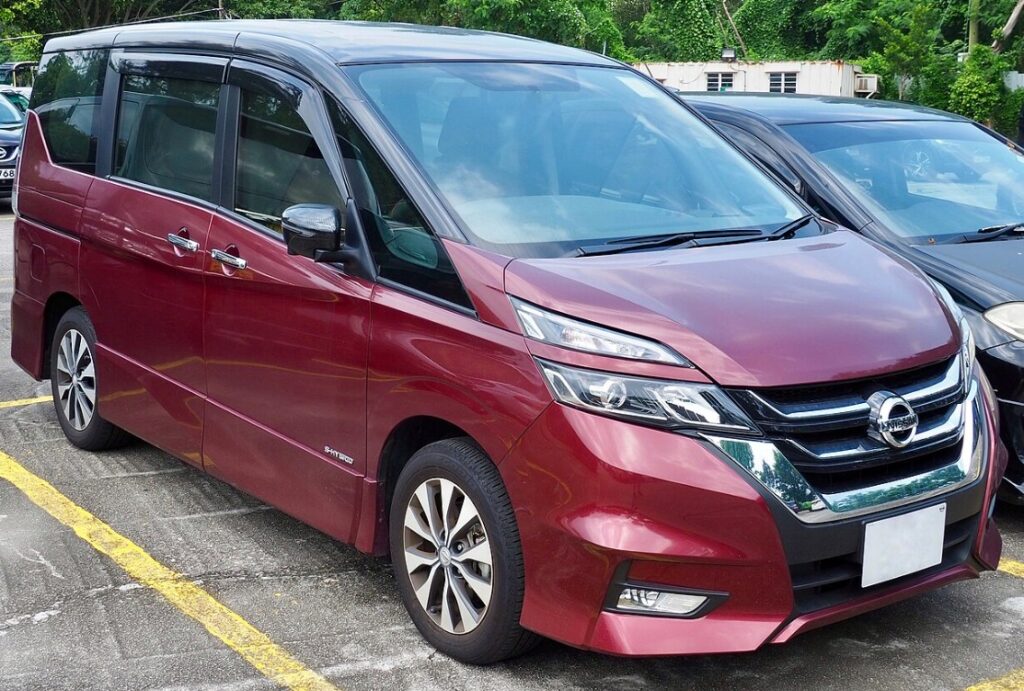
The Nissan Serena dashboard can occasionally look like a miniature control room. One moment, everything is calm; the next, a yellow triangle, red oil can, or mysterious steering-wheel icon appears without warning.
Should we stop immediately? Can we continue driving? Is the vehicle simply telling us that a feature is active?
Understanding Nissan Serena dashboard symbols and meanings removes much of that uncertainty. Some dashboard lights are harmless status indicators, while others warn us that continuing to drive could damage the engine, compromise braking, or leave us stranded.
The exact collection of symbols varies between Serena generations, trim levels, powertrains, and markets. A C25 petrol model will not display every warning found in a newer C27 S-Hybrid or C28 e-POWER Serena. Nissan therefore advises owners to consult the manual that matches the vehicle’s model year and equipment.
In this guide, we explain the most common Nissan Serena warning lights, what their colors mean, how urgently we should respond, and which symbols may appear specifically on hybrid and e-POWER versions.
Content in this publication
- What Do Nissan Serena Dashboard Light Colors Mean?
- Nissan Serena Dashboard Symbols Quick Reference
- Red Nissan Serena Dashboard Symbols and Meanings
- Engine Oil Pressure Warning Light
- Brake System Warning Light
- Battery Charging System Warning Light
- High Engine Coolant Temperature Warning
- Airbag and Seat Belt Warning Light
- Door, Sliding Door, or Tailgate Open Warning
- Yellow Nissan Serena Warning Symbols Explained
- Check Engine Light or Malfunction Indicator Light
- ABS Warning Light
- Vehicle Dynamic Control and Traction Control Symbol
- Tire Pressure Monitoring System Warning
- Master Warning Light: Triangle With Exclamation Mark
- Electric Power Steering Warning Light
- Intelligent Key Warning Symbol
- Low Fuel Warning Light
- Forward Emergency Braking Warning Symbol
- Lane Departure Warning and Lane Intervention Symbols
- Nissan Serena e-POWER Dashboard Symbols
- READY Indicator
- e-POWER System Warning Light
- EV Mode and Charge Indicators
- Regenerative Braking Indicator
- S-Hybrid and Idling-Stop Indicators
- Lighting and Visibility Indicators
- Cruise Control and ProPILOT Symbols
- Security and Immobilizer Indicator
- Maintenance and Service Reminder Symbols
- Why Several Nissan Serena Warning Lights Appear Together
- What to Do When an Unknown Serena Dashboard Symbol Appears
- When Should We Stop Driving Immediately?
- Can We Reset Nissan Serena Dashboard Warning Lights?
- How to Reduce Dashboard Warning Lights in the Future
- Final Thoughts on Nissan Serena Dashboard Symbols
- Frequently Asked Questions
- 1. What does the yellow triangle mean on a Nissan Serena?
- 2. Can I drive my Nissan Serena with the check engine light on?
- 3. Why are the ABS, traction control, and brake lights on together?
- 4. What does READY mean on a Nissan Serena e-POWER?
- 5. Why did my Nissan Serena warning lights appear after changing the battery?
What Do Nissan Serena Dashboard Light Colors Mean?
Before decoding individual symbols, we should understand the dashboard’s color language. It works rather like traffic lights: red demands immediate attention, yellow asks us to proceed cautiously, and green generally confirms that a system is operating.
Red Nissan Serena Warning Lights
Red usually signals a serious safety or mechanical concern. We may need to stop as soon as it is safe.
Common red warnings include:
- Engine oil pressure
- Brake system
- High coolant temperature
- Battery charging system
- Supplemental airbag system
- Seat belt reminder
- Door or tailgate open warning
- Electric or e-POWER system failure
A red light does not always mean that the vehicle is about to break down. The seat belt symbol, for example, is simply a reminder. However, we should never assume a red warning is harmless until we know what it represents.
Yellow or Amber Nissan Serena Warning Lights
Yellow and amber lights normally indicate that a system needs attention, has been switched off, or is temporarily unavailable.
Examples include:
- Check engine light
- Anti-lock braking system warning
- Tire pressure warning
- Master warning triangle
- Vehicle Dynamic Control warning
- Forward emergency braking warning
- Power steering warning
- Hybrid or e-POWER system alert
The Serena may remain drivable, but the warning should not be ignored. Yellow is the dashboard’s way of saying, “Something needs checking before it becomes more serious.”
Green, Blue, and White Indicator Lights
These colors are generally informational.
They often confirm that:
- Headlights are operating
- High beams are active
- Turn signals are flashing
- Cruise control is engaged
- ECO mode is selected
- ProPILOT or driver-assistance functions are active
- The e-POWER system is ready to drive
Green does not normally indicate a fault. Blue is commonly used for high beams or a cold-engine temperature indicator on certain versions.
Nissan Serena Dashboard Symbols Quick Reference
The following overview helps us judge the first action to take.
| Dashboard symbol | Usual color | General meaning | Recommended response |
|---|---|---|---|
| Oil can | Red | Low engine oil pressure | Stop the engine safely |
| Thermometer over waves | Red or blue | Coolant temperature | Red: stop; blue: engine is cold |
| Battery | Red | Charging system fault | Stop safely and inspect |
| Circle with exclamation mark | Red | Brake system warning | Check parking brake and brake fluid |
| ABS letters | Yellow | ABS malfunction | Drive carefully and arrange inspection |
| Engine outline | Yellow | Engine or emissions fault | Diagnose soon; stop if flashing |
| Triangle with exclamation mark | Yellow or red | Master warning | Read the information display |
| Tire with exclamation mark | Yellow | Low tire pressure or TPMS fault | Check all tires |
| Car with skid marks | Yellow | Stability or traction control | Flashing may mean the system is working |
| Steering wheel with exclamation mark | Yellow or red | Power steering fault | Steering may become heavy |
| Person with airbag | Red | Airbag or restraint fault | Arrange urgent inspection |
| Key symbol | Yellow | Intelligent Key issue | Check key location or battery |
| Fuel pump | Yellow | Low fuel level | Refuel soon |
| Car between lane lines | Green or yellow | Lane assistance status | Green: active; yellow: unavailable or fault |
| Two cars or collision symbol | Yellow | Emergency braking warning | Check system settings and sensors |
Red Nissan Serena Dashboard Symbols and Meanings
Red lights deserve our fastest response. When one appears while driving, we should reduce speed, assess the vehicle’s behavior, and stop in a safe place whenever the warning indicates a critical system.
Engine Oil Pressure Warning Light
The engine oil pressure symbol resembles an old-fashioned oil can with a droplet at its tip.
What the Oil Warning Symbol Means
This light means the engine may not be receiving adequate oil pressure. It does not merely indicate that an oil change is due.
Possible causes include:
- Low engine oil level
- An oil leak
- A blocked oil filter or pickup
- Oil pump failure
- Incorrect oil viscosity
- A defective pressure sensor
- Internal engine wear
What Should We Do?
If the red oil light appears while driving:
- Pull over safely.
- Switch off the engine.
- Wait several minutes.
- Check the oil level on a level surface.
- Add the correct oil only if the level is low.
- Do not restart the engine if the light remains on.
Driving with insufficient oil pressure can damage bearings, camshafts, turbocharger components where fitted, and other internal parts. The engine may sound normal at first, yet damage can develop quickly—like running across dry pavement in socks and expecting the fabric to survive.
Oil Warning Light Versus Maintenance Reminder
These two alerts are not interchangeable.
A maintenance reminder tells us that scheduled servicing or an oil change may be due. The red oil-pressure light warns of a potentially immediate lubrication problem.
Brake System Warning Light
The brake warning often appears as an exclamation mark inside a circle, surrounded by curved brackets. Depending on the model, the word BRAKE may also appear.
Why the Brake Warning Light Comes On
The symbol may indicate:
- The parking brake is engaged
- Brake fluid is low
- A hydraulic braking problem is present
- The electronic parking brake has a fault
- A brake-related electronic system requires attention
First, we should confirm that the parking brake is fully released. If the light remains illuminated, braking performance could be affected.
Can We Drive With the Brake Warning Light On?
We should not continue normal driving if the red brake warning stays on after releasing the parking brake.
Stop and check for:
- A soft or sinking brake pedal
- Unusually long stopping distances
- Brake fluid below the minimum mark
- Fluid leaking near a wheel
- Grinding, scraping, or metallic noises
If the red brake and yellow ABS lights appear together, the Serena may have reduced electronic brake assistance. Conventional braking might remain available, but stopping stability can be compromised.
Battery Charging System Warning Light
The battery symbol does not always mean that the battery itself is defective. It usually means the electrical charging system is not operating correctly.
Possible causes include:
- Alternator failure
- Loose or broken auxiliary belt
- Damaged wiring
- Corroded battery terminals
- Faulty voltage regulator
- Weak 12-volt battery
- DC-to-DC charging fault on electrified models
What Happens If We Keep Driving?
The Serena may continue operating briefly using stored battery power. However, once that power is exhausted, the engine-management, lighting, steering-assistance, and transmission-control systems may shut down.
Turn off unnecessary electrical equipment, pull over safely, and arrange assistance. If the battery warning appears with a high-temperature warning or heavy steering, stop immediately because a failed belt may be affecting multiple components.
High Engine Coolant Temperature Warning
This symbol usually resembles a thermometer dipping into waves. On some Serena versions, a red temperature light replaces a traditional temperature gauge.
What Causes the Temperature Warning?
Possible causes include:
- Low coolant level
- Cooling-system leak
- Radiator fan failure
- Thermostat malfunction
- Blocked radiator
- Water pump problem
- Severe engine load
- Damaged drive belt
- Head-gasket failure
How Should We Respond?
Switch off the air conditioning, reduce the engine load, and stop as soon as it is safe. If steam is visible, do not open the hood immediately.
Never remove a hot radiator cap. Pressurized coolant can erupt like boiling water from a shaken kettle.
Allow the vehicle to cool before inspecting the coolant reservoir. Continuing to drive an overheating Serena can warp the cylinder head or cause major engine damage.
What Does a Blue Temperature Light Mean?
A blue coolant symbol normally means the engine is still cold. It should disappear as the engine warms.
We can drive, but it is wise to avoid hard acceleration and high engine speeds until normal operating temperature is reached. If the blue light never turns off, the coolant-temperature sensor or thermostat may need inspection.
Airbag and Seat Belt Warning Light
The airbag symbol usually shows a seated person with a circle in front of them.
It may indicate a problem with:
- The airbag control module
- Seat belt pretensioners
- Crash sensors
- Passenger occupancy sensor
- Steering-wheel clock spring
- Wiring under a front seat
- Supplemental restraint system connections
The Serena may still drive normally, but one or more airbags might not deploy correctly during an accident.
A temporary light during startup is normal. If it stays on or flashes after the self-check, arrange professional diagnosis promptly.
Door, Sliding Door, or Tailgate Open Warning
The Serena is known for its family-friendly sliding doors, and many versions monitor them individually.
The display may indicate that:
- A front door is open
- A power sliding door is not fully latched
- The dual back door is open
- The tailgate is not secured
- A door sensor or latch switch is malfunctioning
Stop and close the indicated door firmly. Avoid driving at speed with a door or tailgate warning active, particularly when passengers or luggage are inside.
Yellow Nissan Serena Warning Symbols Explained
Yellow warnings are usually less urgent than red warnings, but they still deserve attention. Treating them as decoration is a little like covering a smoke detector because the beeping is annoying—it removes the warning, not the underlying problem.
Check Engine Light or Malfunction Indicator Light
The check engine light looks like a small engine outline. It monitors the engine, emissions, fuel, ignition, and related electronic systems.
A Steady Check Engine Light
A steady light may be caused by:
- Loose fuel cap
- Oxygen sensor fault
- Airflow sensor problem
- Ignition coil failure
- Worn spark plugs
- Fuel-injection issue
- Catalytic converter inefficiency
- Vacuum or intake leak
- Exhaust sensor fault
- Hybrid control irregularity
Check that the fuel cap is tightened correctly where applicable. If the vehicle drives normally, arrange a diagnostic scan soon.
A Flashing Check Engine Light
A flashing check engine light is more serious. It often points to an active misfire that could overheat and damage the catalytic converter.
Reduce speed, avoid hard acceleration, and stop if the engine shakes, loses power, smells of fuel, or runs roughly.
ABS Warning Light
The yellow ABS light indicates a problem with the anti-lock braking system.
ABS helps prevent wheel lock during emergency braking. If the light stays on, ordinary braking may still work, but the anti-lock function might not.
Common causes include:
- Faulty wheel-speed sensor
- Damaged sensor wiring
- Contaminated reluctor ring
- Weak 12-volt battery
- ABS control-module fault
- Incorrect tire size
- Low brake fluid
- Blown fuse
Drive cautiously, leave extra stopping distance, and avoid sudden braking until the system has been checked.
Vehicle Dynamic Control and Traction Control Symbol
This icon normally shows a car with wavy skid marks beneath it. Nissan may refer to the system as Vehicle Dynamic Control, or VDC.
Flashing Skid Symbol
A flashing symbol usually means the system is actively correcting wheelspin or instability. This may happen on wet roads, loose gravel, snow, or during aggressive acceleration.
Ease off the accelerator and steer smoothly.
Skid Symbol Staying On
A continuously illuminated light may mean:
- VDC has been switched off
- The system has detected a fault
- A wheel-speed sensor is malfunctioning
- The engine-management system has limited stability control
- Tires have significantly different sizes or pressures
Check whether the VDC OFF switch has been pressed. If not, diagnosis may be required.
Tire Pressure Monitoring System Warning
The tire pressure symbol resembles a horseshoe-shaped tire with an exclamation mark inside.
It may mean:
- One or more tires are underinflated
- A tire is punctured
- Pressure dropped because of cold weather
- A TPMS sensor battery is weak
- A sensor is damaged or missing
- Replacement wheels have not been registered
- The monitoring system has a fault
Check all four road tires when cold and inflate them to the pressure specified on the driver’s door label—not the maximum pressure printed on the tire sidewall.
Why Does the TPMS Light Flash First?
A light that flashes for a period and then stays on often indicates a system or sensor malfunction rather than simple low pressure.
A permanently illuminated light more commonly indicates that at least one tire requires inflation, although behavior varies by generation.
Master Warning Light: Triangle With Exclamation Mark
The triangle containing an exclamation mark is the master warning light. It acts as a general attention signal rather than identifying one specific fault.
The real explanation usually appears on the vehicle information display.
Messages may relate to:
- Low fuel
- Intelligent Key not detected
- Door or tailgate open
- Parking brake
- Low washer fluid
- Driver-assistance system unavailable
- e-POWER system warning
- Maintenance reminder
- Chassis-control system
- Sensor obstruction
Read the accompanying message before taking action. The triangle is like a messenger knocking at the door; the display tells us what the message actually says.
Electric Power Steering Warning Light
This symbol may show a steering wheel, sometimes with an exclamation mark.
If it remains on, electric steering assistance may be reduced or unavailable.
Possible causes include:
- Weak 12-volt battery
- Low charging voltage
- Steering motor fault
- Control-module error
- Overheating after repeated low-speed steering
- Wiring or sensor failure
The steering wheel may become much heavier, especially during parking. Stop safely, restart the vehicle once, and see whether the light clears. If it returns or steering remains heavy, arrange inspection.
Intelligent Key Warning Symbol
The Nissan Serena may display a key-shaped icon or a dashboard message when the Intelligent Key system needs attention.
Common messages include:
- Key not detected
- Incorrect key ID
- Key battery low
- Place key near start switch
- Shift to Park
- Key left inside vehicle
- Intelligent Key system fault
Nissan’s Intelligent Key technology allows compatible vehicles to unlock and start without inserting a conventional key.
Replace the key-fob battery if its range has decreased. If the car will not recognize the key, hold the fob near the start button while pressing the brake pedal, following the procedure in the correct owner’s manual.
Low Fuel Warning Light
The fuel-pump symbol indicates that the fuel level is low.
It is tempting to stretch the remaining range, but repeatedly driving near empty can:
- Leave us stranded
- Overheat the fuel pump
- Draw contaminants from the tank
- Prevent the engine from supporting the hybrid charging system
- Reduce the accuracy of the estimated range
On e-POWER models, the wheels are driven by an electric motor, but the petrol engine still generates electricity for the high-voltage battery. Running out of fuel can therefore stop the vehicle even when battery charge appears to remain. Nissan describes e-POWER as a system in which the wheels are driven by the electric motor while the petrol engine generates electricity.
Forward Emergency Braking Warning Symbol
Depending on the Serena generation, this symbol may resemble two vehicles approaching each other, a car with a star, or a collision graphic.
It can indicate that:
- Intelligent Emergency Braking is switched off
- The system is temporarily unavailable
- The front camera is blocked
- The radar sensor is dirty
- Heavy rain, fog, snow, or glare is affecting detection
- The system has detected a fault
Clean the windshield around the camera and remove dirt, snow, or insects from the front sensor area. Do not assume the feature is active merely because no warning appears. Driver-assistance systems support the driver; they do not replace observation, braking, or safe following distances.
Lane Departure Warning and Lane Intervention Symbols
These symbols often show a vehicle between two lane markings.
Depending on color and display design:
- Green may mean lane assistance is active
- White may mean the system is ready
- Yellow may show a warning, temporary unavailability, or malfunction
- Flashing lane markings may indicate unintended lane departure
The system may not work reliably when:
- Road markings are faded
- Rain or snow covers the lane
- Sunlight shines directly into the camera
- The windshield is dirty
- The road has sharp bends
- Construction markings conflict
- The camera is obstructed
Keep the windshield clean and drive based on visible road conditions rather than relying exclusively on the dashboard symbol.
Nissan Serena e-POWER Dashboard Symbols
Newer e-POWER Serena models have additional indicators related to electric-motor drive, energy generation, battery condition, and regenerative braking.
The dashboard can therefore differ considerably from that of a conventional petrol Serena.
READY Indicator
The READY light means the e-POWER system is switched on and the vehicle can move.
This matters because the petrol engine may not be running. The cabin can feel silent even though the Serena is fully operational.
Before leaving the vehicle:
- Select Park
- Apply the parking brake
- Switch the power system off
- Confirm the READY light has disappeared
Never assume the car is off simply because we cannot hear an engine.
e-POWER System Warning Light
An e-POWER warning may appear as a vehicle with an exclamation mark, an EV-related symbol, or a message in the information display.
Possible causes include problems with:
- High-voltage battery
- Inverter
- Traction motor
- Generator
- e-POWER control module
- Cooling system
- High-voltage wiring
- 12-volt electrical system
If the warning is red, the vehicle loses power, or a message instructs us to stop, pull over safely and arrange professional assistance.
Do not touch orange high-voltage cables or attempt DIY repairs on e-POWER components.
EV Mode and Charge Indicators
Depending on the model, the display may show when:
- The vehicle is using electric-motor power
- The petrol engine is generating electricity
- Regenerative braking is recovering energy
- The battery is charging or discharging
- A specific e-Pedal or drive mode is selected
These are normally information indicators, not faults.
The flow graphic may move between the engine, generator, battery, and motor as conditions change. Seeing the engine start while parked does not automatically mean something is wrong; the system may be maintaining battery charge, cabin temperature, or component condition.
Regenerative Braking Indicator
Regenerative braking converts some of the vehicle’s motion into electrical energy.
A charge gauge or animated energy-flow arrow may appear when we release the accelerator or brake gently.
The amount of regeneration can vary because of:
- Battery charge level
- Battery temperature
- Drive mode
- Vehicle speed
- Road gradient
- Braking demand
- Stability-control operation
When the battery is nearly full or very cold, regenerative braking may feel weaker. We should always be ready to use the brake pedal.
S-Hybrid and Idling-Stop Indicators
Some C26 and C27 Serena variants use an S-Hybrid or idle-stop system rather than the newer e-POWER configuration.
Symbols may indicate:
- Idle-stop system ready
- Engine automatically stopped
- Idle-stop temporarily unavailable
- Auxiliary battery charge insufficient
- Air-conditioning demand preventing shutdown
- System fault
The engine may remain running when the cabin requires cooling, the battery charge is low, the steering wheel is turned, or the engine has not reached operating temperature.
A crossed-out idle-stop symbol does not always indicate a defect. It may simply mean the required operating conditions have not been met.
Lighting and Visibility Indicators
Not every glowing dashboard icon is a warning. Many symbols simply confirm what the exterior lights or visibility systems are doing.
High Beam Indicator
A blue headlamp symbol with straight horizontal beams means the high beams are on.
Switch to low beams when approaching other traffic to avoid dazzling drivers.
Low Beam and Side Light Indicators
A green lamp symbol usually indicates that the side lights or low-beam headlights are active.
On Serena models with automatic lighting, the symbol may appear and disappear as ambient light changes.
Front and Rear Fog Light Symbols
The front fog light symbol normally points toward the left, while the rear fog light symbol points toward the right.
Rear fog lights are extremely bright. Use them only when visibility is seriously reduced, and switch them off once conditions improve.
Turn Signal and Hazard Indicators
Green arrows flash when the indicators or hazard lights are operating.
Rapid flashing may suggest:
- A failed exterior bulb
- Incorrect replacement bulb
- LED conversion issue
- Wiring fault
- Damaged lamp unit
Walk around the vehicle and confirm that all indicators function.
Cruise Control and ProPILOT Symbols
Newer Serena models may use several icons for cruise control, Intelligent Cruise Control, steering assistance, and ProPILOT.
Cruise Control Indicator
The symbol may resemble a speedometer with an arrow.
Different colors can indicate:
- System switched on
- Speed selected
- Following distance set
- Cruise control temporarily cancelled
- System unavailable
ProPILOT Steering Assistance Indicator
A steering wheel or vehicle-between-lanes graphic may illuminate when steering assistance is ready or active.
Yellow or grey indicators can appear when:
- Lane markings cannot be detected
- The driver is not holding the steering wheel
- The camera is obstructed
- Road conditions are unsuitable
- The system has been cancelled
- A fault has occurred
Keep both hands ready to steer. ProPILOT assistance does not make the Serena autonomous.
Security and Immobilizer Indicator
A small car-and-key symbol or red security light may blink after the vehicle is switched off.
That is often normal. It shows that the immobilizer or anti-theft system is armed.
A problem may exist when:
- The security light stays on with the ignition active
- The engine will not start
- “Incorrect Key ID” appears
- The light flashes unusually
- A recently programmed key is not recognized
Try the spare key if available. A weak key battery or low 12-volt vehicle battery can sometimes trigger recognition problems.
Maintenance and Service Reminder Symbols
A wrench, spanner, oil message, or maintenance notification generally means scheduled service is approaching or overdue.
The reminder may relate to:
- Engine oil
- Oil filter
- Tire rotation
- General inspection
- User-defined maintenance interval
- Hybrid or e-POWER inspection
Resetting the reminder does not complete the maintenance. It only clears the message.
Record the mileage and have the required work performed before resetting the interval.
Why Several Nissan Serena Warning Lights Appear Together
Multiple lights do not always mean that several unrelated components failed at once.
A single problem can trigger a chain reaction.
For example:
- A weak battery can cause ABS, steering, VDC, and key warnings
- A failed wheel-speed sensor can disable ABS, traction control, and driver assistance
- An engine fault can deactivate cruise control and stability functions
- Low brake fluid can trigger brake, ABS, and master warnings
- A blocked camera can affect lane and emergency-braking systems
- Incorrect tire pressures can affect TPMS and stability control
This is why reading diagnostic trouble codes is more useful than replacing parts based solely on dashboard icons.
What to Do When an Unknown Serena Dashboard Symbol Appears
When we see an unfamiliar light, use this simple process:
- Observe the color. Red is usually more urgent than yellow.
- Read the display message. It may identify the exact concern.
- Notice vehicle behavior. Check for power loss, noise, smoke, smells, or heavy steering.
- Move somewhere safe. Do not study the display while driving.
- Check basic items. Inspect doors, fuel level, tire pressure, oil, and coolant when safe.
- Restart only when appropriate. Some temporary electronic warnings may clear.
- Consult the correct manual. Match the generation, year, powertrain, and market.
- Scan the vehicle. A compatible diagnostic tool may reveal stored fault codes.
- Seek professional help. Do so immediately for red warnings or abnormal behavior.
When Should We Stop Driving Immediately?
Stop as soon as it is safe when:
- The red oil-pressure light remains on
- The engine-temperature warning is red
- The brake pedal feels weak or abnormal
- The red brake warning stays on
- Smoke or steam appears
- The engine shakes severely
- The check engine light flashes with power loss
- Steering suddenly becomes extremely heavy
- The e-POWER system displays a stop warning
- Burning smells or electrical smoke appear
- Several red warnings appear together
- The vehicle enters severe reduced-power mode
Calling for assistance may feel inconvenient, but it is usually cheaper than replacing an engine, catalytic converter, hybrid inverter, or damaged braking component.
Can We Reset Nissan Serena Dashboard Warning Lights?
Some reminders and temporary indicators can be reset through the dashboard menu. Genuine fault lights normally return until the underlying problem is repaired.
Do not disconnect the battery merely to erase a warning. Doing so may:
- Clear useful diagnostic information
- Reset windows or clock settings
- Create additional low-voltage codes
- Affect idle learning
- Interrupt infotainment settings
- Hide a fault temporarily
Repair first, reset second.
How to Reduce Dashboard Warning Lights in the Future
Not every fault is preventable, but regular attention helps.
Follow a Consistent Maintenance Routine
Check:
- Engine oil level
- Coolant level
- Brake fluid
- Tire pressures
- 12-volt battery condition
- Drive belts
- Exterior lighting
- Windshield-camera area
- Radar sensor surfaces
- Service intervals
Do Not Ignore a Weak 12-Volt Battery
Modern Serenas rely heavily on stable voltage. Even an e-POWER vehicle needs a healthy 12-volt battery to activate control modules and close high-voltage contactors.
A weak battery can produce a dashboard full of apparently unrelated warnings.
Use Correct Tires and Pressures
Fit matching tire sizes with suitable load ratings. Large differences in tire circumference can confuse ABS, stability control, and driver-assistance systems.
Keep Cameras and Sensors Clean
Clean the windshield near the forward camera and the external areas where radar or parking sensors are installed.
Mud, snow, stickers, accessories, and accident damage can interfere with these systems.
Final Thoughts on Nissan Serena Dashboard Symbols
Understanding Nissan Serena dashboard symbols and meanings helps us respond calmly rather than guessing.
The simplest rule is to respect the color:
- Red: stop and investigate safely
- Yellow: proceed cautiously and arrange inspection
- Green, blue, or white: a feature is usually active or available
Still, color alone does not tell the entire story. A flashing check engine light can be more urgent than some steady red reminders, while a red seat belt icon can disappear as soon as everyone buckles up.
Always read the information display, pay attention to how the vehicle feels, and consult the owner’s manual for the exact Serena generation. Dashboard lights are not there to spoil the journey. They are the vehicle’s vocabulary—and once we understand it, the dashboard becomes less like a puzzle and more like a useful conversation.
Frequently Asked Questions
1. What does the yellow triangle mean on a Nissan Serena?
The yellow triangle with an exclamation mark is usually the master warning light. It means the vehicle has a message requiring attention. Read the information display to identify the specific issue, which could involve low fuel, a door, the Intelligent Key, tire pressure, maintenance, or a driver-assistance system.
2. Can I drive my Nissan Serena with the check engine light on?
You may be able to drive a short distance if the light is steady and the Serena operates normally. Arrange a diagnostic scan soon. If the light flashes, the engine runs roughly, or power drops, reduce speed and stop because an active misfire may damage the catalytic converter.
3. Why are the ABS, traction control, and brake lights on together?
These systems share sensors and electronic information. Low brake fluid, a failed wheel-speed sensor, damaged wiring, weak battery voltage, or an ABS control fault can illuminate several warnings simultaneously. Have the vehicle scanned rather than assuming that all three systems failed independently.
4. What does READY mean on a Nissan Serena e-POWER?
READY means the e-POWER system is switched on and the vehicle can move. The petrol engine does not have to be running because the wheels are driven by an electric motor. Always switch the power system off before leaving the vehicle.
5. Why did my Nissan Serena warning lights appear after changing the battery?
Low voltage, interrupted module communication, lost steering-angle calibration, or incomplete system initialization can cause temporary warnings after battery replacement. Some lights disappear after a short drive, while others require calibration or diagnostic clearing. Recheck terminal connections and confirm that the replacement battery has the correct specification.
If you want to know other articles similar to Nissan Serena Dashboard Symbols and Meanings: Complete Warning Light Guide you can visit the category Service and Parts.
BYD Shark 6 Weight: Kerb Weight, Payload, GVM and What It Means
BYD Shark 6 Towing Capacity: Complete Towing Guide
Peugeot RCZ Engine Swap: Options, Costs, Compatibility, and What You Need to Know

Mitsubishi Pajero Sport Engine Size: Complete Engine Guide
Mitsubishi Pajero Sport Weight: Kerb Weight, GVM, Payload and What It Really Means
Mitsubishi Pajero Sport Service Reset: Complete Step-by-Step Guide
Leave a Reply
More content of your interest